1. Introducció
This manual provides essential information for the safe and efficient use of your TCL 75T69C 75-inch QLED 4K HDR Google Smart TV. Please read it thoroughly before operating the device and retain it for future reference. This television features QLED technology for vibrant colors, 4K HDR for enhanced contrast and detail, and Google TV for a personalized smart experience with integrated Google Assistant and Alexa compatibility.
Informació de seguretat
- Ensure the TV is placed on a stable surface or securely mounted to a wall.
- No bloquejar les obertures de ventilació.
- Eviteu exposar el televisor a la pluja o la humitat.
- Desendolleu el cable d'alimentació durant tempestes o quan no l'utilitzeu durant períodes prolongats.
- Demaneu tot el servei a personal de servei qualificat.
2. Configuració
Què hi ha a la caixa
En desembalar, comproveu que hi hagi tots els components:
- TCL 75T69C 75-inch QLED 4K HDR Google Smart TV
- Cable d'alimentació
- Control remot
- Suport (2 peces)
- Manual d'usuari (aquest document)
Instal·lació física
Instal·lació de l'estand: Carefully attach the two stand pieces to the designated slots at the bottom of the TV, securing them with the provided screws. Ensure the TV is stable before proceeding.
Muntatge a la paret: If wall mounting, use a VESA compatible mount (300x300mm) and follow the mount manufacturer's instructions. Ensure the wall can support the TV's weight (27.3 kg).

Image: Dimensions of the TCL 75T69C 75-inch TV, showing its width, height, thickness, and VESA mounting points. The remote control model RC833A is also pictured.
Potència de connexió: Connecteu el cable d'alimentació a l'entrada d'alimentació del televisor i després a una presa de corrent.
Connexió de dispositius externs
Your TCL 75T69C TV offers various ports for connecting external devices:
- HDMI (x3): Per connectar reproductors de Blu-ray, consoles de jocs, barres de so, etc.
- USB (x2): For connecting USB storage devices to play media or for service.
- LAN (Ethernet): Per a una connexió a Internet per cable.
- Òptic (sortida d'àudio digital): Per connectar a sistemes d'àudio externs.
- Cable/Satellite: For connecting antenna or satellite cables.
- Ranura CI: For Conditional Access Modules (CAMs) from pay-TV providers.

Image: A visual representation of the various input and output ports available on the TCL 75T69C television.
3. Instruccions de funcionament
Configuració inicial i Google TV
After connecting the power, turn on your TV. The first-time setup wizard will guide you through:
- Selecció d'idioma: Trieu el vostre idioma preferit.
- Connexió de xarxa: Connecteu-vos a la xarxa Wi-Fi de casa o utilitzeu una connexió Ethernet amb cable.
- Inici de sessió al compte de Google: Inicia la sessió amb el teu compte de Google per accedir a les funcions, aplicacions i recomanacions personalitzades de Google TV.
- Escaneig de canals: Scan for available TV channels (if using an antenna or cable).
Google TV organizes movies, shows, live TV, and more from your apps and subscriptions, presenting them in a personalized interface.

Image: The Google TV home screen displaying a selection of popular streaming applications and content.
Característiques i tecnologies clau
Your TCL 75T69C TV incorporates advanced technologies for an enhanced viewing and audio experience:
- Tecnologia QLED: Quantum Dot technology reproduces over a billion shades of color, delivering cinematic color volume and brightness.
- AiPQ Processor: This processor optimizes content in 4K resolution, ensuring smooth images, sharp contrasts, and precise details through AI-driven enhancements for contrast, color, clarity, motion, and HDR.
- HDR Multiformat: Supports HDR10, HLG, HDR10+, and Dolby Vision for exceptional image quality from various sources, ensuring optimal brightness, contrast, and color.
- Dolby Vision i Dolby Atmos: Experience immersive cinematic visuals with Dolby Vision and rich, moving audio with Dolby Atmos.
- HVA Panel: The innovative HVA panel provides sharper contrasts, improved energy saving, and wider viewangles d'ajust.
- Motion Clarity (MEMC): Reduces blur and judder in fast-moving scenes, providing smoother and clearer images for sports and action films.
- Mestre del joc: Optimized for gaming with HDMI 2.1, Auto Low Latency Mode (ALLM), Variable Refresh Rate (VRR), and a Game Bar for quick settings adjustments.
- Control de veu: Compatible with Google Assistant and Amazon Alexa. Use your voice to search for content, control playback, adjust volume, and manage smart home devices.
- Google Cast: Easily cast your favorite music, videos, and photos from your smartphone, tablet, or computer directly to your TCL TV.

Image: A visual demonstration of QLED technology, showcasing rich and vibrant colors in a floral image.

Image: A graphic illustrating the AiPQ Processor and its capabilities in enhancing image performance.

Imatge: Un cop mésview of HDR Multiformat support, highlighting compatibility with major streaming platforms.

Image: The Dolby Vision logo alongside a scene from a theater, emphasizing an immersive viewexperiència.

Image: The Dolby Atmos logo with a dynamic wave image, illustrating a cinematic audio experience.

Image: A visual representation of the HVA Panel's ability to deliver sharper contrasts and wider viewangles d'ajust.

Image: A side-by-side comparison demonstrating the effect of Motion Clarity (MEMC) on fast-moving images.

Image: A depiction of the Game Master feature, illustrating an optimized gaming experience.

Image: A user interacting with the TV using Google Assistant voice commands.

Image: A family enjoying content on the TV, demonstrating compatibility with Alexa voice commands.

Image: A visual representation of Google Cast functionality, allowing content sharing from mobile devices to the TV.
Control remot
The included remote control (model RC833A) provides full functionality for navigating Google TV, adjusting settings, and controlling connected devices. It features a microphone for voice commands.

Image: The TCL RC833A remote control, showing its layout and buttons.
4. Manteniment
Neteja del televisor
- Pantalla: Netegeu suaument la pantalla amb un drap suau i sense borrissol. Per a les marques difícils, utilitzeu una solució de neteja de pantalles dissenyada específicament per a televisors, aplicada al drap, no directament a la pantalla.
- Cos: Wipe the TV frame and stand with a soft, dry cloth. Do not use abrasive cleaners or solvents.
- Desendolla sempre el televisor abans de netejar-lo.
Actualitzacions de programari
Your TCL TV may receive automatic software updates to improve performance and add new features. Ensure your TV is connected to the internet to receive these updates. You can also manually check for updates in the TV's settings menu.
5. Solució De Problemes
Si teniu problemes amb el televisor, consulteu els problemes i solucions més comuns següents:
| Problema | Possible solució |
|---|---|
| Sense poder | Comproveu si el cable d'alimentació està connectat correctament al televisor i a la presa de corrent. Proveu una altra presa de corrent. |
| Sense imatge / Pantalla negra | Ensure the correct input source is selected. Check all HDMI/AV cable connections. Try restarting the TV. |
| Sense so | Check the volume level and mute status. Ensure external audio devices are correctly connected and selected as output. |
| El control remot no funciona | Canvieu les piles. Assegureu-vos que no hi hagi cap obstacle entre el comandament a distància i el sensor d'infrarojos del televisor. |
| Problemes de connexió de xarxa | Restart your router/modem. Check Wi-Fi password. Try a wired Ethernet connection if Wi-Fi fails. |
| Problemes de qualitat d'imatge | Adjust picture settings (brightness, contrast, color). Ensure the content source is high quality (e.g., 4K). |
If the problem persists, consult the TCL support weblloc o contacteu amb el servei d'atenció al client.
6. Especificacions
Detailed technical specifications for the TCL 75T69C TV:
| Característica | Detall |
|---|---|
| Marca | TCL |
| Número de model | 75T69C |
| Mida de la pantalla | 75 polzades |
| Tecnologia de pantalla | QLED, Direct LED, HVA Panel |
| Resolució | 4K (3840 x 2160 píxels) |
| Freqüència d'actualització | 60 Hz |
| Característiques especials | AiPQ Processor, HDR Multiformat (HDR10, HLG, HDR10+, Dolby Vision), Game Master, Google TV, Google Assistant, Alexa compatibility |
| Connectivitat | Bluetooth, Ethernet, HDMI (x3), USB (x2), Wi-Fi |
| Relació d'aspecte | 16:9 |
| Dimensions del producte | 166.7 cm (W) x 102.7 cm (H) x 34.9 cm (D) with stand |
| Pes | 27.3 kg |
| Classe d'eficiència energètica (SDR) | F (115 kWh/1000h) |
| Classe d'eficiència energètica (HDR) | G (170 kWh/1000h) |
| Enllaç de la base de dades EPREL | View Dades de l'EPREL |
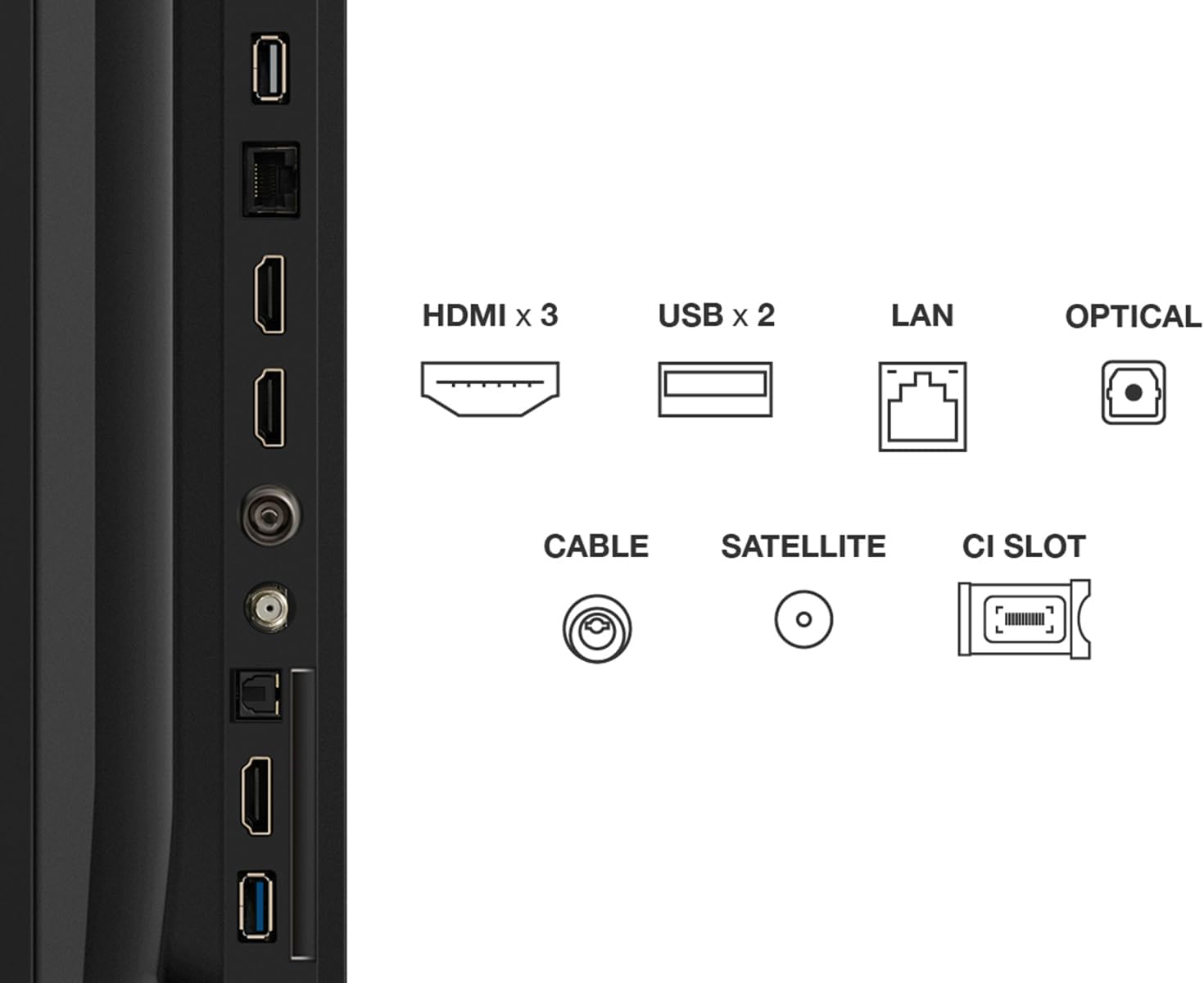
Image: The EU Energy Label for the TCL 75T69C, indicating its energy efficiency ratings.
7. Garantia i Suport
Informació de la garantia
Your TCL 75T69C television comes with a standard manufacturer's warranty of 2 years. Please retain your proof of purchase for warranty claims. The availability of spare parts is guaranteed for 8 years, and product support is available for 8 years.
Atenció al client
For technical assistance, troubleshooting beyond this manual, or warranty inquiries, please contact TCL Customer Support. Specialized customer support is available to assist you with any product-related questions.
You can find contact information and additional resources on the official TCL weblloc.