1. Introducció
This manual provides essential information for setting up, operating, and maintaining your TCL 43T69C QLED 4K UHD Smart TV. Please read this manual thoroughly before using the product to ensure safe and correct operation. Keep this manual for future reference.
The TCL T69C television integrates 4K UHD HDR resolution, QLED panel technology, the AiPQ™ processor, and Motion Clarity for enhanced high-definition image quality. It supports Game Master features and multiple HDR formats, including HDR10+ and Dolby Vision, making it suitable for movies, games, and sports. This TV also features the Google TV smart system with Google Assistant and Dolby Audio for an immersive sound experience.
2. Informació de seguretat
Seguiu sempre les precaucions de seguretat bàsiques quan utilitzeu aquest televisor per reduir el risc d'incendi, descàrrega elèctrica i lesions.
- No exposeu el televisor a la pluja o la humitat.
- No obriu l'armari; Demani el servei a personal qualificat.
- Assegureu-vos una ventilació adequada al voltant del televisor.
- Eviteu col·locar el televisor sobre superfícies inestables.
- Desendolleu el televisor durant tempestes o quan no l'utilitzeu durant períodes prolongats.
- Mantingueu les peces petites i les piles fora de l'abast dels nens.
3. Contingut del paquet
Verifiqueu que tots els elements siguin presents al paquet:
- TCL 43T69C QLED 4K UHD Smart TV
- Control remot
- Cable d'alimentació
- Stand/Support
- Manual d'usuari (aquest document)
4. Configuració
4.1 Desembalatge i col·locació
Carefully remove the TV from its packaging. Place the TV on a stable, flat surface or mount it on a wall using a compatible VESA mount (200x200mm, not included).
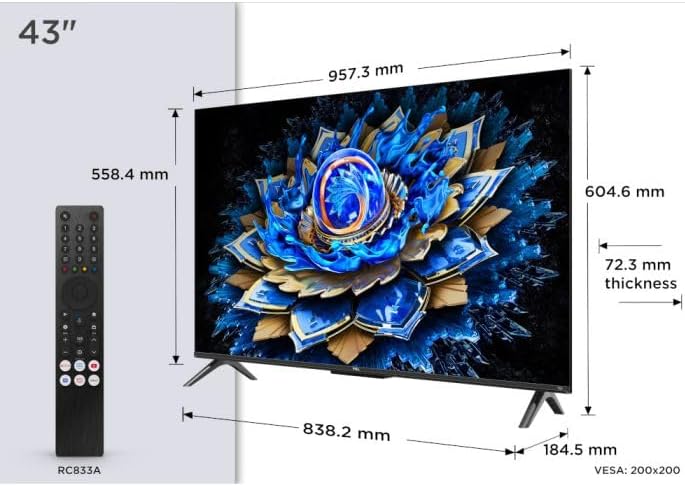
Image: The TCL 43T69C television with its dimensions (957.3 mm width, 604.6 mm height, 72.3 mm thickness) and the included RC833A remote control. This image helps in planning the placement of the TV.
4.2 Connexió de perifèrics
Connect your devices (e.g., cable box, gaming console, Blu-ray player) to the appropriate ports on the TV. The TCL 43T69C features multiple connectivity options.

Imatge: Un professional lateralfile view of the TCL 43T69C television, illustrating the placement of various input/output ports on the rear and side for connecting external devices.
Available connections include:
- HDMI 2.1: For high-definition audio and video input from devices like gaming consoles (Game Master features benefit from HDMI 2.1). The TV has 3 HDMI ports.
- USB: For connecting USB storage devices. The TV has 1 USB port.
- Ethernet: Per a una connexió a Internet per cable.
- Wi-Fi: Per a la connexió a Internet sense fil.
- Bluetooth: Per connectar accessoris sense fil.
- Sortida d'àudio òptic: Per connectar a sistemes d'àudio externs.
4.3 Connexió d'alimentació
After connecting all necessary cables, plug the power cable into the TV and then into a wall outlet.
4.4 Configuració inicial
Upon first power-on, the TV will guide you through the initial setup process, including language selection, network connection, and Google TV account setup. Follow the on-screen instructions.
5. Funcionament
5.1 Funcions de control remot
Use the provided remote control to navigate the TV's interface. Familiarize yourself with buttons for power, volume, channel, input selection, and smart TV functions.
5.2 Interfície de Google TV
The TCL 43T69C operates on the Google TV platform, offering a personalized experience with access to streaming services, apps, and Google Assistant.

Image: The Google TV home screen displaying content recommendations, including "Oppenheimer," and various streaming app icons like Netflix, YouTube, Prime Video, Disney+, Apple TV, Viki, Max, and Spotify.

Imatge: Una altra view of the Google TV home screen, featuring "The Super Mario Bros. Movie" as trending content, alongside other app icons and recommendations.
5.3 Configuració d'imatge i so
Access the TV's settings menu to adjust picture (brightness, contrast, color, HDR modes) and sound (Dolby Audio, equalizer) preferences. The QLED panel provides vibrant colors and impressive contrast, while the AiPQ™ processor optimizes 4K content.
5.4 Game Master Features
For gamers, the TV includes Game Master features, HDMI 2.1, ALLM (Auto Low Latency Mode), and VRR (Variable Refresh Rate) to ensure low input lag and optimized image settings for gaming. A dedicated Game Bar may be available for quick adjustments.
6. Manteniment
6.1 Neteja del televisor
Before cleaning, unplug the power cord. Use a soft, dry cloth to wipe the screen and cabinet. Do not use liquid cleaners or aerosol sprays directly on the TV.
6.2 Actualitzacions de programari
The TV may receive software updates periodically. Ensure your TV is connected to the internet to receive these updates, which can improve performance and add new features. You can usually check for updates in the TV's settings menu.
7. Solució De Problemes
Si teniu problemes amb el televisor, consulteu les solucions habituals següents:
| Problema | Possible solució |
|---|---|
| Sense poder | Comproveu si el cable d'alimentació està connectat correctament al televisor i a la presa de corrent. Proveu una altra presa de corrent. |
| No hi ha imatge, però hi ha so | Assegureu-vos que heu seleccionat la font d'entrada correcta. Comproveu les connexions dels cables als dispositius externs. |
| No hi ha so, però hi ha imatge | Check volume levels and mute settings. Verify audio cable connections. |
| El comandament a distància no funciona | Canvieu les piles. Assegureu-vos que no hi hagi obstruccions entre el comandament a distància i el sensor d'infrarojos del televisor. |
| Problemes de connexió de xarxa | Restart your router. Check Wi-Fi password. For wired connections, ensure the Ethernet cable is properly connected. |
If the problem persists, consult the TCL support weblloc o contacteu amb el servei d'atenció al client.
8. Especificacions
| Característica | Detall |
|---|---|
| Marca | TCL |
| Número de model | 43T69C |
| Mida de la pantalla | 43 polzades (109 cm) |
| Tecnologia de visualització | QLED |
| Resolució | 4K UHD (3840 x 2160) |
| Freqüència d'actualització | 60 Hz |
| Suport HDR | HDR10, HLG, HDR10+, Dolby Vision |
| Sistema de televisió intel·ligent | Google TV amb l'Assistent de Google |
| Processador | AiPQ™ Processor |
| Ports HDMI | 3 (HDMI 2.1 with ALLM, VRR) |
| Ports USB | 1 |
| Connectivitat | Wi-Fi, Bluetooth, Ethernet |
| Tecnologia d'àudio | Dolby Audio |
| Dimensions del producte (AxPxA) | 95.7 cm x 18.5 cm x 60.3 cm (amb suport) |
| Compatibilitat VESA | 200x200 mm |
| Consum d'energia (SDR) | 54 kWh/1000h |
| Consum d'energia (HDR) | 94 kWh/1000h |
| Energy Label Link | Base de dades EPREL |

Image: The EU Energy Label for the TCL 43T69C television, showing an energy efficiency class of G for both SDR and HDR content, with consumption values of 54 kWh/1000h for SDR and 94 kWh/1000h for HDR. It also indicates the screen size and resolution.
9. Garantia i Suport
For warranty information, please refer to the warranty card included with your product or visit the official TCL weblloc web per a la vostra regió. Els termes i condicions de la garantia poden variar.
For technical support, troubleshooting beyond this manual, or service inquiries, please contact TCL customer support. You can find contact details on the official TCL weblloc.


