Introducció
The Satechi FindAll Keychain is a wireless, rechargeable location tracker designed to help you keep track of your essential items. Utilizing Apple's Find My network, it provides real-time location tracking, left-behind alerts, and an audible chime to help you quickly locate misplaced belongings. This device is exclusively compatible with Apple products, including iPhone, iPad, and Mac.
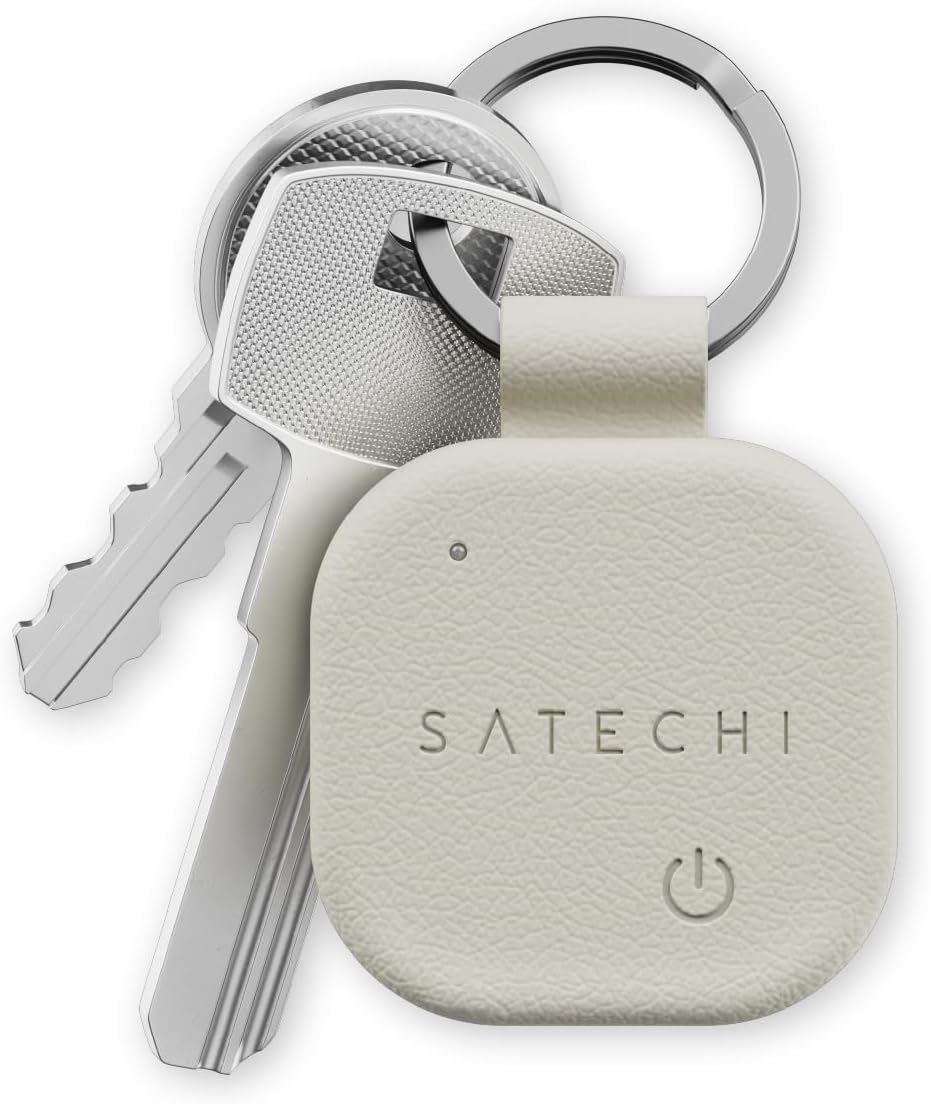
Image: The Satechi FindAll Keychain in Sand color, attached to a set of silver keys, demonstrating its primary use.
Producte acabatview
Característiques clau
- Apple Find My Integration: Track items using the Apple Find My app.
- Left-Behind Alerts: Receive notifications when you leave your item behind.
- Loud Audible Chime: Activate a sound to pinpoint your item's location (80dB).
- Wireless Rechargeable Battery: Up to 12 months of use on a single charge.
- Resistència a l'aigua i a la pols IP66: Durable design for everyday use.
- Material premium: Smooth, refined aesthetic with a comfortable grip.
- Disseny compacte: Easily attaches to keys, bags, wallets, and more.
Identificació de components
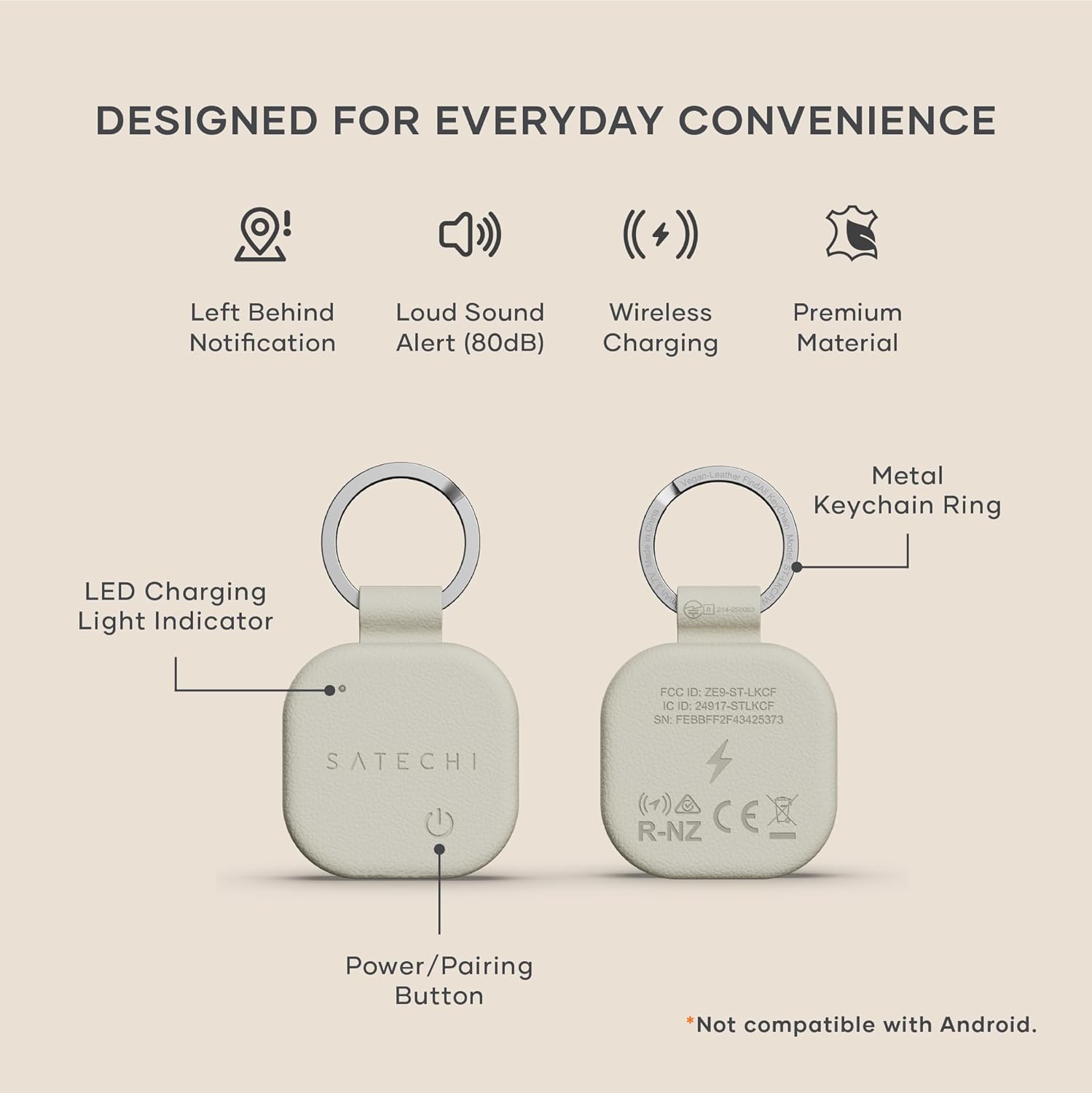
Image: A detailed diagram illustrating the key components of the Satechi FindAll Keychain, including the LED Charging Light Indicator, Power/Pairing Button, and Metal Keychain Ring.
- LED Charging Light Indicator: Mostra l'estat de càrrega.
- Botó d'encesa/emparellament: Used for turning on/off and initiating pairing.
- Metal Keychain Ring: For attaching to various items.
Configuració
Càrrega inicial
Before first use, fully charge the FindAll Keychain.
- Place the keychain on a Qi, Qi2, or MagSafe wireless charger.
- The LED indicator will show orange during charging and turn green when fully charged.
Note: The keychain is not magnetic; ensure it is placed flat on the charger for proper contact.
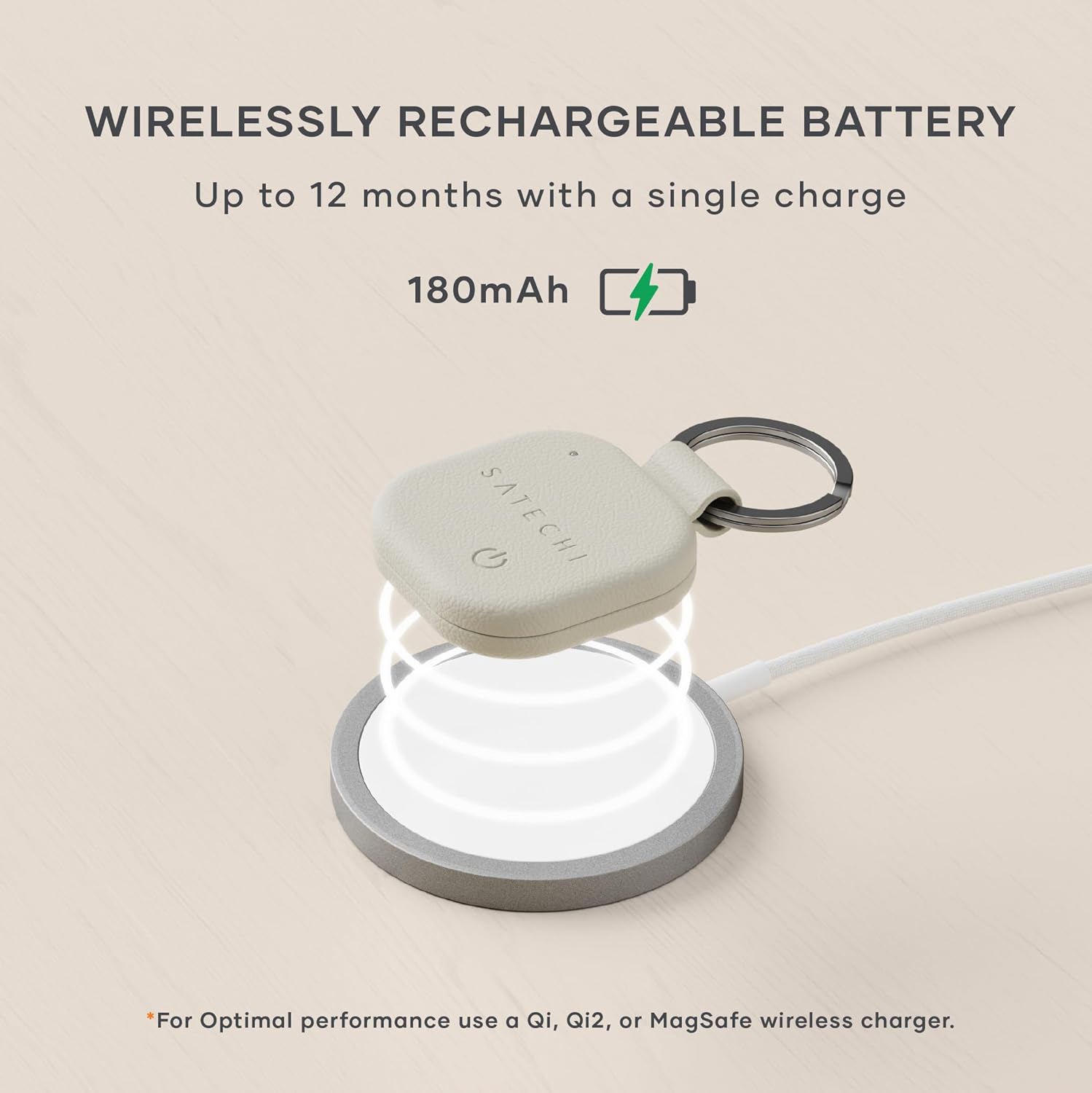
Image: The Satechi FindAll Keychain positioned on a wireless charging pad, illustrating the charging process.
Pairing with Apple Find My
Follow these steps to pair your FindAll Keychain with your Apple device:
- Ensure your iPhone or iPad is updated to the latest iOS/iPadOS version.
- Open the "Find My" app on your Apple device.
- Navegueu fins a la pestanya "Elements".
- Toca "Afegeix element" i després selecciona "Altres elements compatibles".
- Press and hold the Power/Pairing Button on the FindAll Keychain until it is detected by your device.
- Tap "Connect" in the Find My app to complete the pairing process.
If the device is not detected, ensure it is charged and try again. If issues persist, perform a factory reset (refer to Troubleshooting) and reconnect.
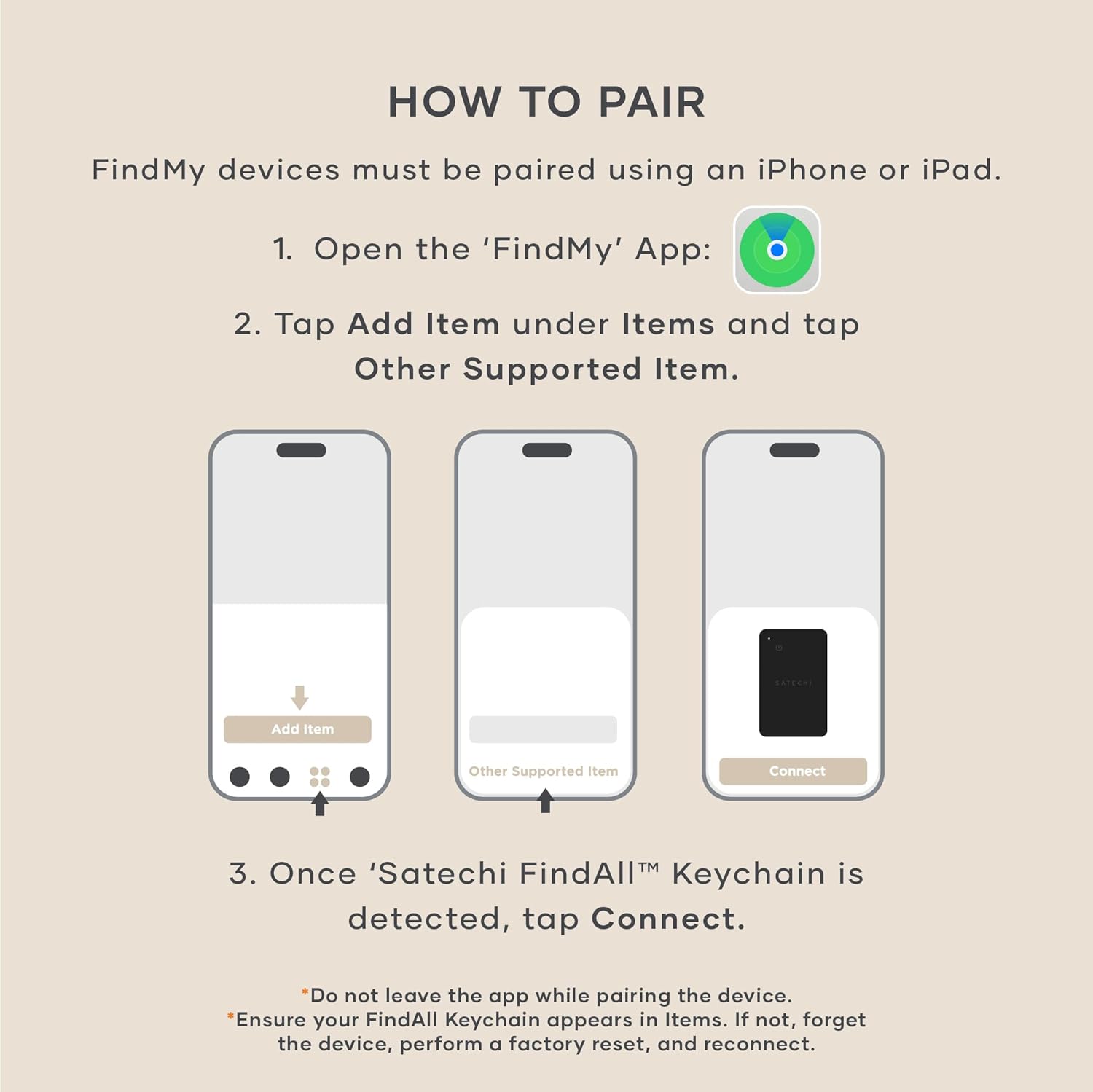
Image: A visual guide demonstrating the step-by-step pairing process of the FindAll Keychain with an iPhone using the Apple Find My application.
Instruccions de funcionament
Localització del vostre article
To find your misplaced item:
- Open the "Find My" app on your iPhone, iPad, or Mac.
- Select the FindAll Keychain from your list of items.
- To hear a sound, tap "Play Sound". The keychain will emit a loud audible chime (80dB).
- A view its location on a map, use the map interface in the Find My app.
The Find My network uses Bluetooth 5.4 LE for short-range tracking (up to 20 meters indoors, 50 meters outdoors) and leverages ultra-wideband, GPS, Wi-Fi, and cellular signals for broader location tracking.

Image: The Satechi FindAll Keychain resting on a wooden surface, with an iPhone screen showing its location within the Apple Find My app.

Image: A hand holding an iPhone displaying the Find My app, with the option to 'Play Sound' to locate the keychain, which is subtly visible on a kitchen counter in the background.
Left-Behind Alerts
Configure "Notify When Left Behind" in the Find My app settings for your keychain. You will receive an alert on your Apple device if you move away from your keychain.
Accés compartit
You can securely share access to your FindAll Keychain's location with family and friends through the Find My app.
Manteniment
Carregant
Recharge the internal 180mAh lithium-ion battery using a Qi, Qi2, or MagSafe wireless charger. A full charge provides up to 12 months of use. Monitor the LED indicator: orange for charging, green for fully charged.
Neteja
Netegeu l'exterior amb un drap suau i sec. Eviteu productes de neteja o dissolvents abrasius.
Resistència a l'aigua i a la pols
The FindAll Keychain has an IP66 rating, meaning it is protected against dust ingress and powerful water jets. It can withstand accidental spills, splashes, and brief submersion. However, it is not designed for prolonged submersion.
Resolució de problemes
| Problema | Solució |
|---|---|
| Keychain not detected during pairing. | Ensure the keychain is sufficiently charged. Press and hold the Power/Pairing button. If still unsuccessful, perform a factory reset. |
| Keychain not charging. | Ensure the wireless charger is powered on and the keychain is placed flat on the charging surface. Check the LED indicator. |
| Audible chime is not loud enough or not working. | Ensure the keychain is within Bluetooth range of your Apple device. Check the volume settings on your Apple device. |
| El seguiment de la ubicació és inexacte. | Ensure your Apple device has location services enabled for the Find My app. Location accuracy can vary based on environmental factors and network availability. |
Especificacions
- Número de model: ST-LKCF
- Dimensions: 3.4 x 3.4 x 0.9 cm (1.34 x 1.34 x 0.35 polzades)
- Pes: 14.2 grams (0.494 unces)
- Bateria: 180mAh Lithium-Ion (rechargeable, included)
- Durada de la bateria: Fins a 12 mesos amb una única càrrega
- Connectivitat: Bluetooth 5.4 LE
- Rang de seguiment: Up to 20 meters (65.5 feet) indoors, up to 50 meters (164 feet) outdoors
- Resistència a l'aigua/pols: IP66
- Material: Material Premium
- Compatibilitat: Apple devices only (iPhone, iPad, Mac) with Find My app. Not compatible with Android.

Image: The Satechi FindAll Keychain displayed next to an AirPods case, highlighting its lightweight and travel-ready design with specified dimensions and weight.
Garantia i Suport
Garantia: The Satechi FindAll Keychain is covered by a 2-year limited warranty against defects in materials and workmanship under normal use.
Atenció al client: For assistance, please contact Satechi customer service. Refer to the official Satechi weblloc per obtenir informació de contacte.


