Introducció
This manual provides detailed instructions for the LILYGO T-Embed SI4732 ESP32-S3 Development Board. It covers hardware overview, setup procedures, operational guidelines, programming information, and troubleshooting tips to help you effectively use your device.
Producte acabatview
The LILYGO T-Embed is a versatile development board featuring an ESP32-S3 dual-core microprocessor, integrated SI4732 radio receiver, a 1.9-inch IPS TFT LCD, microphone, and speaker. It supports Wi-Fi and BLE 5 connectivity, making it suitable for a wide range of embedded projects.
Característiques clau
- MCU: ESP32-S3 Dual-core LX7 microprocessor
- Connectivitat sense fils: 2.4G Wi-Fi 802.11 b/g/n, BLE 5
- Receptor de ràdio: SI4732-A10 CMOS AM/FM/SW/LW/RDS radio receiver IC
- Visualització: 1.9 inch ST7789V IPS TFT LCD (170x320 resolution)
- Memòria: 16MB Flash, 8MB PSRAM
- Àudio: Integrated Microphone and Speaker
- Programming Platforms: Arduino-IDE, ESP-IDF
Identificació de components
Familiarize yourself with the various components of the T-Embed board.
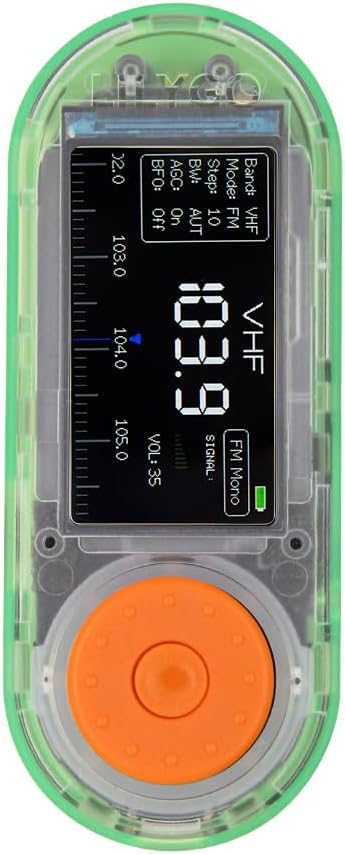
Figura 1: Frontal view of the LILYGO T-Embed, showing the 1.9-inch IPS TFT LCD and control knob.

Figura 2: A baix view of the LILYGO T-Embed, highlighting the antenna connector.

Figure 3: LILYGO T-Embed SI4732 Pinmap, illustrating various connections including microphone, speaker, TF card slot, USB-C, and GPIO pins.
Especificacions
| Característica | Detall |
|---|---|
| MCU | ESP32-S3 Dual-core LX7 microprocessor |
| Connectivitat sense fil | 2.4G Wi-Fi 802.11 b/g/n, BLE 5 |
| Radio Receiver IC | SI4732-A10 (CMOS AM/FM/SW/LW/RDS) |
| Mostra | 1.9 inch ST7789V IPS TFT LCD, 170(H)x320(V) resolution |
| Memòria Flash | 16 MB |
| PSRAM | 8 MB |
| Àudio | Micròfon, altaveu |
| Programming Platforms | Arduino-IDE, ESP-IDF |
| Connectivitat | USB Type-C, GPIO |
| Bandes de ràdio compatibles | FM (64-108 MHz), AM (520-1710 KHz), SW (2.3-26.1 MHz), LW (153-279 KHz) |

Figura 4: Mésview of LILYGO T-Embed's core specifications and supported radio bands.

Figure 5: Physical dimensions of the LILYGO T-Embed board and its telescopic antenna.
Guia de configuració
- Desembalatge: Carefully remove the LILYGO T-Embed board and included antenna from its packaging.
- Connexió d'antena: Attach the provided telescopic antenna to the SMA connector located on the bottom of the board. Ensure it is securely fastened.

Figure 6: LILYGO T-Embed with the telescopic antenna connected.
- Font d'alimentació: Connect the T-Embed to a power source using a USB Type-C cable. The USB-C port is located on the side of the board. This connection also allows for data transfer and programming.
- Engegada inicial: Once connected, the device should power on, and the 1.9-inch LCD will illuminate.
Instruccions de funcionament
The LILYGO T-Embed typically comes with pre-installed firmware that allows for basic radio operation.
- Visualització: The 1.9-inch IPS TFT LCD shows current operating information, such as radio frequency, band, and signal strength.
- Botó de control: The integrated rotary encoder (control knob) is used for navigation and selection within the device's interface.
- Girar: Turn the knob to scroll through options or adjust values (e.g., frequency, volume).
- Premsa: Press the knob to confirm a selection or toggle a setting.
- Extensió de l'antena: For optimal radio reception, extend the telescopic antenna fully.
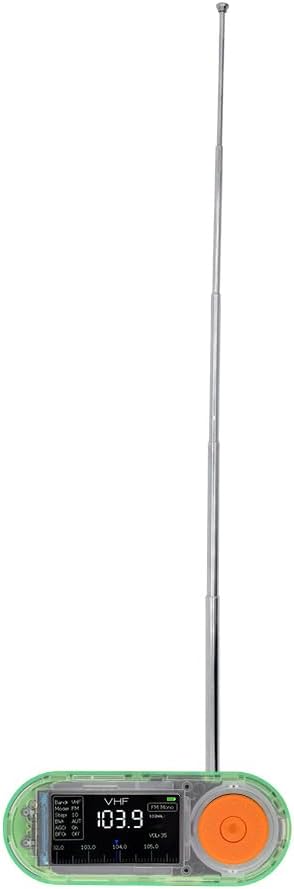
Figure 7: LILYGO T-Embed in operation with the antenna extended for improved reception.
Informació de programació
The LILYGO T-Embed is a development board designed for custom applications. It supports programming using standard ESP32 development environments.
- Plataformes compatibles: The board is compatible with Arduino-IDE and ESP-IDF.
- Recursos de desenvolupament: For detailed programming guides, examples, and technical documentation, refer to the official LILYGO GitHub repository: github.com/Xinyuan-LilyGO/T-Embed.
- Interfície USB-C: Use the USB Type-C port for flashing new firmware and serial communication during development.
Manteniment
- Neteja: Feu servir un drap suau i sec per netejar el dispositiu. Eviteu utilitzar líquids o productes de neteja abrasius.
- Emmagatzematge: Guardeu el dispositiu en un lloc fresc i sec, allunyat de la llum solar directa i de temperatures extremes.
- Cura de l'antena: Handle the telescopic antenna carefully to prevent bending or damage. Retract it when not in use or during transport.
Resolució de problemes
- El dispositiu no s'encén:
- Assegureu-vos que el cable USB tipus C estigui connectat correctament tant al dispositiu com a una font d'alimentació que funcioni.
- Proveu un cable USB-C o un adaptador d'alimentació diferent.
- Mala recepció de ràdio:
- Ensure the telescopic antenna is fully extended and securely connected.
- Move to an open area away from obstructions or sources of electromagnetic interference.
- Verify the correct radio band and frequency are selected.
- Problemes de visualització:
- If the display is blank, check power connection.
- If the display shows unexpected behavior, a firmware re-flash might be necessary. Refer to the programming section.
- Errors de programació:
- Ensure correct drivers are installed for the USB-to-serial chip.
- Verify the correct board and port are selected in your IDE.
- Consult the LILYGO GitHub repository for common issues and solutions.
Suport
For further assistance, technical inquiries, or suggestions regarding the LILYGO T-Embed, please refer to the official LILYGO resources or contact customer support.
- Recursos en línia: Visit the official LILYGO GitHub repository for documentation, code examples, and community support: github.com/Xinyuan-LilyGO/T-Embed.
- Atenció al client: If you have specific product questions or require direct support, please contact the seller or LILYGO customer service.


