1. Introducció
The Womier SK75 TMR/HE is a 75% layout wireless mechanical keyboard designed for high-performance gaming and efficient daily use. Featuring advanced TMR (Tunneling Magnetoresistance) Hall Effect magnetic switches, this keyboard offers unparalleled customization for actuation points and rapid trigger responses. Its durable full CNC aluminum body, versatile connectivity options (wired USB-C, 2.4GHz wireless, Bluetooth 5.0), and vibrant RGB backlighting make it a robust and adaptable input device for various operating systems and applications.
2. Contingut del paquet
Verifiqueu que tots els elements siguin presents al vostre paquet:
- Womier SK75 TMR/HE Keyboard (x1)
- USB-A to USB Type-C Cable (x1)
- 2-in-1 Keycap & Switch Puller (x1)
- Manual d'usuari (x1)
- Extra Magnetic Switches (x3)
- Color Supplementary Keycaps (x7)
- 2.4G Wireless Receiver (x1)

Image: All components included in the Womier SK75 TMR/HE keyboard package.
3. Configuració
3.1. Encès / apagat
To power on or off the keyboard, locate the small switch beneath the Caps Lock keycap. Use the provided 2-in-1 keycap puller to carefully remove the Caps Lock keycap, then toggle the switch to the 'ON' or 'OFF' position. Replace the keycap after use.
Video: Demonstrates how to access and use the power switch located under the Caps Lock keycap.
3.2. Modes de connectivitat
The Womier SK75 TMR/HE supports three connectivity modes: Wired USB-C, 2.4GHz Wireless, and Bluetooth 5.0. You can switch between these modes using FN key combinations.
- Mode per cable: Connect the keyboard to your device using the provided USB-A to USB Type-C cable. The keyboard will automatically detect the wired connection.
- Mode sense fil de 2.4 GHz: Plug the 2.4G wireless receiver into an available USB port on your device. Press FN + R to activate 2.4GHz wireless mode.
- Mode Bluetooth: El teclat admet fins a tres dispositius Bluetooth.
- Premeu FN + Q, FN + W, o FN + E per seleccionar un canal Bluetooth.
- On your device, search for "Womier SK75 TMR/HE" in the Bluetooth settings and pair.

Image: The keyboard demonstrating its multi-mode connectivity options with various devices.
3.3. Càrrega de la bateria
The keyboard is equipped with an 8000mAh battery. To charge, connect the USB-C cable to the port located at the top of the keyboard and the other end to a power source (e.g., computer USB port, wall adapter). The keyboard can be used while charging.
To check the battery level, press FN + retrocés. The RGB lighting will indicate the current battery percentage.
4. Instruccions de funcionament
4.1. Key Functions (FN Combinations)
The keyboard features various functions accessible via the FN key. Refer to the table below for common combinations:
| Combinació | Function (Windows/macOS) |
|---|---|
| FN + Q/W/E | Bluetooth channel 1/2/3 |
| FN + R | Mode sense fil 2.4G |
| FN + T | Mode per cable |
| FN + retrocés | Comproveu el nivell de la bateria |
| FN + Win | Bloquejar/Desbloquejar la clau Win |
| FN + M | Press and hold for 3 seconds to switch between MAC/WIN mode |
| FN + Suprimir | Enceneu / apagueu la llum de fons |
| FN + Inici | Switch the backlight modes |
| FN + Final | Switch the backlight colors |
| FN + Left/Right Arrow | Backlight direction left/right |
| FN + Fletxa amunt/avall | Brillantor de la retroiluminació +/- |
| FN + Esc | Manteniu premut durant 3 segons per restaurar la configuració de fàbrica |
| FN + F1 | Screen brightness - (macOS) |
| FN + F2 | Screen brightness + (macOS) |
| FN + F3 | Task control (Win+E) / Console (macOS) |
| FN + F4 | Cançó anterior |
| FN + F5 | Reproduir/Pausa |
| FN + F6 | Següent cançó |
| FN + F7 | Explorer (Win+E) / Keyboard backlight brightness - (macOS) |
| FN + F8 | Mail / Keyboard backlight brightness + (macOS) |
| FN + F9 | Silenciar |
| FN + F10 | Volum - |
| FN + F11 | Volum + |
4.2. Control de la il·luminació RGB
The keyboard features 16.8 million RGB backlight with 22 pre-set lighting effects. Use the FN combinations mentioned above to customize your lighting experience.
- FN + Inici: Cycle through different RGB lighting effects.
- FN + End: Change the color of static RGB effects.
- FN + Up/Down Arrow: Ajusteu la brillantor de la llum de fons.
- FN + Left/Right Arrow: Adjust lighting effect speed/direction.

Image: The keyboard displaying its vibrant 16.8 million RGB backlight.
4.3. Software Customization (Womier Driver)
The Womier SK75 TMR/HE utilizes an online driver for advanced customization. This web-based software allows you to:
- Customize key functions and remapping.
- Adjust actuation travel for magnetic switches (0.1mm - 3.5mm with 0.01mm sensitivity).
- Create and assign macros.
- Design personalized backlight effects.
- Experience advanced gaming functions like SOCD, DKS, MT, and RT with real-time visual feedback.
Access the Womier Driver via their official website. Follow the on-screen instructions for installation and customization.
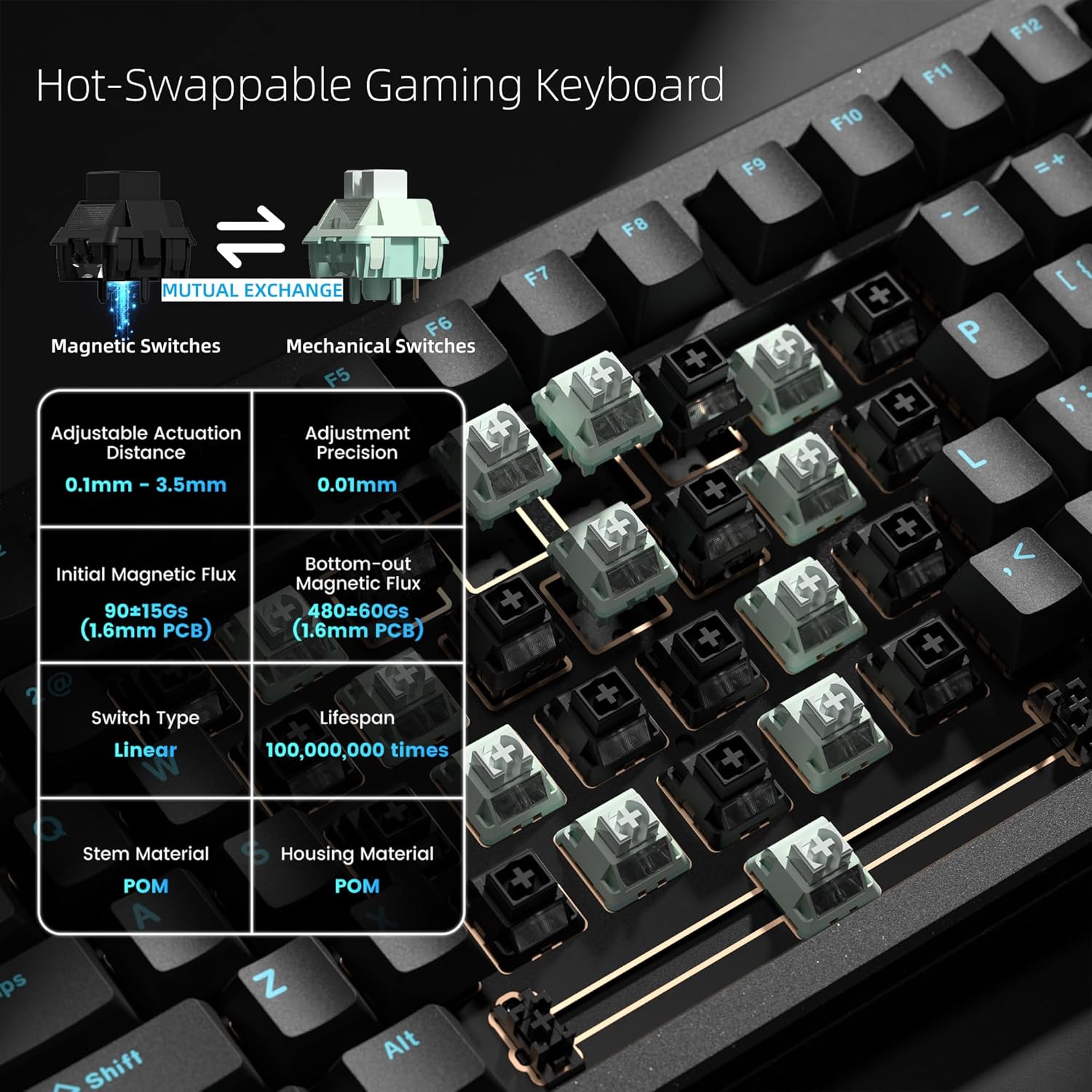
Image: The Womier online driver interface for advanced keyboard customization.
4.4. Magnetic Switch Customization
The TMR magnetic switches allow for precise control over key actuation. Using the Womier Driver, you can:
- Set individual key actuation points from 0.1mm to 3.5mm.
- Enable Rapid Trigger for instant key activation and deactivation, providing a competitive edge in gaming.
- Configure Dynamic Key Stroke (DKS) and Mod Tap (MT) functions for multi-action keys based on press depth or duration.

Image: Visual representation of the 0.01mm precision adjustable dead zone feature.
4.5. Interruptors d'intercanvi en calent
The SK75 TMR/HE features a hybrid hot-swappable PCB, allowing compatibility with both magnetic and traditional mechanical switches. This provides flexibility to customize your typing and gaming experience.
- Use the provided 2-in-1 keycap & switch puller to carefully remove keycaps and switches.
- Alineeu els pins del nou interruptor amb els endolls de la placa de circuit imprès i premeu fermament fins que encaixi al seu lloc.
- Ensure switches are properly seated to avoid damage.

Image: Illustration of the hot-swappable feature, allowing exchange between magnetic and mechanical switches.
5. Manteniment
- Neteja: Use a soft, dry cloth to wipe the keyboard surface. For deeper cleaning, remove keycaps with the provided puller and use compressed air to clear debris.
- Cura de les tecles: The double-shot PBT keycaps are durable and resistant to shine. Avoid harsh chemicals when cleaning.
- Cura del canvi: Magnetic switches generally require less maintenance than traditional mechanical switches. If replacing switches, ensure proper alignment to prevent bending pins.
6. Solució De Problemes
- El teclat no respon:
- Ensure the keyboard is powered on (check switch under Caps Lock).
- Verify the correct connectivity mode (Wired, 2.4GHz, Bluetooth) is selected.
- For wireless modes, ensure the battery is charged.
- Prova de connectar-te mitjançant un cable USB-C per descartar problemes sense fil.
- Problemes de connexió Bluetooth:
- Ensure the keyboard is in Bluetooth pairing mode (FN + Q/W/E).
- Forget the device on your computer/tablet and re-pair.
- Assegureu-vos que cap altre dispositiu interfereixi amb el senyal Bluetooth.
- Claus que no es registren o s'escriuen dues vegades:
- This may indicate a faulty switch. Use the switch puller to replace the affected switch.
- Ensure switches are fully seated in their sockets.
- Perform a factory reset (FN + Esc for 3 seconds).
- La il·luminació RGB no funciona:
- Ensure RGB is not turned off (FN + Delete).
- Adjust brightness (FN + Up/Down Arrow).
- Check settings in the Womier Driver software.
7. Especificacions
- Model: SK75 TMR/HE
- Disseny: 75%
- Interruptors: Hall Effect Magnetic Switches (Hot-swappable with mechanical switches)
- Rang d'actuació: 0.1mm - 3.5mm (0.01mm precision)
- Taxa de votació: 8000 Hz
- Temps de resposta: 0.125 ms
- Connectivitat: Sense fil de 2.4 GHz, Bluetooth 5.0, USB-C amb cable
- Bateria: Polímer de liti de 8000 mAh
- Material del cos: Alumini CNC complet
- Tecles de tecles: PBT de doble injecció Cherry Profile
- Il·luminació de fons: 16.8 Million RGB (22 effects)
- Sistema operatiu compatible: Mac, Windows, Linux
- Pes: Aproximadament 5.52 lliures (2.5 kg)
- Dimensions: 15.16 x 8.43 x 3.35 polzades
8. Garantia i assistència
For warranty information and technical support, please refer to the official Womier weblloc web o contacteu directament amb el servei d'atenció al client. Conserveu el rebut de compra per a reclamacions de garantia.
Recursos en línia:
- Womier Official Weblloc: Womier Store
- Womier Driver Download: Refer to the official website for the latest software.


