1. Introducció
Thank you for choosing the WIWU OWS O300 Open-Ear Earbuds. These wireless earbuds are designed to provide a comfortable audio experience while maintaining situational awareness. This manual provides detailed instructions for setup, operation, maintenance, and troubleshooting to ensure optimal performance.

Image: The WIWU OWS O300 Open-Ear Earbuds in white, alongside their matching charging case.
2. Contingut del paquet
Si us plau, verifiqueu que tots els elements siguin presents al vostre paquet:
- WIWU OWS O300 Open-Ear Earbuds (Left and Right)
- Estoig de càrrega
- Cable de càrrega USB-C
- Manual d'usuari

Image: The retail packaging for the WIWU OWS O300 Open-Ear Earbuds, showing the product and branding.
3. Configuració
3.1 Càrrega dels auriculars i l'estoig
Abans del primer ús, carregueu completament els auriculars i l'estoig de càrrega.
- Col·loca els auriculars a l'estoig de càrrega, assegurant-te que estiguin correctament col·locats.
- Connecteu el cable de càrrega USB-C al port de càrrega de la carcassa i l'altre extrem a una font d'alimentació (per exemple, un adaptador de paret USB, un port USB de l'ordinador).
- The indicator light on the charging case will show the charging status. A full charge typically takes approximately 1.5 hours.

Image: The WIWU OWS O300 earbuds resting inside their open charging case, ready for charging.
3.2 Vinculació Bluetooth
To connect the earbuds to your device:
- Assegureu-vos que els auriculars estiguin carregats.
- Open the charging case. The earbuds will automatically enter pairing mode, indicated by a flashing light (refer to specific light patterns in the quick start guide if available).
- Al dispositiu (telèfon intel·ligent, tauleta, etc.), activeu el Bluetooth i cerqueu els dispositius disponibles.
- Select "WIWU OWS O300" from the list of detected devices.
- Un cop connectats, els auriculars indicaran que l'emparellament s'ha realitzat correctament (per exemple, una indicació de veu o una llum fixa).
- Els auriculars es tornaran a connectar automàticament a l'últim dispositiu emparellat quan es treguin de l'estoig, si el Bluetooth està activat al dispositiu.
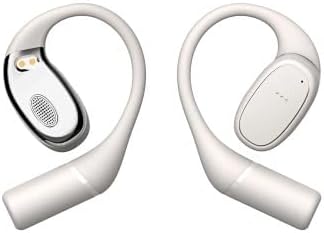
Image: The WIWU OWS O300 earbuds removed from their charging case, showcasing el seu disseny.
3.3 Com posar-se els auriculars
The OWS O300 earbuds feature an open-ear design for comfort and awareness.
- Gently place each earbud over your ear, ensuring the speaker portion is positioned near your ear canal without entering it.
- Adjust the ear hook for a secure and comfortable fit.
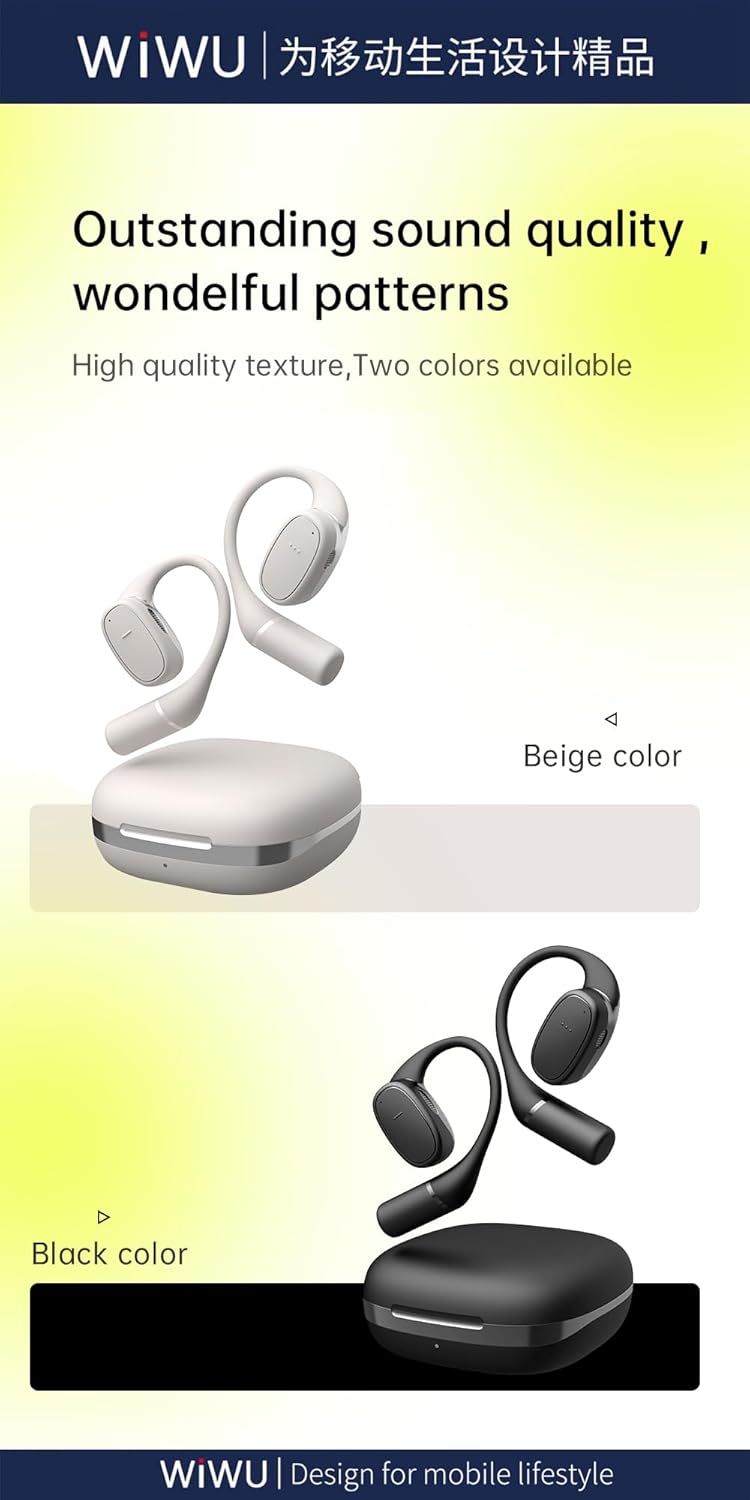
Imatge: Un costat view of the WIWU OWS O300 earbuds, highlighting their ergonomic open-ear design.

Image: A person wearing the WIWU OWS O300 earbuds while engaged in physical activity, demonstrating their secure fit.
4. Instruccions de funcionament
4.1 Encès/Apagat
- Encès: Els auriculars s'encenen automàticament quan es treuen de l'estoig de càrrega.
- Apagar: The earbuds automatically power off and begin charging when placed back into the charging case and the lid is closed.
4.2 Reproducció de música
The earbuds feature touch controls for music management. Specific touch functions may vary slightly, but generally include:
- Reproduir/pausa: Un sol toc a qualsevol dels auriculars.
- Pista següent: Toqueu dues vegades l'auricular dret.
- Pista anterior: Toqueu dues vegades l'auricular esquerre.
- Control de volum: Volume adjustment is typically managed via your connected device.
4.3 Gestió de trucades
- Respondre/Finalitzar la trucada: Single tap on either earbud during an incoming call or an active call.
- Rebutja la trucada: Press and hold on either earbud for approximately 2 seconds during an incoming call.
5. Manteniment
Un manteniment adequat garanteix la longevitat i el rendiment dels teus auriculars.
- Neteja: Feu servir un drap suau, sec i sense borrissol per netejar els auriculars i l'estoig de càrrega. No utilitzeu productes de neteja abrasius, alcohol ni dissolvents químics.
- Emmagatzematge: Quan no els utilitzeu, guardeu els auriculars a la funda de càrrega per protegir-los de la pols i els danys. Guardeu-los en un lloc fresc i sec, allunyat de la llum solar directa i de temperatures extremes.
- Exposició a l'aigua: The earbuds are not waterproof. Avoid exposing them to water, rain, or excessive moisture.
6. Solució De Problemes
If you encounter issues with your WIWU OWS O300 earbuds, try the following solutions:
- Auriculars que no s'emparellan:
- Assegureu-vos que els dos auriculars estiguin carregats.
- Desactiva i activa el Bluetooth del dispositiu.
- Forget "WIWU OWS O300" from your device's Bluetooth list and attempt to pair again.
- Torneu a col·locar els auriculars a la funda, tanqueu la tapa, espereu 10 segons i, a continuació, obriu-la per tornar a entrar al mode d'emparellament.
- No se sent cap so d'un auricular:
- Assegureu-vos que els dos auriculars estiguin carregats.
- Try placing both earbuds back in the charging case, closing the lid, and then taking them out again.
- Perform a factory reset if available (refer to manufacturer's website for specific instructions if not in this manual).
- Problemes de càrrega:
- Comproveu si el cable USB-C i l'adaptador de corrent estan danyats.
- Assegureu-vos que el port de càrrega de la carcassa estigui net i lliure de residus.
- Verify the earbuds are correctly seated in the charging case.
- Volum baix:
- Ajusteu el volum del vostre dispositiu connectat.
- Ensure the earbuds are clean and free from obstructions.
7. Especificacions
Detailed technical specifications for the WIWU OWS O300 Open-Ear Earbuds:
| Característica | Especificació |
|---|---|
| Model | OWS O300 |
| Versió Bluetooth | V5.3 |
| Xipset Bluetooth | Airohia AB1562M |
| Caixa de càrrega Capacitat de la bateria | 400 mAh |
| Capacitat de la bateria dels auriculars | 50 mAh (per auricular) |
| Port de càrrega | USB-C |
| Temps de càrrega | Aprox. 1.5 hores |
| Hora de trucada | Fins a 5 hores |
| Temps de reproducció de música | Fins a 8 hores |
| Earbuds Standby Time | 12 mesos |
| Total Standby Time (with case) | Fins a 40 hores |
| Net Weight (solo earbud) | 7.5 g ± 0.2 g |
| Net Weight (charging case) | 52.6 g |
| Dimensions de l'auricular | 16.10 mm x 41.51 mm x 49.60 mm |
| Dimensions de la caixa de càrrega | 66.71 mm x 66.28 mm x 28.97 mm |
| Tecnologia de connectivitat | Sense fil |

Image: A visual representation of the Bluetooth 5.3 chip, highlighting its advanced wireless connectivity.
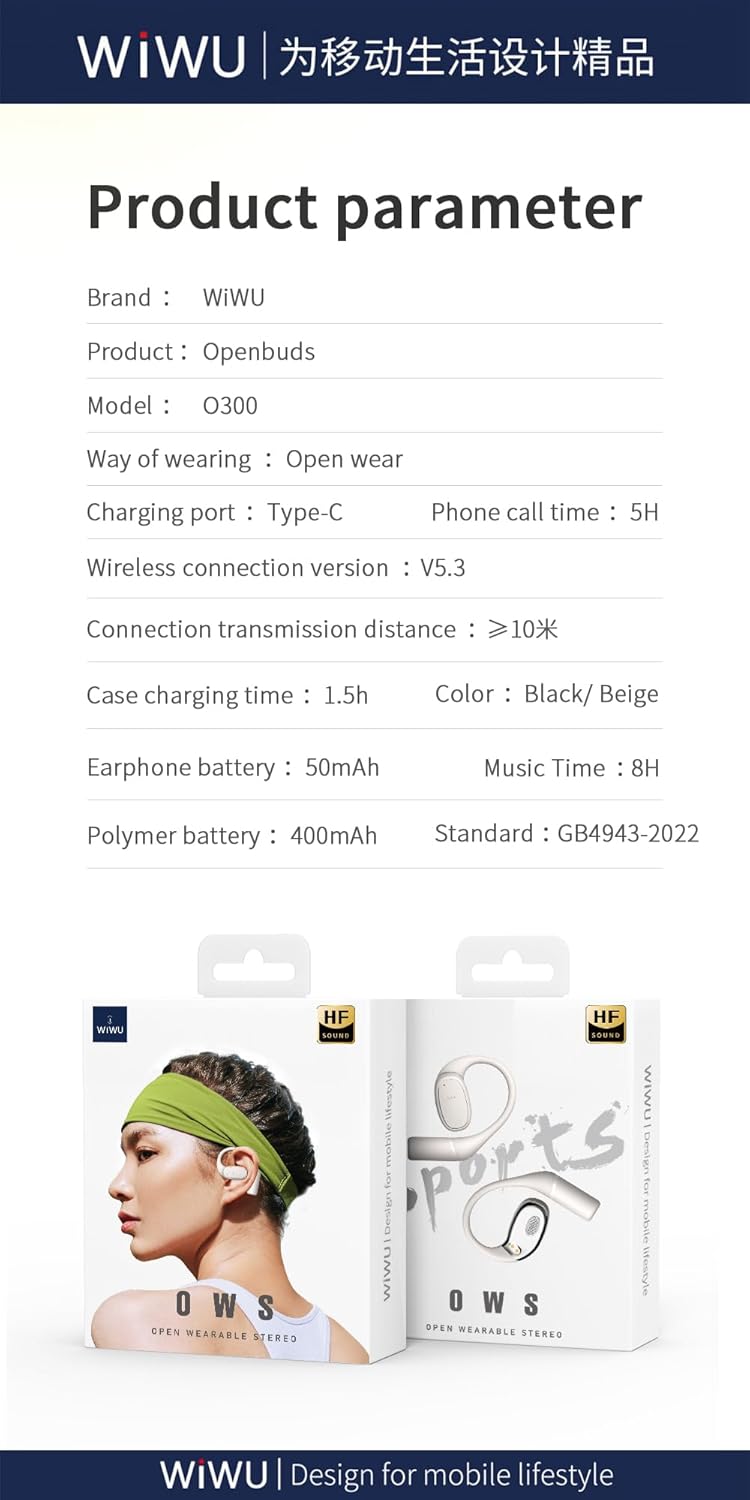
Image: A graphic displaying key product parameters and specifications for the WIWU OWS O300.
8. Garantia i Suport
For warranty information and customer support, please refer to the documentation included with your purchase or visit the official WIWU weblloc web. Conserveu el comprovant de compra per a reclamacions de garantia.
If you require further assistance, please contact WIWU customer service through their official channels.


