Introducció
This manual provides comprehensive instructions for the MSI X870E Gaming Plus WiFi Motherboard, designed for AMD Ryzen 9000, 8000, and 7000 series processors on the AM5 platform. It covers setup, operation, maintenance, and troubleshooting for optimal performance with DDR5 memory, PCIe 5.0, M.2 Gen5 storage, Wi-Fi 7, and 5G LAN connectivity. Please read this manual thoroughly before installation and use to ensure proper functionality and safety.

Figure 1: MSI X870E Gaming Plus WiFi Motherboard and Retail Packaging
Configuració
Follow these steps for initial setup and component installation.
1. Instal·lació de la CPU
The MSI X870E Gaming Plus WiFi Motherboard supports AMD Ryzen 9000, 8000, and 7000 series processors on the AM5 socket. Ensure the CPU is correctly oriented before placing it into the socket.

Figura 2: De dalt a baix view of the motherboard, highlighting the AM5 CPU socket.
2. Instal·lació de memòria
This motherboard features 4 x DDR5 DIMM SMT slots, supporting memory speeds up to 8200+ MT/s (OC). Install DDR5 memory modules into the designated slots, ensuring they are fully seated.
3. Instal·lació d'emmagatzematge
The motherboard offers extensive storage options, including 1 x M.2 Gen5 x4 128Gbps slot with EZ M.2 Shield Frozr II and 2 x M.2 Gen4 x4 64Gbps slots. Install M.2 SSDs into these slots, utilizing the EZ M.2 Shield Frozr II for thermal management.

Figura 3: Angle view of the motherboard, showing the M.2 slots with heatsinks.
4. Instal·lació de la targeta gràfica
The motherboard includes premium GPU support with a PCIe 5.0 x16 SMT slot (128GB/s) with Steel Armor. Insert your graphics card into this slot, ensuring it is securely latched.
5. Connexions d'alimentació
To power the latest Ryzen 9000 processors, the X870E GAMING PLUS WIFI is equipped with a 14 Duet Rail Power System (60A, SPS) VRM for the CPU and dual 8-pin CPU power connectors. Connect the 24-pin ATX power connector and the 8-pin CPU power connectors from your power supply to the motherboard.
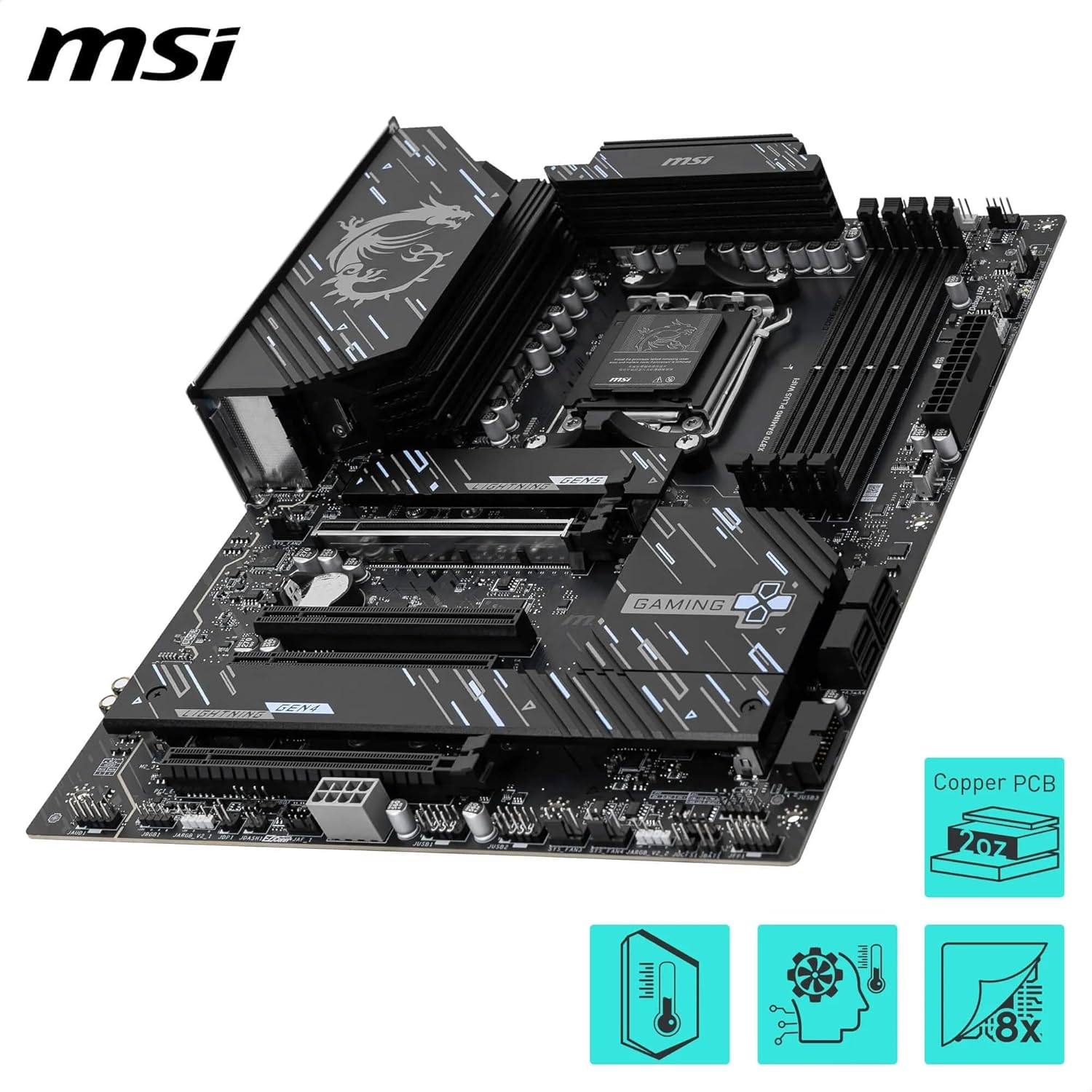
Figure 4: Close-up of the motherboard's VRM heatsinks, indicating robust power delivery.
6. Connectivitat
Connect your peripherals and network cables to the rear I/O ports. This includes full-speed Wi-Fi 7 and Bluetooth 5.4 technology, Realtek 5G LAN, USB4 Type-C (40Gbps) with 4K/120Hz display support, and 7.1 HD audio.

Figura 5: Detallada view dels ports d'entrada/sortida posteriors de la placa base.
Instruccions de funcionament
1. Arrencada inicial i configuració de la BIOS
Upon first boot, enter the BIOS setup to configure system settings, including memory profiles (EXPO/XMP), boot order, and fan curves. Refer to the on-screen instructions or the full user manual for detailed BIOS navigation.
2. Instal·lació del controlador
After installing your operating system, install the necessary drivers for the chipset, LAN, Wi-Fi, Bluetooth, and audio from the MSI support website or the included driver disk/USB drive.
3. BIOS Update
Regularly check the MSI support website for the latest BIOS updates to ensure optimal performance, compatibility, and security. Follow the instructions provided by MSI for the specific BIOS update method (e.g., M-Flash, Flash BIOS Button).
Video 1: Unboxing the MSI X870E Motherboard. This video provides a visual overview of the motherboard and its components.
Manteniment
Un manteniment adequat garanteix la longevitat i el rendiment estable de la placa base.
- Sistema de refrigeració: The motherboard features multiple passive cooling features, including an Extended Heatsink, chipset heatsink, and EZ M.2 Shield Frozr II. Ensure proper airflow within your PC case to maximize cooling efficiency.
- Neteja: Periodically clean dust from the motherboard and components using compressed air. Avoid using liquids directly on the motherboard.
- Actualitzacions de firmware: Keep all drivers and BIOS firmware updated to the latest versions available from the MSI official weblloc.
Resolució de problemes
Si teniu problemes, consulteu els passos habituals següents per a la resolució de problemes:
- Sense energia: Ensure all power cables (24-pin ATX, 8-pin CPU) are securely connected. Check your power supply unit.
- Sense pantalla: Verify that your graphics card is properly seated and connected to the monitor. Check RAM module installation.
- Inestabilitat del sistema: Reset BIOS settings to default. Ensure RAM is compatible and installed correctly. Check CPU and GPU temperatures.
- Problemes de xarxa: Verify LAN cable connection or Wi-Fi antenna installation. Update network drivers.
- BIOS Debug LEDs: The motherboard may feature debug LEDs that indicate the status of CPU, DRAM, VGA, and BOOT during startup. Consult the full manual for specific LED codes.
Especificacions
| Característica | Detall |
|---|---|
| Marca | msi |
| Sèrie | MSI X870E GAMING PLUS WIFI |
| Nom del model | MSI X870E GAMING PLUS WIFI |
| Número de model de l'article | X870E Gaming Plus WiFi |
| Socket de CPU | Presa AM5 |
| Processadors compatibles | Supports AMD Ryzen 9000/7000 Series Desktop Processor |
| Tipus de xipset | AMD X870E |
| Tecnologia de memòria RAM | DDR5 |
| RAM | DDR5 |
| Tipus de connector d'alimentació principal | 24-pins |
| Plataforma | Windows 11 |
| Pes de l'article | 4.4 lliures |
| Dimensions del producte | 11.7 x 7.4 x 2.1 polzades |
Garantia i Suport
For warranty information, technical support, or to download the latest drivers and utilities, please visit the official MSI weblloc web. També hi podeu trobar recursos de suport addicionals i preguntes freqüents.
MSI Official Weblloc: www.msi.com


