1. Introducció
This manual provides detailed instructions for the installation, operation, and maintenance of your AINAVI 9-inch Android 12 Car Stereo. Please read this manual thoroughly before using the product to ensure proper function and safety. This car stereo is designed to enhance your driving experience with advanced features such as wireless CarPlay, Android Auto, GPS navigation, and high-quality audio processing.

Figure 1.1: AINAVI 9-inch Android 12 Car Stereo with its user interface displayed.
2. Compatibilitat del producte
This car stereo system is specifically designed for Dodge Ram 1500, 2500, and 3500 models manufactured between 2013 and 2018. It includes a plug-and-play wiring harness, CANbus decoder, and a frame panel customized for these vehicles. It supports most original vehicle functions, including steering wheel controls and reverse signals.
Nota important: This unit is compatible with vehicles equipped with manual air conditioning controls. It is no compatible with vehicles that have automàtic air conditioning controls.

Figure 2.1: Visual guide for vehicle compatibility, indicating fit for manual AC and non-fit for automatic AC.
3. Què s'inclou
El paquet conté els components següents:
- 1x Android Car Stereo Head Unit
- Wiring Harness Power Cable
- Descodificador CANbus
- 1x Radio Antenna Adaptor
- 1x altaveus
- 1x Cable RCA
- 2x cables USB
- 1 x Antena GPS
- 1x Rear View Càmera
- 1x micròfon
- Manual d'usuari (aquest document)
- Frame Removal Tool

Figura 3.1: Mésview of all components included in the product package.
4. Configuració i instal·lació
The AINAVI car stereo is designed for plug-and-play installation, minimizing the need for complex wiring modifications. However, professional installation is recommended to ensure correct setup and to avoid damage to your vehicle's electrical system.
4.1. Comprovacions prèvies a la instal·lació
- Verify vehicle compatibility (manual AC models only).
- Assegureu-vos que hi hagi tots els components enumerats a la secció 3.
- Disconnect the vehicle's battery before beginning installation.
4.2. Installation Steps (General Overview)
- Carefully remove the original car stereo and dashboard trim using appropriate tools.
- Connect the provided wiring harness and CANbus decoder to the vehicle's existing wiring.
- Connect the GPS antenna, USB cables, and any other accessories (e.g., rearview camera, microphone) to the new head unit.
- Mount the AINAVI head unit into the dashboard opening, ensuring all connections are secure.
- Torneu a instal·lar el revestiment del tauler de control.
- Torneu a connectar la bateria del vehicle i proveu el sistema.
For detailed, step-by-step installation instructions, please refer to the dedicated installation guide provided with your product or consult a qualified automotive technician.
Figure 4.1: The AINAVI car stereo seamlessly integrated into a Dodge Ram dashboard after installation.
5. Instruccions de funcionament
5.1. Funcionament bàsic
- Encès/apagat: Premeu i manteniu premut el botó d'engegada de la unitat o feu servir el contacte del vehicle.
- Control de volum: Adjust using the physical buttons on the unit or via steering wheel controls.
- Interfície de pantalla tàctil: Navigate the Android 12 operating system by tapping, swiping, and pinching on the 9-inch QLED display. The screen features 1280x720 resolution and a 178° full-viewangle de ing.
5.2. CarPlay sense fil i Android Auto
The unit supports both wired and wireless Apple CarPlay and Android Auto. This allows seamless integration of your smartphone for navigation, calls, messages, and music playback.
- Connexió: Connect your smartphone via USB for wired connection or pair via Bluetooth for wireless functionality.
- Comandaments de veu: Access voice assistants like Siri or Google Assistant directly from the head unit by saying "Hey Siri" or "Hey Google".

Figure 5.1: Demonstrating the Apple CarPlay and Android Auto interfaces on the stereo screen.
5.3. Navegació GPS
The stereo has built-in GPS navigation capabilities.
- Navegació en línia: Connect to a network via WiFi to receive real-time traffic information.
- Mapes fora de línia: Baixeu mapes fora de línia per navegar sense connexió a Internet.

Figure 5.2: The car stereo displaying a GPS navigation map with various applications.
5.4. Connectivity (WiFi & Bluetooth)
- WiFi: Supports dual-band 2.4GHz & 5GHz WiFi for high-speed internet access. Connect to a mobile hotspot or public WiFi.
- Bluetooth 5.0: Enables hands-free calling, music streaming, and phonebook synchronization.

Figure 5.3: Visual representation of WiFi and Bluetooth 5.0 connectivity options.
5.5. Digital Sound Processor (DSP) & Equalizer (EQ)
The built-in DSP with Time Correction and a 48-band EQ allows for precise audio customization.
- Correcció del temps: Adjust the sound output timing for each speaker to optimize the sound field position.
- 48-band EQ: Fine-tune audio frequencies to match your preferences and vehicle acoustics.

Figure 5.4: The user interface for adjusting DSP and 48-band equalizer settings.
5.6. Split Screen Mode
Utilize the split-screen feature to run two applications simultaneously on the display, such as navigation and music playback.
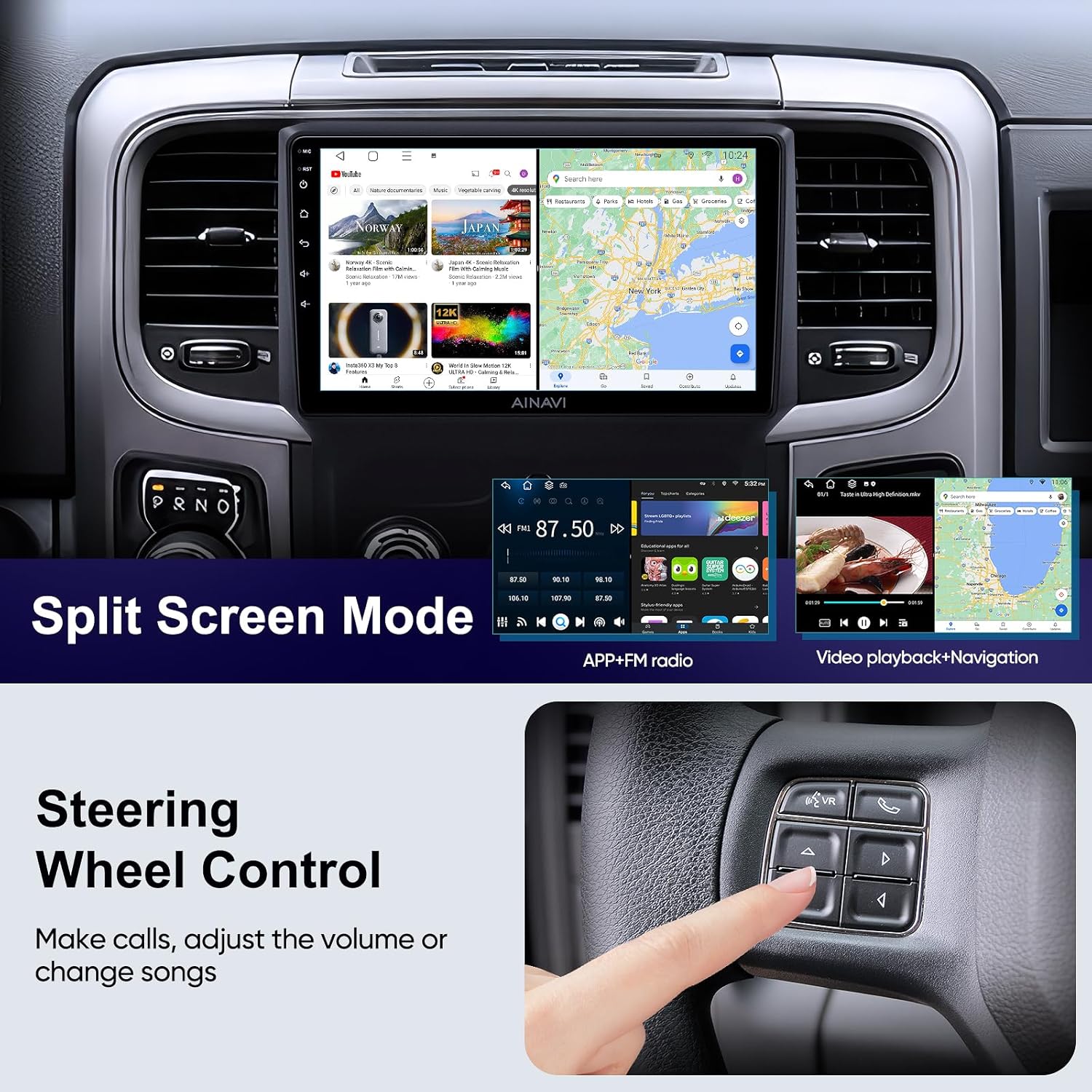
Figure 5.5: The car stereo displaying two applications simultaneously in split-screen mode.
5.7. Control del volant
The unit supports your vehicle's original steering wheel controls, allowing you to manage calls, adjust volume, and change songs without taking your hands off the wheel.

Figure 5.6: Demonstrating the use of steering wheel controls to operate the car stereo.
6. Manteniment
To ensure the longevity and optimal performance of your AINAVI car stereo, follow these maintenance guidelines:
- Neteja: Feu servir un drap suau i sec per netejar la pantalla i la unitat. Per a taques difícils, netegeu lleugerament.ampNetegeu el drap amb aigua o un netejador de pantalles. Eviteu materials abrasius o productes químics agressius.
- Temperatura: Eviteu exposar la unitat a temperatures extremes, tant altes com baixes, durant períodes prolongats.
- Actualitzacions de programari: Periodically check for and install software updates to ensure the system runs efficiently and has the latest features and security patches.
- Connexions: Ensure all cables and connections remain secure. Avoid pulling on cables forcefully.
7. Solució De Problemes
This section addresses common issues you might encounter with your car stereo. If the problem persists, please contact customer support.
| Problema | Causa possible | Solució |
|---|---|---|
| La unitat no s'encén. | Connexió d'alimentació fluixa, fusible fundit, problema amb la bateria del vehicle. | Check power cables, inspect vehicle fuses, ensure battery is charged. |
| Sense sortida de so. | Volum massa baix, font d'àudio incorrecta, problema de cablejat de l'altaveu. | Increase volume, select correct audio source, check speaker connections. |
| El GPS no rep senyal. | Antena GPS no connectada correctament o obstruïda. | Assegureu-vos que l'antena GPS estigui connectada correctament i que tingui una visió clara view del cel. |
| Problemes d'emparellament per Bluetooth. | Bluetooth not enabled on device, device too far, interference. | Ensure Bluetooth is on for both devices, bring devices closer, restart both devices. |
| El CarPlay/Android Auto no es connecta. | Incorrect USB cable, software glitch, phone settings. | Use original or certified USB cable, restart phone and stereo, check phone's CarPlay/Android Auto settings. |
8. Especificacions
| Característica | Especificació |
|---|---|
| Sistema operatiu | Android 12 |
| Processador | ARM Cortex A55 8-Core |
| RAM | 2 GB |
| Emmagatzematge intern | 32 GB |
| Mida de la pantalla | 9 polzades |
| Tipus de visualització | QLED, G+G Full Lamination |
| Resolució | 1280 x 720 |
| Viewangle ing | 178° |
| Potència de sortida d'àudio | Max. 4*45W |
| DSP | Built-in with Time Correction & 48-band EQ |
| Versió Bluetooth | 5.0 |
| Suport WiFi | Banda dual de 2.4 GHz i 5 GHz |
| GPS | Built-in Navigation (supports online/offline maps) |
| CarPlay / Android Auto | Wired & Wireless Support |
| Pes de l'article | 4.51 lliures |
| Dimensions del paquet | 14.06 x 9.76 x 5.2 polzades |
9. Garantia i Suport
AINAVI provides comprehensive product care for your car stereo.
- Garantia: The product comes with a default 12-month manufacturer guarantee.
- Extended Product Care: You can extend your product care for an additional 6 months, totaling 18 months, by contacting AINAVI via Amazon email.
- Suport tècnic: Professional technical support is available to assist with any issues or questions you may have.
9.1. How to Contact Support
For assistance with installation or any other product-related inquiries, please reach out to the seller, HomeCar, through your Amazon order center. Look for the 'Ask a question' button on the seller's page or within your order details.

Figure 9.1: Guide on how to contact the seller for installation support via Amazon.
Alternatively, you may contact AINAVI customer service directly:
- Línia directa: +1 (833) 858-5016
- Horari de treball: 01:00 PM to 00:00 AM PST
- Correu electrònic: info@ainavi.com

Figure 9.2: AINAVI customer service contact details.
10. Notes importants
No hi havia vídeos oficials de productes disponibles per incrustar segons les dades de producte proporcionades.


