1. Introducció
Thank you for choosing the MONTECH X5-White ATX Mid-Tower Gaming PC Case. This case is designed to provide excellent airflow and hardware compatibility for your gaming PC build. It features a sleek design with carbon print accents, a tempered glass side panel, and comes with pre-installed ARGB fans for vibrant lighting and efficient cooling. This manual will guide you through the setup, operation, and maintenance of your new PC case.
2. Contingut del paquet
Assegureu-vos que hi hagi tots els elements abans de començar la instal·lació:
- MONTECH X5-White ATX Mid-Tower Gaming PC Case
- 3 x 140mm ARGB Front Fans (Pre-installed)
- 1 x 120mm ARGB Rear Fan (Pre-installed)
- Integrated GPU Holder
- Accessory Box (Screws, zip ties, etc.)
3. Configuració i instal·lació
Before starting, ensure you have a clean, static-free workspace. Refer to your motherboard and component manuals for specific installation steps.
3.1 Unpacking the Case
Carefully remove the case from its packaging. The tempered glass side panel is fragile; handle with care. Place the case on a stable surface.

Figura 3.1: Frontal esquerre view of the MONTECH X5-White case, showcasing its spacious interior and pre-installed rear ARGB fan. The front mesh panel allows for high airflow.
3.2 Instal·lació de components
The MONTECH X5-White case offers excellent hardware compatibility.

Figure 3.2: Internal dimensions for component compatibility. The case supports GPUs up to 410mm, CPU coolers up to 165mm, and power supplies up to 230mm.
3.2.1 Instal·lació de la placa base
- Remove the tempered glass side panel.
- Install the necessary standoffs for your ATX or Micro ATX motherboard.
- Col·loca amb cura la placa base sobre els separadors, alineant els forats dels cargols.
- Fixeu la placa base amb els cargols proporcionats.
3.2.2 Instal·lació de la unitat d'alimentació (PSU).
The case supports standard ATX PSUs with a bottom mount design.
- Locate the PSU shroud at the bottom rear of the case.
- Slide your PSU into the designated area from the rear of the case.
- Secure the PSU with screws from the outside of the case.
3.2.3 Graphics Processing Unit (GPU) Installation
The case supports GPUs up to 410mm in length and includes an adjustable GPU holder for stability.
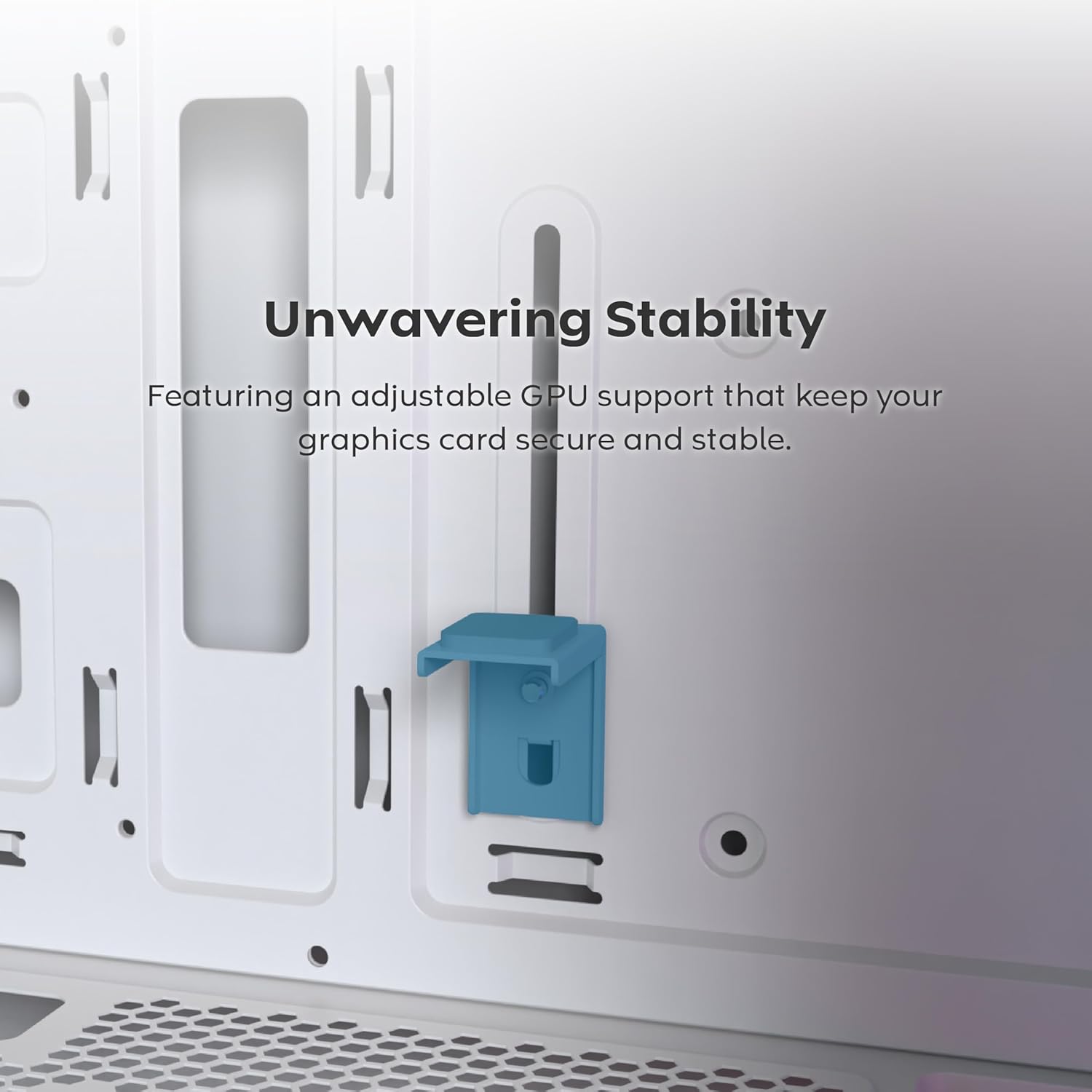
Figure 3.3: The adjustable GPU support stand provides reliable physical support for graphics cards, preventing sag.
- Traieu les cobertes de les ranures PCIe necessàries de la part posterior de la carcassa.
- Inseriu la GPU a la ranura PCIe adequada de la placa base.
- Fixeu la GPU amb cargols.
- Adjust the integrated GPU holder to support the graphics card, ensuring it is stable.
3.2.4 Storage Drive Installation (SSD/HDD)
The case provides dedicated mounting points for SSDs and HDDs.
- Locate the drive bays/mounts behind the motherboard tray or within the PSU shroud.
- Secure your 2.5" SSDs or 3.5" HDDs using the provided screws.
3.2.5 Instal·lació del sistema de refrigeració
The X5-White comes with three 140mm ARGB fans pre-installed at the front and one 120mm ARGB fan at the rear. It supports extensive cooling configurations, including 360mm AIOs.
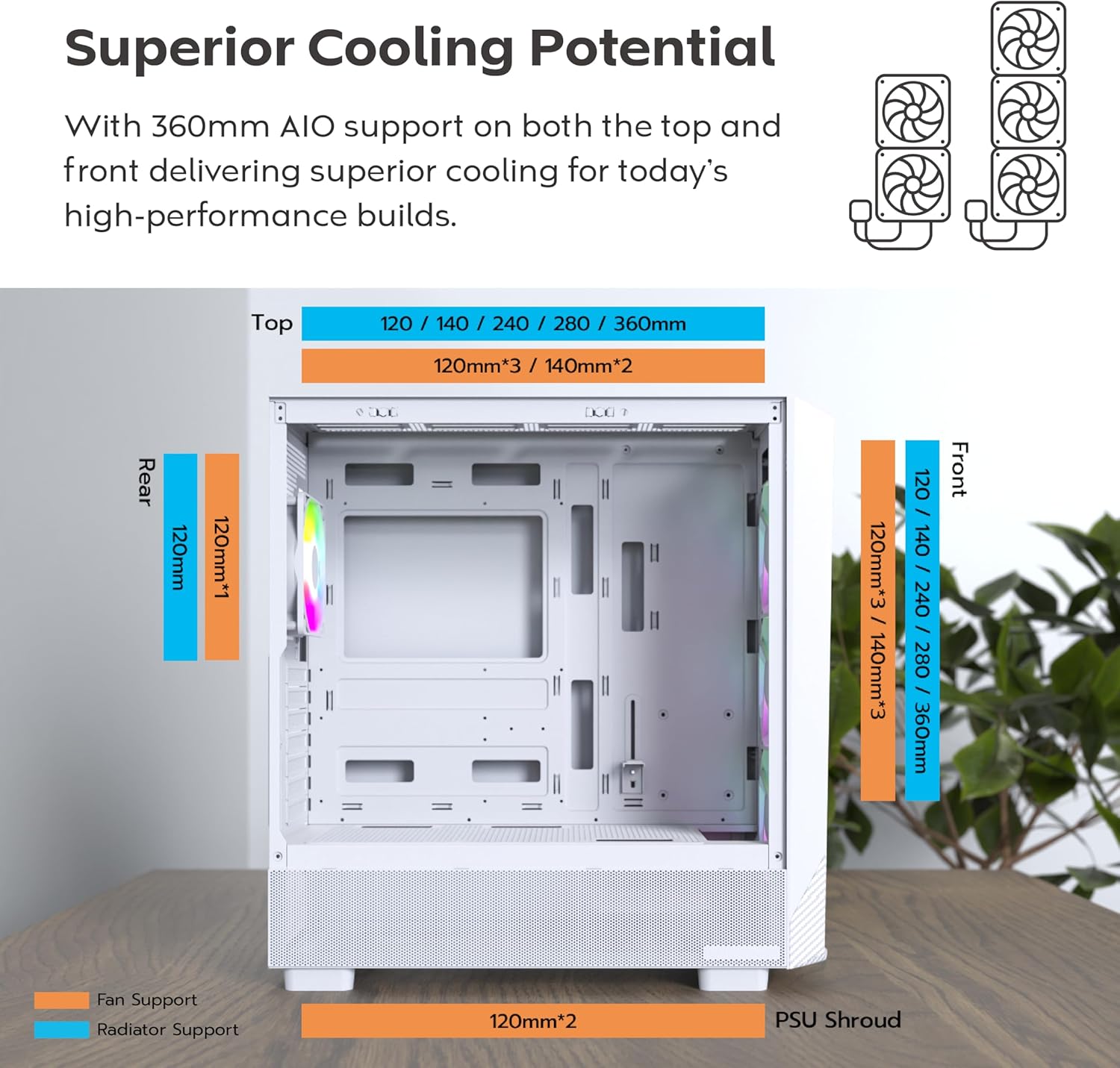
Figure 3.4: Fan and radiator compatibility. The case supports up to 360mm radiators on both the top and front, and a 120mm radiator at the rear.

Figure 3.5: Airflow demonstration with pre-installed 140mm front fans and 120mm rear fan, ensuring efficient cooling.
- Ventiladors addicionals: You can install additional fans on the top (up to 2x 140mm or 3x 120mm) and bottom (2x 120mm).
- Radiadors: The case supports radiators up to 360mm on the front and top, and 120mm on the rear.
3.3 Gestió de cables
The MONTECH X5-White features an extra-large PSU shroud and expanded routing space behind the motherboard tray, making cable management easier and cleaner. Utilize the provided zip ties and routing channels to organize cables for improved airflow and aesthetics.

Figure 3.6: The case with components installed, demonstrating the visual appeal of the ARGB fans and organized interior.
4. Funcionament de la caixa
4.1 Connectivitat del panell frontal
El panell frontal d'E/S proporciona un accés convenient als ports i controls essencials.

Figure 4.1: Front panel connectivity includes USB 2.0, USB 3.0, USB Type-C, Mic & Audio jacks, an LED button for ARGB control, and the Power button.
- Botó d'encesa: Press to power on/off your PC.
- Botó LED: Cycles through 25 built-in ARGB lighting modes for the pre-installed fans.
- Ports USB: Includes USB 2.0, USB 3.0, and USB Type-C for data transfer and peripheral connectivity.
- Mic & Audio Jacks: Per connectar auriculars i micròfons.
Control del ventilador 4.2 ARGB
Els ventiladors ARGB preinstal·lats es poden controlar de dues maneres:
- Case LED Button: Use the dedicated LED button on the front I/O panel to cycle through 25 pre-set lighting effects.
- Programari de la placa base: If your motherboard supports ARGB synchronization (e.g., ASUS Aura Sync, MSI Mystic Light Sync, GIGABYTE RGB Fusion, ASRock Polychrome Sync), you can connect the fan ARGB cables to your motherboard's 3-pin 5V ARGB header for full software control.
5. Manteniment
Un manteniment regular ajuda a garantir un rendiment òptim i una llarga vida útil dels components del teu PC.
5.1 Cleaning the Case
- Exterior: Utilitzeu un suau, damp drap per netejar les superfícies exteriors. Eviteu productes de neteja abrasius.
- Filtres de pols: The case features a magnetic dust filter on the top panel and a removable filter at the bottom for the PSU. Regularly remove and clean these filters by rinsing them with water and allowing them to dry completely before reinstallation.
- Interior: Use compressed air to blow out dust from inside the case, especially from fans and heatsinks. Do this in a well-ventilated area.
5.2 Manteniment del ventilador
Ensure fans are free from dust buildup to maintain optimal airflow and prevent noise. If a fan becomes noisy or stops spinning, check for obstructions or loose connections.
6. Solució De Problemes
Aquesta secció tracta problemes comuns que podeu trobar.
6.1 Els ventiladors no giren o l'RGB no funciona
- Connexió d'alimentació: Ensure all fan power cables (e.g., Molex, 3-pin, 4-pin) are securely connected to the power supply or motherboard fan headers.
- Connexió ARGB: For RGB lighting, verify that the ARGB cables are correctly connected to the case's ARGB controller or your motherboard's 3-pin 5V ARGB header. Some Molex connectors for RGB might have an unconnected 3-pin wire that needs to be removed for the RGB to function.
- Configuració de la placa base: If using motherboard software for RGB control, ensure the software is installed and configured correctly. Check BIOS/UEFI settings for fan control.
6.2 Poor Airflow or High Temperatures
- Acumulació de pols: Clean all dust filters and internal components as described in the Maintenance section.
- Orientació del ventilador: Ensure fans are oriented correctly for optimal airflow (front fans typically intake, rear/top fans exhaust).
- Gestió de cables: Poor cable management can obstruct airflow. Reorganize cables to improve air circulation.
6.3 Components Not Fitting
- Comprovar les dimensions: Refer to the Specifications section and Figure 3.2 to confirm component compatibility with the case's maximum dimensions for GPU, CPU cooler, and PSU.
- Re-evaluate Installation: Ensure components are aligned correctly and not obstructed by other parts or cables.
7. Especificacions
Detailed specifications for the MONTECH X5-White ATX Mid-Tower Gaming PC Case:
| Característica | Especificació |
|---|---|
| Nom del model | X5-White |
| Tipus de cas | Torre mitja |
| Compatibilitat amb la placa base | ATX, Micro ATX |
| Material | Plastic with Carbon Fiber Accents, Tempered Glass Side Panel |
| Color | Blanc |
| Dimensions (L x A x A) | 21.65 x 20.87 x 10.63 polzades (dimensions del paquet) |
| Pes de l'article | 14.3 lliures |
| Ventiladors preinstal·lats | 3 x 140mm ARGB (Front), 1 x 120mm ARGB (Rear) |
| Suport del ventilador (màx.) | Front: 3x 140mm / 3x 120mm Top: 2x 140mm / 3x 120mm Posterior: 1x 120mm Bottom: 2x 120mm |
| Suport del radiador (màx.) | Davant: Fins a 360 mm Superior: Fins a 360 mm Darrera: 120 mm |
| Liquidació de la GPU | Fins a 410 mm |
| Alçada lliure del refrigerador de CPU | Fins a 165 mm |
| Longitud de la font d'alimentació | Fins a 230 mm |
| Drive Bays | SSD, HDD support (specific quantities not provided) |
| Ports d'E/S | 1x USB 2.0, 1x USB 3.0, 1x USB Type-C, Mic & Audio, LED Button, Power Button |
| Tipus de muntatge de la font d'alimentació | Muntatge inferior |
| Mètode de refrigeració | Aigua, Aire |
8. Garantia i Suport
Information regarding product warranty and customer support is not provided within this manual. Please refer to the product packaging or the manufacturer's official website for warranty details and contact information for technical support.


