1. Introducció
Thank you for choosing the Dreo 110-Pint Smart Dehumidifier. This appliance is designed to efficiently remove excess moisture from large spaces up to 4500 square feet, such as basements, bedrooms, living rooms, bathrooms, and laundry rooms. Featuring smart controls, multiple operating modes, and dual drainage options, it provides a comfortable and healthy environment by maintaining optimal humidity levels. Please read this manual thoroughly before operation to ensure proper use and maintenance.
2. Instruccions de seguretat importants
Per reduir el risc d'incendi, descàrrega elèctrica o lesions, seguiu sempre les precaucions de seguretat bàsiques quan feu servir aquest aparell.
- Llegiu totes les instruccions abans d'utilitzar el deshumidificador.
- Aquest aparell només és per a ús interior.
- Assegureu-vos que la font d'alimentació coincideixi amb el voltage especificat a l'etiqueta de qualificació.
- No feu funcionar el deshumidificador amb un cable o endoll danyats.
- Always unplug the unit before cleaning, servicing, or moving.
- No bloquegeu les entrades o sortides d'aire.
- Keep the unit upright for at least 24 hours before plugging it in after transport.
- The Dreo Dehumidifier is ETL-certified to meet stringent electrical safety standards, featuring a 90° tilt waterproof design that automatically powers off when tilted, along with comprehensive thermal protection (23°F to 248°F) to prevent overheating and 15A overcurrent protection against power surges.
3. Producte acabatview
3.1. Components
The Dreo 110-Pint Smart Dehumidifier is designed for efficient and user-friendly operation. Below are the main components:
- Tauler de control: Located on the top, with touch buttons and a digital display.
- Sortida d'aire: Top-mounted for efficient moisture expulsion.
- Entrada d’aire: Rear-mounted for air intake.
- Dipòsit d'aigua: Front-loading, 2-gallon (8L) capacity with a visible water level indicator.
- Drain Hose Outlet: Located at the rear for continuous drainage.
- Rodes de rodes: 360° smooth-rolling wheels for easy mobility.
- Nanses de transport: Integrated on the sides for convenient lifting.
- Filtre rentable: Easily accessible for cleaning to maintain air quality.
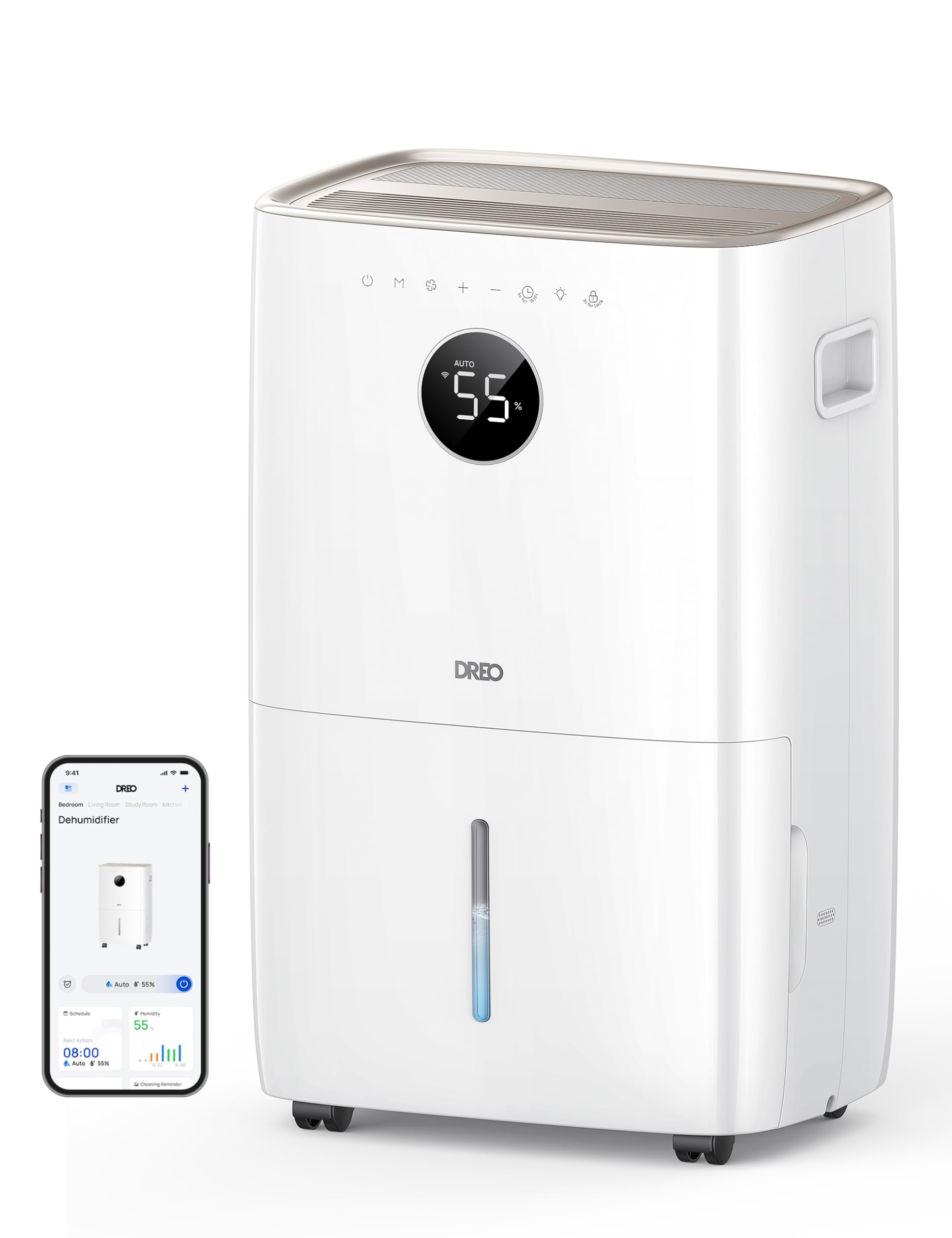
Imatge: Frontal view of the Dreo 110-Pint Smart Dehumidifier, highlighting its compact design and dimensions (11.3"D x 15.4"W x 24.4"H).
3.2. Tauler de control
The intuitive control panel allows for easy operation and monitoring of your dehumidifier.
- Botó d'encesa: Encén o apaga la unitat.
- Botó de mode: Cycles through Auto, Comfort, and Continuous modes.
- Botó de velocitat del ventilador: Ajusta la velocitat del ventilador (Baixa, Mitjana, Alta).
- Humidity Adjustment Buttons (+/-): Sets desired humidity level in Auto Mode.
- Botó del temporitzador: Sets a 24-hour timer for automatic on/off.
- Indicador de Wi-Fi: Mostra l'estat de la connexió Wi-Fi.
- Botó de bloqueig infantil: Bloqueja el tauler de control per evitar canvis accidentals.
- Indicador de reinici del filtre: Lights up when the filter needs cleaning.
- Water Full Alert: Illuminates when the water tank is full, and the unit stops operation.
- Indicador de descongelació: Activates automatically at 41°F (5°C) for optimal performance in cold environments.

Image: Close-up of the dehumidifier's control panel, showing the digital display set to 55% humidity in Auto Mode, with various function icons.
4. Configuració
4.1. Desembalatge i col·locació
- Traieu amb cura el deshumidificador del seu embalatge.
- Place the unit upright on a flat, stable surface. Ensure there is at least 8 inches (20 cm) of space around the air inlets and outlets for proper airflow.
- Deixeu la unitat en posició vertical durant almenys 24 hores abans d'endollar-la per permetre que el refrigerant s'assenti.
4.2. Connexió d'alimentació
Plug the power cord into a grounded electrical outlet. Ensure the outlet meets the electrical requirements of the dehumidifier.
4.3. Opcions de drenatge
The Dreo dehumidifier offers two drainage methods: manual emptying of the water tank or continuous drainage via a hose.

Image: The dehumidifier illustrating both the manual water tank removal and the continuous drainage hose connection.
4.3.1. Drenatge manual
- When the water tank is full, the unit will automatically stop and display a "Water Full" alert.
- Carefully pull out the water tank from the front of the unit using the integrated handle.
- Aboqueu l'aigua recollida en una pica o desguàs.
- Feu lliscar el dipòsit d'aigua buit de nou a la unitat fins que encaixi al seu lloc. El deshumidificador reprendrà el funcionament.
4.3.2. Drenatge continu
- Locate the drain hose outlet at the rear of the dehumidifier.
- Traieu el tap de goma de la presa de corrent.
- Connect the provided drain hose (or a standard garden hose) to the outlet. Ensure the connection is secure to prevent leaks.
- Route the hose to a suitable drain point (e.g., floor drain, sink, or sump pump). Ensure the hose is sloped downwards to allow gravity to drain the water and is free of kinks.
- The dehumidifier will now continuously drain water without needing to empty the tank manually.
5. Instruccions de funcionament
Premeu el botó Botó d'engegada to turn the dehumidifier on. The unit will start operating in its last used mode and settings.
5.1. Modes de funcionament
Premeu el botó Botó de mode per anar ciclant pels modes de funcionament disponibles:
- Mode automàtic: The dehumidifier intelligently adjusts fan speed to maintain your target humidity level within a 5% tolerance. Use the botons +/- to set your desired humidity (e.g., 45-55% is generally recommended).
- Mode de confort: The unit operates to maintain a comfortable humidity level based on ambient temperature.
- Mode continu: The dehumidifier runs continuously at the selected fan speed, regardless of the ambient humidity. This is ideal for very damp conditions or for continuous drainage.
5.2. Ajust de velocitat del ventilador
In Auto or Continuous mode, press the Botó de velocitat del ventilador to select between Low, Medium, or High fan speeds.
5.3. Funció de temporitzador
Premeu el botó Botó del temporitzador to set a desired operating duration (from 1 to 24 hours). The unit will automatically turn on or off after the set time has elapsed.
5.4. Smart Control (DREO App)
The Dreo 110-Pint Smart Dehumidifier can be controlled remotely via the DREO app on your smartphone or through voice assistants like Alexa and Google Home.

Image: A smartphone displaying the DREO app interface, showing remote control capabilities for the dehumidifier.
5.4.1. Connecting to the DREO App
- Download the DREO app from your smartphone's app store (available on iOS and Android).
- Creeu un compte o inicieu sessió.
- Follow the in-app instructions to add your Dreo 110-Pint Smart Dehumidifier (Model DH711S). Ensure your phone is connected to a 2.4GHz Wi-Fi network.
Video: This video demonstrates the process of downloading the DREO app and creating a new user account to manage your smart dehumidifier.
Video: This video provides a step-by-step guide on how to connect your Smart Dehumidifier DH711S to the DREO app for remote control and smart features.
5.4.2. Funcions de l'aplicació
Through the DREO app, you can:
- Monitoritzar els nivells d'humitat en temps real.
- Establir horaris i temporitzadors.
- Adjust operating modes and fan speeds.
- Receive notifications (e.g., water tank full, filter cleaning reminder).
- Control the unit using voice commands with Alexa or Google Home.
6. Manteniment
Un manteniment regular garanteix un rendiment òptim i una llarga vida útil del deshumidificador.
6.1/XNUMX/XNUMX. Neteja del filtre d'aire
The filter reset indicator will light up after approximately 250 hours of operation, signaling that the filter needs cleaning.
- Desendolleu el deshumidificador de la presa de corrent.
- Remove the air filter from the rear of the unit.
- Wash the filter with clean water (no hotter than 104°F / 40°C) and a mild detergent.
- Esbandiu-ho bé i deixeu-ho assecar completament a l'aire abans de tornar-ho a instal·lar.
- Un cop reinstal·lat el filtre, connecteu la unitat i premeu el botó Botó de restabliment del filtre for 3 seconds to clear the indicator.

Image: A hand removing the washable air filter from the back of the dehumidifier for cleaning.
6.2. Neteja del dipòsit d'aigua
Netegeu el dipòsit d'aigua regularment per evitar el creixement de floridura i fongs.
- Remove the water tank as described in the Manual Drainage section.
- Renteu el dipòsit amb aigua tèbia i un detergent suau.
- Rinse thoroughly and dry completely before placing it back into the unit.
6.3. Neteja general
Netegeu l'exterior del deshumidificador amb un damp tela. No utilitzeu productes químics aggressivs ni netejadors abrasius.
7. Solució De Problemes
Si teniu problemes amb el deshumidificador, consulteu els següents problemes i solucions habituals:
| Problema | Causa possible | Solució |
|---|---|---|
| El deshumidificador no s'encén. | No power, power cord loose, water tank full. | Check power connection, ensure plug is secure, empty water tank. |
| Unit is not collecting water. | Humidity level too low, room temperature too low, air filter clogged. | Increase target humidity, ensure room temp is above 41°F (5°C), clean air filter. |
| La unitat fa soroll. | La unitat no està sobre una superfície plana, el filtre d'aire està obstruït. | Place on a flat surface, clean air filter. |
| Fuites d'aigua de la unitat. | Water tank not properly installed, continuous drain hose is loose or kinked. | Reinstall water tank correctly, check drain hose connection and ensure no kinks. |
| Display shows fluctuating numbers. | Normal adjustment to current humidity. | This is normal operation as the sensor adjusts to ambient conditions. |
| Unit isn't defrosting automatically. | Issue with the condenser. | Contacteu amb l'assistència al client per obtenir assistència. |
8. Especificacions
| Característica | Detall |
|---|---|
| Marca | Dreo |
| Nom del model | DR-HDH001S |
| Capacitat | 110 Pints (at 86°F, RH 90%) / 50 Pints per Day (DOE Standard) |
| Àrea de cobertura | Fins a 4500 peus quadrats |
| Volum del dipòsit d'aigua | 2 galons (8 L) |
| Modes de funcionament | Automàtic, Confort, Continu |
| Velocitats del ventilador | 3 (Baix, Mitjà, Alt) |
| Capacitat de cabal d'aire | 210 peus cúbics per minut (CFM) |
| Control d'humitat | Adjustable, with ±5% precision sensor |
| Característiques especials | Smart Control (DREO App, Alexa, Google Home), Auto-Defrost, 90° Tilt Waterproof Design, Thermal Protection, 15A Overcurrent Protection, Washable Filter, 360° Caster Wheels |
| Dimensions del producte | 11.3 "P x 15.4" W x 24.4" H |
| Pes de l'article | 43.7 lliures |
| Material | Metall, plàstic |
| Certificacions | Certificat per ETL |
9. Garantia i Suport
Dreo products come with a standard warranty. For specific warranty details, please refer to the warranty card included in your product packaging or visit the official Dreo weblloc.
9.1. Atenció al client
If you have any questions, concerns, or require assistance with your Dreo 110-Pint Smart Dehumidifier, please contact Dreo Customer Support:
- Correu electrònic: support@dreo.com
- Weblloc: www.dreo.com
Please have your model number (DR-HDH001S) and purchase information ready when contacting support.


