Introducció
This manual provides detailed instructions for the installation, operation, and maintenance of your Joying JY-UTS07N8 9-inch Single DIN Touchscreen Car Stereo. Please read this manual thoroughly before using the product to ensure proper function and safety. This device features Android 13, Carplay, Android Auto, AM/FM Radio, GPS, Steering Wheel Control (SWC), and a volume knob.

Imatge: Frontal view of the Joying JY-UTS07N8 car stereo displaying its Android 13 interface with navigation, media, and app icons.
Què hi ha a la caixa
Desembaleu la caixa amb cura i assegureu-vos que hi hagi tots els elements:
- 9" radio x1
- Single Din Cage x1
- Funda de muntatge x1
- Left & Right Bracket x1
- Plastic Trim Out x1
- Extraction Keys x1
- Manual d'instal·lació x1
- Antena WiFi x1
- Antena GPS x1
- Antena 4G x2
- Micròfon extern x1
- USB cable x2
- AR Cable x1
- Screen Ribbon Cable x1
- ISO Cable x1
- Manual d'usuari x1

Image: A grid display of all components included in the Joying JY-UTS07N8 package, such as the main unit, mounting hardware, various cables, and antennas.
Configuració i instal·lació
1. Consideracions prèvies a la instal·lació
Before installation, you may require additional components such as an installation frame kit, a special ISO harness, an amplifier adapter, or a CANbus decoder, depending on your vehicle's specific requirements. This unit does not support factory car GPS antennas, backup rear cameras, Bluetooth, USB, or microphones. Only JOYING accessories are supported for DAB+ digital radio adapter, DVR, OBDII scanner, reverse camera, TPMS, and steering wheel controller, which are sold separately.
2. Physical Dimensions and Connections
Refer to the diagram below for the unit's dimensions and rear port layout to ensure compatibility with your vehicle's dashboard and wiring.

Image: A detailed diagram illustrating the physical dimensions of the 9-inch display and the main unit, along with a labeled view of all rear input/output ports including USB, HDMI, optical, coaxial, and various audio/video connections.
3. Adjustable Installation Structure
The included left and right brackets are designed with adjustable fixing positions. They can be extended or telescoped to achieve the optimal fixing position for your car's center console, accommodating a wider range of vehicles.

Image: A visual representation of the upgraded installation structure, showing how the left and right brackets can be adjusted to different lengths (34mm, 52mm, MAX 88mm) to fit various car consoles.
4. Arrencada inicial
After connecting the power, the unit will start up immediately upon turning the car key. It will enter the user interface within 2 seconds. The very first boot-up may take approximately 30-40 seconds.
Instruccions de funcionament
1. CarPlay i Android Auto
Connect your mobile phone to the car radio via a USB cable or Bluetooth to utilize Carplay or Android Auto. This allows you to display and interact with your phone's apps, including navigation, phone calls, and music, on the larger car stereo screen.

Imatge: Una divisió view showing the user interfaces for Apple CarPlay and Android Auto as displayed on the car stereo screen, highlighting navigation, communication, and media functions.
2. Navegació GPS
The unit features precise GPS engines and includes a GPS antenna for accurate positioning and faster real-time navigation. You can download Google offline maps for areas where supported, saving the map data directly to the car stereo for offline use. Mobile phone map data can also be synchronized to the head unit via Carplay or Android Auto.
3. Ràdio AM/FM
Access AM/FM radio stations. Use the touchscreen interface to scan, save, and select your preferred stations.
4. Built-in 4G Module
Insert a SIM card into the dedicated slot for internet access. Note that this module supports data for internet access but cannot be used to make phone calls or send SMS messages. Supported FDD-LTE bands include B2/B4/B5/B7/B12/B13/B14/B17/B25/B26/B38/B66/B71, and TDD-LTE band B41.
5. Optical Fiber and Coaxial Digital Output
For users with external amplifiers featuring Optical Fiber or Coaxial Digital Input, this unit provides direct digital audio output, allowing for optimal sound quality.

Image: A graphic highlighting the car stereo's audio capabilities, including a TDA7851 DSP chip, 48-band graphic equalizer, 4x50W max output power, and support for aftermarket amplifiers via 4 audio outputs, 1 SUB output, fiber optical output, SPDIF coaxial output, and center channel output.
6. Split-screen Multitasking
The unit supports split-screen functionality, allowing you to run two applications simultaneously. To activate, tap the recent apps icon, then find the app you want to run in split-screen, click its icon to bring up the split-screen button, and tap it. The first app will display on the left side, then choose the second app from recent apps.
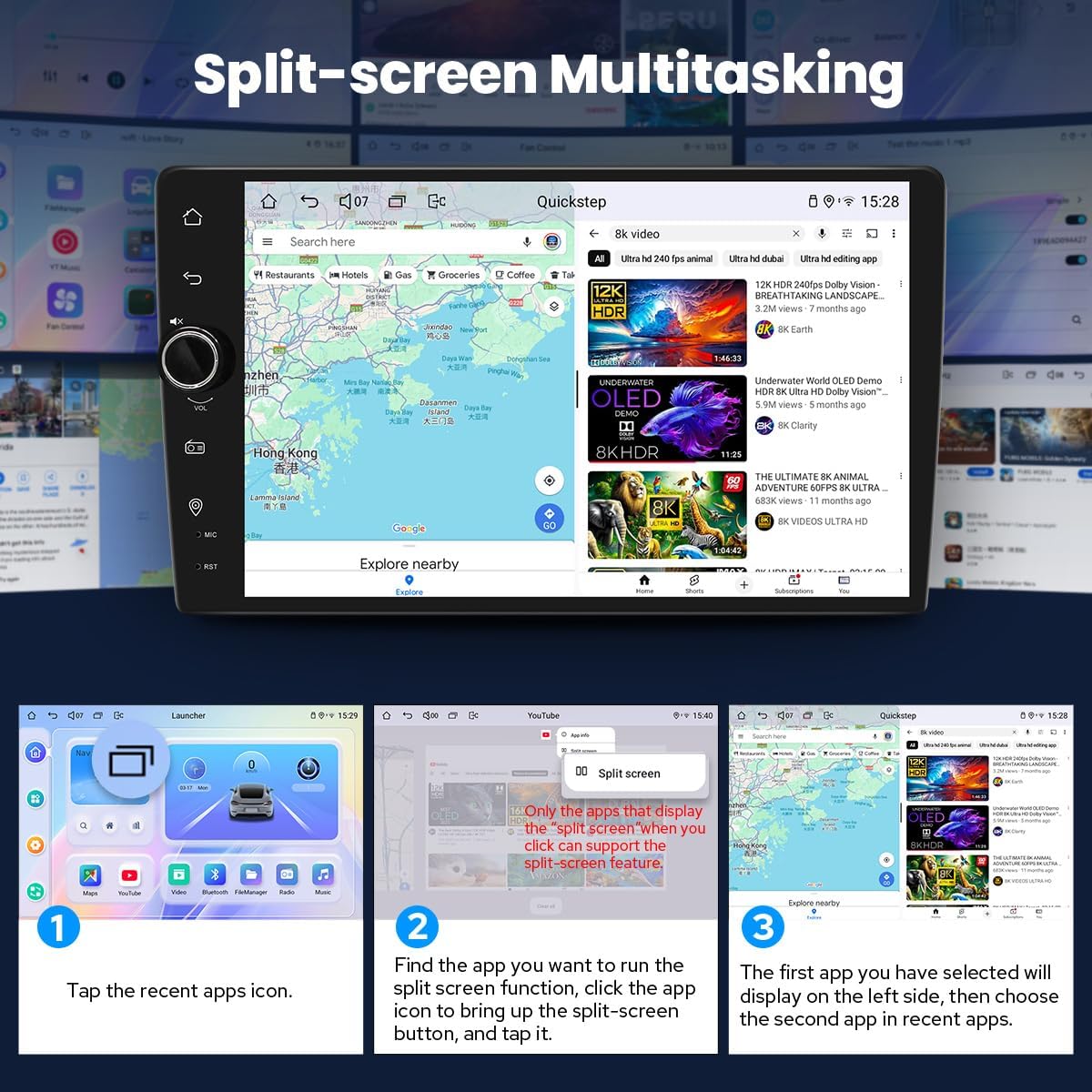
Image: A visual guide demonstrating the steps to activate and use the split-screen multitasking feature, showing navigation on one side and a video player on the other.
7. Control del volant (SWC)
The unit supports steering wheel controls, enabling you to easily switch songs, change radio channels, and adjust volume for a safer driving experience. For vehicles with a CAN system, an additional CANbus cable may be required to retain this feature.

Image: An illustration showing a car's steering wheel with control buttons and the car stereo display, indicating how steering wheel controls can be configured and used to manage media and volume.
8. Sortida HDMI
The HDMI output provides a full digital image and sound-sending interface. It supports uncompressed audio and video signals, allowing for synchronous output to external displays without manual adjustment. This enables projection screen display for passengers in the headrest or on-screen display for a zero-delay, 1080P clear picture. Note that the HDMI cable is not included.

Image: A visual demonstrating the HDMI output feature, showing the car stereo connected to a flip-down screen and headrest monitors, displaying the same content. An inset highlights the HDMI OUT port on the rear of the unit.
9. Personalized Settings
Customize your car stereo experience with various personalized settings:
- Changeable Button Color: Adjust the color of the physical buttons to match your vehicle's interior lighting or personal preference.
- Car Boot Logo: Select a custom logo to display during the unit's startup sequence.
- Customizable Wallpapers: Choose from a selection of wallpapers or upload your own to personalize the home screen.
- Brillantor de pantalla ajustable: Control the screen brightness for optimal visibility in various lighting conditions.

Imatge: Una mostra de collageasing the personalized settings, including options for changing button colors, setting a car boot logo, customizing wallpapers, and adjusting screen brightness.
10. Altres característiques
The unit also includes:
- Picture-in-Picture functionality
- 3 USB ports for connectivity
- Ranura per a targeta Micro SD
- Ranura per a targeta SIM 4G
- Hands-free Call capability

Image: A graphic summarizing various features of the car stereo, including Fast Boot, GPS Navigation, AM/FM Radio, Hands-free Call, Picture-in-Picture, 3 USB ports, Micro SD Card Slot, and 4G SIM Card Slot.
Manteniment
1. Sistema de refrigeració
The unit features a dual heat sink design for superior heat dissipation, improved temperature control, and enhanced performance stability. You can set a warning value for CPU temperature or radio volume. If the CPU temperature or radio's volume exceeds this warning value, the fan will automatically activate for cooling to prevent overheating.

Image: A diagram illustrating the upgraded cooling system of the car stereo, showing dual heat sinks and a fan, along with a screenshot of the fan control interface on the unit's display.
2. Neteja general
To maintain the unit's appearance and functionality, regularly wipe the screen and exterior with a soft, dry cloth. Avoid using abrasive cleaners or solvents that could damage the surface.
3. WiFi Signal
The unit includes an independent WiFi antenna to ensure stable signal quality and provide fast, smooth internet access. The supported WiFi standard is 802.11a/b/g/n/AC, with spectral bands of 2.4GHz/5GHz.

Imatge: Un primer pla view of the independent WiFi antenna connected to the car stereo, emphasizing its role in providing stable and fast internet access.
Resolució de problemes
- Sense energia: Check all power connections and fuses. Ensure the car ignition is on.
- Sense so: Verify speaker connections. Check volume levels and mute settings. Ensure external amplifiers are powered on if used.
- Problemes amb el senyal GPS: Assegureu-vos que l'antena GPS estigui instal·lada correctament i que tingui una vista clara view del cel.
- CarPlay/Android Auto no es connecta: Ensure your phone is compatible and connected via a quality USB cable or Bluetooth. Check phone settings for Carplay/Android Auto permissions.
- Pantalla tàctil que no respon: Prova de reiniciar la unitat. Si el problema persisteix, contacta amb el servei d'assistència.
- Unsupported Factory Features: This unit does not support factory car GPS antenna, backup rear camera, Bluetooth, USB, or microphone. These require specific JOYING accessories.
Especificacions
| Dimensions del producte | 5.91 x 7.99 x 4.72 polzades |
| Pes de l'article | 2.65 lliures |
| Número de model de l'article | JY-UTS07N8 |
| Marca | ALEGRANT |
| Tecnologia de connectivitat | Bluetooth, Ethernet, HDMI, USB, Wi-Fi |
| Tipus de controlador | Android |
| Característica especial | DSP, Equalizer, RCA, RDS, Rear View Entrada de càmera |
| Dispositius compatibles | Amplifier, telèfon intel·ligent, altaveu |
| Ports HDMI totals | 1 |
| Tipus de connector | Coaxial, Òptic |
| Mode de sortida d'àudio | estèreo |
| Configuració del canal de so envoltant | 5.1 |
| Codificació de vídeo | Supports H264/H265/MP4/AVI/MKV/FLV |
Accessoris opcionals
The following accessories are not included in the standard package but can be purchased separately to enhance your experience:
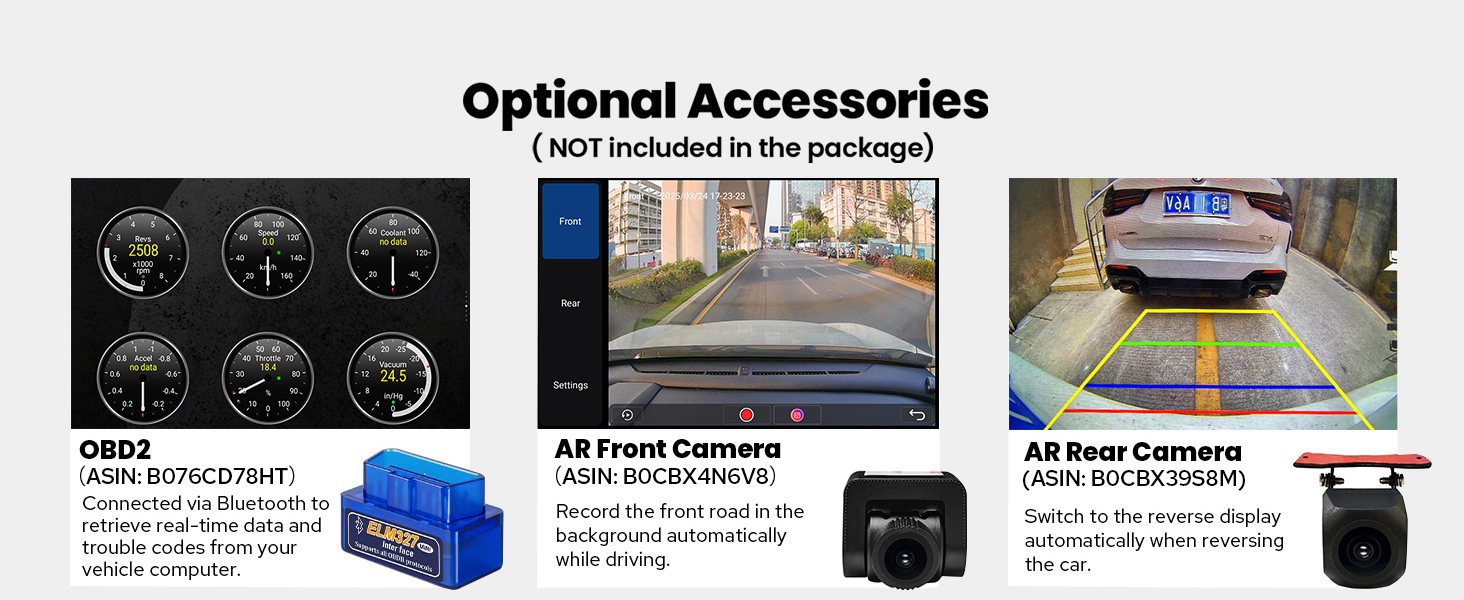
Image: A display of optional accessories including an OBD2 scanner, AR Front Camera, and AR Rear Camera, with descriptions of their functions.
- OBD2 Scanner: Connects via Bluetooth to retrieve real-time data and trouble codes from your vehicle's computer.
- AR Front Camera: Records the front road in the background automatically while driving.
- AR Rear Camera: Switches to the reverse display automatically when backing up the car.
Garantia i suport
For warranty information, technical support, or service inquiries, please refer to the warranty card included in your package or visit the official JOYING weblloc web. També podeu contactar directament amb el venedor a través de la vostra plataforma de compra per obtenir ajuda.


