1. Introducció
This manual provides essential information for setting up, operating, maintaining, and troubleshooting your MINIX NR774 Mini PC. Please read this guide thoroughly before using the device to ensure proper functionality and longevity.

Imatge 1.1: Frontal view of the MINIX NR774 Mini PC, showcasinel seu disseny compacte i els ports frontals accessibles.
2. Contingut del paquet
Verifiqueu que tots els elements que s'enumeren a continuació s'inclouen al vostre paquet:
- 1 x MINIX NGC NR774 Mini PC
- 1 x VESA Mount with Screws
- 1 x Power Adapter with US/EU/UK Plug
- 1 x Manual d'usuari (aquest document)
3. Producte acabatview
The MINIX NR774 Mini PC is a compact desktop computer designed for various applications, from home office tasks to gaming and multimedia. It features a robust AMD Ryzen 7 8745HS processor, 32GB DDR5 RAM, and a 1TB PCIe 4.0 SSD, running on Windows 11 Pro.
3.1. Disseny del port
Familiarize yourself with the available ports for connecting peripherals and network devices.

Image 3.1: Detailed diagram illustrating the front and rear port configurations of the MINIX NR774 Mini PC.
- Ports frontals: Power Button, USB-A 3.2 Gen2 (x2), USB-C 4.0/PD 3.0 (x2), 3.5mm Audio Input/Output Combo Jack, Reset Hole.
- Ports posteriors: DC IN Port, USB-A 2.0 (x2), HDMI, DP (DisplayPort), 2.5G RJ-45 Ethernet Port (x2).
4. Guia de configuració
Follow these steps for initial setup of your Mini PC.
4.1. Connexió de perifèrics
- Connecta la pantalla: Use an HDMI or DisplayPort cable to connect your monitor to the corresponding port on the rear of the Mini PC. For 8K resolution, ensure your monitor and cable support 8K@60Hz and connect via a single USB-C 4.0 port.
- Connecteu el teclat i el ratolí: Plug your USB keyboard and mouse into any available USB-A ports.
- Connectar l'alimentació: Connect the power adapter to the DC IN port on the rear of the Mini PC, then plug the adapter into a power outlet.
4.2. Encès
Press the power button located on the front of the Mini PC. The device will boot up, and the operating system will begin loading.
4.3. Configuració inicial de Windows 11 Pro
Upon first boot, you will be guided through the Windows 11 Pro setup process. Follow the on-screen instructions to configure language, region, network, and user accounts.
4.4. Multi-Display Configuration
The MINIX NR774 supports up to four displays simultaneously via HDMI, DisplayPort, and two USB-C 4.0 ports. To configure multiple displays:
- Connect additional monitors to the available video output ports.
- Once connected, right-click on the desktop and select 'Display settings' (Windows).
- From the display settings, you can arrange your monitors, set their resolution, and choose display modes (e.g., Extend, Duplicate).
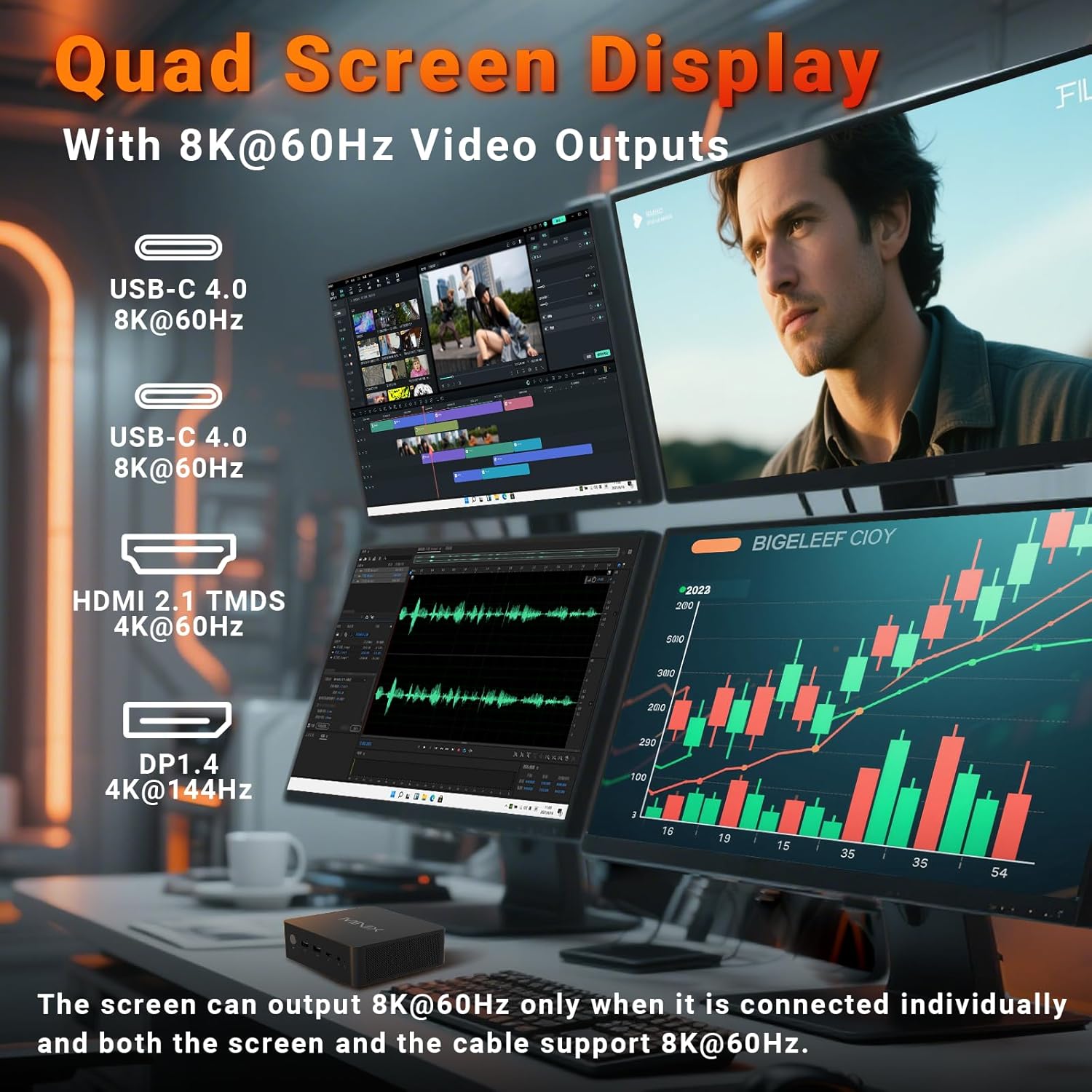
Image 4.1: The Mini PC supporting a quad-display setup, demonstrating its capability for enhanced productivity and immersive viewfent experiències.
5. Instruccions de funcionament
5.1. Funcionament bàsic
The MINIX NR774 functions as a standard Windows 11 Pro desktop computer. Utilize the connected keyboard and mouse for navigation and interaction with the operating system and applications.
5.2. Connectivitat de xarxa
- Wi-Fi 6E: For wireless internet access, connect to your Wi-Fi network through Windows settings. The device supports 2.4GHz, 5GHz, and 6GHz bands for high-speed wireless communication.
- LAN dual de 2.5 G: For wired network connections, plug Ethernet cables into the two 2.5G RJ-45 ports on the rear. This provides stable and high-speed multi-gigabit networking.
- Bluetooth 5.2: Pair Bluetooth devices such as headphones, speakers, or game controllers through Windows Bluetooth settings.

Imatge 5.1: posterior view of the Mini PC highlighting the dual 2.5G Ethernet ports, alongside other connectivity options.
5.3. USB4.0 Functionality
The two USB-C 4.0 ports on the front support data transfer speeds up to 40Gbps and can be used for external GPUs, high-speed storage, or additional display output (up to 8K@60Hz).
5.4. Diverse Applications
The MINIX NR774 is suitable for various uses, including:
- Treball d'oficina: Efficiently handle productivity applications and multitasking.
- Teatre a casa: Enjoy high-resolution streaming and media playback.
- Edició de vídeo: Process and render video content with its powerful processor and ample memory.
- Jocs: Capable of running many games, especially at 1080p or 720p resolutions with appropriate settings.

Image 5.2: A user engaged in gaming, demonstrating the Mini PC's capability for entertainment.
6. Manteniment
Regular maintenance helps ensure the optimal performance and longevity of your Mini PC.
6.1. Atenció general
- Keep the device in a clean, dry environment, away from direct sunlight and extreme temperatures.
- Avoid blocking the ventilation holes to ensure proper airflow.
- Netegeu l'exterior amb un drap suau i sec. No utilitzeu netejadors líquids.
6.2. Storage and Memory Upgrades
The Mini PC supports upgrades for both RAM and SSD. It features two M.2 slots for storage and two DDR5 memory slots.
- RAM: The device comes with 32GB DDR5 memory and can be upgraded up to 256GB (not included). For optimal performance, especially in gaming, ensure dual-channel memory configuration.
- SSD: A 1TB PCIe 4.0 SSD is pre-installed. Storage can be expanded up to 8TB (not included) using additional M.2 PCIe 4.0 SSDs.
Consult a qualified technician for hardware upgrades to avoid damaging the device or voiding the warranty.

Imatge 6.1: Interna view of the Mini PC, illustrating the dual DDR5 RAM slots and M.2 PCIe 4.0 SSD slots for potential upgrades.
6.3. Sistema de refrigeració
The Mini PC incorporates an advanced dual-fan cooling system with a heatsink to maintain optimal operating temperatures and minimize noise.

Imatge 6.2: Diagrama que mostraasing the active cooling design of the Mini PC, featuring dual fans for efficient heat dissipation.
7. Solució De Problemes
If you encounter issues with your MINIX NR774 Mini PC, refer to the following common solutions:
- Sense pantalla:
- Assegureu-vos que el monitor estigui encès i que s'hagi seleccionat la font d'entrada correcta.
- Check that video cables (HDMI, DisplayPort, USB-C) are securely connected to both the Mini PC and the monitor.
- Try a different video cable or monitor to rule out faulty equipment.
- Sense energia:
- Verify the power adapter is correctly plugged into the Mini PC and a working power outlet.
- Assegureu-vos que el botó d'encesa estigui premut amb fermesa.
- Problemes de connectivitat de xarxa:
- For Wi-Fi, check if the Wi-Fi adapter is enabled in Windows settings and ensure you are connected to the correct network.
- For wired LAN, ensure Ethernet cables are properly connected and your router/modem is functioning.
- Reinicieu el vostre encaminador/mòdem i el mini PC.
- Windows Not Loading/Operating System Issues:
- If Windows fails to load, try restarting the device.
- If issues persist, consider using Windows recovery options (accessible during boot by pressing F8 or Shift + Restart).
- Assegureu-vos que tots els controladors estiguin actualitzats.
- Sobreescalfament:
- Ensure the Mini PC's ventilation holes are clear and not obstructed.
- Utilitzeu el dispositiu en una zona ben ventilada.
If these steps do not resolve the issue, please contact MINIX customer support.
8. Especificacions
Detailed technical specifications for the MINIX NR774 Mini PC.
| Característica | Especificació |
|---|---|
| Marca | MINIX |
| Número de model | NGC NR774 |
| Sistema operatiu | Windows 11 Pro |
| Processador | AMD Ryzen 7 8745HS (8 Cores/16 Threads, up to 4.9 GHz) |
| Coprocessador gràfic | AMD Radeon 780M (integrada) |
| RAM | 32 GB de DDR5 (ampliable fins a 256 GB) |
| Disc dur | 1TB PCIe 4.0 SSD (Expandable up to 8TB) |
| Resolució de pantalla màxima | 7680x4320 (8K) |
| Tipus sense fil | Wi-Fi 6E (802.11ax), Bluetooth 5.2 |
| Ethernet | LAN dual 2.5G |
| Ports USB | 2x USB-A 3.0, 2x USB-A 2.0, 2x USB-C 4.0 |
| Sortida de vídeo | HDMI, DisplayPort, 2x USB-C 4.0 (Quad Display Support) |
| Pes de l'article | 1.62 lliures |
| Dimensions del producte | 5.45 x 5.17 x 2.05 polzades |
9. Informació de la garantia
MINIX products typically come with a standard manufacturer's warranty. For specific details regarding the warranty period and terms for your MINIX NR774 Mini PC, please refer to the warranty card included in your product packaging or visit the official MINIX weblloc web. Conserveu el comprovant de compra per a reclamacions de garantia.
10. Atenció al client
For technical assistance, troubleshooting, or any inquiries regarding your MINIX NR774 Mini PC, please use the following contact methods:
- Assistència en línia: Log in to your Amazon account, navigate to 'Your Orders', and select 'Ask Product Question' for the MINIX NR774.
- Oficial Weblloc: Visit the official MINIX website for offline maintenance services and additional support resources.


