Instruccions importants de seguretat
Si us plau, llegiu i comprengui totes les instruccions de seguretat abans d'utilitzar aquest producte. Conservi aquest manual per a futures consultes.
- Ventilació: Assegureu-vos que hi hagi una ventilació adequada. No bloquegeu cap obertura de ventilació.
- Aigua i humitat: No exposeu aquest aparell a la pluja ni a la humitat. No col·loqueu objectes plens de líquids, com ara gerros, sobre l'aparell.
- Fonts de calor: No instal·leu a prop de cap font de calor com ara radiadors, registres de calor, estufes o altres aparells (inclosos amplificadors) que produeixen calor.
- Fonts d'alimentació: Use only power supplies specified by the manufacturer. Ensure the power cord is protected from being walked on or pinched.
- Neteja: Netegeu només amb un drap sec.
- Manteniment: No intenteu atendre aquest producte vosaltres mateixos. Consulteu tots els serveis a personal de servei qualificat.
Contingut del paquet
Verifiqueu que tots els elements que s'enumeren a continuació s'inclouen al vostre paquet:
- Kuephom CD-X2A Boombox
- Cable d'alimentació CA
- Manual de l'usuari (aquest document)
- Control remot
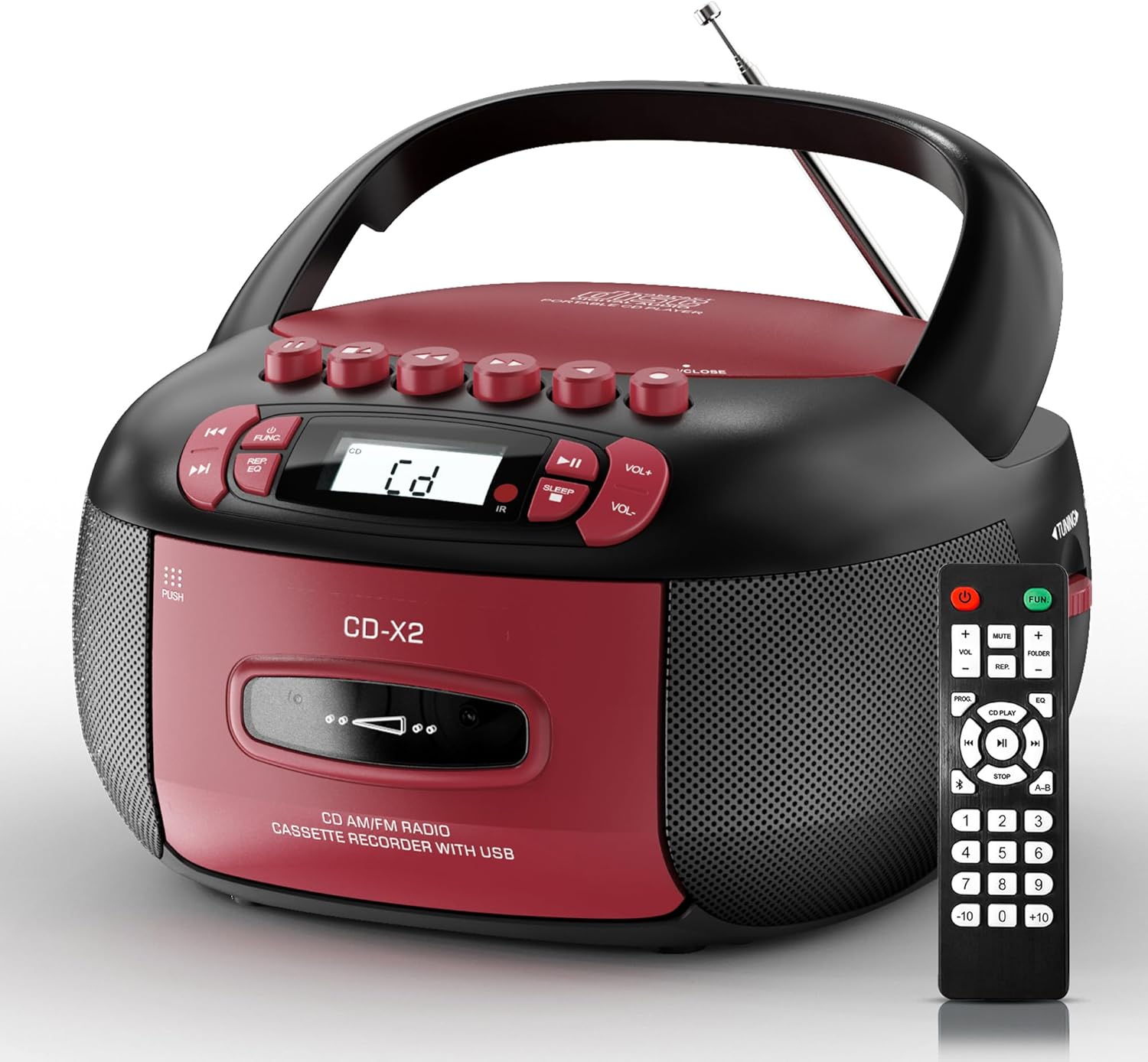
Image: The Kuephom CD-X2A Boombox with its included remote control, showcasing its compact design and red/black color scheme.
Producte acabatview
Familiarize yourself with the various components and controls of your Kuephom CD-X2A Boombox.
Controls del panell frontal
- Botó d'encesa/funció: Press and hold to power on/off. Press to cycle through modes (CD, USB, Bluetooth, Radio, AUX, Tape).
- Botons de volum +/-: Ajusta el volum de reproducció.
- Botó Reproduir/Pausa: Start or pause playback for CD, USB, Bluetooth, or Tape.
- Botó d'aturada: Atura la reproducció.
- Skip/Search Buttons: Navigate between tracks on CD/USB or fast forward/rewind on tape.
- Botó EQ: Seleccioneu els valors predefinits de l'equalitzador.
- Botó del temporitzador de repòs: Estableix el temporitzador de son.
Controls del panell lateral
- Pom d'afinació: Manually tune AM/FM radio stations.
- Auriculars Jack: Connecteu els auriculars per a una escolta privada.
- Port d'entrada AUX: Connecteu dispositius d'àudio externs.
- Port USB: Insert USB drives for MP3/WMA playback.
Funcions del panell superior
- Compartiment de CD: Top-loading compartment for CDs.
- Compartiment de casset: Front-loading compartment for cassette tapes.
- Antena telescòpica: Esteneu-lo per millorar la recepció de ràdio.

Image: The boombox highlighting its multiple functions including CD/MP3, Bluetooth, Type I/II tape, USB, FM/AM Radios, Sleep timer, Remote, Phone jack, AUX, and Tape recording.

Imatge: Primer pla views of the boombox's phone jack, top-loading CD player, telescopic antenna, and tape play/record buttons.
Configuració
Alimentant el Boombox
Alimentació CA
- Connect the supplied AC power cord to the AC IN jack on the back of the boombox.
- Plug the other end of the power cord into a standard AC wall outlet (120V~60Hz).
Potència de la bateria
- Open the battery compartment cover located on the bottom of the boombox.
- Insert 6 x 'C' size batteries (not included), ensuring correct polarity (+/-).
- Tanqueu bé la tapa del compartiment de la bateria.
- When operating on battery power, disconnect the AC power cord.

Image: The boombox demonstrating both AC power connection and the use of 6 C-size batteries for portable operation.
Control remot
- Insert 2 x 'AAA' batteries (not included) into the remote control, observing polarity.
- Point the remote control towards the boombox's IR sensor for optimal operation.

Image: An individual comfortably operating the boombox using the remote control from a distance.
Instruccions de funcionament
Funcionament general
- Encès/apagat: Press and hold the Power/Function button to turn the unit on or off.
- Selecció de la funció: Press the Power/Function button repeatedly to switch between CD, USB, Bluetooth, Radio (AM/FM), AUX, and Tape modes.
Reproducció de CD
- Obriu la tapa del compartiment del CD.
- Place a CD (CD, CD-R, MP3, WMA compatible) onto the spindle with the label side facing up.
- Tanqueu la coberta del compartiment del CD.
- Press the Power/Function button to select 'CD' mode.
- Premeu el botó Reproduir/Pausa per iniciar la reproducció.
- Use the Skip/Search buttons to navigate tracks.
- Press the Repeat button to repeat a single track, folder, or all tracks.
- Press the Program button to program a custom playback sequence.

Image: The boombox's display showing 'CD' mode, with icons indicating compatibility with CD, CD-R, CD-RW, WMA, and MP3 formats, along with single cycle, repeat folder, repeat all, random play, and play in order options.
Reproducció i gravació de cassets
- Press the 'OPEN/CLOSE' button on the cassette compartment to open it.
- Inseriu una cinta de casset.
- Tanqueu el compartiment del casset.
- Press the Power/Function button to select 'TAPE' mode.
- Premeu el botó Reproduir per iniciar la reproducció.
- Use the Fast Forward/Rewind buttons to navigate the tape.
- Gravació: In TAPE mode, select the desired source (CD, Bluetooth, USB, or AM/FM radio). Press the Record button to begin recording onto the cassette. The unit features an auto-stop function when the tape reaches its end.

Image: A hand inserting a cassette tape into the boombox's front-loading compartment, with controls for tape operation visible.
Ràdio AM/FM
- Press the Power/Function button to select 'RADIO' mode. Press again to switch between AM and FM bands.
- Extend the telescopic antenna for better FM reception. For AM, rotate the unit for best reception.
- Use the Tuning knob on the side to manually tune to your desired station. The frequency will be displayed on the screen.

Image: A man relaxing on a couch with the boombox, which displays various FM/AM radio frequencies, indicating good reception.
Connectivitat Bluetooth
- Press the Power/Function button to select 'BT' (Bluetooth) mode. The display will show 'BT' and flash, indicating it's in pairing mode.
- On your mobile device, enable Bluetooth and search for 'CD-X2A'.
- Select 'CD-X2A' to pair. Once paired, the 'BT' indicator will stop flashing.
- You can now stream audio wirelessly from your device to the boombox.

Image: A woman in a living room wirelessly streaming audio from her smartphone to the boombox via Bluetooth 5.1, indicating a stable connection.
Reproducció USB
- Insert a USB flash drive into the USB port on the side of the boombox.
- Press the Power/Function button to select 'USB' mode.
- The boombox will automatically detect and play compatible MP3/WMA files.
- Use the Play/Pause, Stop, and Skip/Search buttons to control playback.
Entrada AUX
- Connect an external audio device (e.g., smartphone, MP3 player) to the AUX-in port using a 3.5mm audio cable (not included).
- Press the Power/Function button to select 'AUX' mode.
- Controla la reproducció directament des del dispositiu extern connectat.
Temporitzador de dormir
- While the unit is playing, press the Sleep Timer button.
- Repeatedly press the button to cycle through available sleep timer durations (e.g., 15, 30, 60, 90 minutes).
- La unitat s'apagarà automàticament després del temps seleccionat.

Image: A man sleeping in bed with the boombox on his nightstand, illustrating the sleep timer feature which allows the device to turn off automatically.
Manteniment
- Neteja: Feu servir un drap suau i sec per netejar l'exterior del boombox. No utilitzeu productes de neteja abrasius ni dissolvents.
- Cura de CD: Manipuleu els CD per les vores. Netegeu els CD bruts amb un drap suau i sense borrissol, netejant des del centre cap a fora.
- Cura del casset: Keep cassette tapes away from direct sunlight and heat. Periodically clean the tape heads with a specialized cassette head cleaner.
- Emmagatzematge: When not in use for extended periods, disconnect the power cord and remove batteries. Store the unit in a cool, dry place.
Resolució de problemes
Si teniu problemes, consulteu la taula següent per veure els problemes i les solucions més habituals.
| Problema | Causa possible | Solució |
|---|---|---|
| Sense poder | Cable de CA no connectat; piles esgotades o inserides incorrectament. | Check AC connection; Replace or correctly insert batteries. |
| Sense so | Volum massa baix; Mode de funció incorrecte seleccionat; Auriculars connectats. | Increase volume; Select correct mode; Disconnect headphones. |
| CD skips or doesn't play | CD dirty or scratched; CD inserted incorrectly; Incompatible CD format. | Clean or replace CD; Insert CD correctly; Ensure CD is compatible (CD, CD-R, MP3, WMA). |
| Ràdio estàtica/mala recepció | Antena no estesa/col·locada; Senyal feble. | Extend and adjust telescopic antenna; Try repositioning the unit. |
| Bluetooth no emparellat | Boombox not in pairing mode; Device Bluetooth off; Device too far. | Ensure boombox is in 'BT' mode and flashing; Enable Bluetooth on device; Move device closer. |
| Cassette not playing/recording | Tape inserted incorrectly; Tape heads dirty; Auto-stop engaged. | Insert tape correctly; Clean tape heads; Check tape end. |
Especificacions
| Característica | Detall |
|---|---|
| Número de model | CD-X2A |
| Dimensions del producte (L x A x A) | 8.39 x 4.8 x 8.54 polzades |
| Pes de l'article | 3.45 lliures |
| Font d'alimentació | AC 120V~60Hz or 6 x 'C' size batteries |
| Tecnologia de connectivitat | Auxiliar, Bluetooth, USB |
| Tipus d'altaveu | Stereo (2W+2W output) |
| Formats de disc compatibles | CD, CD-R, MP3, WMA |
| Supported Tape Types | Type I/II Cassette |
| Bandes de ràdio | AM/FM |
| Característiques especials | Tape Recording, Sleep Timer, Earphone Jack, Remote Control |
Garantia i Suport
Kuephom products are designed for reliability and performance. This product comes with a standard manufacturer's warranty against defects in materials and workmanship under normal use.
For warranty claims, technical assistance, or any questions regarding your Kuephom CD-X2A Boombox, please contact Kuephom customer support. Refer to the contact information provided with your purchase documentation or visit the official Kuephom weblloc per obtenir detalls de suport.
We are committed to providing lifetime service support and 7/24 customer assistance for our products.


