1. Producte acabatview
The XTRONS Android 14 Car Stereo is a 9-inch touch screen head unit designed for select Volkswagen, Skoda, and SEAT models. It features a high-definition IPS display, an Octa-Core CPU, 4GB RAM, and 64GB ROM for a fast and smooth user experience. This unit integrates advanced features such as built-in DSP, wireless CarPlay, wireless/wired Android Auto, and dual-band WiFi connectivity.

Imatge 1.1: Frontal view of the XTRONS Android 14 Car Stereo highlighting its core specifications and features.
2. Compatibilitat del vehicle
This car stereo is compatible with a range of Volkswagen, Skoda, and SEAT models. It is designed for plug-and-play installation, retaining original vehicle features such as steering wheel controls, AC information, door status, and mileage display.
2.1 Compatible Volkswagen Models:
- Amarok (2010-2015)
- Beetle (2011-2015)
- Bora (Jetta) (2005-2015)
- Caddy (2004-2015)
- EOS (2006-2015)
- Golf MK5 / V5 / A5 / 1K (Variant / GTI / Estate) (2003-2009)
- Golf MK6 / VI6 / A6 / 5K (GTI / Wagon / R / Variant / Estate / Cabriolet) (2008-2013)
- Golf Plus (2004-2013)
- Jetta V / A5 / 1K (2005-2009)
- Jetta VI / A6 / 1B (2010-2015)
- Passat B6 / 3C (Estate / Sedan / Wagon) (2005-2010)
- Passat B7 / 3C (Estate / Sedan / Wagon / Alltrack) (2010-2014)
- Passat CC (2008-2011)
- Polo MK5 / 6R (GTI / Sedan) (2009-2014)
- Scirocco Mk3 (2008-2011)
- Magotan (2007-2013)
- Sharan (2010-2014)
- Touran (2003-2014)
- Tiguan (2007-2013)
- T5 Multivan (2010-2013)
- T5 Transporter (2010-2013)
- T5 Caravelle (2010-2015)
- Vento (2009-2015)
2.2 Compatible SKODA Models:
- Fabia (2007-2014)
- Fabia Combi (2008-2014)
- Roomster (2006-2015)
- Octavia (2007-2012)
- Yeti (2009-2015)
- Superb (2008-2015)
2.3 Compatible SEAT Models:
- Alhambra (2010-2015)
- Altea (2004-2015)
- Altea XL (2007-2015)
- Leon Mk2 (2005-2012)
- Toledo (2004-2015)

Image 2.1: Visual comparison of a car's center console before and after installation, demonstrating the integrated look.
2.4 Important Compatibility Notes:
- Please verify your VW T5 vehicle's center console shape. If it is not a square shape as shown in the product images, this unit may not fit.
- For SKODA vehicles, compare your center console with the provided images to ensure compatibility.
- This unit does not support vehicles equipped with Dynaudio or Fender sound systems.
3. Contingut del paquet
The following items are included with your XTRONS Android 14 Car Stereo:
- 2 × Arnès de cablejat ISO
- 2 cable USB
- 1 × Antena 4G
- 1 × Antena GPS
- 1 × Original USB Cable Adapter
- 1 × Manual d'usuari
- 1 × Caixa CANbus
- 1 × Micròfon
- 1 × CANbus Cable
- 1 × Cable de càmera
- 1 × Cable de ranura per a targeta SIM
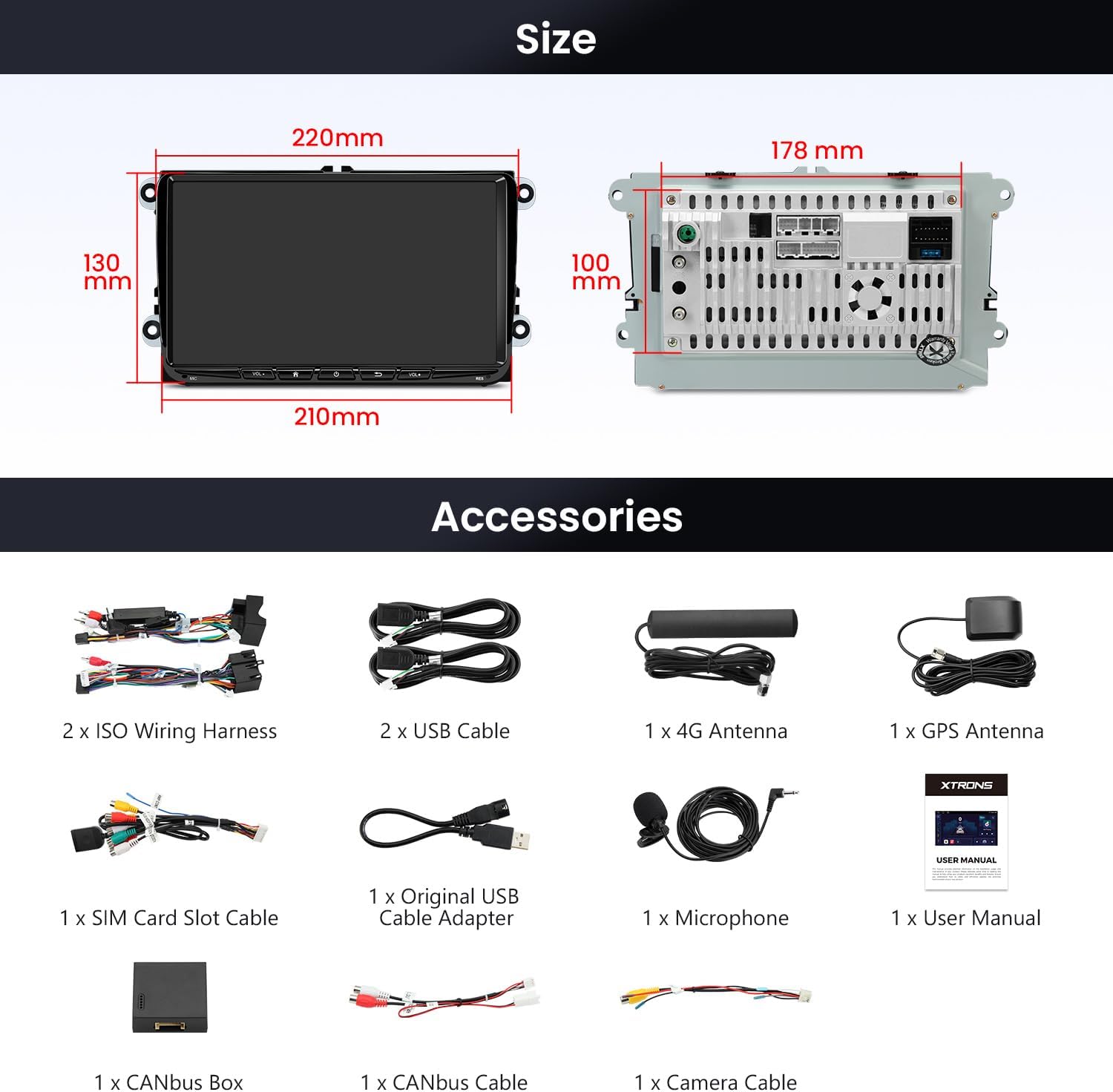
Imatge 3.1: Una imatge completa view de tots els accessoris i cables inclosos.
4. Configuració i instal·lació
Installation should be performed by a qualified professional. Ensure the vehicle's power is disconnected before beginning installation.
4.1 Connexions de cablejat:
- ISO Wiring Harness: Connect the appropriate ISO wiring harness to your vehicle's existing wiring.
- Cables USB: Connecteu els cables USB proporcionats per a la transferència de dades i la càrrega.
- Antenes: Connect the 4G antenna and GPS antenna to their respective ports on the unit.
- CANbus Box and Cable: The CANbus box and cable are essential for integrating with your vehicle's original features like steering wheel controls and displaying vehicle information. Connect them as per the wiring diagram in the detailed user manual.
- Micròfon: Connecteu el micròfon extern per millorar la qualitat de la trucada.
- Cable de la càmera: If installing a reverse camera, connect it using the provided camera cable.
- SIM Card Slot Cable: Insert a SIM card into the SIM card slot cable to enable 4G network connectivity.

Image 4.1: Wiring options for retaining the original reversing camera function.
For detailed wiring diagrams and specific installation steps, refer to the included User Manual.
5. Instruccions de funcionament
5.1 Display and User Interface:
The unit features a 9-inch 1280x720 HD IPS display with 178° ultra-wide viewing angles. The Android 14 operating system provides a customizable user interface (UI). You can explore XTRONS built-in UI themes and download additional themes from the built-in App platform.

Image 5.1: The IPS panel offers wide viewing angles and consistent color accuracy.

Imatge 5.2: Ex.amples of multiple customizable UI themes available for the unit.
Video 5.1: This video demonstrates how to refresh themes on XTRONS ID series units, showcasing the process of selecting and applying new interface designs.
5.2 Smartphone Connectivity:
The unit supports both wireless and wired CarPlay and Android Auto. Bluetooth 5.0 is included for hands-free calls and audio streaming. Screen mirroring functionality allows you to display your smartphone's content directly on the car stereo screen.

Imatge 5.3: acabatview of smartphone connectivity features: CarAutoPlay, Android Auto, and Screen Mirroring.
Video 5.2: This video demonstrates the car radio stereo's wireless CarPlay and Android Auto features, GPS navigation, FM radio, and WiFi connectivity.
5.3 Característiques d'àudio:
A built-in Digital Signal Processor (DSP) enhances the audio experience, allowing for detailed sound customization.

Image 5.4: The built-in DSP offers advanced audio customization options.
5.4 Vehicle Integration:
The unit supports original vehicle functions and displays information such as parking sensor data, PDC (Park Distance Control), reversing radar, air conditioning information, door status, fuel consumption, mileage, car battery voltage, engine speed, radio frequency, Bluetooth status, GPS status, ACC control, reversing control, light control, and handbrake control.

Image 5.5: Display of integrated vehicle information and steering wheel control functionality.
6. Especificacions
| Característica | Descripció |
|---|---|
| Mida de la pantalla | 9 polzades |
| Resolució de pantalla | 1280 x 720 HD |
| Tipus de panell | Panell IPS, 178° Viewangle ing |
| Sistema operatiu | Android 14 |
| Processador | CPU de vuit nuclis |
| RAM | 4 GB |
| ROM | 64 GB |
| Tecnologia de connectivitat | Bluetooth 5.0, Dual-band WiFi (2.4GHz & 5GHz) |
| Característiques especials | Touchscreen, Built-in DSP, Wireless CarPlay, Wireless/Wired Android Auto |
| Tipus de servei del vehicle | Cotxe |
7. Manteniment i cura
Per garantir la longevitat i el rendiment òptim del vostre estèreo de cotxe XTRONS, seguiu aquestes pautes de manteniment:
- Neteja: Feu servir un drap suau i sec per netejar la pantalla i l'exterior. Eviteu productes de neteja o dissolvents abrasius.
- Actualitzacions de programari: Periodically check for and install software updates to ensure the system runs efficiently and has the latest features.
- Temperatura: Avoid exposing the unit to extreme temperatures for extended periods.
- Potència: Ensure stable power supply to prevent damage to the unit.
8. Solució De Problemes
If you encounter any issues with your XTRONS car stereo, refer to the following basic troubleshooting steps:
- Sense energia: Comproveu totes les connexions d'alimentació i assegureu-vos que el vehicle estigui engegat. Verifiqueu que els fusibles estiguin intactes.
- Sense so: Check speaker connections, volume settings, and ensure the audio source is correctly selected. Verify DSP settings are not muting output.
- Pantalla tàctil que no respon: Try restarting the unit. If the issue persists, a factory reset may be necessary (refer to the detailed user manual for instructions).
- Problemes de connexió Bluetooth/CarPlay/Android Auto: Ensure Bluetooth is enabled on both the unit and your smartphone. For wired connections, try a different USB cable. For wireless, ensure WiFi is active and the device is discoverable.
- Pèrdua de senyal GPS: Assegureu-vos que l'antena GPS estigui instal·lada correctament i que tingui una línia de visió clara cap al cel.
For more complex issues, consult the comprehensive user manual or contact XTRONS customer support.
9. Garantia i Suport
The XTRONS Android 14 Car Stereo comes with a 1 any de garantia del fabricant. For warranty claims, technical support, or service inquiries, please refer to the contact information provided in your product packaging or visit the official XTRONS weblloc.


