1. Introducció
This manual provides instructions for the proper setup, operation, and maintenance of your A4TECH KR-3330S USB Keyboard and Mouse combo. This product is designed for general-purpose computing tasks, offering a reliable and ergonomic input solution for personal computers and laptops.
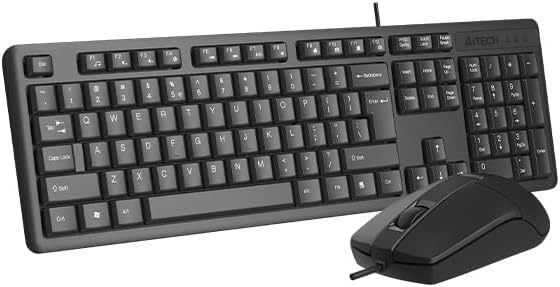
Image 1.1: The A4TECH KR-3330S USB Keyboard and Mouse combo. This image displays the full-size keyboard with a numeric keypad and the accompanying wired mouse, both in black.
2. Instruccions de configuració
The A4TECH KR-3330S keyboard and mouse are designed for simple plug-and-play installation. No additional drivers are typically required for basic functionality.
- Unpack the Devices: Traieu amb cura el teclat i el ratolí del seu embalatge.
- Connecteu el teclat: Locate an available USB port on your computer (desktop PC or laptop). Insert the USB connector of the keyboard firmly into the USB port.
- Connecteu el ratolí: Locate another available USB port on your computer. Insert the USB connector of the mouse firmly into the USB port.
- Reconeixement del sistema: El vostre sistema operatiu hauria de detectar i instal·lar automàticament els controladors necessaris. Aquest procés pot trigar uns instants.
- Funcionalitat de prova: Once installed, test the keyboard by typing in a text editor and test the mouse by moving the cursor and clicking.

Image 2.1: The A4TECH KR-3330S keyboard and mouse, showcasing their wired USB connectivity. Both devices are black and feature a standard layout.
3. Instruccions de funcionament
3.1 Ús del teclat
- Mecanografia estàndard: Feu servir les tecles alfanumèriques per introduir text.
- Tecles de funció (F1-F12): These keys perform various functions depending on the application or operating system.
- Teclat numèric: The dedicated numeric keypad on the right provides efficient data entry. Ensure "Num Lock" is active.
- Tecles d'accés ràpid: The keyboard features 10 hot keys for quick access to common functions. Refer to your operating system or application documentation for specific hot key assignments.
- Disseny ergonòmic: The keyboard is designed for comfortable use during extended periods. Adjust your seating and desk height for optimal posture.
3.2 Ús del ratolí
- Moviment: Move the mouse across a flat surface to control the cursor on your screen. The optical sensor provides precise tracking.
- Clic esquerre: S'utilitza per seleccionar elements, obrir files, i activant funcions.
- Clic dret: Opens context-sensitive menus.
- Roda de desplaçament: Desplaça't amunt o avall pels documents i web pages. The scroll wheel can also function as a middle click button.
- Clic silenciós: The mouse features silent click buttons, reducing audible click noise during use.
- DPI: The mouse operates at 1200 DPI (Dots Per Inch), providing a balance of speed and precision for general use.
4. Manteniment
Proper maintenance ensures the longevity and optimal performance of your A4TECH KR-3330S keyboard and mouse.
- Neteja del teclat:
- Desconnecteu el teclat de l'ordinador abans de netejar-lo.
- Utilitzeu un drap suau i sense pelusa lleugerament dampEsbandiu amb aigua o una solució netejadora suau per netejar les tecles i la superfície.
- Eviteu ruixar líquids directament sobre el teclat.
- Feu servir aire comprimit per eliminar la pols i les restes que hi ha entre les tecles.
- Neteja del ratolí:
- Desconnecteu el ratolí de l'ordinador abans de netejar-lo.
- Wipe the surface of the mouse with a soft, lint-free cloth.
- Ensure the optical sensor on the underside of the mouse is clean and free of obstructions for accurate tracking.
- Emmagatzematge: When not in use for extended periods, store the devices in a clean, dry environment away from extreme temperatures.
5. Solució De Problemes
If you encounter issues with your A4TECH KR-3330S keyboard and mouse, refer to the following common troubleshooting steps:
- Dispositiu no reconegut:
- Ensure the USB cables are securely plugged into the computer's USB ports.
- Try connecting the devices to different USB ports on your computer.
- Reinicieu l'ordinador.
- Test the devices on another computer to determine if the issue is with the devices or your computer's ports.
- Les tecles no responen / El ratolí no es mou:
- Check for any physical obstructions under the keys or around the mouse sensor.
- Ensure the keyboard and mouse are properly connected to the USB ports.
- Reinicieu l'ordinador.
- For the mouse, ensure the optical sensor is clean and not obstructed.
- Funcionalitat intermitent:
- Ensure USB connections are stable and not loose.
- Avoid using the devices on uneven or highly reflective surfaces (for the mouse).
6. Especificacions
| Característica | Detall |
|---|---|
| Marca | A4TECH (also listed as Generic) |
| Número de model | KR-3330S (also referred to as KK-3330) |
| Tecnologia de connectivitat | Cable USB |
| Color | Negre |
| Descripció del teclat | Wired keyboard with soft touch keys, 10 hot keys, ergonomic design. |
| Detecció de moviment del ratolí | Òptic |
| DPI del ratolí | 1200 Dpi |
| Característiques especials | Ergonomic design, Silent Click Mouse |
| Dispositius compatibles | Ordinador portàtil, ordinador personal |
| Pes de l'article | 0.7 quilos |
| Dimensions del paquet | 53.3 x 15.8 x 4.5 cm |
| Piles necessàries | No |
| País d'origen | Xina |
7. Garantia i Suport
Per obtenir informació sobre la garantia i assistència tècnica, consulteu la documentació que s'inclou amb la compra o poseu-vos en contacte directament amb el distribuïdor/fabricant. Conserveu el comprovant de compra per a reclamacions de garantia.


