1. Introducció
This manual provides essential information for the installation, operation, and maintenance of your maxsun GeForce RTX 3050 6GB Graphics Card. Designed for optimal performance in gaming PCs, including mini and small form factor (SFF) systems, this graphics card leverages the NVIDIA Ampere architecture to deliver enhanced visual experiences. Please read this manual thoroughly before installation and use.

Image 1.1: maxsun GeForce RTX 3050 SLP Graphics Card.
2. Informació de seguretat
- Desconnecteu sempre l'alimentació de l'ordinador abans d'instal·lar o treure qualsevol component.
- Wear an anti-static wrist strap or frequently touch a grounded metal object to prevent electrostatic discharge (ESD) damage to the graphics card and other components.
- Manegeu la targeta gràfica per les vores per evitar tocar els components sensibles.
- Assegureu-vos de ventilar adequadament la carcassa del vostre PC per evitar que s'escalfi.
- Keep the graphics card away from moisture and extreme temperatures.
3. Contingut del paquet
Verifiqueu que tots els elements siguin presents al paquet:
- 1x maxsun GeForce RTX 3050 6GB Graphics Card
- 1x Standard Height I/O Bracket (pre-installed or separate)
- 1x Low Profile I/O Bracket (for SFF systems)

Image 3.1: The maxsun GeForce RTX 3050 graphics card and its retail packaging.
4. Producte acabatview
The maxsun GeForce RTX 3050 is a compact graphics card designed for performance and compatibility with various PC builds, including small form factor cases. It features a single fan cooling solution and multiple display outputs.
4.1 Característiques clau
- NVIDIA AmpArquitectura: Provides advanced graphics performance.
- NVIDIA DLSS: AI-powered rendering for increased frame rates with uncompromised image quality.
- 6 GB de memòria GDDR6: High-speed memory for demanding applications and games.
- Pro baixfile Disseny: Compact dimensions (6.65 x 2.71 inches) suitable for Mini-ITX and SFF PC cases.
- PCI Express 4.0 x8 Interface: Ensures high bandwidth connectivity.
- Sortides de visualització: Includes HDMI 2.1 and DisplayPort 1.4a, supporting up to 8K resolution and multi-monitor setups.
4.2 Card Layout and Ports

Imatge 4.1: Part superior view of the graphics card, showing the single cooling fan.

Image 4.2: The standard and low-profile I/O brackets, illustrating the display output options (HDMI and DisplayPort).
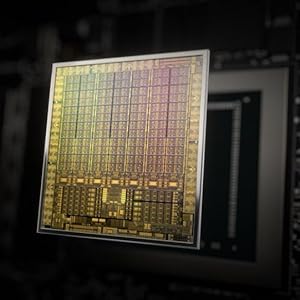
Image 4.3: Diagram illustrating the NVIDIA Ampere GPU architecture, which powers the RTX 3050.
5. Configuració i instal·lació
Follow these steps to install your maxsun GeForce RTX 3050 graphics card into your computer system.
5.1 Preparing Your System
- Power down your computer completely and unplug the power cable from the wall outlet.
- Open your computer case. Refer to your computer's manual for specific instructions on how to open the case.
- Localitza una ranura PCI Express x16 disponible a la placa base.
- Remove any existing graphics card or the metal slot cover from the PCI Express slot.
5.2 Installing the Graphics Card
- If your PC case requires a low-profile bracket, carefully remove the pre-installed standard bracket from the graphics card and attach the included low-profile mènsula.
- Align the graphics card with the PCI Express x16 slot.
- Gently but firmly press the card straight down into the slot until it is fully seated. You should hear a click as the retention clip engages.
- Secure the graphics card to the PC case with the screw(s) from the slot cover.

Image 5.1: Diagram showing the process of inserting a graphics card into a PCI Express slot within a computer case.
5.3 Connexió de pantalles
- Connect your monitor(s) to the DisplayPort or HDMI outputs on the graphics card.
- Tanqueu la carcassa de l'ordinador i torneu a connectar el cable d'alimentació.
- Enceneu l'ordinador.
6. Instruccions de funcionament
6.1 Instal·lació del controlador
After physical installation, you must install the appropriate drivers for your graphics card to function correctly and achieve optimal performance.
- Boot your computer. The operating system may detect new hardware and install a basic driver, or display a low-resolution image.
- Visita la pàgina oficial d'NVIDIA weblloc (www.nvidia.com/drivers) to download the latest drivers for the GeForce RTX 3050.
- Seguiu les instruccions que apareixen a la pantalla per completar la instal·lació del controlador. Pot ser necessari reiniciar el sistema.

Image 6.1: Icon representing the download and installation of graphics drivers.
6.2 Configuració de diversos monitors
The maxsun RTX 3050 supports multiple displays. Once drivers are installed, you can configure your display settings through your operating system's display settings or the NVIDIA Control Panel.

Image 6.2: Illustration of a multi-monitor setup connected via DisplayPort and HDMI outputs.
7. Manteniment
Proper maintenance ensures the longevity and performance of your graphics card.
- Eliminació de pols: Periodically clean dust from the fan and heatsink using compressed air. Ensure the fan is held stationary during cleaning to prevent damage.
- Monitorització de la temperatura: Use monitoring software to keep track of your GPU temperatures, especially during heavy loads. Ensure temperatures remain within safe operating limits.
- Actualitzacions de controladors: Regularly update your graphics drivers from the NVIDIA weblloc web per beneficiar-se de millores de rendiment i correccions d'errors.
8. Solució De Problemes
Si teniu problemes amb la targeta gràfica, consulteu els passos habituals següents per a la resolució de problemes:
- Sense sortida de pantalla:
- Assegureu-vos que el cable del monitor estigui connectat correctament tant a la targeta gràfica com al monitor.
- Verify that the graphics card is fully seated in the PCI Express slot.
- Comproveu si el monitor està configurat a la font d'entrada correcta.
- Si és possible, prova amb un cable de pantalla o monitor diferent.
- Problemes d'instal·lació del controlador:
- Uninstall any previous graphics drivers using a utility like Display Driver Uninstaller (DDU) in Safe Mode, then attempt a fresh installation of the latest NVIDIA drivers.
- Assegureu-vos que el vostre sistema operatiu estigui actualitzat.
- Overheating/Loud Fan Noise:
- Clean dust from the graphics card fan and heatsink.
- Ensure adequate airflow within your PC case. Consider adding or improving case fans.
- Monitor GPU temperatures during load. If temperatures are consistently high, reduce graphics settings in games or applications.
- Inestabilitat/Avaries del sistema:
- Assegureu-vos que la vostra font d'alimentació (PSU) compleixi amb el consum mínim d'aiguatage requirements for your system, including the new graphics card.
- Check for any conflicts with other hardware components.
- Run system diagnostics to identify other potential hardware issues.
9. Especificacions
Detailed technical specifications for the maxsun GeForce RTX 3050 6GB Graphics Card:
| Característica | Especificació |
|---|---|
| Coprocessador gràfic | NVIDIA GeForce RTX 3050 |
| Mida de la RAM gràfica | 6 GB GDDR6 |
| Interfície de memòria | 96 bits |
| Velocitat de rellotge de memòria | 14000 MHz |
| GPU Core Clock | 1042 MHz |
| Boost Clock Speed | 1470 MHz |
| Interfície de sortida de vídeo | 1x HDMI 2.1, 1x DisplayPort 1.4a |
| PCI Express | PCI-E X8 4.0 |
| Dimensions del producte | 6.65 x 2.71 x 0.04 polzades (16.9 x 6.9 cm) |
| Pes de l'article | 8.5 unces |
| Fabricant | MAXSUN |
| Número de model | RTX 3050 |

Imatge 9.1: posterior view of the product packaging, detailing key features and specifications.
10. Garantia i Suport
10.1 Garantia limitada
The maxsun GeForce RTX 3050 Graphics Card comes with a Garantia limitada de 3 anys. This warranty covers defects in materials and workmanship under normal use. For specific terms and conditions, please refer to the warranty information provided with your product or contact maxsun customer support.
10.2 Atenció al client
For technical assistance, warranty claims, or general inquiries, please contact maxsun customer support through their official weblloc web o la informació de contacte que es proporciona a la documentació del producte.


