1. Introducció
This manual provides essential information for setting up, operating, maintaining, and troubleshooting your Blackview Shark 6 smartphone. Please read this guide thoroughly to ensure optimal performance and longevity of your device.
El Negreview Shark 6 is a 5G-enabled smartphone featuring a 6.88-inch 120Hz display, powered by an octa-core processor with 12GB RAM and 128GB internal storage, expandable up to 2TB. It runs on Android 15 with DokeOS 4.2 and includes a 5000mAh battery with 18W fast charging, a 16MP main camera, an 8MP front camera, and NFC functionality.
2. Què hi ha a la caixa
Verifiqueu que tots els elements estiguin presents a l'embalatge del producte:
- Negreview SHARK 6 Mobile Phone
- Power Adaptor (9V2A)
- Micro USB Cable (Type-C)
- Funda protectora
- Film de vidre temperat
- Pin d'expulsió de SIM
- Manual d'usuari (aquest document)
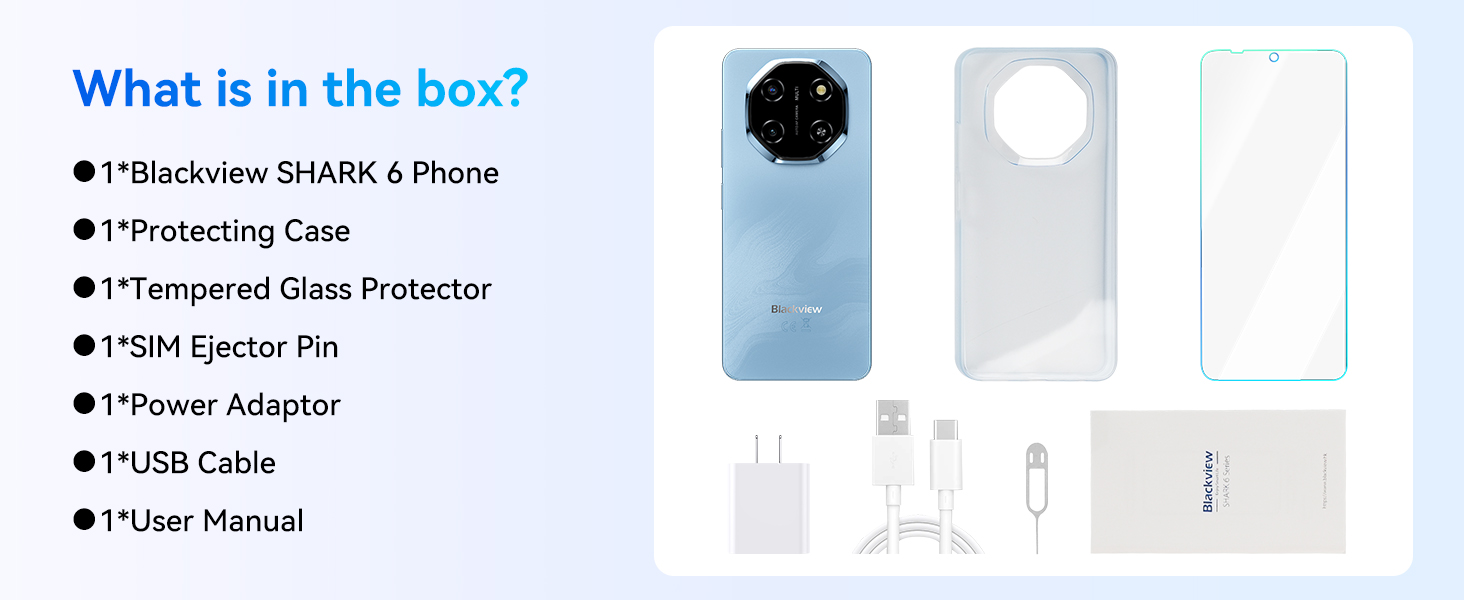
Image: Contents of the Blackview Shark 6 retail box.
3. Dispositiu acabatview
El Negreview Shark 6 features a sleek design with a large display and a distinctive camera module. Familiarize yourself with the physical components of your device.

Imatge: Davant i darrere view del Negreview Shark 6.
- Davant: 6.88-inch display, 8MP front camera, earpiece.
- posterior: 16MP main camera, flash, Blackview marca.
- Laterals: Power button (with integrated fingerprint sensor), volume buttons, SIM/microSD card tray, USB Type-C port, 3.5mm audio jack.

Image: Blackview Shark 6 design and dimensions (8.45mm thin, 210.5g weight).
4. Configuració
4.1 Inserció de targetes SIM i targetes MicroSD
- Localitza la safata de la targeta SIM al lateral del telèfon.
- Insert the SIM ejector pin into the small hole next to the tray and press gently until the tray pops out.
- Place your Nano-SIM cards (up to two) and/or a microSD card into the designated slots on the tray. Ensure the gold contacts face downwards.
- Empenyeu amb cura la safata cap al telèfon fins que encaixi al seu lloc.
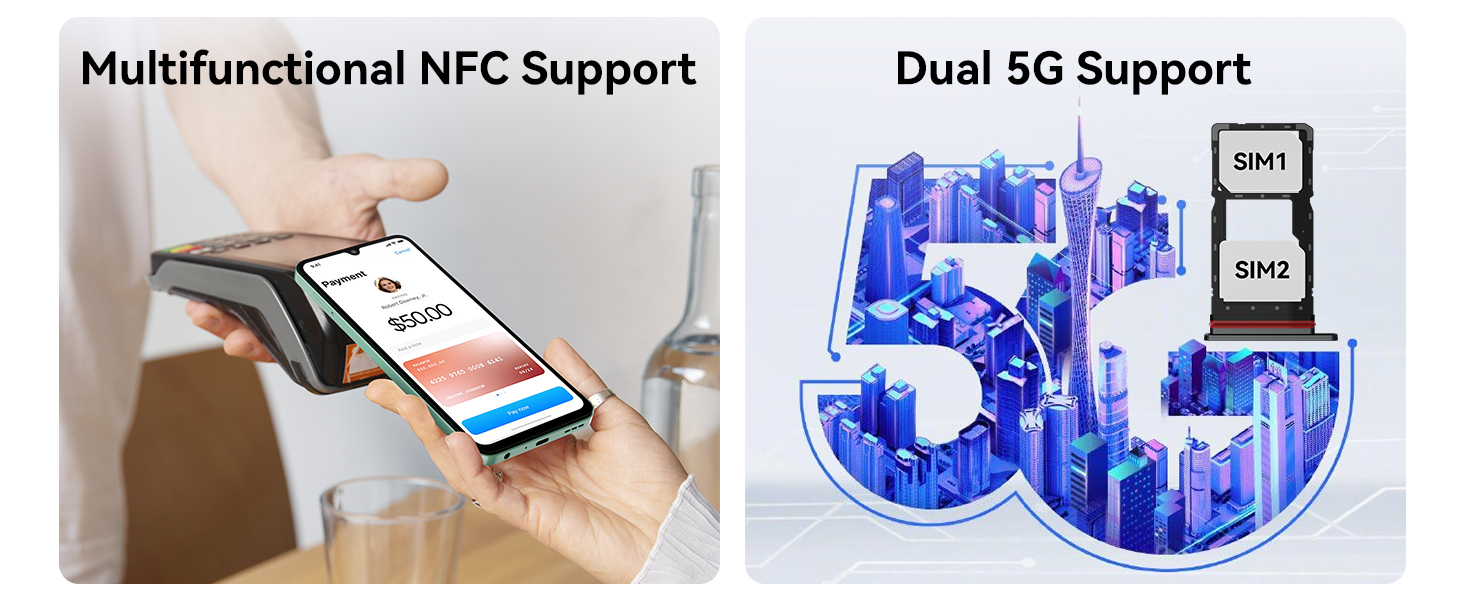
Image: Dual 5G SIM support and NFC functionality.
4.2 Engegada inicial i configuració bàsica
- Press and hold the Power button until the Blackview apareix el logotip.
- Segueix les instruccions que apareixen a la pantalla per seleccionar l'idioma, connectar-te a una xarxa Wi-Fi i acceptar els termes i condicions.
- Inicia la sessió amb el teu compte de Google o crea'n un de nou per accedir als serveis de Google i a Play Store.
- Set up screen lock methods such as PIN, pattern, or password.
4.3 Fingerprint and Face Unlock Setup
For enhanced security and convenience, configure fingerprint and face unlock:
- Navega a Configuració > Seguretat > Desbloqueig amb empremta digital or Desbloqueig facial.
- Follow the on-screen instructions to register your fingerprints or face. Ensure good lighting for face recognition.
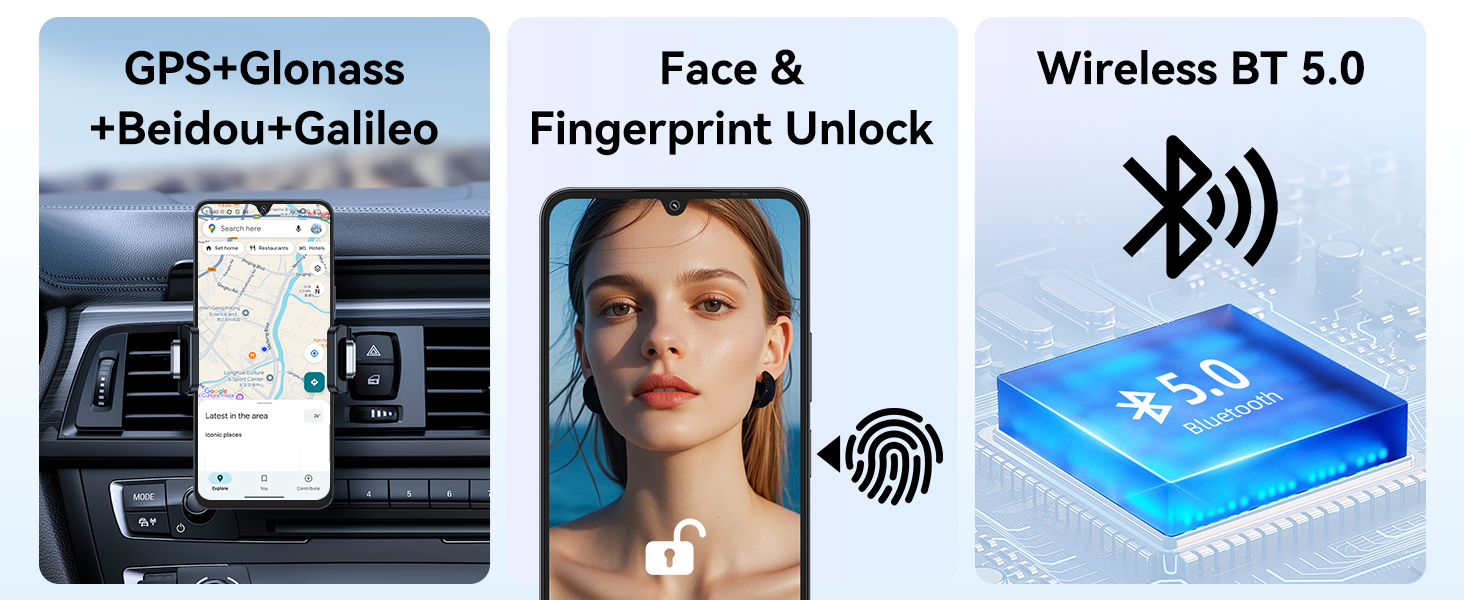
Image: GPS, Face & Fingerprint Unlock, and Wireless BT 5.0 features.
5. Operating Your Blackview Tauró 6
5.1 Basic Navigation and Android 15 Features
Your Blackview Shark 6 runs on Android 15 with Blackview's DokeOS 4.2, offering a user-friendly interface and enhanced privacy features.
- Pantalla d'inici: Swipe left/right to access app pages, swipe down for notifications and quick settings.
- Calaix d'aplicacions: Feu lliscar el dit cap amunt des de la pantalla d'inici a view totes les aplicacions instal·lades.
- Multitasca: Swipe up and hold from the bottom of the screen (or tap the square navigation button) to view aplicacions recents.
- Tauler de control de privadesa: Monitor and manage app permissions under Settings > Privacy.

Image: DokeOS 4.2 features based on Android 15.
5.2 Display Settings and Eye Comfort
The 6.88-inch FHD+ display offers a 120Hz refresh rate for smooth visuals. Adjust display settings for optimal viewcomoditat:
- Freqüència d'actualització: Set to 120Hz for the smoothest experience, or use Smart AI Refresh Rate for adaptive power saving.
- Mode de lectura: Redueix la llum blava per a una lectura còmoda.
- Llum nocturna: Adjusts screen colors to warmer tones for evening use.
- Mode fosc: Changes the system theme to dark colors, reducing eye strain in low light.

Image: 6.88-inch FHD+ Immersive Display with 120Hz refresh rate.
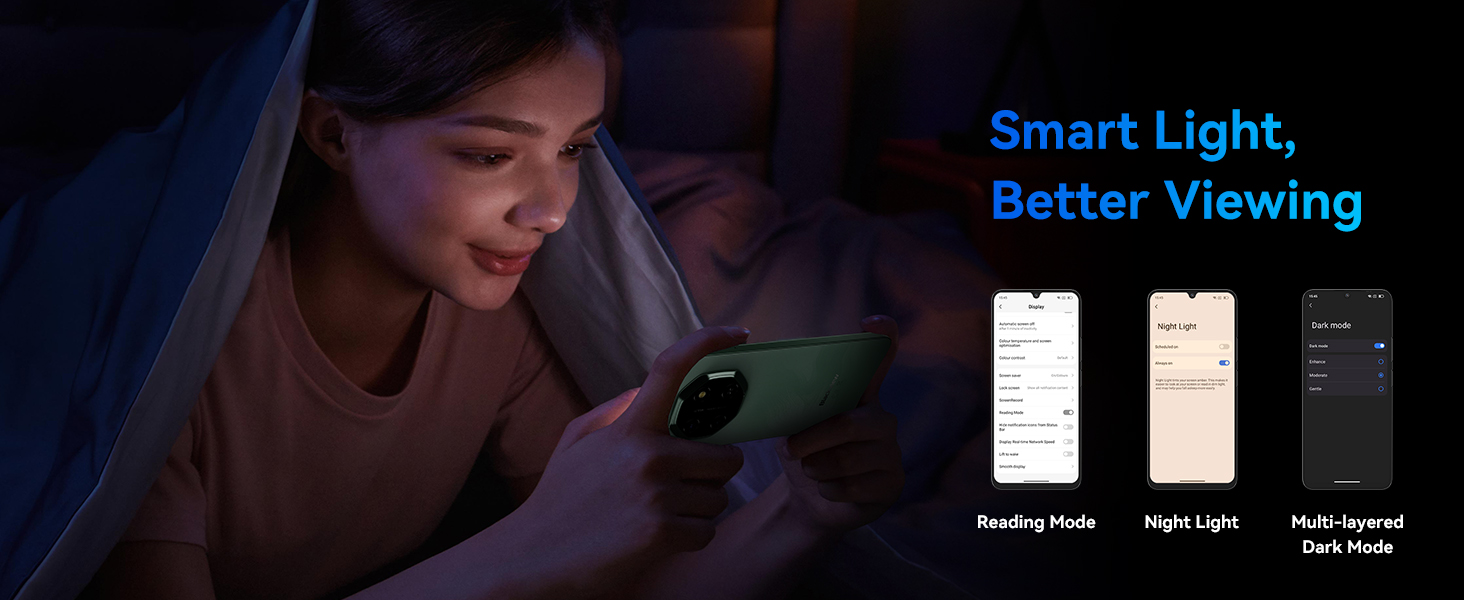
Image: Smart Light features for better viewcomoditat.
5.3 Camera Usage and AI Features
Capture moments with the 16MP rear camera and 8MP front camera. Utilize AI features for enhanced photography and creativity.
- Càmera posterior: 16MP with AI Scene Recognition, Portrait mode, Smile Shutter, and 4K Ultra-clear Video Recording.
- Càmera frontal: 8MP with Face Fill Light and HDR for clear selfies.
- AI Photo Editing Tools: Includes Magic Eraser to remove unwanted objects, One-Tap Sky Replacement, and Portrait Blur.

Image: Magic AI Photo Editing Tools.
5.4 Connectivitat
El Negreview Shark 6 supports various connectivity options:
- Xarxa 5G: Gaudeix de connectivitat a Internet d'alta velocitat.
- Wi-Fi: Connecteu-vos a xarxes sense fil per accedir a Internet.
- Bluetooth: Emparella amb auriculars sense fil, altaveus i altres dispositius.
- NFC: Enable contactless payments and quick pairing with compatible devices.
- GPS: Integrated GPS, GLONASS, Beidou, and Galileo for accurate navigation.
5.5 AI Assistant and Smart Features
Leverage the integrated AI features for a smarter user experience:
- Doke AI: Includes AI Smart Chat App, Magic AI Photo Editor, Smart AI Video Editor, and Smart AI Music Composer.
- Integració de Bessons: Access Google Gemini for voice wake-up, voiceprint recognition, real-time voice interaction, and global smart control.

Image: Doke AI features for enhanced functionality.
5.6 Power Key Update Notice
To meet Google Gemini integration requirements, the power key functionality has been updated:
- Long press Power: Launches Gemini.
- Power + Volume Up: Accesses the Power menu (Power off, Restart, Emergency).
- Power + Volume Down: Fa una captura de pantalla.
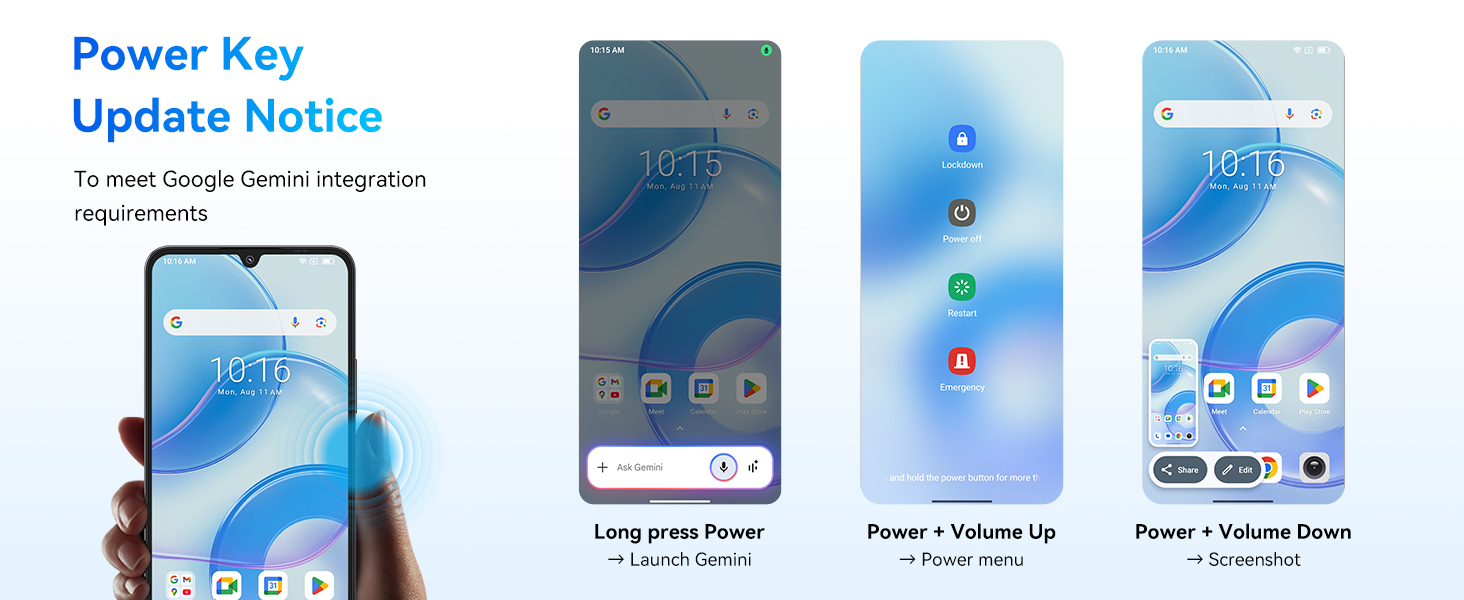
Image: Power Key Update Notice for Google Gemini integration.
6. Manteniment
6.1 Cura i càrrega de la bateria
El Negreview Shark 6 is equipped with a 5000mAh battery and supports 18W fast charging.
- Use the provided Power Adaptor (9V2A) and Micro USB Cable (Type-C) for optimal charging.
- Eviteu temperatures extremes quan carregueu o utilitzeu el dispositiu.
- The phone retains approximately 80% battery capacity after over 800 charge cycles.
- AI Overnight Charging Protection: Helps prolong battery lifespan by optimizing charging patterns.
- AI Power Saving: Intelligently manages background app activity to conserve battery.
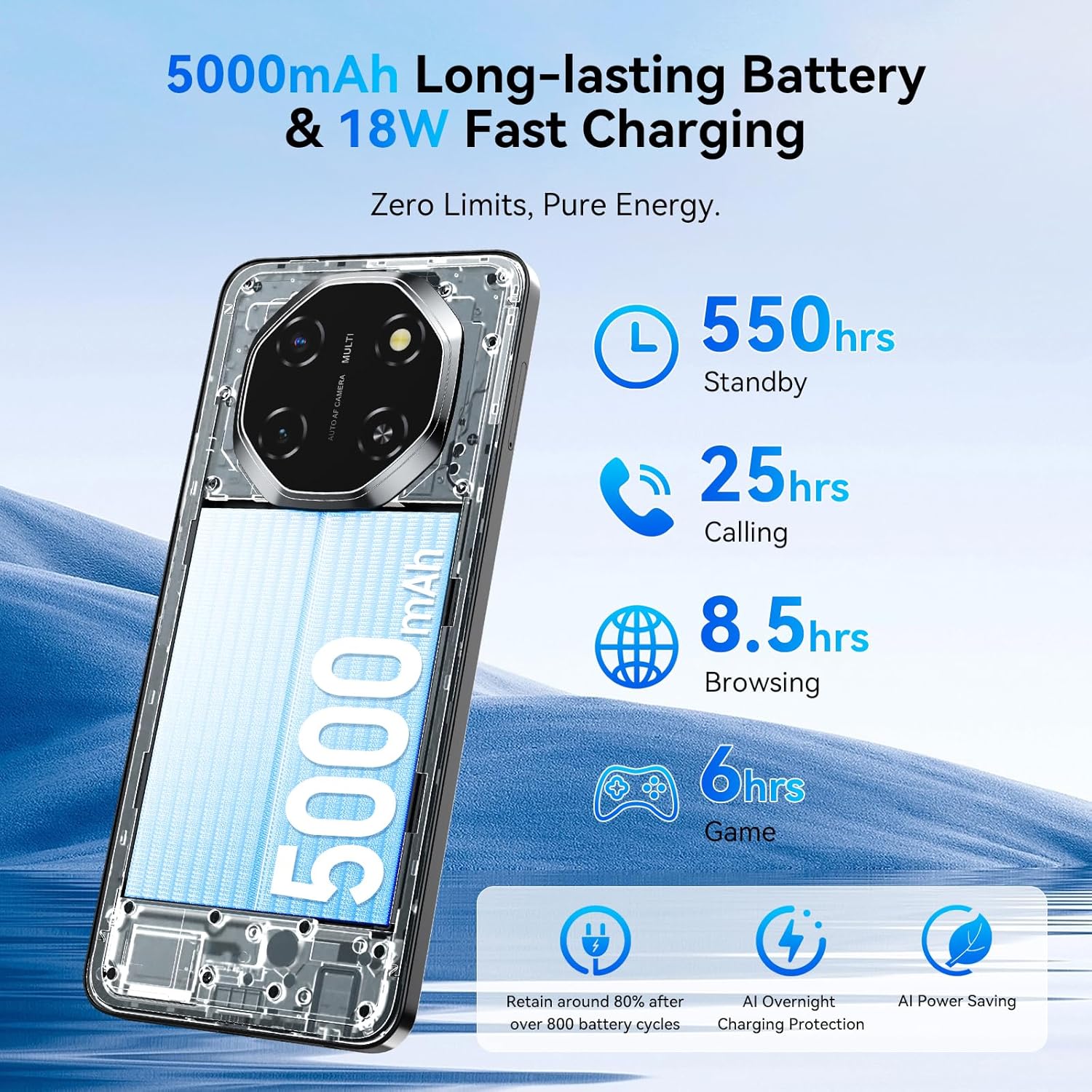
Image: 5000mAh Long-lasting Battery & 18W Fast Charging.
6.2 Actualitzacions de programari
Comproveu i instal·leu regularment si hi ha actualitzacions de programari per assegurar-vos que el dispositiu tingui les darreres funcions, pegats de seguretat i millores de rendiment. Normalment podeu trobar aquesta opció a Configuració > Sistema > Actualització del sistema.
6.3 Neteja del vostre dispositiu
Feu servir un drap suau i sense borrissol per netejar la pantalla i la carcassa del telèfon. Eviteu utilitzar productes químics agressius o materials abrasius que puguin danyar el dispositiu.
6.4 Gestió d'emmagatzematge
Your device comes with 128GB of internal storage, expandable up to 2TB via a microSD card. Regularly manage your storage to maintain optimal performance:
- Elimineu-les innecessàries files, aplicacions i mitjans de comunicació.
- Moure en gran files a la targeta microSD.
- Utilitzeu serveis d'emmagatzematge al núvol per a còpies de seguretat.

Image: Powerful Performance: Octa-Core Processor, 12GB RAM, 128GB ROM, and 2TB Expansion.
6.5 Advanced Integrated Cooling System
El Negreview Shark 6 incorporates an advanced cooling system to manage heat during intensive tasks, ensuring stable performance.
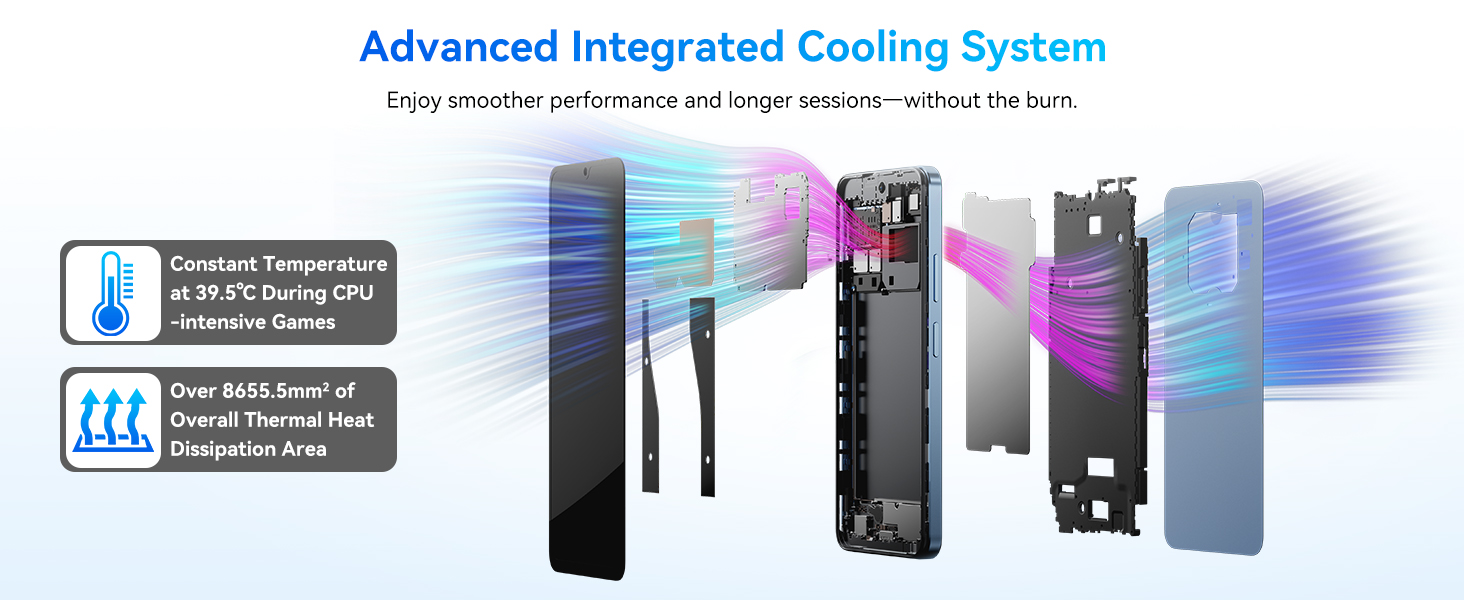
Image: Advanced Integrated Cooling System.
7. Solució De Problemes
Si teniu problemes amb el vostre Blackview Shark 6, refer to the following common solutions:
- El dispositiu no s'encén: Assegureu-vos que la bateria estigui carregada. Connecteu el telèfon al carregador durant almenys 15 minuts abans d'intentar tornar-lo a encendre.
- Les aplicacions es bloquegen o es bloquegen: Close background apps, clear the app's cache (Settings > Apps > [App Name] > Storage > Clear Cache), or restart the device.
- Problemes de connectivitat de xarxa: Check if airplane mode is off. Restart the phone. Verify SIM card insertion. Contact your mobile carrier if the issue persists.
- Rendiment lent: Free up storage space, close unused apps, or restart the device.
- Fingerprint/Face unlock not working: Ensure your fingers are clean and dry, or your face is well-lit and unobstructed. Re-register your biometrics if necessary.
For more complex issues, please refer to the support section or contact Blackview servei al client.
8. Especificacions
Especificacions tècniques detallades del Blackview Shark 6:
| Sistema operatiu | Android 15 (DokeOS 4.2) |
| Processador | Octa-Core (Unisoc T8100, 2.2 GHz CPU Speed) |
| RAM | 12 GB (4 GB físic + 8 GB virtual) |
| Emmagatzematge intern | 128 GB |
| Emmagatzematge ampliable | Fins a 2 TB mitjançant targeta microSD |
| Mostra | 6.88 Inches, 720 x 1604 Resolution, 120 Hz Refresh Rate |
| Càmera posterior | 16 MP |
| Càmera frontal | 8 MP |
| Capacitat de la bateria | 5000 mAh |
| Carregant | Càrrega ràpida de 18 W |
| Connectivitat | 5G, Wi-Fi, Bluetooth, NFC, GPS (Built-In GPS, GLONASS, Beidou, Galileo) |
| Jack d'àudio | 3.5 mm |
| Dimensions | 7.36 x 3.82 x 2.2 polzades (paquet) |
| Pes de l'article | 1.15 lliures |
| Característiques especials | Dual SIM, Expandable Memory, Fast Charging Support, Supports USB OTG |
9. Garantia i Suport
El Negreview Shark 6 comes with a 2 any de garantia. Negreview provides a responsive after-sales service team to assist with any product-related inquiries or issues.
For support, please visit the official Blackview website or contact their customer service through the details provided in your warranty card or on the Blackview store page.
Podeu trobar més informació i recursos de suport a Negreview Botiga a Amazon.


