1. Introducció
This manual provides essential information for the safe and efficient operation of your SANSUI ES-G24C1L 24-inch curved gaming monitor. Please read this manual thoroughly before using the product and retain it for future reference.

Imatge: Frontal view of the SANSUI 24-inch curved gaming monitor highlighting its key specifications.
Característiques principals:
- 24-inch 1500R Curved VA Display
- Full HD (1920x1080P) Resolution
- Freqüència de refresc de 160 Hz
- 1ms MPRT Response Time
- AMD FreeSync Compatibility
- Suport HDR
- Gamma de colors 110% sRGB
- Multiple Connectivity: HDMI 2.0, DisplayPort 1.4
- VESA Mount Compatible (75x75mm)
2. Informació de seguretat
Observeu les següents precaucions de seguretat per evitar danys al monitor i garantir la seguretat de l'usuari:
- Do not expose the monitor to rain or moisture to avoid fire or electric shock hazards.
- No obriu el monitor casing. No hi ha peces a l'interior que l'usuari pugui reparar. Demaneu totes les tasques de manteniment a personal qualificat.
- Col·loqueu el monitor sobre una superfície estable i plana per evitar que caigui.
- Assegureu-vos una ventilació adequada. No bloquegeu les obertures de ventilació.
- Use only the power adapter and cables provided or specified by the manufacturer.
- Desendolleu el monitor durant tempestes o quan no l'utilitzeu durant períodes prolongats.
3. Contingut del paquet
Verifiqueu que tots els elements siguin presents al paquet:
- SANSUI ES-G24C1L 24-inch Curved Gaming Monitor
- Suport de monitor (base i coll)
- Adaptador d'alimentació
- Cable HDMI
- Manual d'usuari
- Cargols per al muntatge del suport
4. Instruccions de configuració
4.1 Muntatge del suport
- Traieu amb cura el monitor del seu embalatge, mantenint la pantalla protegida.
- Fixeu el coll del suport al panell del monitor amb els cargols proporcionats.
- Connecteu la base del suport al coll del suport i fixeu-lo amb els cargols restants.
- Col·loqueu el monitor muntat sobre una superfície plana i estable.
Alternatively, the monitor supports VESA 75x75mm mounting for compatible wall mounts or monitor arms. Ensure the VESA mount is rated for the monitor's weight (approximately 7.68 lbs).

Image: Illustrated guide for stand assembly and product dimensions.
4.2 Cables de connexió
Assegureu-vos que el monitor i l'ordinador estiguin apagats abans de fer cap connexió.
- Connexió d'alimentació: Connect the power adapter to the monitor's DC IN port, then plug the adapter into a power outlet.
- Connexió de vídeo: Connect one end of the HDMI cable (or DisplayPort cable, not included) to your computer's graphics card output and the other end to the corresponding HDMI 2.0 or DP 1.4 port on the monitor.
- Sortida d'àudio: If desired, connect external speakers or headphones to the monitor's 3.5mm Audio Jack.
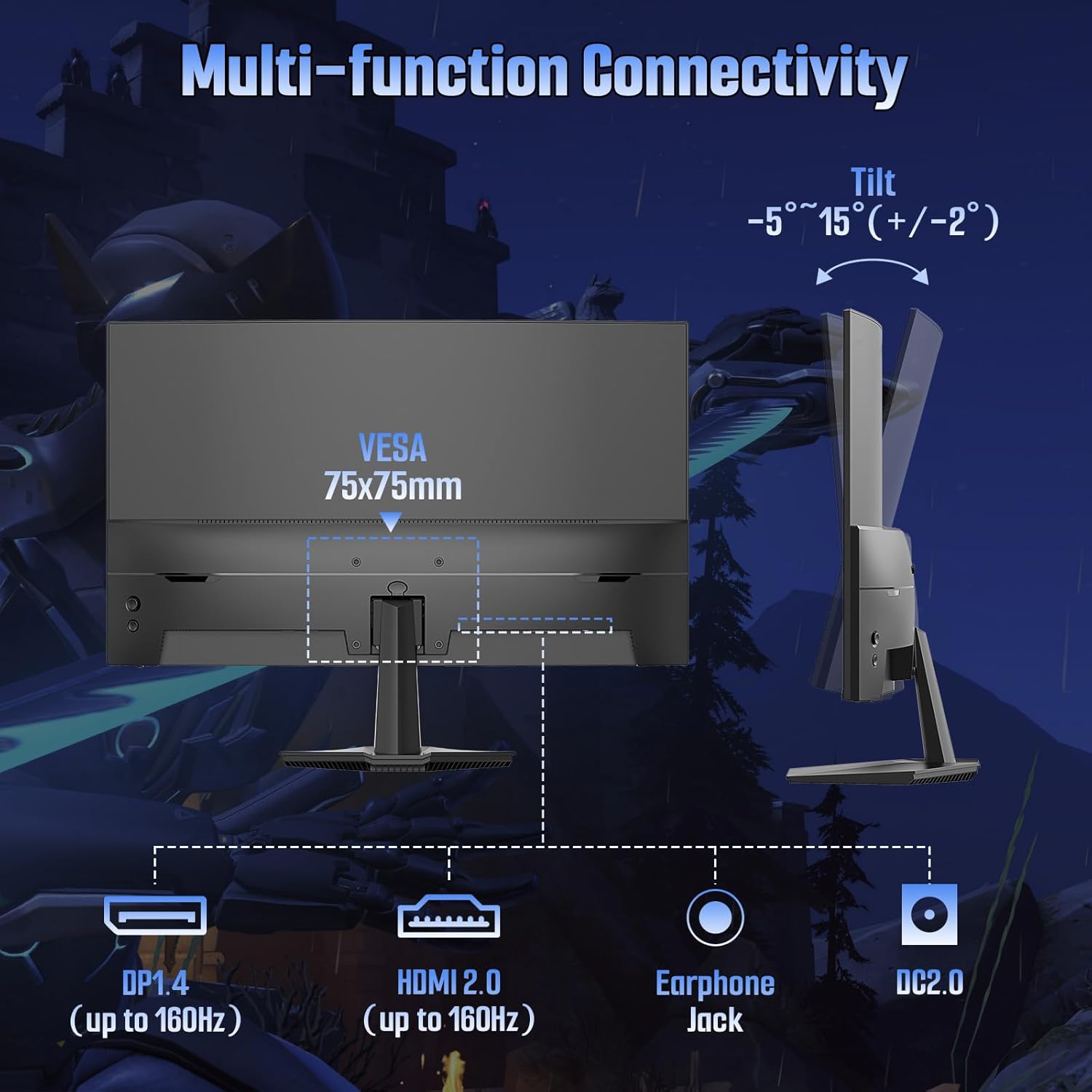
Imatge: Part posterior view of the monitor detailing port locations and tilt adjustment capability.
5. Instruccions de funcionament
5.1 Encès/Apagat
Premeu el botó d'engegada que es troba al monitor per engegar-lo o apagar-lo. L'indicador lluminós d'engegada s'il·luminarà quan el monitor estigui actiu.
5.2 Menú de visualització en pantalla (OSD)
Use the control buttons on the monitor to navigate and adjust settings within the OSD menu. Common OSD menu options include:
- Configuració de la imatge: Brightness, Contrast, Color Temperature, Sharpness, HDR.
- Configuració de color: Adjust color gamut, gamma, and individual RGB levels.
- Selecció d'entrada: Canvia manualment entre les entrades HDMI i DisplayPort.
- Àudio: Adjust volume for the audio jack output.
- Configuració OSD: Language, OSD Transparency, OSD Timeout.
- Característiques del joc: FreeSync, MPRT, Crosshair, Game Timer, Black Level.
5.3 Característiques del joc
The ES-G24C1L monitor includes several features designed to enhance your gaming experience:
- Freqüència de refresc de 160 Hz: Provides smoother motion and reduced input lag.
- 1ms MPRT (Moving Picture Response Time): Minimizes motion blur for clearer fast-paced scenes.
- FreeSync: Synchronizes the monitor's refresh rate with your AMD graphics card to eliminate screen tearing and stuttering. Enable this feature in the OSD menu and your graphics card settings.

Image: Visual demonstration of FreeSync technology reducing screen tearing.
- Black Level Adjustment: Millora la visibilitat en zones fosques dels jocs.
- Punt de mira: Displays an on-screen crosshair for improved aiming in first-person shooter games.
- Temporitzador de joc: Un temporitzador en pantalla per al seguiment dels esdeveniments del joc.
- Múltiples modes de joc: Pre-calibrated display settings for various game genres (FPS, RTS, MOVIE, STANDARD).
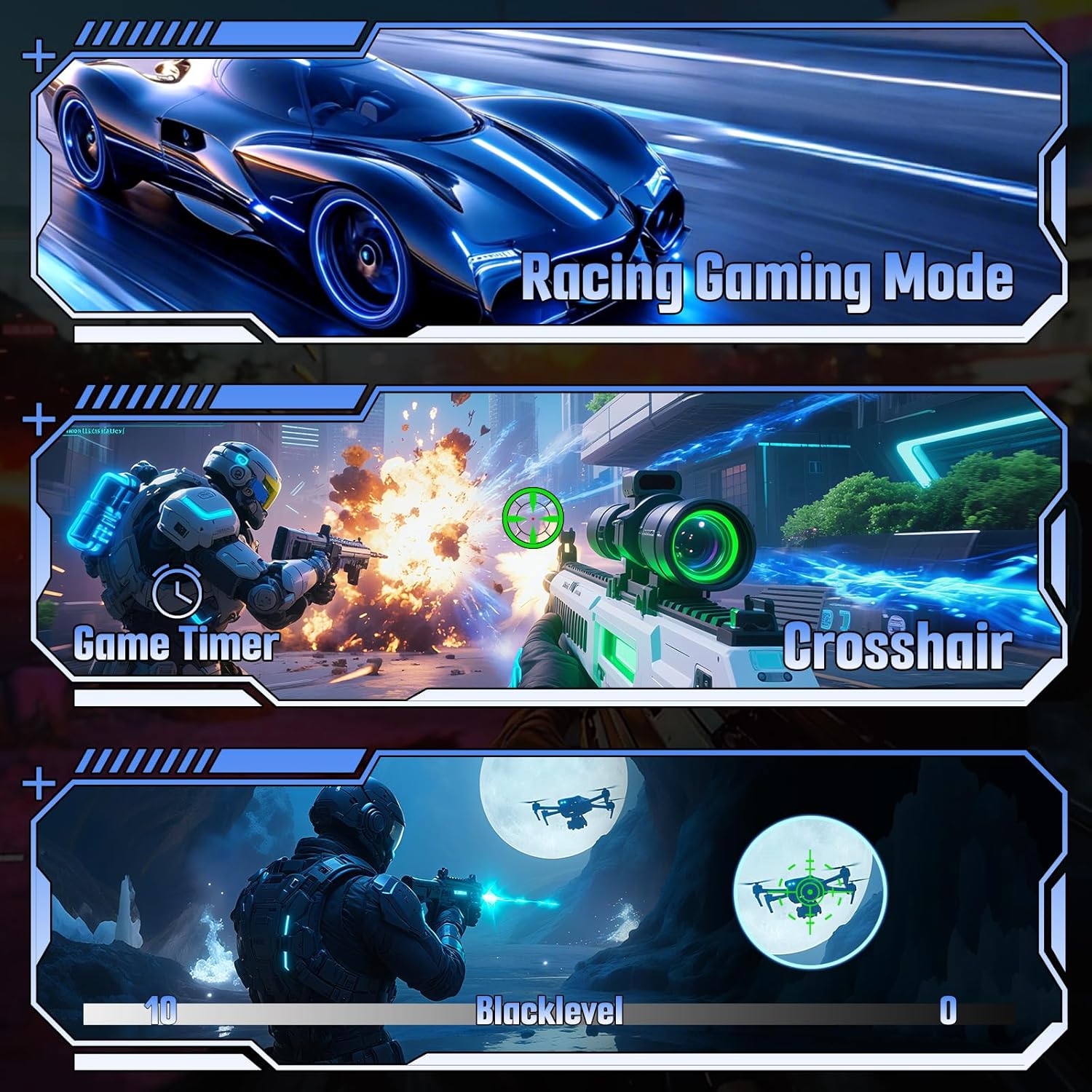
Imatge: Examples of various gaming features including game modes, timer, crosshair, and black level.
6. Especificacions
| Característica | Especificació |
|---|---|
| Número de model | ES-G24C1L |
| Mida de la pantalla | 24 polzades |
| Curvatura | 1500R |
| Tipus de panell | VA |
| Resolució | 1920 x 1080 (FHD) |
| Freqüència d'actualització | 160 Hz |
| Temps de resposta | MPRT d'1 ms |
| Brillantor | 300 nits |
| Relació de contrast | 3000:1 |
| Gamma de colors | 110% sRGB |
| Colors de visualització | 16.7 Million (8-bit) |
| Suport HDR | Sí |
| Sincronització adaptativa | FreeSync |
| Connectivitat | 1x HDMI 2.0, 1x DisplayPort 1.4, 1x Audio Jack |
| Muntatge VESA | 75x75mm |
| Ajust d'inclinació | -5° to 15° (+/-2°) |
| Dimensions del producte (amb suport) | 4.69 x 23.78 x 15.55 polzades |
| Pes de l'article | 7.68 lliures |

Imatge: Més deview of the monitor's technical specifications and gaming enhancements.
7. Solució De Problemes
Si teniu problemes amb el monitor, consulteu els passos habituals següents per a la resolució de problemes:
- Sense energia: Assegureu-vos que el cable d'alimentació estigui connectat correctament tant al monitor com a la presa de corrent. Verifiqueu que l'adaptador de corrent funciona.
- Sense senyal: Check that the video cable (HDMI/DP) is firmly connected to both the monitor and your computer. Ensure the correct input source is selected in the monitor's OSD menu. Try restarting your computer.
- Pantalla parpellejant: Check the video cable for damage. Ensure your graphics card drivers are up to date. Disable or enable FreeSync in the OSD menu and graphics card settings to see if it resolves the issue.
- Resolució/freqüència d'actualització incorrecta: Adjust the display settings in your computer's operating system to the recommended resolution (1920x1080) and refresh rate (160Hz).
- Problemes de qualitat de la imatge: Adjust brightness, contrast, and color settings in the OSD menu. Ensure HDR is enabled or disabled as desired in both the monitor OSD and your operating system settings.
8. Manteniment
Una cura adequada allargarà la vida útil del monitor:
- Neteja de la pantalla: Netegeu suaument la pantalla amb un drap suau i sense borrissol. Per a marques difícils, netegeu suaument.ampNetegeu el drap amb aigua o un netejador de pantalles especialitzat. No ruixeu líquid directament sobre la pantalla.
- Neteja de la Casing: Feu servir un drap suau i sec per netejar el monitor casing. Eviteu els productes de neteja abrasius.
- Ventilació: Mantingueu les obertures de ventilació lliures de pols i obstruccions per evitar el sobreescalfament.
- Emmagatzematge: When storing the monitor for extended periods, place it in a cool, dry environment and protect it from dust.
9. Garantia i Suport
Your SANSUI ES-G24C1L monitor is backed by a warranty that includes:
- Money-back guarantee and free replacement within 30 days from the order date.
- Suport tècnic de per vida.
For technical assistance or warranty claims, please contact SANSUI customer support. Refer to the contact information provided with your purchase or visit the official SANSUI weblloc.


