Introducció
The PXN VD6 Direct Drive Steering Wheel Base is engineered to provide an immersive and precise racing simulation experience on PC. Featuring a powerful low-inertia servo motor and advanced force feedback technology, it delivers realistic tactile sensations and accurate control for competitive sim racing.
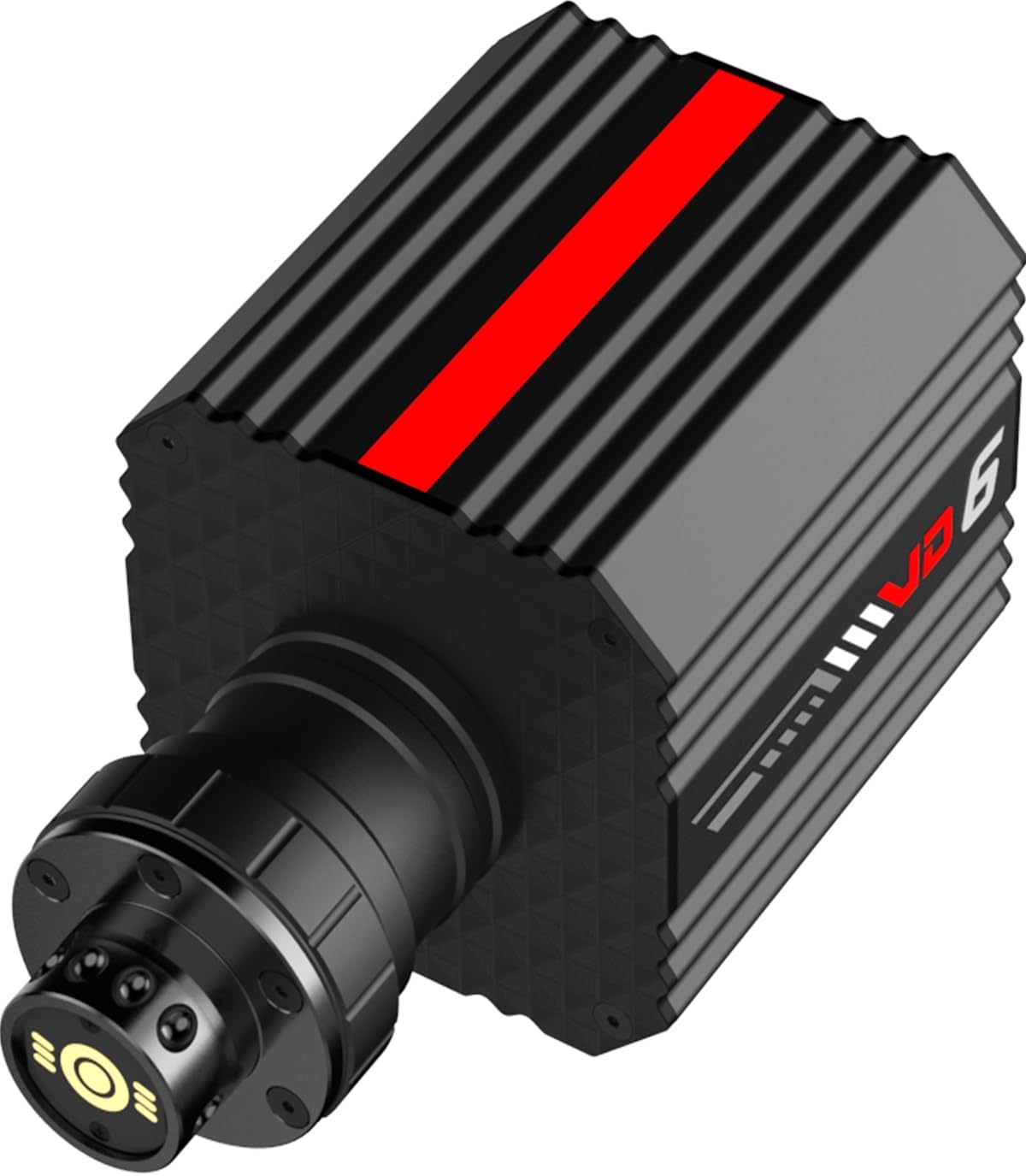
Figure 1: The PXN VD6 Direct Drive Steering Wheel Base, a compact and powerful unit designed for realistic racing simulation.
Guia de configuració
Follow these steps to set up your PXN VD6 Direct Drive Steering Wheel Base for optimal performance.
1. Requisits del sistema
- Compatible with Windows 7, 8, 10, and 11 PC operating systems.
- Not compatible with macOS or game consoles (e.g., PlayStation, Xbox).
2. Connecting the Base
Identify the various ports on the rear of the VD6 base for proper connection of your peripherals.

Figura 2: posterior view of the PXN VD6 base showing various connection ports including PC, Shifter, Pedal, DC In, and E-Stop.
- Connecteu el Port de PC to your computer using the provided USB cable.
- Connect your PXN pedals to the Port de pedals.
- If using a PXN shifter, connect it to the Shifter Port.
- Connecteu l'adaptador d'alimentació al DC IN port and then into a wall outlet.
- Assegureu-vos el E-Stop Port is connected if an emergency stop button is used.
- Turn on the base using the Interruptor d'alimentació.
3. Attaching the Steering Wheel
The VD6 features a quick-release system for easy attachment and detachment of PXN steering wheels.

Figure 3: Illustration of the quick-release hub for attaching PXN steering wheels to the VD6 base.
- Align the steering wheel's quick-release mechanism with the base's shaft.
- Empenyeu la roda fermament sobre l'eix fins que encaixi al seu lloc.
- To detach, pull back the quick-release collar and slide the wheel off.
- Note: This quick-release system is designed for PXN wheels and may not be compatible with third-party quick-release systems.
4. Software Installation (PXN SimRacing)
The PXN SimRacing software is essential for configuring your VD6 base, updating firmware, and managing game profiles.

Figure 4: Screenshot of the PXN SimRacing software interface, showing options for force feedback curves, LED effects, and pedal response.
- Download the latest PXN SimRacing software from the official PXN weblloc.
- Instal·leu el programari seguint les instruccions que apareixen a la pantalla.
- Launch the software to customize force feedback curves, LED effects, and pedal response.
- Save your preferred settings as profiles per a un accés ràpid.
Instruccions de funcionament
Understand the core technologies that power your PXN VD6 and how to maximize your racing experience.
Direct Drive Force Feedback System
The VD6 utilizes a direct drive system with a 20-pole low-inertia servo motor, delivering a continuous torque of 6 Nm and a peak torque of 7 Nm. This provides a crisp tactile response and precise control.

Figura 5: Detallada view of the low-inertia servo motor, highlighting its advanced multi-pole architecture and segmented stator for smooth, stable force feedback.
- Funcionament suau: Innovative stator segments reduce cogging torque and minimize micro-vibrations for fluid acceleration.
- High Resolution Feedback: A 24-bit magnetic encoder generates approximately 46,603 pulses per degree, ensuring precise motor speed tracking.
- Real-time Processing: A custom multi-core processor ensures real-time force feedback and steering response without latency.
PXN Sense+ Algorithm
The PXN Sense+ algorithm refines force response for a more realistic driving feel, incorporating vehicle-specific force profiles, dynamic terrain reactions, and real-time chassis telemetry.

Figure 6: Visual representation of the PXN Sense+ algorithm, illustrating how it processes vehicle dynamics, road conditions, and chassis telemetry for enhanced force feedback.
Supported PC Games
The PXN VD6 is compatible with a wide range of popular PC racing games. For some titles, manual configuration may be required within the game settings or via the PXN SimRacing software.

Figure 7: A comprehensive list of PC racing games compatible with the PXN VD6, including titles that may require manual configuration.
Some notable compatible games include:
- iRacing
- Assetto Corsa series
- WRC series
- rFactor 2
- Forza Motorsport series
- Sèrie F1
- Dirt Rally 2.0
- Project CARS 2
- Euro Truck Simulator 2
- American Truck Simulator
- I molts més.
Note: Titles marked in red in the image may require manual configuration for full force feedback. Refer to the PXN SimRacing software for specific instructions or download device files from the official PXN weblloc.
Manteniment
Proper maintenance ensures the longevity and consistent performance of your VD6 base.
Intelligent Thermal Management
The VD6 features an aluminum alloy chassis with intelligent temperature control, ensuring stable and consistent force feedback even during extended use.
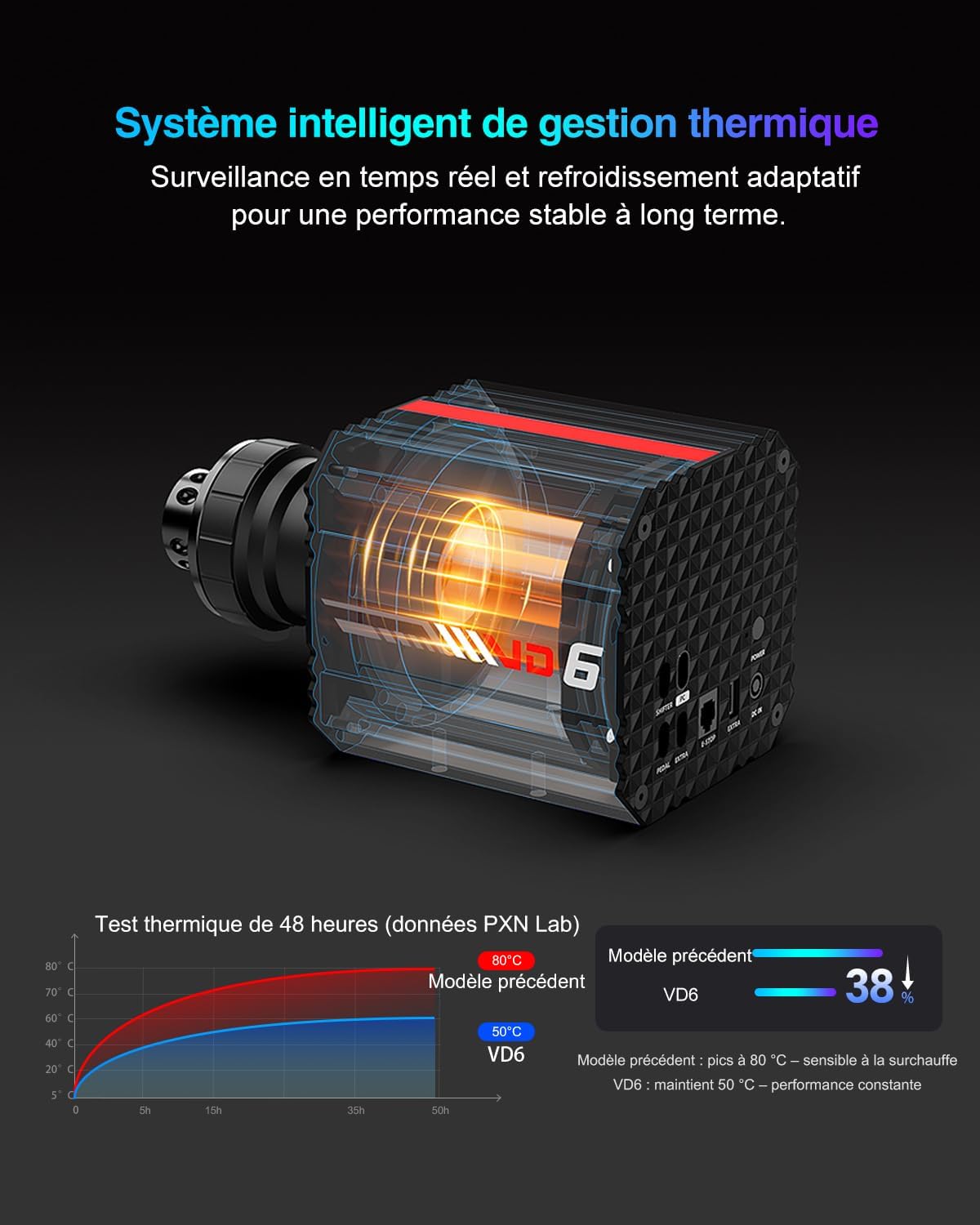
Figure 8: Diagram illustrating the intelligent thermal management system within the VD6 base, which helps maintain optimal operating temperature.
Atenció General
- Mantingueu el dispositiu net i lliure de pols. Feu servir un drap suau i sec per netejar-lo.
- Avoid exposing the base to extreme temperatures or direct sunlight.
- Ensure all cables are securely connected before and during use.
- Do not attempt to disassemble the unit, as this will void the warranty.
Resolució de problemes
If you encounter issues with your PXN VD6, refer to the following common solutions.
- No Force Feedback / Weak Force Feedback:
- Ensure the power adapter is securely connected and the base is powered on.
- Check USB connection to the PC. Try a different USB port.
- Verify force feedback settings within the PXN SimRacing software and the game itself.
- Update firmware via the PXN SimRacing software.
- Steering Wheel Not Recognized:
- Ensure the steering wheel is properly attached to the quick-release hub.
- Restart your PC and the VD6 base.
- Reinstall the PXN SimRacing software and drivers.
- In-Game Issues (e.g., incorrect button mapping):
- Calibrate the wheel and pedals within the PXN SimRacing software.
- Check in-game controller settings and re-map controls if necessary.
- For games requiring manual configuration, ensure the correct device profile is loaded or settings are applied as per PXN guidelines.
For further assistance, please contact PXN support at support@e-pxn.com.
Especificacions
| Característica | Detall |
|---|---|
| Model | VD6 |
| Marca | PXN |
| Parell continu | 6 Nm |
| Parell màxim | 7 Nm |
| Resolució del codificador | 24-bit magnetic encoder (approx. 46,603 pulses per degree) |
| Tipus de motor | Low Inertia 20-pole Servo Motor |
| Compatibilitat | PC (Windows 7-11) |
| Dimensions (paquet) | 41 x 39 x 19 cm |
| Pes (paquet) | 8.5 quilograms |
| País d'origen | Xina |
| Primera data disponible | 17 de juliol de 2025 |
Garantia i Suport
PXN offers a comprehensive warranty and dedicated customer support for the VD6 Direct Drive Steering Wheel Base.
- Garantia: The PXN VD6 comes with a 12-month warranty from the date of purchase. This warranty covers manufacturing defects and ensures the product meets high performance and reliability standards.
- Atenció al client: For any technical issues, setup assistance, or warranty claims, please contact our dedicated support team.
Informació de contacte:
Correu electrònic: support@e-pxn.com


