1. Introducció
Thank you for choosing the Klarus E5 Plus Ultra-Slim Dual Switch Triple-Light EDC Flashlight. This manual provides detailed instructions for the safe and efficient operation, maintenance, and troubleshooting of your new device. Please read this manual thoroughly before use and retain it for future reference.
2. Producte acabatview
The Klarus E5 Plus is a compact and versatile everyday carry (EDC) flashlight featuring three distinct light sources and a dual-switch design for intuitive control. Its ultra-slim profile, magnetic base, and pocket clip offer multiple hands-free lighting options.

Figure 1: Klarus E5 Plus Flashlight with key features highlighted.
3. Contingut del paquet
- Klarus E5 Plus Flashlight
- Cable de càrrega USB-C
- Manual d'usuari (aquest document)

Figure 2: Contents included in the Klarus E5 Plus package.
4. Especificacions
| Característica | Detall |
|---|---|
| Model | E5 PLUS |
| Sortida màxima | 650 Lumens (Side COB) |
| Fonts de llum | Front (White), Side (Warm White, Red) |
| Dimensions | 4.45" de llargada x 0.98" d'amplada x 0.31" d'alçada (113 mm x 25 mm x 8 mm) |
| Pes | 1.26 oz (39g) |
| Bateria | Ió de liti de 500 mAh integrat |
| Port de càrrega | USB-C |
| Temps de càrrega | Aprox. 1.5 hores |
| Temps d'execució màxim | Fins a 12.5 hores (mode baix) |
| Resistència a l'aigua | IPX4 (a prova d'esquitxades) |
| Material | Aluminum Alloy (6061) |
| Característiques especials | Dual Switch, Magnetic Base, Pocket Clip, Flicker-Free Dimming |

Figure 3: Physical dimensions and weight comparison.
5. Configuració: Càrrega de la bateria
The Klarus E5 Plus features a built-in rechargeable lithium-ion battery. Before first use, fully charge the device.
- Locate the USB-C charging port on the side of the flashlight, protected by a silicone cover.
- Gently lift the silicone cover to expose the USB-C port.
- Connect the provided USB-C cable to the flashlight and plug the other end into a compatible USB power source (e.g., computer, wall adapter).
- During charging, the indicator light on the flashlight will illuminate red.
- Once fully charged (approximately 1.5 hours), the indicator light will turn blue.
- Disconnect the charging cable and securely close the silicone cover to maintain IPX4 water resistance.

Figure 4: Charging the Klarus E5 Plus via USB-C.
6. Instruccions de funcionament
The E5 Plus features two distinct switches for controlling its multiple light sources.
6.1. Head Light (Front White Light) Operation
- Activar/Desactivar: Manteniu premut el botó Interruptor de la llum del cap (upper button) for 0.5 seconds.
- Canvia la brillantor: With the head light on, single-click the Interruptor de la llum del cap to cycle through brightness modes (Low, High).
- Mode de memòria: The head light will remember the last used brightness mode when turned off and on again.
6.2. Side Light (Warm White & Red Light) Operation
- Activar/Desactivar: Manteniu premut el botó Side Light Switch (lower button) for 0.5 seconds.
- Change Brightness (Warm White): With the warm white side light on, single-click the Side Light Switch to cycle through brightness modes (Low, Medium, High, Turbo).
- Toggle Red Light: With the warm white side light on, double-click the Side Light Switch to switch to Red Constant-On mode. Double-click again to return to warm white.
- Strobe vermell: From Red Constant-On mode, single-click the Side Light Switch to activate Red Strobe mode. Single-click again to return to Red Constant-On.
- Mode de memòria: The warm white side light will remember the last used brightness mode. Red light modes do not have memory and will default to Red Constant-On when reactivated.

Figure 5: Dual switch operation for the Klarus E5 Plus.
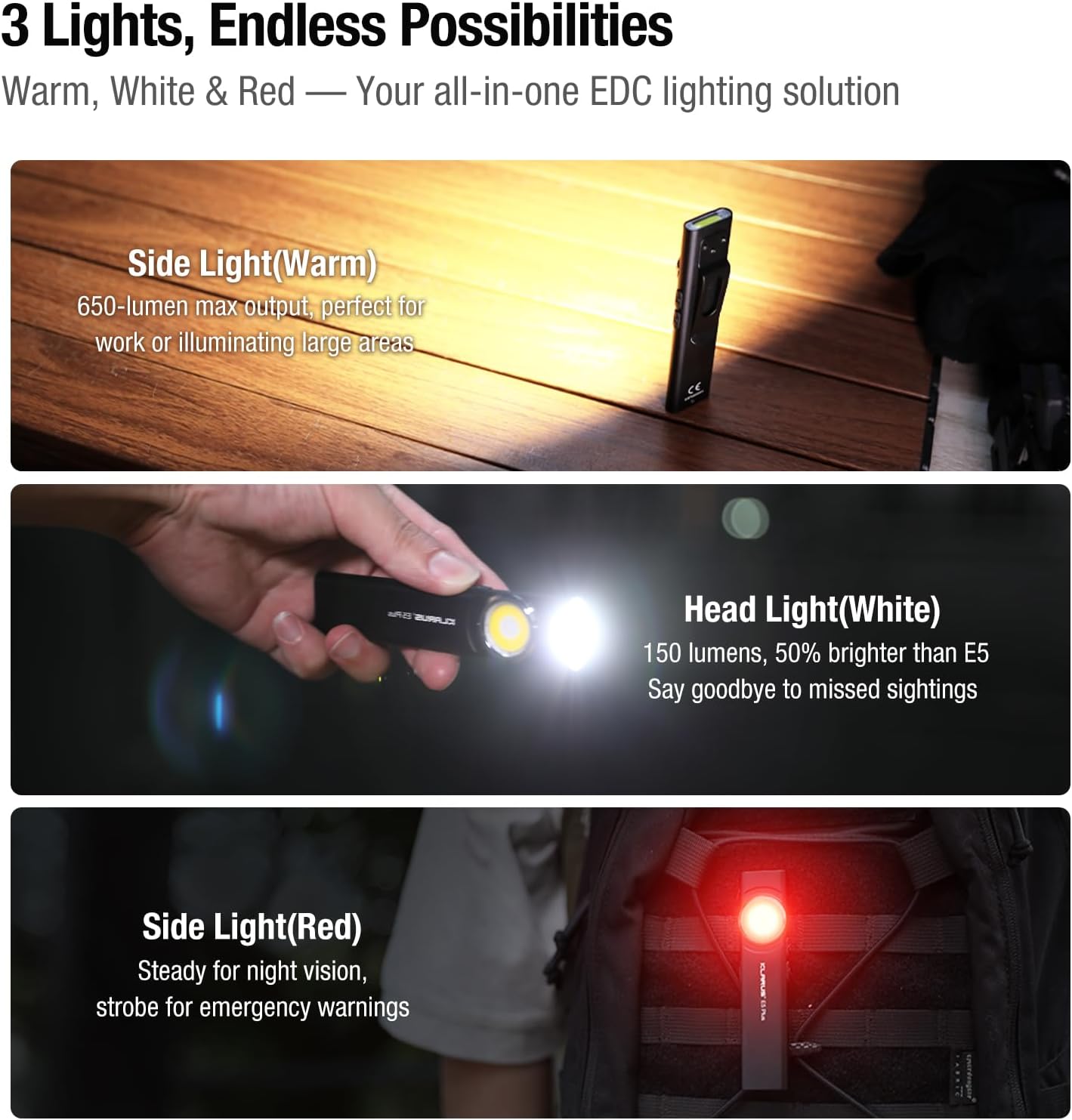
Figure 6: Three light sources and their applications.

Figure 7: Hands-free usage with magnetic base and clip.
7. Manteniment
- Neteja: Netegeu el cos de la llanterna amb un drap suauamp drap. Eviteu productes de neteja o dissolvents abrasius.
- Càrrega: Recharge the battery regularly to maintain optimal performance, especially if stored for extended periods.
- Emmagatzematge: Guardeu la llanterna en un lloc fresc i sec, lluny de la llum solar directa i de temperatures extremes.
- Resistència a l'aigua: Ensure the USB-C port's silicone cover is securely closed to maintain IPX4 water resistance.
8. Solució De Problemes
| Problema | Causa possible | Solució |
|---|---|---|
| La llanterna no s'encén. | Low battery or lockout mode activated. | Charge the battery. Ensure no buttons are accidentally pressed during storage. |
| La sortida de llum és tènue. | Low battery or incorrect mode selected. | Charge the battery. Cycle through brightness modes to select a higher setting. |
| L'indicador de càrrega no funciona. | Loose connection or faulty cable/charger. | Ensure USB-C cable is securely connected. Try a different USB-C cable or power source. |
9. Vídeos oficials de productes
The following videos provide additional visual guidance and demonstrations of the Klarus E5 Plus flashlight's features and operation.
Klarus E5 Plus - Ultra-Slim Dual Switch Triple-Light EDC Flashlight
Vídeo 1: Un overview of the Klarus E5 Plus, highlighting its ultra-slim design, dual switch, and triple-light functionality. This video demonstrates the product's key features and versatility.
10. Garantia i Suport
Klarus products are manufactured to high-quality standards. For warranty information, technical support, or service inquiries, please refer to the official Klarus website or contact your authorized dealer. Please retain your proof of purchase for warranty claims.
Fabricant: KLARUS


