1. Introducció
Welcome to your new Loluka D9 Smart Watch, a versatile 3-in-1 device combining a smartwatch, integrated earbuds, and a protective silicone case. This manual provides comprehensive instructions for the setup, operation, and maintenance of your device, ensuring you can fully utilize its features.
The Loluka D9 Smart Watch is designed to enhance your daily life with features such as Bluetooth calling, music control, AI voice assistant, and extensive fitness tracking capabilities. It is compatible with both Android (7.0 and above) and iOS (12.0 and above) smartphones.

Figure 1: Loluka D9 Smart Watch with integrated earbuds.
2. Què s'inclou
Your Loluka D9 Smart Watch package contains the following items:
- 1 x rellotge intel·ligent
- 2 x Earbuds (integrated into the watch)
- 1 x Silicone Case (for earbuds)
- 1 x Carregador
- 1 x Manual d'usuari (aquest document)
- 1 x Watch Box
3. Guia de configuració
3.1. Càrrega del dispositiu
Before initial use, ensure your smartwatch is fully charged. Connect the provided charger to the charging port on the watch. A full charge typically takes approximately 2 hours. The watch display will indicate charging status.
3.2. Instal·lació de l'aplicació
To unlock the full functionality of your Loluka D9 Smart Watch, you must install the companion application on your smartphone:
- Cerca "FaceLink" in your smartphone's app store (Google Play Store for Android or Apple App Store for iOS).
- Download and install the "FaceLink" application.
3.3. Emparellament amb el telèfon intel·ligent
Segueix aquests passos per emparellar el teu rellotge intel·ligent amb el teu telèfon intel·ligent:
- Assegureu-vos que el Bluetooth estigui habilitat al vostre telèfon intel·ligent.
- Open the "FaceLink" application on your smartphone.
- Follow the on-screen instructions within the app to search for and bind your Loluka D9 Smart Watch.
- Once successfully paired, the time, date, and language settings on your watch will automatically synchronize with your phone.
Nota: If you encounter difficulties during pairing, please refer to the Troubleshooting section.
4. Funcionament del rellotge intel·ligent
4.1. Navegació bàsica
The Loluka D9 Smart Watch features a 1.46-inch TFT full touch color screen. Swipe left, right, up, or down to navigate through menus and functions. Tap to select items.
4.2. Trucades per Bluetooth
The integrated earbuds and smartwatch allow for convenient hands-free communication.
- Contestar trucades: When a call comes in, you can answer directly from the smartwatch or by taking out the earbuds.
- Fer trucades: Use the watch to dial numbers, access call records, or select contacts from your synchronized phone book (up to 50 contacts can be synchronized).

Figure 2: Bluetooth calling feature in use.
4.3. Control de la música
Control music playback on your connected smartphone directly from your watch. Functions include play, pause, skip tracks, and volume adjustment.
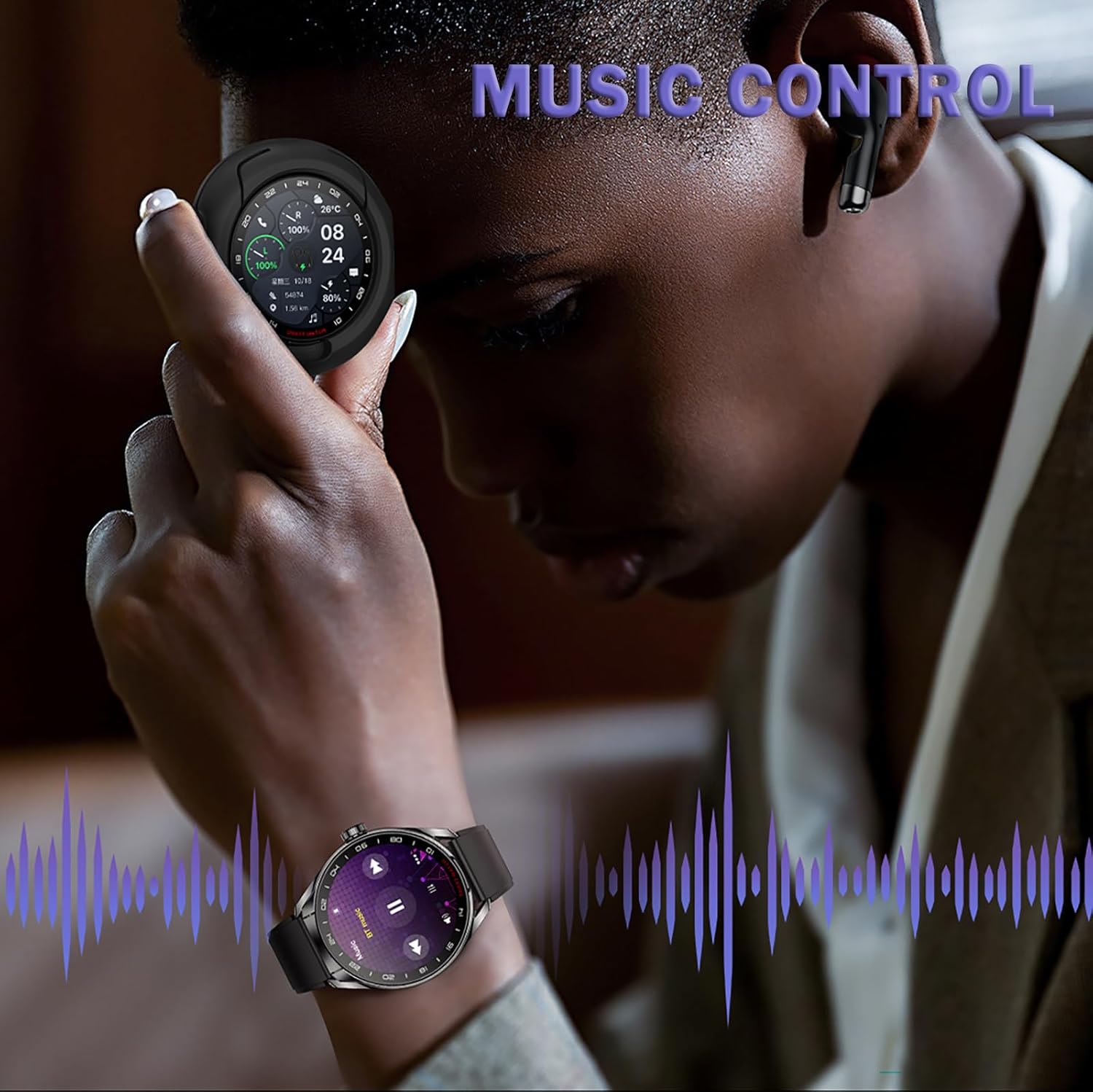
Figure 3: Music control interface on the smartwatch.
4.4. Assistent de veu amb IA
Activate the AI voice assistant through your watch or earbuds for hands-free commands and information retrieval.
4.5. Other Smartwatch Functions
The Loluka D9 Smart Watch includes a variety of additional features:
- Cronòmetre: Per a activitats de cronometratge.
- Visualització de l'hora: Digital and analog watch faces.
- Call/SMS Push: Receive notifications for calls and messages.
- Cerca el telèfon: Localitza el teu telèfon intel·ligent emparellat.
- Recordatori de beure aigua: Et recomana que et mantinguis hidratat/da.
- Turn Wrist to Light Up Screen: Convenient screen activation.
- Recordatori sedentari: Encourages movement after periods of inactivity.
- Despertador: Configura alarmes directament des del teu rellotge.
- Calendari: View dates and events.
- Temps: Get current weather updates.
- Càmera amb control remot: Activa la càmera del telèfon de forma remota.
5. Using the Integrated Earbuds
The Loluka D9 Smart Watch features discreetly integrated earbuds, providing a convenient audio solution.

Figure 4: Integrated earbuds design.
To use the earbuds, simply open the watch compartment and remove them. Place them in your ears as shown in Figure 5.

Figure 5: Proper placement of earbuds.
The package also includes a silicone case for the earbuds, offering additional protection and an alternative carrying option.

Figure 6: Earbuds with silicone protective case.
5.1. Controls tàctils dels auriculars
The earbuds feature intuitive touch controls for various functions. Refer to the table below for detailed operations:

Figura 7: Funcions de control tàctil dels auriculars.
| Funció | Wear on Both Ears | Wear on One Ear |
|---|---|---|
| Music Status: Disminuir el volum | Long press on the left ear | / |
| Music Status: Augmenta el volum | Long press on the right ear | Premsa llarga: augmenta el volum |
| Music Status: Reprodueix o posa en pausa | Feu doble clic a l'orella esquerra o dreta | Click to play or pause |
| Music Status: Cançó anterior | Feu doble clic a l'orella esquerra | / |
| Music Status: Següent Cançó | Feu doble clic a l'orella dreta | Doble clic: cançó següent |
| Activa l'Assistent de veu | 3 clicks on touch keys | 3 clicks on touch keys |
| Truca: Respon / Penja | Feu clic a la tecla tàctil | Feu clic a la tecla tàctil |
| Truca: Rebutja | Long press to reject | Long press to reject |
6. Seguiment de la salut i la forma física
The Loluka D9 Smart Watch is equipped with features to monitor your physical activity and support a healthy lifestyle.
6.1. Modes esportius
The watch offers multiple sports modes to accurately track various activities. These include:
- Córrer
- Ciclisme
- Saltar a la corda
- Ioga
- Corda de batalla
- Les abdominals
- Màquines el·líptiques
- I més.
For each activity, the watch records relevant data such as distance, speed, and duration.
6.2. Seguiment de l'activitat diària
Beyond specific sports modes, the watch continuously tracks your daily activity, including:
- Recompte de passos
- Calories cremades
- Distància recorreguda
This data helps you monitor your progress and maintain an active lifestyle.
7. Personalització
Personalize your Loluka D9 Smart Watch with a variety of watch faces.
- Pre-installed Dials: Choose from a selection of pre-designed watch faces available on the device.
- Esferas personalitzades: Import your favorite pictures from your smartphone via the "FaceLink" app to create unique, personalized watch faces.

Figura 8: Exampmenys esferes de rellotge personalitzables.
8. Manteniment
8.1. Neteja
To maintain the appearance and functionality of your watch and earbuds:
- Wipe the watch screen, body, and earbuds with a soft, dry, lint-free cloth.
- Eviteu utilitzar netejadors abrasius, dissolvents o productes químics agressius, ja que poden danyar el dispositiu.
8.2. Càrrega
Always use the charger provided with your Loluka D9 Smart Watch. Do not use damaged chargers or cables, as this may pose a safety risk or damage the device.
9. Solució De Problemes
9.1. Problemes d'aparellament
If your smartwatch fails to pair with your smartphone:
- Assegureu-vos que el Bluetooth estigui actiu al vostre telèfon intel·ligent.
- Verify that the "FaceLink" app is correctly installed and open.
- Try resetting the smartwatch to its factory settings.
- Restart your smartphone and attempt the pairing process again.
9.2. Time, Date, or Language Incorrect
The time, date, and language settings automatically synchronize with your smartphone after successful pairing. If these settings are incorrect, re-pair your smartwatch with the "FaceLink" app to ensure proper synchronization.
10. Especificacions
Key technical specifications for the Loluka D9 Smart Watch:
| Característica | Detall |
|---|---|
| Pantalla | 1.46" TFT Full Touch Color Screen |
| Versió Bluetooth | 5.3 |
| Compatibilitat | Android 7.0 i posterior, iOS 12.0 i posterior |
| Material de la banda | Silicona/Acer inoxidable |
| Diàmetre de la caixa | 50.5MM (1.99") |
| Gruix de la caixa | 14.9MM (0.59") |
| Longitud de banda | 235MM (9.25") |
| Pes de l'article | 7.1 unces |
| Nom del model | D9 |
| Característiques especials | Activity Tracker, Music Player, Notifications, Phone Call, Voice Control |
11. Assistència i garantia
For further assistance, technical support, or warranty information, please refer to the official Loluka website or contact their customer service department. Details can typically be found on the product packaging or the manufacturer's weblloc.


