Introducció
This manual provides essential information for setting up, operating, and maintaining your TCL 32S5K 32-inch QLED Smart TV. Please read these instructions carefully before using your television to ensure proper functionality and safety. Keep this manual for future reference.

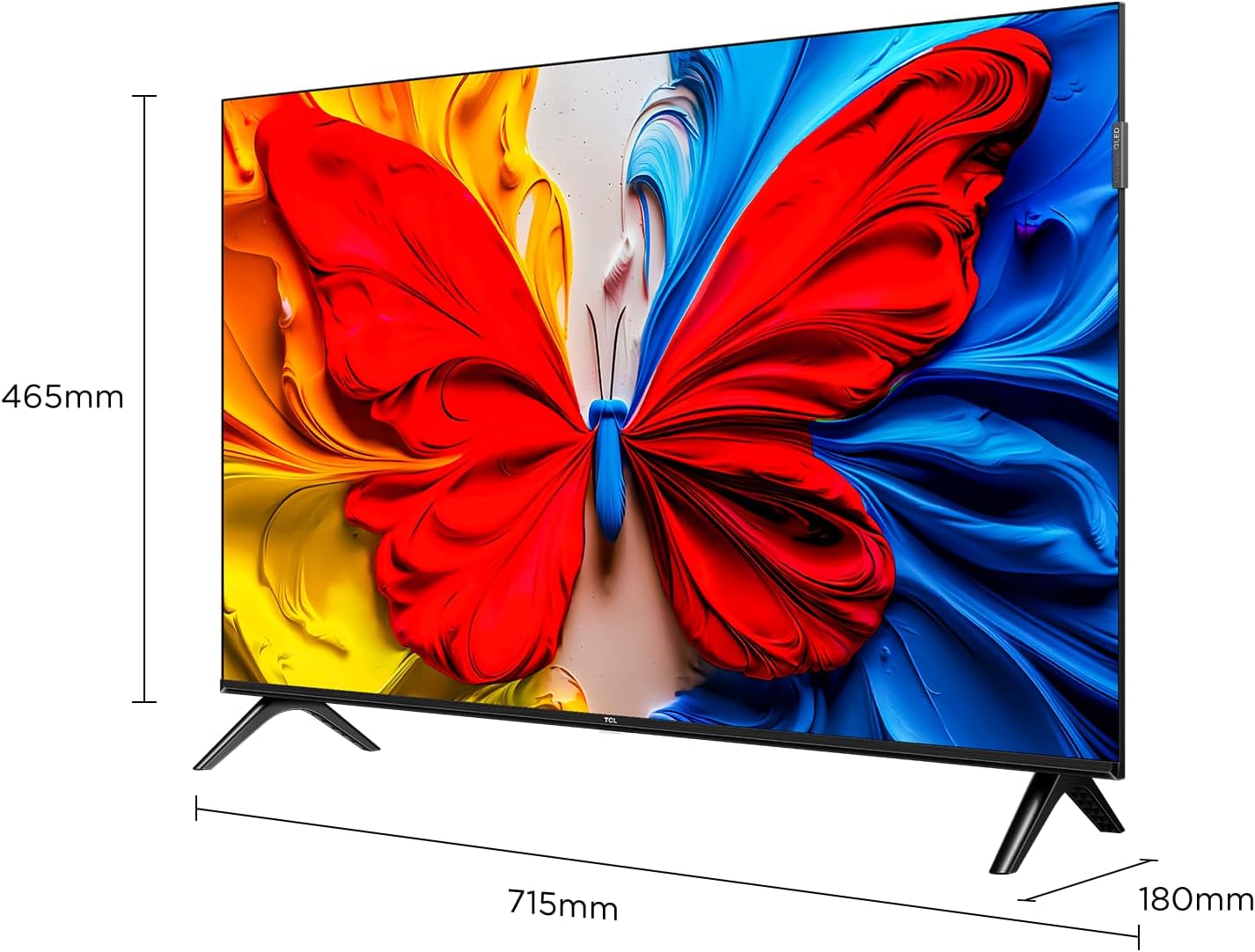
Davant view of the TCL 32S5K 32-inch QLED Smart TV. This image shows the television screen displaying vibrant colors, supported by two sleek stands.
Què hi ha a la caixa
Verifiqueu que tots els components siguin presents a l'embalatge:
- TCL 32S5K Television
- Adaptador d'alimentació
- Cable d'alimentació
- Control remot
- Moble per a TV (2 peces)
- Manual d'usuari (aquest document)
Configuració
1. Fixació del suport de TV
- Col·loqueu amb cura la pantalla del televisor amb la pantalla cap avall sobre una superfície suau i plana per evitar que es faci malbé.
- Alineeu cada suport amb les ranures corresponents de la part inferior del televisor.
- Fixeu els suports amb els cargols proporcionats. Assegureu-vos que estiguin ben fixats.

Image illustrating the dimensions of the TCL 32S5K TV and how the stands are attached to the bottom of the unit. The image shows measurements for width (715mm) and height (465mm).
2. Muntatge a la paret (opcional)
If you choose to wall mount your TV, refer to the instructions provided with your wall mount kit. Ensure the wall mount is compatible with the VESA mounting pattern of the TCL 32S5K TV. Professional installation is recommended for wall mounting.
posterior view of the TCL 32S5K TV, showing the VESA mounting points and various input ports. This view is useful for understanding wall mount compatibility and cable management.
3. Connexió de dispositius externs
El televisor disposa de diversos ports per connectar dispositius externs:
- Ports HDMI: Connect Blu-ray players, game consoles, cable/satellite boxes, etc. (Total 2 HDMI ports).
- Ports USB: Connecteu unitats USB per a la reproducció de contingut multimèdia.
- Wi-Fi: Connecta't a la teva xarxa domèstica per accedir a Internet i reproduir en temps real.
- Bluetooth: Connect compatible wireless accessories.

lateral view of the TCL 32S5K TV, highlighting the accessible input ports including HDMI and USB. This image helps users locate the connectivity options.
4. Connexió d'alimentació
Connect the power cable to the TV's power input, then plug the other end into a suitable electrical outlet.
5. Configuració inicial
En encendre'l per primera vegada, el televisor us guiarà pel procés de configuració inicial, que inclou:
- Selecció de la llengua.
- Network connection (Wi-Fi).
- Google Account sign-in (for Google TV features).
- Channel scanning (if connecting an antenna).
Instruccions de funcionament
Control remot
The included remote control allows you to navigate the TV's interface and control various functions. Insert two AAA batteries (not included) into the remote control, observing polarity.
- Botó d'encesa: Encén o apaga el televisor.
- Botó d'entrada: Selects input sources (HDMI 1, HDMI 2, USB, etc.).
- Botons de navegació: Fletxes amunt, avall, esquerra i dreta per moure's pels menús.
- Botó D'acord: Confirma les seleccions.
- Botó enrere: Torna a la pantalla anterior.
- Botó d'inici: Accedeix a la pantalla d'inici de Google TV.
- Botons de volum: Ajusta el nivell de volum.
- Botons de canal: Changes TV channels (if applicable).
- Botó de l'Assistent de Google: Activa el control per veu.
Interfície de Google TV
Your TCL 32S5K TV runs on the Google TV operating system, providing access to a wide range of streaming apps, movies, and shows. Navigate using the remote control to browse content, search, and manage settings.
- Pantalla d'inici: Displays personalized content recommendations, installed apps, and quick access to inputs.
- Aplicacions: Baixeu i gestioneu aplicacions des de Google Play Store.
- Configuració: Access TV settings for picture, sound, network, system, and more.
Característiques clau
QLED Display Technology
The TCL 32S5K features QLED (Quantum Dot LED) technology, which enhances color volume and accuracy, delivering a more vibrant and lifelike viewing experience compared to conventional LED TVs.

Diagram explaining the difference between Colorful Quantum Crystal (TCL QLED) and Conventional Quantum Crystal, highlighting the layers and efficiency.
HDR 10 Support
With HDR 10 support, the TV can display a wider range of brightness and contrast, revealing more detail in both the darkest and brightest areas of the picture. This results in a more dynamic and immersive visual experience.

Comparison image showing a scene with HDR (left) and without HDR (right), demonstrating the enhanced detail and dynamic range provided by HDR 10.
Dolby Audio
Experience rich, clear, and powerful sound with Dolby Audio. This technology optimizes the TV's audio output for an immersive listening experience, whether you're watching movies, sports, or playing games.

Image depicting a TV screen displaying a dynamic ocean wave, with visual elements suggesting enhanced audio quality, representing Dolby Audio.
Mode de joc
Game Mode automatically optimizes display settings for gaming, reducing input lag and improving responsiveness. This provides a smoother and more enjoyable gaming experience.

Split-screen image comparing "Game Mode Off" (left) and "Game Mode On" (right) during a video game scene, illustrating the visual improvements and reduced lag.
Disseny esvelt
The TCL 32S5K features a modern, slim design with a metallic bezel-less display, allowing the screen to blend seamlessly into your living space and providing a more immersive viewexperiència.

Mostra d'imatgesasing el pro primfile and metallic bezel-less design of the TCL 32S5K TV, emphasizing its modern aesthetic.
Manteniment
- Neteja de la pantalla: Netegeu suaument la pantalla amb un drap suau i sense borrissol. Per a les marques difícils, utilitzeu un netejador de pantalles dissenyat específicament per a televisors, aplicant-lo al drap, no directament a la pantalla.
- Neteja de l'armari: Feu servir un drap suau i sec per netejar el moble del televisor. Eviteu utilitzar productes de neteja o dissolvents abrasius.
- Ventilació: Assegureu-vos que les obertures de ventilació del televisor no estiguin bloquejades per evitar el sobreescalfament.
- Cable d'alimentació: Reviseu regularment el cable d'alimentació per si hi ha algun dany. Si està malmès, poseu-vos en contacte amb el servei d'atenció al client per a la seva substitució.
Resolució de problemes
Abans de contactar amb l'atenció al client, prova les solucions següents per a problemes comuns:
| Problema | Possible solució |
|---|---|
| No hi ha alimentació / el televisor no s'encén. |
|
| No hi ha imatge, però hi ha so. |
|
| No hi ha so, però hi ha imatge. |
|
| El comandament a distància no funciona. |
|
| TV turns on for a few seconds then shuts off. |
|
Especificacions
| Característica | Detall |
|---|---|
| Nom del model | 32S5K |
| Mida de la pantalla | 32 polzades |
| Tecnologia de visualització | QLED |
| Resolució | 1920 x 1080 (FHD) |
| Freqüència d'actualització | 60 Hz |
| Format HDR compatible | HDR10 |
| Tecnologia d'àudio | Dolby Audio, DTS, Dolby Atmos |
| Sistema operatiu | Google TV |
| Connectivitat | Wi-Fi, Bluetooth, 2x HDMI, USB |
| Dimensions del producte (P x A x A) | 2.95 "P x 28.15" W x 16.61" H |
| Pes de l'article | 4.42 quilos |
| Tipus de muntatge | Suport de taula, suport de paret |
| Components inclosos | Power Adapter, Power Cable, Remote Control, Stand, User Manual |
Garantia i Suport
For warranty information, please refer to the warranty card included with your product or visit the official TCL website. For technical support or service inquiries, please contact TCL customer service through their official channels. Keep your purchase receipt as proof of purchase for warranty claims.
Podeu trobar més informació i suport a TCL Store on Amazon.