1. Introducció
This manual provides comprehensive instructions for the PXN W AS Gaming Racing Wheel. The W AS is an 11-inch sim racing wheel designed for use with PXN VD4 and VD6 direct drive wheel bases, offering an immersive and precise control experience for PC racing simulators.

Imatge: Frontal view of the PXN W AS Gaming Racing Wheel, showcasing its 11-inch design, control layout, and black and red color scheme.
2. Característiques clau
- W AS Racing Wheel & Compatibility: The W AS is a 28cm (11-inch) sim racing wheel featuring the D1 quick-release system, fully compatible with PXN VD4 and VD6 direct drive wheel bases. Designed for use with Windows 7-11, it works seamlessly with popular racing simulators such as iRacing, Assetto Corsa, the F1 series, and Euro Truck Simulator 2.
- Premium Build with Comfortable Grip: Built on a rigid aluminum alloy frame and wrapped in high-quality microfiber leather, the W AS gaming steering wheel delivers a lightweight yet solid feel (only 1.05kg), offering superior control and long-lasting comfort during intense racing sessions.
- Full Control Layout for Racing Enthusiasts: Equipped with 19 programmable buttons, 2 rotary encoders, and 4 aluminum paddle shifters (2 magnetic top paddles and 2 linear analog lower paddles), this racing wheel provides a comprehensive input solution for serious sim racers and PC gamers alike.
- Quick-Release Hub System: The quick-release mechanism enables fast, tool-free installation and removal from PXN VD-series bases. The secure locking system guarantees zero play or flex while racing. Note: Only compatible with PXN VD4 and VD6 bases.
- Dynamic & Customizable RGB LED Lights: Features dynamic and fully customizable RGB LED lights for an immersive racing atmosphere.

Imatge: Detallada view of the wheel's central panel, highlighting the dynamic RGB LED lights, a 20-position pressable rotary encoder, and multiple programmable buttons.
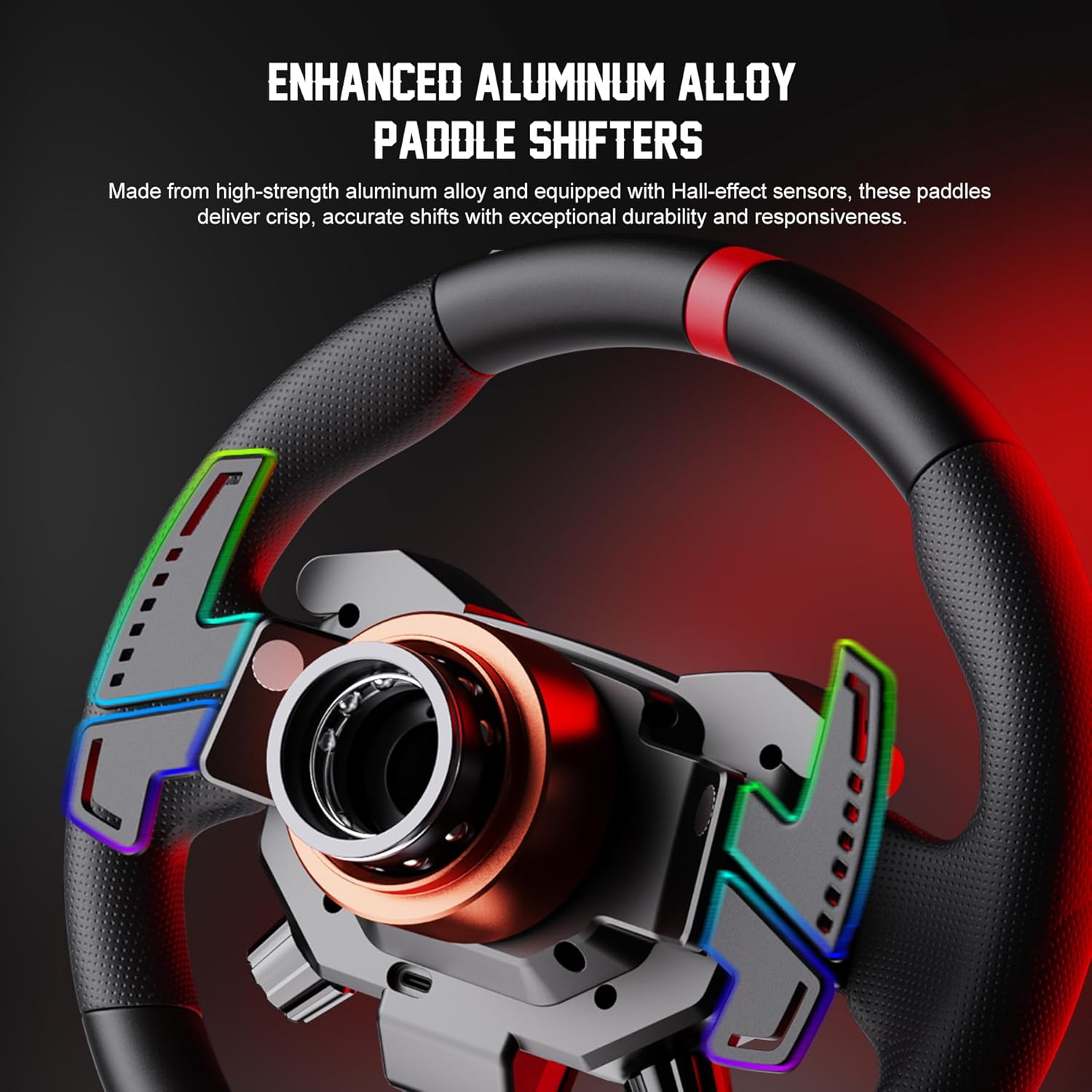
Image: Close-up of the enhanced aluminum alloy paddle shifters, designed for crisp and accurate shifts.

Image: The customized quick-release hub system, showing how the wheel attaches to the base for secure and tool-free installation.

Imatge: Un primer pla view of the premium microfiber leather grip, highlighting its texture and stitching for comfort and durability.
3. Configuració
3.1 Desembalatge i inspecció inicial
Upon receiving your PXN W AS Gaming Racing Wheel, carefully unbox all components. Verify that all items listed in the package contents are present and inspect for any visible damage. If any items are missing or damaged, please contact customer support immediately.
The package includes the W AS steering wheel and a user manual. Please note that the direct drive base is not included and must be purchased separately (compatible with PXN VD4 and VD6 bases).
3.2 Attaching to a PXN VD Series Base
The PXN W AS steering wheel utilizes a D1 quick-release system for easy attachment and detachment from compatible PXN VD4 or VD6 direct drive bases. Align the quick-release mechanism on the steering wheel with the shaft on your direct drive base and push firmly until it clicks into place. Ensure the connection is secure to prevent any play or flex during use.
For a visual guide on setting up PXN VD Direct Drive Servo Motor Bases, please refer to the video below:
Video: An unboxing and initial setup guide for PXN VD Direct Drive Servo Motor Bases, demonstrating how to connect the wheel.
3.3 Instal·lació i configuració del programari
To fully customize button mappings, LED settings, and optimize performance, download and install the PXN SimRacing software from PXN’s official website. This software allows for fine-tuning of force feedback and importing game profiles. Ensure your PC is running Windows 7-11 for compatibility.
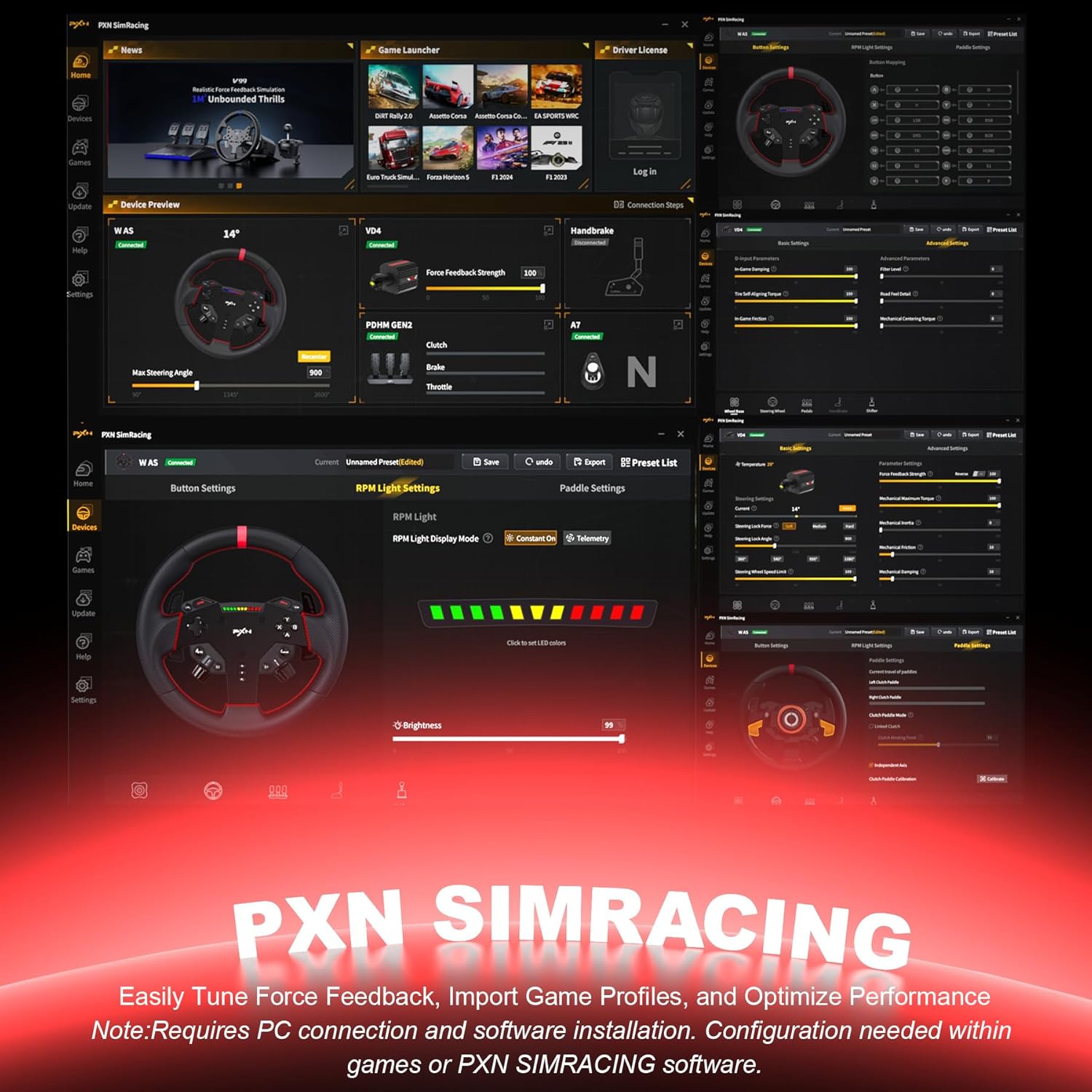
Image: Screenshot of the PXN SimRacing software interface, showing options for device preview, button settings, RPM light configuration, and paddle settings.
4. Instruccions de funcionament
4.1 Button and Control Layout
The PXN W AS features a comprehensive control layout for optimal racing performance:
- 19 botons programables: Utilize these buttons for in-game navigation, camera control, pit strategy, and other functions.
- 2 Rotary Encoders: These 20-position pressable rotary encoders provide precise control for adjustments such as brake bias, traction control (TC), anti-lock braking system (ABS), and fuel mixture.
- 4 Aluminum Paddle Shifters:
- 2 Magnetic Top Paddles: For quick and responsive gear shifts.
- 2 Linear Analog Lower Paddles: Offer nuanced control for clutch or other analog functions.
4.2 Dynamic RGB Rev Lights
The integrated dynamic RGB Rev Lights provide visual feedback on engine RPM, shift points, and other in-game telemetry. These lights can be customized via the PXN SimRacing software to match your preferences and enhance immersion.
4.3 Compatibilitat del joc
The PXN W AS Gaming Racing Wheel is compatible with Windows 7-11 PCs and a wide range of popular racing titles. Some recommended games include:
- iRacing
- Assetto Corsa series (Assetto Corsa, Assetto Corsa Competizione, Assetto Corsa EVO)
- F1 series (F1 2021, F1 22, F1 23, F1 24)
- Forza series (Forza Horizon 4, Forza Horizon 5, Forza Motorsport)
- Euro Truck Simulator 2
- Dirt Rally 2.0
- Project CARS 2
- I molts més.
For certain games, manual setup or specific force feedback configuration files may be required. Refer to the PXN official website for detailed instructions and downloads under the Tool section. If you have any questions regarding game compatibility or setup procedures, please contact PXN Support Team at support@e-pxn.com.

Image: A visual representation of various PC racing games compatible with the PXN W AS wheel, including Assetto Corsa, Forza Horizon 5, Dirt Rally 2.0, EA WRC, LMU, F1 Series, Project CARS 2, American Truck Simulator, and Euro Truck Simulator 2.
5. Manteniment
Proper maintenance ensures the longevity and optimal performance of your PXN W AS Gaming Racing Wheel.
- Neteja: Use a soft, dry cloth to wipe down the wheel and its components. For stubborn dirt, a slightly damp cloth with mild soap can be used, but ensure no liquid enters the internal mechanisms. Avoid abrasive cleaners or solvents.
- Emmagatzematge: When not in use, store the racing wheel in a clean, dry environment away from direct sunlight, extreme temperatures, and excessive dust.
- Gestió de cables: Ensure all cables are neatly organized and not under tension to prevent damage to connectors or wires.
6. Solució De Problemes
If you encounter issues with your PXN W AS Gaming Racing Wheel, please refer to the following common troubleshooting steps:
- Sense poder/reconeixement:
- Ensure the direct drive base is properly connected to power and turned on.
- Verify the quick-release connection between the wheel and the base is secure.
- Check USB connections to your PC. Try a different USB port.
- Reinicieu el vostre ordinador.
- Buttons/Paddles Not Responding:
- Ensure the PXN SimRacing software is installed and updated.
- Check button mappings within the software and in-game settings.
- Perform a calibration through the PXN SimRacing software if available.
- Problemes de retroalimentació de força:
- Adjust force feedback settings within the PXN SimRacing software and in-game.
- Ensure the latest drivers and firmware for your PXN direct drive base and wheel are installed.
- Alguns jocs poden requerir un professional específic de retroalimentació de forçafiles; check the PXN official website for game-specific guides.
If these steps do not resolve the issue, please contact PXN customer support for further assistance.
7. Especificacions
| Atribut | Detall |
|---|---|
| Marca | PXN |
| Model | PXN Steering Wheel - W AS |
| Pes de l'article | 5.1 lliures (aprox. 2.3 kg) |
| Dimensions del paquet | 15.59 x 14.92 x 6.77 polzades |
| Color | Negre |
| Material | Microfiber Leather, Aluminum |
| Diàmetre de l'element | 11 polzades (28 cm) |
| Mida de l'empunyadura | 11 polzades |
| Compatibilitat | PXN VD4/VD6 Direct Drive Bases, Windows 7-11 |
| Botons | 19 Botons programables |
| Codificadors rotatius | 2 (20-position pressable) |
| Paletes de canvi | 4 Aluminum (2 magnetic, 2 linear analog) |
8. Garantia i Suport
The PXN W AS Gaming Racing Wheel includes a 12-month warranty from the date of purchase. This warranty covers manufacturing defects and ensures product quality.
For any technical assistance, product inquiries, or warranty claims, PXN offers 24/7 expert customer support. You can reach the PXN Support Team via email at support@e-pxn.com.
Si us plau, conserveu el comprovant de compra per validar la garantia.


