1. Introducció
The iKiKin V702 is a professional On-Board Diagnostics (OBD2) diagnostic tool designed to help vehicle owners and technicians quickly and accurately identify issues with their vehicles. This device supports all OBDII/EOBD protocols and offers a wide range of functions, including reading and clearing fault codes, displaying live data, and performing various system tests. Its user-friendly interface and extensive DTC database make it an essential tool for maintaining vehicle health and performance.

Figure 1: The iKiKin V702 OBD2 Diagnostic Tool and its retail packaging.
2. Informació de seguretat
- Feu sempre les proves d'automòbils en una zona ben ventilada.
- Utilitzeu protecció ocular que compleixi els estàndards ANSI.
- Mantingueu la roba, els cabells, les mans, les eines, els equips de prova, etc. allunyats de totes les parts del motor en moviment o calentes.
- No connecteu ni desconnecteu cap equip de prova mentre l'encesa estigui activada o el motor estigui en marxa.
- The vehicle's exhaust contains poisonous carbon monoxide. To prevent injury or death, do not run the engine in an enclosed area without proper ventilation.
- Always refer to the vehicle's service manual for specific service procedures.
3. Producte acabatview
3.1 Disseny del dispositiu
The iKiKin V702 features a compact, handheld design with a clear color display and intuitive button layout for easy navigation.

Figura 2: Frontal view of the iKiKin V702, highlighting the 2.8-inch screen and control buttons.
3.2 Característiques clau
- Pantalla a color d'2.8 polzades: Provides clear display of diagnostic information.
- Extensive DTC Database: Over 36,000 Diagnostic Trouble Codes for comprehensive error detection.
- Funcions OBDII/EOBD completes: Supports all 10 modes of OBDII testing.
- Suport multi-idioma: Available in 8 languages including English, German, French, Spanish, Italian, Dutch, Chinese, and Russian.
- Compatibilitat àmplia de vehicles: Works with most US vehicles (1996 and newer), EU vehicles (2002 and newer), and Asian vehicles (2008 and newer).
- Plug & Play: No batteries or chargers required; powered directly from the vehicle's OBD2 port.

Figura 3: Mésview of the iKiKin V702's design and ease of use.
4. Configuració
The iKiKin V702 is a plug-and-play device, requiring minimal setup.
- Localitza el port OBD2: The OBD2 port is typically located under the dashboard on the driver's side of the vehicle. Refer to your vehicle's manual if you cannot find it.
- Turn Off the Ignition: Ensure the vehicle's ignition is in the OFF position before connecting the tool.
- Connecteu l'eina: Plug the 16-pin connector of the iKiKin V702 into the vehicle's OBD2 port. Ensure a secure connection.
- Engegueu l'encesa: Turn the vehicle's ignition to the ON position (engine off). The tool will automatically power on and begin communication with the vehicle's ECU.
5. Instruccions de funcionament
Navigate through the menu using the directional buttons (UP, DOWN, LEFT, RIGHT) and confirm selections with the OK button. Use the ESC/Return button to go back to the previous screen.
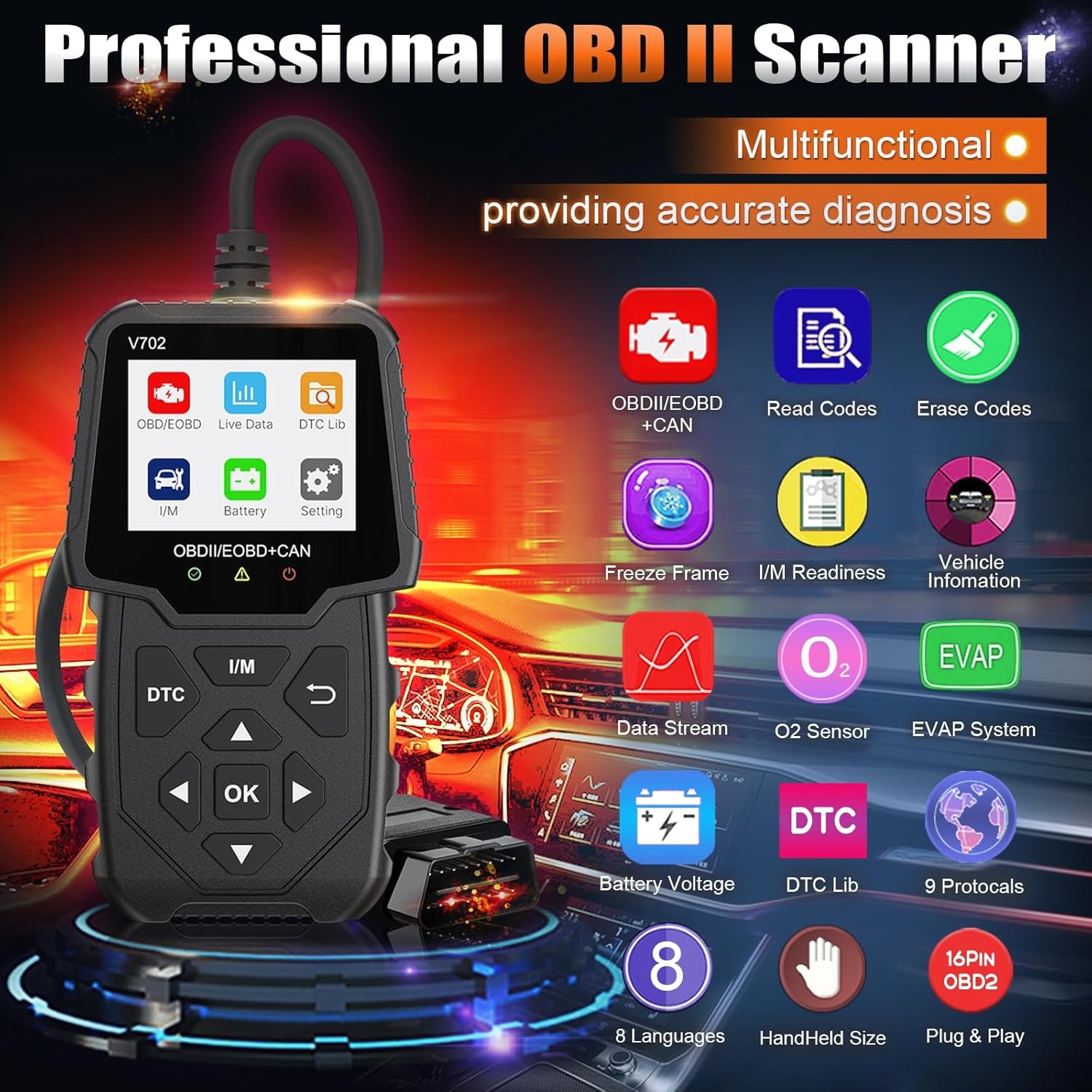
Figure 4: Main menu showing available diagnostic functions.
5.1 Read & Clear Fault Codes
- Al menú principal, seleccioneu "Llegir codis" per a view current, pending, and permanent Diagnostic Trouble Codes (DTCs).
- To clear codes, select "Erase Codes" from the main menu. Confirm the action when prompted. This will turn off the Check Engine Light (MIL).
Note: Clearing codes only turns off the warning light. The underlying issue must be resolved to prevent the code from reappearing.

Figure 5: Clearing fault codes and turning off the Check Engine Light.
5.2 Flux de dades en directe
This function displays real-time operational parameters from the vehicle's sensors, such as engine RPM, vehicle speed, oxygen sensor readings, and more. This data can be viewed in numerical or graphical format.
- Select "Live Data" from the main menu.
- Trieu els paràmetres que voleu monitoritzar.
- Observe the real-time values to diagnose performance issues.
5.3 Disponibilitat I / M
I/M Readiness (Inspection/Maintenance Readiness) indicates whether the various emissions-related systems on the vehicle are operating correctly and have completed their diagnostic tests. This is crucial for passing emissions inspections.
- Seleccioneu "Preparació I/M" al menú principal.
- The screen will display the status of various monitors (e.g., O2 Sensor Monitor, EVAP System Monitor) as either "OK" (completed) or "INC" (incomplete).

Figure 6: Using the one-click I/M Readiness function to check emission system status.
5.4 Prova del sensor d'O2
Aquesta funció permet la recuperació i viewing of O2 sensor monitor test results for the most recently completed tests from the vehicle's on-board computer. This helps in diagnosing fuel efficiency and emissions-related problems.
- Select "O2 Sensor Test" from the main menu.
- Review the test results for each oxygen sensor.
5.5 Prova del sistema EVAP
The EVAP (Evaporative Emission Control System) Test function initiates a leak test for the vehicle's EVAP system. This test is performed by the vehicle's ECU and helps detect fuel vapor leaks.
- Select "EVAP System Test" from the main menu.
- Follow any on-screen prompts to initiate the test.
5.6 Volum de la bateriatage Comproveu
Monitoritzar el volum de la bateria del vehicletage in real-time to assess its state of charge and overall health.
- Select "Battery" or "Battery Voltage" del menú principal.
- La bateria actual voltages mostrarà e.

Figure 7: Displaying real-time battery voltage.
6. Solució De Problemes
- Sense energia: Ensure the OBD2 connector is securely plugged into the vehicle's port. Check the vehicle's ignition is in the ON position. Verify the vehicle's battery has sufficient charge.
- Error d'enllaç: This indicates a communication failure. Verify the ignition is ON, the tool is correctly connected, and the vehicle is OBDII compliant. Try turning the ignition OFF, waiting 10 seconds, then turning it ON again before re-attempting.
- Els DTC no s'esborren: Ensure the underlying issue causing the fault code has been resolved. Some codes may require multiple drive cycles to clear after a repair.
- Funcionament lent: The iKiKin V702 features powerful industrial chips for fast scanning. If operation is unusually slow, ensure the vehicle's electrical system is stable.
7. Especificacions
| Característica | Especificació |
|---|---|
| Mostra | 2.8-inch Color Screen (240x320 pixels) |
| Vol. Operatiutage | 9-16V (via port OBD2) |
| Protocols compatibles | KWP2000, CAN, ISO9141, J1850 PWM, J1850 VPW, and others (9 protocols total) |
| Base de dades DTC | Més de 36,000 codis |
| Compatibilitat de vehicles | US vehicles (1996+), EU vehicles (2002+), Asia vehicles (2008+) |
| Temperatura de funcionament | De 0 °C a 60 °C (32 °F a 140 °F) |
| Temperatura d'emmagatzematge | -20 °C a 70 °C (-4 °F a 158 °F) |
| Dimensions | Aproximadament 20.2 x 18.5 x 4.4 cm |
| Pes | Aproximadament 240 g |

Figure 8: Global compatibility and supported languages/protocols.
8. Manteniment
- Neteja: Utilitzeu un suau, damp drap per netejar el dispositiu. No utilitzeu productes de neteja abrasius ni dissolvents.
- Emmagatzematge: Store the tool in a dry, clean environment away from direct sunlight and extreme temperatures.
- Cura del cable: Avoid bending or twisting the OBD2 cable excessively to prevent damage.
9. Garantia i Suport
For warranty information and technical support, please refer to the documentation included with your purchase or contact the manufacturer directly. Keep your purchase receipt as proof of purchase.


