Introducció
This manual provides essential information for the setup, operation, and maintenance of your ONIDA 80 cm (32 inch) Smart Genius Series HD Ready Smart LED TV, model 32AHI. Please read these instructions carefully before using your television to ensure proper functionality and safety. Keep this manual for future reference.
Què hi ha a la caixa
En desembalar, comproveu que hi hagi tots els elements següents:
- 1 x ONIDA 80 cm (32 inch) Smart Genius Series HD Ready Smart LED TV Unit
- 1 x comandament a distància
- 1 x cable mini AV
- 1 x cable d'alimentació
- 1 x Wall Mount Kit (for wall installation)
- 1 x Manual d'usuari (aquest document)
- 2 piles AAA (per al comandament a distància)
- 2 x TV Stands (for table-top installation)
- 4 x cargols de suport

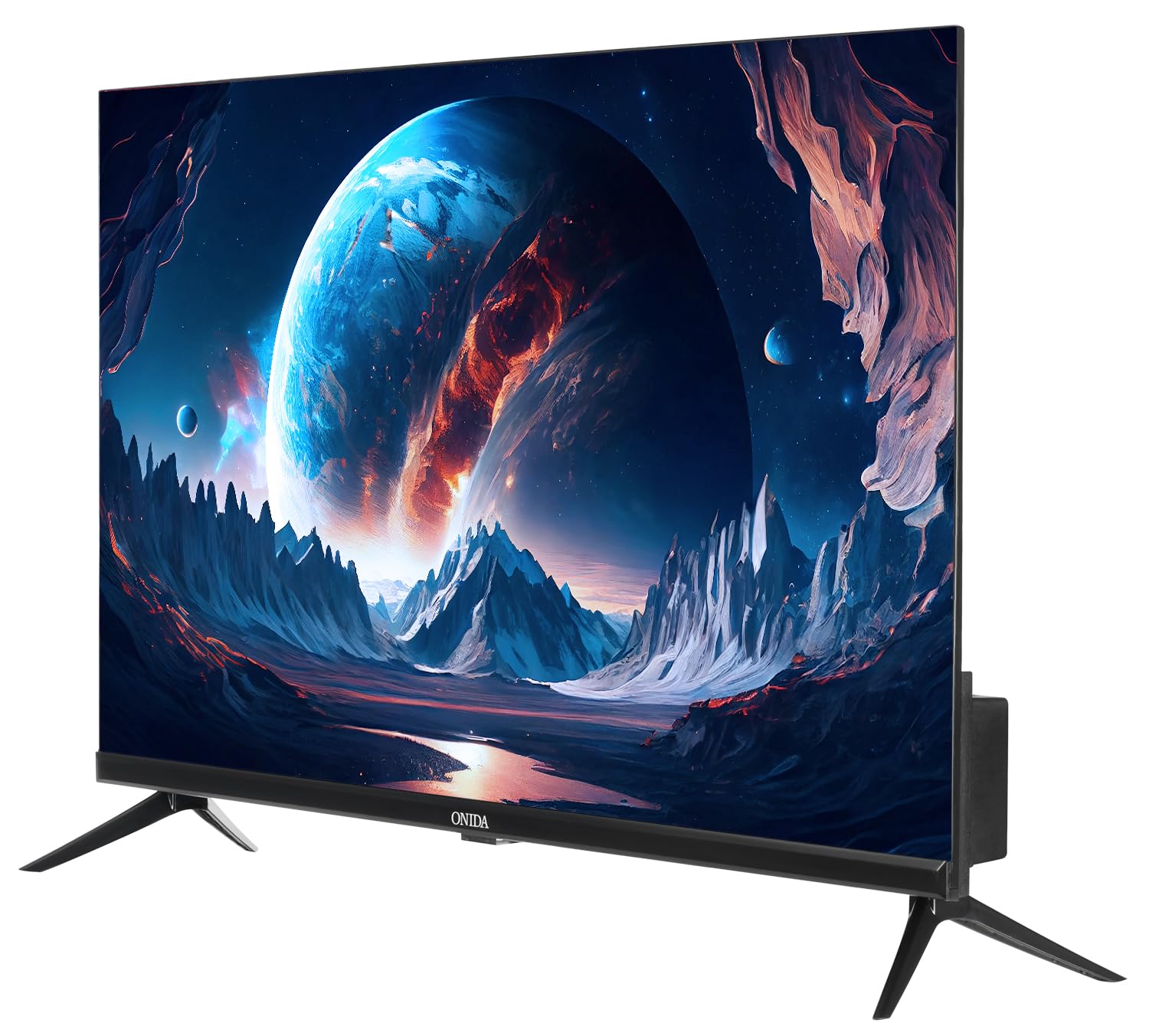
Image: The ONIDA 32AHI Smart LED TV and its included accessories, such as the remote control, power cord, and stand components.
Configuració
1. Instal·lació dels suports de TV
If you plan to place the TV on a table or cabinet, attach the included stands:
- Col·loqueu amb cura la pantalla del televisor amb la pantalla cap avall sobre una superfície suau i plana per evitar que es faci malbé.
- Alineeu cada suport amb els forats de cargol corresponents a la part inferior del televisor.
- Secure the stands using the provided stand screws. Ensure they are tightened firmly.
2. Muntatge a la paret (opcional)
If you intend to wall-mount your TV, use the provided wall mount kit. Professional installation is recommended for wall mounting to ensure safety and proper alignment. Refer to the separate instructions included with the wall mount kit for detailed steps.
Imatge: Part posterior view of the ONIDA 32AHI TV, illustrating the wall mount screw points and various input ports.
3. Potència de connexió
Connect the power cord to the TV's power input and then plug it into a standard AC power outlet (140 Volts).
4. Connexió de dispositius externs
El televisor té diversos ports per connectar diversos dispositius:
- Ports HDMI (2): Connecteu descodificadors, reproductors de Blu-ray, consoles de jocs o altres dispositius compatibles amb HDMI.
- Port USB (1): Connecteu discs durs, unitats flaix USB o altres dispositius USB per a la reproducció de contingut multimèdia.
- Mini AV Cable: Use for older devices requiring composite video and audio input.
- Wi-Fi: Connecta't a la xarxa domèstica per a funcions de televisió intel·ligent i accés a Internet.

Imatge: Una imatge detallada view of the connectivity panel on the ONIDA 32AHI TV, showing HDMI, USB, and other input/output ports.
Funcionament del televisor
1. Engegada i configuració inicials
After connecting the power, press the power button on the remote control or the TV. Follow the on-screen instructions for initial setup, including language selection, network connection (Wi-Fi), and channel scanning.
2. Smart TV Features (Coolita OS)
Your ONIDA Smart Genius TV runs on the Coolita operating system, providing access to a variety of applications and streaming services. Navigate the smart interface using your remote control.
- Aplicacions compatibles: YouTube, YouTube Music, Jiohotstar, Prime Video, MX Player, SonyLiv, Zee5, Browser, Coolita Channel, CC Cast.
- Accés a l'aplicació: Select the 'Apps' icon on the home screen to browse and launch installed applications.

Image: The ONIDA 32AHI TV screen showing the smart interface with icons for YouTube, Prime Video, JioHotstar, and other streaming applications.
3. Coolink Feature (Phone as Remote)
The Coolink feature allows you to use your smartphone as a remote control for your TV. Download the compatible Coolink app on your smartphone and follow the in-app instructions to pair it with your TV. This enables navigation, content search, and voice control directly from your phone.

Image: Illustration of the Coolink feature, demonstrating a smartphone being used as a remote control for the TV, including voice search and content casting.
4. CC Cast Feature
Utilize the CC Cast feature to mirror content from your compatible smartphone or tablet directly onto your TV screen. Ensure both devices are connected to the same Wi-Fi network for seamless casting.

Image: Visual representation of the CC Cast function, where a smartphone wirelessly displays its screen content onto the ONIDA TV.
5. Configuració d'àudio i pantalla
- Sortida de so: The TV features 20 Watts audio output with Box Speakers and supports Dolby Digital for enhanced sound quality. Adjust audio settings via the TV menu.
- Visualització: Enjoy HD Ready (1366 x 768) resolution with a 60 Hertz refresh rate and a wide 178-degree viewing angle. Picture settings can be customized in the TV menu to suit your preferences.
Manteniment
Regular maintenance helps prolong the life of your TV:
- Neteja de la pantalla: Netegeu suaument la pantalla amb un drap suau, sec i sense borrissol. Per a marques difícils, netegeu lleugerament.ampNetegeu el drap amb aigua o un netejador de pantalles especialitzat (no ruixeu directament sobre la pantalla).
- Neteja de l'armari: Feu servir un drap suau i sec per netejar el moble del televisor. Eviteu utilitzar productes de neteja o dissolvents abrasius.
- Ventilació: Assegureu-vos que les obertures de ventilació del televisor no estiguin bloquejades per evitar el sobreescalfament.
- Apagar: Desendolleu el televisor de la presa de corrent durant tempestes o quan el deixeu sense vigilància durant llargs períodes.
Resolució de problemes
Si teniu problemes amb el televisor, consulteu les solucions habituals següents:
- Sense energia:
- Comproveu si el cable d'alimentació està connectat correctament tant al televisor com a la presa de corrent.
- Comproveu que la presa de corrent funcioni provant-la amb un altre dispositiu.
- Premeu el botó d'engegada del televisor, no només del comandament a distància.
- Sense imatge/so:
- Verify that the correct input source (HDMI, AV, etc.) is selected.
- Comproveu totes les connexions de cable entre el televisor i els dispositius externs.
- Ensure the volume is not muted or set to zero.
- Funcions intel·ligents que no funcionen:
- Check your Wi-Fi connection. Ensure the TV is connected to a stable internet network.
- Restart the TV by unplugging it for a few minutes and then plugging it back in.
- Update the TV's software if an update is available (check settings menu).
- El control remot no respon:
- Substituïu les piles AAA del comandament a distància.
- Assegureu-vos que no hi hagi obstacles entre el comandament a distància i el sensor d'infrarojos del televisor.
For further assistance, please contact ONIDA customer support.
Especificacions
| Característica | Detall |
|---|---|
| Marca | onida |
| Model | 32AHI |
| Mida de la pantalla | 80 cm (32 polzades) |
| Tecnologia de visualització | LED |
| Resolució | HD Ready (1366 x 768 píxels) |
| Freqüència d'actualització | 60 Hz |
| Viewangle ing | 178 graus |
| Sistema operatiu | Coolita |
| Capacitat d'emmagatzematge de memòria | 4 GB |
| Mida instal·lada de la memòria RAM | 512 MB |
| Coprocessador gràfic | Mali-G31MP2 800M |
| Sortida de so | 20 watts |
| Configuració dels altaveus | Box Speaker, Dolby Digital |
| Connectivitat | 2 HDMI, 1 USB, Wi-Fi, Bluetooth |
| Font d'alimentació | CA (140 volts) |
| Dimensions del producte (LxWxH) | 73.5 x 18 x 47.6 cm |
| Pes de l'article | 3.95 kg |
| Tipus de muntatge | Suport de paret i suport de taula |
| Aplicacions compatibles | Youtube, Prime Video, SonyLiv, Hungama, JioCinema, Zee5, Eros Now |

Image: The ONIDA 32AHI TV highlighting key features like HD Ready display, Coolink, CC Cast, and 512MB RAM.
Vídeos oficials de productes
ONIDA 80 cm (32 inch) Smart Genius Series HD Ready Smart LED TV 32AHI Overview
Vídeo: Un overview of the ONIDA 80 cm (32 inch) Smart Genius Series HD Ready Smart LED TV 32AHI, showcasing les seves característiques i disseny.
ONIDA Smart TV Features - Perfect Picture, Perfect Sound, Coolink
Video: This video highlights the "Perfect Picture" and "Perfect Sound" capabilities of ONIDA Smart TVs, along with a demonstration of the Coolink feature for smartphone control.
Garantia i Suport
Your ONIDA TV comes with a 1-year comprehensive warranty from the date of purchase. The warranty can be availed using your purchase invoice.
For customer support, inquiries, or warranty claims, please contact:
- Fabricant: MIRC ELECTRONICS LTD
- Adreça: Mahakali Caves Road, Andheri East, Mumbai - 400093
- Núm. d'atenció al client: 7490955555
- Correu electrònic: customer.care@onida.com