1. Introducció
Thank you for choosing the DEPSTECH DS650-DL Dual-Lens Articulating Industrial Endoscope. This device is designed for detailed visual inspection in hard-to-reach areas, featuring a dual-lens system with 210° bidirectional rotation, a 4.5-inch IPS monitor, and 1080P high-definition imaging. It is an essential tool for home maintenance, vehicle inspection, and machinery checks.
Please read this manual thoroughly before use to ensure proper operation and to maximize the product's lifespan.
2. Informació de seguretat
- Do not use the endoscope in environments with flammable or explosive gases.
- The probe is IP67 waterproof, but the main unit is not. Avoid exposing the main unit to water or excessive moisture.
- No intenteu desmuntar ni modificar el dispositiu. Això anul·larà la garantia i pot causar danys.
- Mantingueu el dispositiu fora de l'abast dels nens.
- Eviteu l'exposició directa dels ulls a les llums LED.
- The device features overheat protection. If the temperature exceeds 70°C, a warning will display. If it exceeds 80°C, the device will automatically shut down to prevent damage. Allow the device to cool down before resuming operation.
3. Contingut del paquet
Verifiqueu que tots els elements estiguin presents i en bon estat en obrir el paquet.
- DEPSTECH DS650-DL Endoscope Unit
- Estoig d'emmagatzematge
- Manual d'usuari
- Cable de càrrega tipus C.
- Targeta de memòria de 32 GB (preinstal·lada o inclosa per separat)

Image: Contents of the DEPSTECH DS650-DL package.
4. Configuració
4.1 Càrrega del dispositiu
Before first use, fully charge the endoscope unit. Connect the provided Type-C charging cable to the charging port on the device and to a suitable USB power adapter (not included).
4.2 Inserció de la targeta de memòria
If the 32GB memory card is not pre-installed, locate the TF card slot on the side of the monitor unit. Insert the memory card with the contacts facing down until it clicks into place.
4.3 Engegada/apagada
Press and hold the power button (usually located near the monitor) for a few seconds to turn the device on or off. The IPS monitor will display the startup screen.
5. Funcionament
5.1 Comprensió dels controls

Imatge: Més deview of the endoscope controls and ports.
- Botó D'acord/Confirmar: Confirma les seleccions als menús.
- Up/Zoom In Button: Navigates up in menus or zooms in on the image.
- Down/Zoom Out Button: Navigates down in menus or zooms out on the image.
- 180° Rotation Button: Rotates the real-time image on the screen by 180 degrees.
- Lens Switch Button: Toggles between front camera, side camera, and dual-view mode.
- Botó foto/vídeo: Premeu curt per fer una foto, premeu llargament per iniciar/aturar la gravació de vídeo.
- Power Button/LED Adjustment: Short press to adjust LED brightness (3 levels), long press to power on/off.
- Articulating Angle Dial: Controls the 210° bidirectional rotation of the probe tip.
- Ranura per a targetes TF: Per inserir la targeta de memòria.
- Port de tipus C: Per a càrrega i transferència de dades.
- Botó de restabliment: Resets the device (use a pin to press).
5.2 Using the Dual-Lens and Articulation
The DS650-DL features both a front camera and a side camera, allowing for a wider inspection range. The probe tip can be articulated up to 210° in two directions for comprehensive viewing.
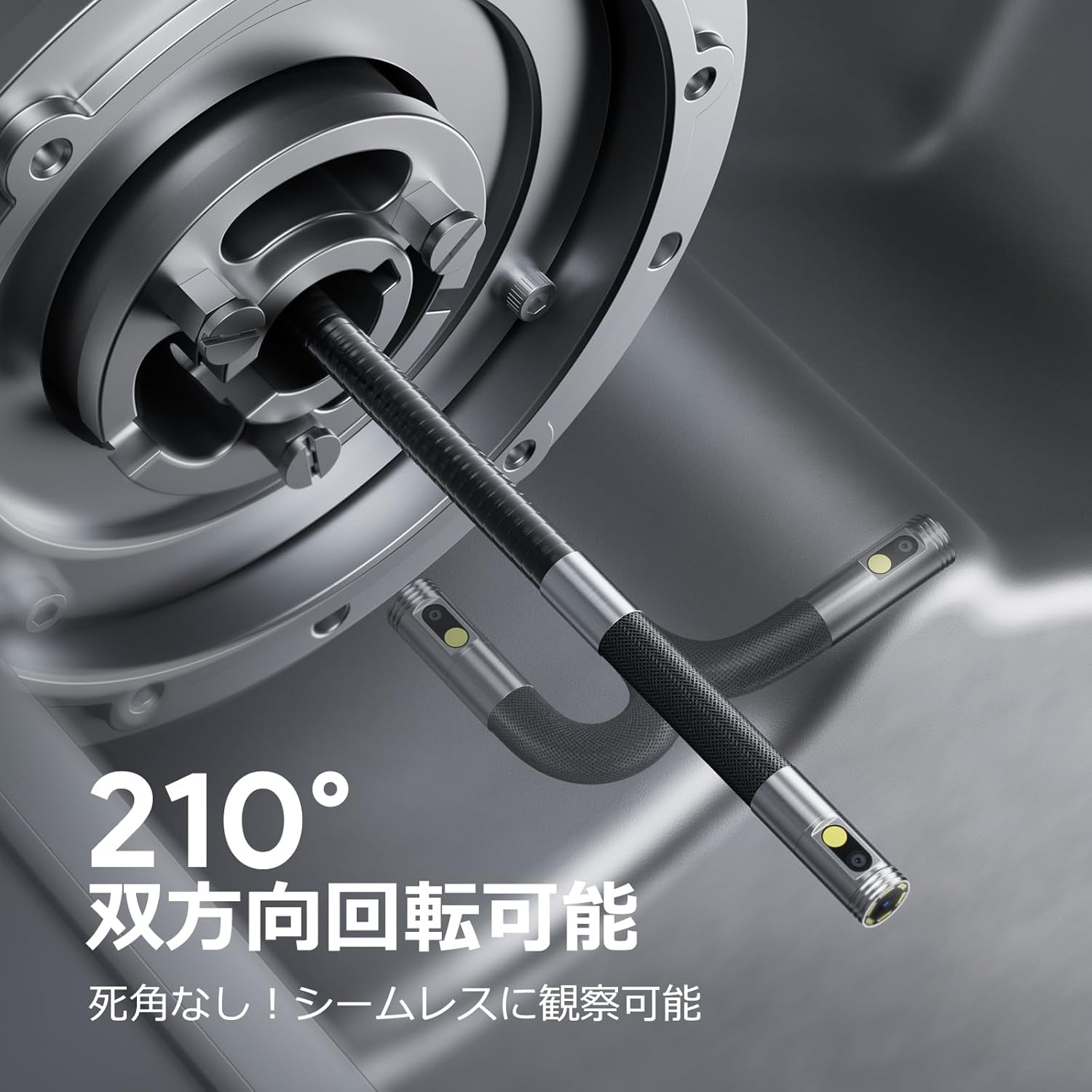
Image: Endoscope probe demonstrating 210° bidirectional articulation.
- Utilitza el Botó de canvi de lent to cycle between the front camera, side camera, or a split-screen dual-view mode.
- Gira el Articulating Angle Dial to precisely adjust the direction of the probe tip. This allows you to navigate around obstacles and view areas from multiple angles without repositioning the entire cable.
5.3 Captura d'imatges i vídeos
The device supports capturing both still images and video recordings directly to the inserted 32GB memory card.

Image: Monitor display showing photo and video capture features.
- Per fer una foto: Premeu breument Botó Foto / Vídeo.
- Per gravar el vídeo: Premeu llargament el botó Botó Foto / Vídeo per començar a gravar. Premeu llargament de nou per aturar la gravació.
- Capturat files are saved to the 32GB memory card. You can store approximately 10,000 images or 50 videos.
5.4 Ajust de la brillantor del LED
The probe is equipped with high-brightness LED lights to illuminate dark inspection areas. Short press the Power Button/LED Adjustment button to cycle through 3 levels of LED brightness.

Image: IP67 waterproof probe with adjustable LED illumination.
5.5 Transferència de dades
You can transfer captured images and videos to a computer via the Type-C cable or by directly accessing the memory card.

Image: High-speed data transfer from endoscope to PC.
6. Manteniment
- Neteja de la sonda: After use, especially in dirty or wet environments, gently wipe the probe with a soft, damp cloth. Ensure no debris remains on the camera lenses.
- Neteja del monitor: Use a soft, dry cloth to clean the IPS monitor. Avoid abrasive cleaners or solvents.
- Emmagatzematge: Store the endoscope in its provided storage case in a cool, dry place, away from direct sunlight and extreme temperatures. This prevents damage from improper storage and moisture.
- Cura de la bateria: Per allargar la durada de la bateria, eviteu descarregar completament el dispositiu amb freqüència. Carregueu-lo regularment, fins i tot si no l'utilitzeu durant períodes prolongats.
7. Solució De Problemes
| Problema | Causa possible | Solució |
|---|---|---|
| El dispositiu no s'encén. | Bateria baixa; mal funcionament del dispositiu. | Carregueu el dispositiu completament. Si el problema persisteix, contacteu amb el servei d'assistència. |
| Cap imatge a la pantalla. | Cable not connected properly; camera lens obstructed. | Ensure the probe cable is securely connected. Check for obstructions on the lens. |
| La imatge és borrosa o poc clara. | Lens is dirty; focus distance incorrect. | Clean the camera lens. Ensure the object is within the optimal focal range (3-10cm). |
| No es poden gravar fotos/vídeos. | Memory card full or not inserted correctly. | Check if the 32GB memory card is inserted correctly. Delete old files or replace the card if full. |
| Device shuts down automatically. | S'ha activat la protecció contra el sobreescalfament. | Allow the device to cool down. Avoid using in excessively hot environments. |
8. Especificacions
| Característica | Detall |
|---|---|
| Marca | DEPSTECH |
| Número de model | DS650DJ |
| Mostra | 4.5-inch IPS LCD Monitor |
| Resolució de la càmera | 1080P |
| Diàmetre de la sonda | 8.5 mm |
| Angle d'articulació | 210° bidireccional |
| Tipus de cable | 1.5M Semi-rigid |
| Classificació impermeable | IP67 (només sonda) |
| Il·luminació | Llums LED ajustables |
| Emmagatzematge | Targeta Micro SD de 32 GB (inclosa) |
| Bateria inclosa | Sí |
| Dimensions del paquet | 43.1 x 21.4 x 7.4 cm |
| Pes del paquet | 1.33 kg |
9. Garantia i assistència
9.1 Garantia del fabricant
This DEPSTECH product comes with a Garantia del fabricant de 24 mesos. Your order number serves as your proof of purchase for warranty claims. Please retain it.
9.2 Atenció al client
For any questions, technical assistance, or warranty inquiries, please contact our professional support team:
Correu electrònic: support.jp@depstech.com
We aim to respond to all inquiries within 24 hours (excluding weekends and public holidays, where responses will be provided on the next business day).

Image: DEPSTECH customer support and warranty information.


