1. Introducció
Thank you for choosing the PXN VD4 Bundle F Gaming Sim Racing Wheel. This comprehensive direct-drive racing system is designed to provide an immersive and realistic racing experience on PC. This manual will guide you through the setup, operation, maintenance, and troubleshooting of your new racing wheel and pedal set.
The PXN VD4 Bundle F includes the VD4 direct-drive base, the W AS racing steering wheel, and the PD HM GEN2 dual pedal set, along with a USB data cable. It is compatible with PC Windows 7, 8, 10, and 11, and supports popular simulators such as iRacing, Assetto Corsa, and the F1 series.

Figure 1.1: PXN VD4 Bundle F complete set, showing the direct-drive base, racing wheel, and dual pedal set.
2. Guia de configuració
Follow these steps to properly set up your PXN VD4 Bundle F racing system.
2.1 Desembalatge i identificació de components
Traieu amb cura tots els components de l'embalatge. Verifiqueu que teniu els elements següents:
- PXN VD4 Direct-Drive Base
- PXN W AS Racing Steering Wheel
- PXN PD HM GEN2 Dual Pedal Set
- Cable de dades USB
- Power Adapter (not explicitly listed but implied for direct drive base)
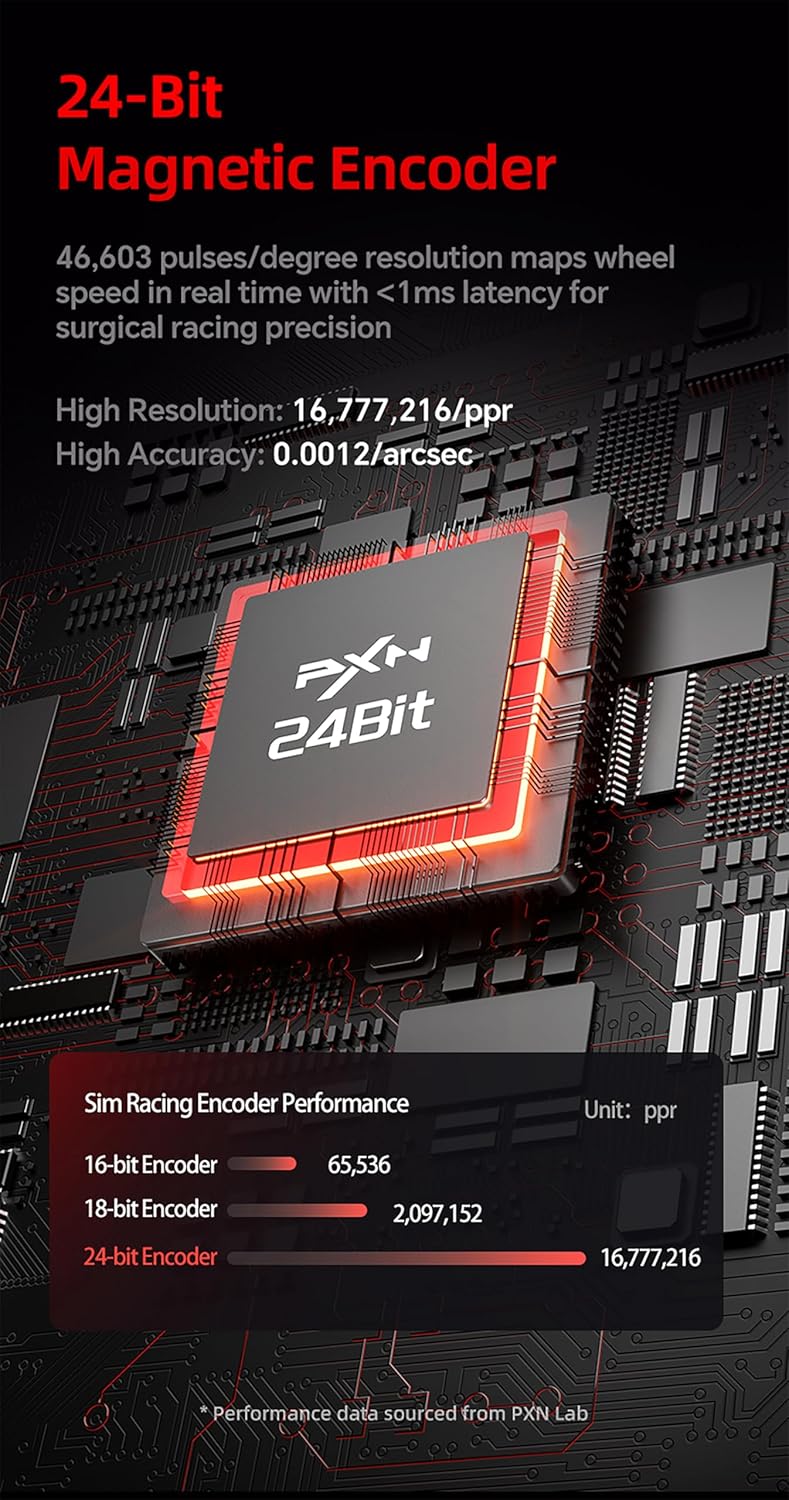
Figura 2.1: Example of the PXN VD4 system mounted on a racing rig, demonstrating typical setup.
2.2 Muntatge i connexió
- Mount the VD4 Direct-Drive Base: Securely attach the VD4 base to your desk or racing cockpit using the provided mounting hardware. Ensure it is stable and does not wobble during use.
- Attach the W AS Racing Steering Wheel: Align the steering wheel with the quick-release mechanism on the VD4 base. Push firmly until it clicks into place, ensuring a secure connection.
- Connect the PD HM GEN2 Dual Pedal Set: Connect the pedal set to the VD4 base using the designated cable.
- Connexió al PC: Plug the USB data cable from the VD4 base into an available USB port on your PC.
- Connectar l'alimentació: Connect the power adapter to the VD4 base and then to a power outlet.
2.3 Instal·lació de controladors i programari
For optimal performance and customization, download and install the PXN SimRacing software from the official PXN website. This software allows for driver installation, firmware updates, and configuration of your racing system.
- Visita la pàgina oficial de PXN weblloc.
- Navigate to the support or downloads section for the VD4 Bundle F.
- Download and run the PXN SimRacing software installer.
- Seguiu les indicacions a la pantalla per completar la instal·lació.

Figure 2.2: PXN SimRacing software interface for configuration and calibration.
3. Instruccions de funcionament
Once set up, your PXN VD4 Bundle F is ready for use. This section details the key features and how to operate them.
3.1 VD4 Direct-Drive Base
The VD4 base features a high-performance driver chip and 20 low-inertia servo motors, providing 4Nm of continuous torque. Its 24-bit magnetic encoder and Sense+ algorithm ensure precise force feedback, accurately capturing road texture, tire slip, and cornering dynamics.
- Feedback de força: Experience realistic force feedback that simulates road conditions and vehicle behavior.
- Precisió: The 24-bit magnetic encoder offers extremely high resolution for accurate wheel speed mapping.
- Durabilitat: The aluminum chassis and intelligent thermal control system allow for extended use without performance degradation.

Figura 3.1: Detallada view of the VD4 direct-drive base's internal technology.

Figure 3.2: Comparison of encoder resolution, highlighting the 24-bit magnetic encoder's precision.
3.2 W AS Racing Steering Wheel
The 11-inch (28 cm) ergonomic steering wheel is crafted with a lightweight aluminum alloy frame and wrapped in microfiber leather for superior grip and comfort. It features extensive controls for in-game adjustments.
- Botons programables: 19 programmable buttons for assigning various in-game functions.
- Codificadors rotatius: 2 rotary encoders for quick adjustments like brake bias or traction control.
- Paletes de canvi: 4 aluminum shift paddles, including 2 magnetic and 2 tactile, for precise gear changes.

Figure 3.3: Features of the W AS Racing Steering Wheel, including button layout and paddle shifters.
3.3 PD HM GEN2 Hall Dual Pedal Set
The PD HM GEN2 pedal set utilizes Hall magnetic induction technology for precise and durable feedback. Its all-metal structure ensures longevity, and the multi-hole design allows for personalized adjustments.
- Hall Effect Sensors: High-precision sensors for throttle and clutch provide linear and accurate input.
- Ajustabilitat: Flexible adjustment of pedal height and angle to tailor your driving experience.
- Disseny modular: Easy to disassemble for maintenance or customization.

Figure 3.4: The PD HM GEN2 Hall Dual Pedal Set, highlighting its adjustable features.
3.4 PXN SimRacing Software
The PXN SimRacing software is your central hub for customizing and optimizing your racing setup. It allows you to:
- Customize base torque settings.
- Launch your favorite games directly.
- Switch between configurations easily.
- Map buttons and adjust LED speed lighting.
- Fine-tune pedal response curves.
- Choose official presets or save your own profiles.
3.5 Compatible Games
The PXN VD4 Bundle F is compatible with a wide range of PC racing simulators and games, including but not limited to:
- iRacing
- Assetto Corsa Series
- Sèrie F1
- Forza Horizon 5
- DiRT Rally 2.0
- Le Mans Ultimate
- EA WRC
- Forza Motorsport
- Project CARS 2
- American Truck Simulator
- Euro Truck Simulator 2

Figure 3.5: Selection of PC games compatible with the PXN VD4 system.
4. Manteniment
Proper maintenance ensures the longevity and optimal performance of your PXN VD4 Bundle F.
- Neteja: Use a soft, dry cloth to wipe down the steering wheel, base, and pedals. Avoid abrasive cleaners or solvents. For stubborn dirt, a slightly damp es pot utilitzar un drap, seguit d'assecat immediat.
- Prevenció de pols: Keep the system covered when not in use to prevent dust accumulation, especially around the base's ventilation areas.
- Gestió de cables: Ensure all cables are neatly routed and not under tension or pinched, which can lead to damage.
- Emmagatzematge: Si guardeu la unitat durant un període prolongat, desconnecteu-la de l'alimentació i guardeu-la en un lloc fresc i sec, allunyat de la llum solar directa.
- Actualitzacions de programari: Regularly check the PXN official website for firmware and software updates for the PXN SimRacing software. Updates can improve performance, add features, and fix bugs.
The VD4 base features an intelligent thermal control system. Ensure proper ventilation around the base to allow for efficient heat dissipation during prolonged use.
5. Solució De Problemes
If you encounter issues with your PXN VD4 Bundle F, refer to the following common troubleshooting steps.
5.1 Problemes generals
- No Power/No Recognition:
- Ensure the power adapter is securely connected to the VD4 base and a working power outlet.
- Verify the USB data cable is firmly connected to both the VD4 base and a functional USB port on your PC. Try a different USB port.
- Reinicieu el vostre ordinador.
- Sense retroalimentació de força o retroalimentació de força feble:
- Check force feedback settings within the PXN SimRacing software and in your game's control options.
- Ensure the VD4 base drivers are correctly installed. Reinstall if necessary.
- Verify the power adapter is providing sufficient power.
- Buttons/Pedals Not Responding:
- Check button mapping within the PXN SimRacing software and your game.
- Assegureu-vos que tots els cables estiguin ben connectats.
- Calibrate pedals using the PXN SimRacing software.
5.2 Software Related Issues
- PXN SimRacing Software Not Launching/Crashing:
- Assegureu-vos que el vostre sistema operatiu estigui actualitzat.
- Run the software as an administrator.
- Reinstall the PXN SimRacing software.
- In-Game Recognition Issues:
- Ensure the game is updated to its latest version.
- Check the game's controller settings and ensure the PXN VD4 is selected as the primary input device.
- Some games may require specific configuration files or community patches; consult game-specific forums if issues persist.
If these steps do not resolve your issue, please contact PXN customer support for further assistance.
6. Especificacions
| Característica | Especificació |
|---|---|
| Model de producte | PXN VD4 Bundle F |
| Compatibilitat | PC (Windows 7/8/10/11) |
| Direct Drive Torque | 4 Nm (Continuous) |
| Resolució del codificador | 24-bit Magnetic Encoder |
| Diàmetre del volant | 11 polzades (28 cm) |
| Pedal Technology | Hall Magnetic Induction |
| Pes de l'article | 27.7 lliures (aprox. 12.56 kg) |
| Dimensions del paquet | 22 x 15 x 12 polzades (aprox. 55.88 x 38.1 x 30.48 cm) |
| Fabricant | PXN |
| Data de primera disponibilitat | 4 de juny de 2025 |
7. Garantia i Suport
PXN is committed to providing high-quality products and customer satisfaction.
7.1 Garantia del producte
For information regarding the warranty period and terms for your PXN VD4 Bundle F, please refer to the warranty card included with your product or visit the official PXN weblloc web. Conserveu el comprovant de compra per a reclamacions de garantia.
7.2 Plans de protecció
Pot ser que hi hagi plans de protecció ampliada disponibles per al vostre producte. Aquests plans ofereixen cobertura addicional més enllà de la garantia estàndard del fabricant. Ex.amples of available plans include:
- Pla de protecció de 2 anys
- Pla de protecció de 3 anys
- Complete Protect (monthly subscription covering eligible past and future purchases)
Availability and terms of these plans may vary. Please check with your retailer or the protection plan provider for details.
7.3 Atenció al client
If you require technical assistance, have questions about your product, or need to initiate a warranty claim, please contact PXN customer support through their official website. Ensure you have your product model number (VD4 Bundle F) and proof of purchase ready when contacting support.
PXN oficial Weblloc: www.pxn.cn (or refer to the link provided in the PXN SimRacing software download section)


