1. Introducció
This manual provides comprehensive instructions for the ATOMSTACK Swift 12W Laser Engraver, a high-precision laser cutting and engraving machine designed for various materials including wood, metal, dark acrylic, glass, and leather. It features a powerful 12W laser, fast engraving speeds, and broad software compatibility. Please read this manual thoroughly before operation to ensure safe and effective use of your device.
2. Informació de seguretat
Operating a laser engraver involves potential hazards. Adhere to all safety guidelines to prevent injury or damage.
- Protecció ocular: Always wear the provided safety glasses or equivalent laser-protective eyewear during operation. Never look directly at the laser beam.
- Ventilació: Feu funcionar la màquina en una zona ben ventilada per dissipar els fums i el fum produïts durant el gravat o el tall.
- Perill d'incendi: Laser processing can ignite flammable materials. Keep a fire extinguisher nearby and never leave the machine unattended during operation.
- Compatibilitat de materials: Only engrave or cut materials specified as safe for laser processing. Avoid PVC, vinyl, or other materials that produce toxic fumes when burned.
- Nens i animals de companyia: Mantingueu els nens i les mascotes lluny de la zona d'operacions.
- Parada d'emergència: Familiaritzeu-vos amb el procediment d'aturada d'emergència.
- Superfície estable: Col·loqueu la màquina sobre una superfície estable, anivellada i no inflamable.

Image: The ATOMSTACK Swift 12W Laser Engraver with eye protection glasses, highlighting the importance of safety during operation.
3. Contingut del paquet
Verify that all components are present and undamaged upon unboxing.

Image: All components of the ATOMSTACK Swift 12W Laser Engraver laid out on a table, including frame parts, laser module, cables, and tools.
- Front X-axis assembly (with cable)
- Rear X-axis assembly
- Muntatge de l'eix X
- Left Y-axis assembly (with motor)
- Right Y-axis assembly
- Optical Shaft
- Mòdul làser
- Adaptador de corrent
- cable USB
- Manual de producte
- Corretja de distribució
- L-shaped Allen wrench set (H2/H2.5/H3)
- Clau anglesa
- Cargols M5x8 (x6)
4. Instruccions de muntatge
The ATOMSTACK Swift 12W is designed for quick and easy assembly. Follow these steps:
- Connect the Frame Assemblies:
Place the five main frame assemblies as shown in the diagram. Ensure the X-axis assembly has the belt facing downward and the Y-axis assembly with the motor is on the left side. Align and connect these five assemblies to form the basic frame.

Image: A user connecting the frame components, ensuring proper alignment of the X and Y axis assemblies.
- Assegureu-vos amb cargols:
Secure the connected assemblies using the six M5x8 screws provided. Tighten them firmly to ensure stability.

Image: Close-up of a hand tightening an M5x8 screw to secure the frame of the laser engraver.
- Install Optical Shaft:
Install the optical shaft onto the X-axis assembly. Push the X-axis toward the front X-axis assembly, ensuring it is fully inserted and aligned parallel. Then tighten the coupling and the timing pulley.
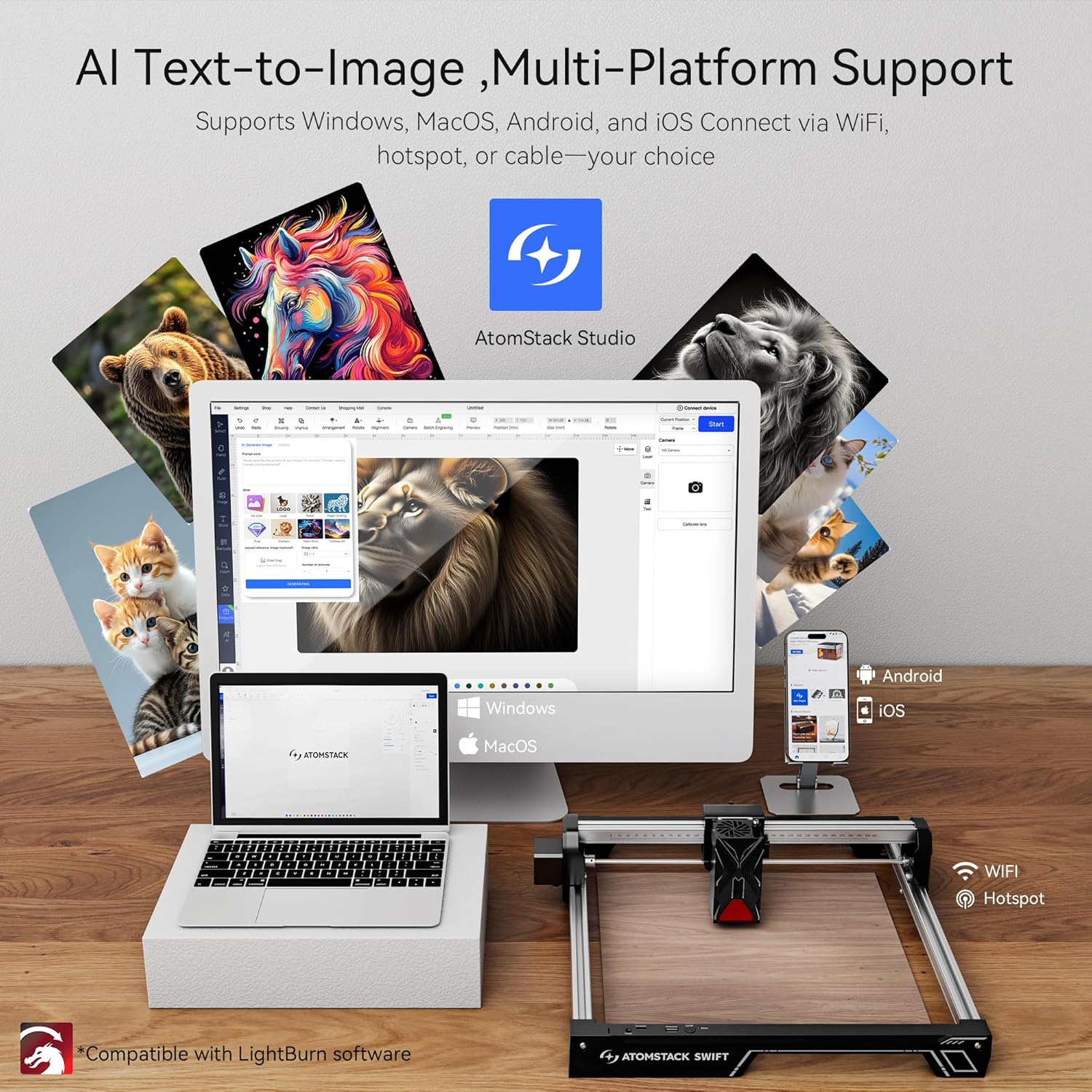
Image: A user inserting the optical shaft into the X-axis assembly, followed by tightening the coupling and timing pulley.
- Instal·leu el mòdul làser:
Install the laser module onto the X-axis assembly and tighten the thumb screw to secure it in place.
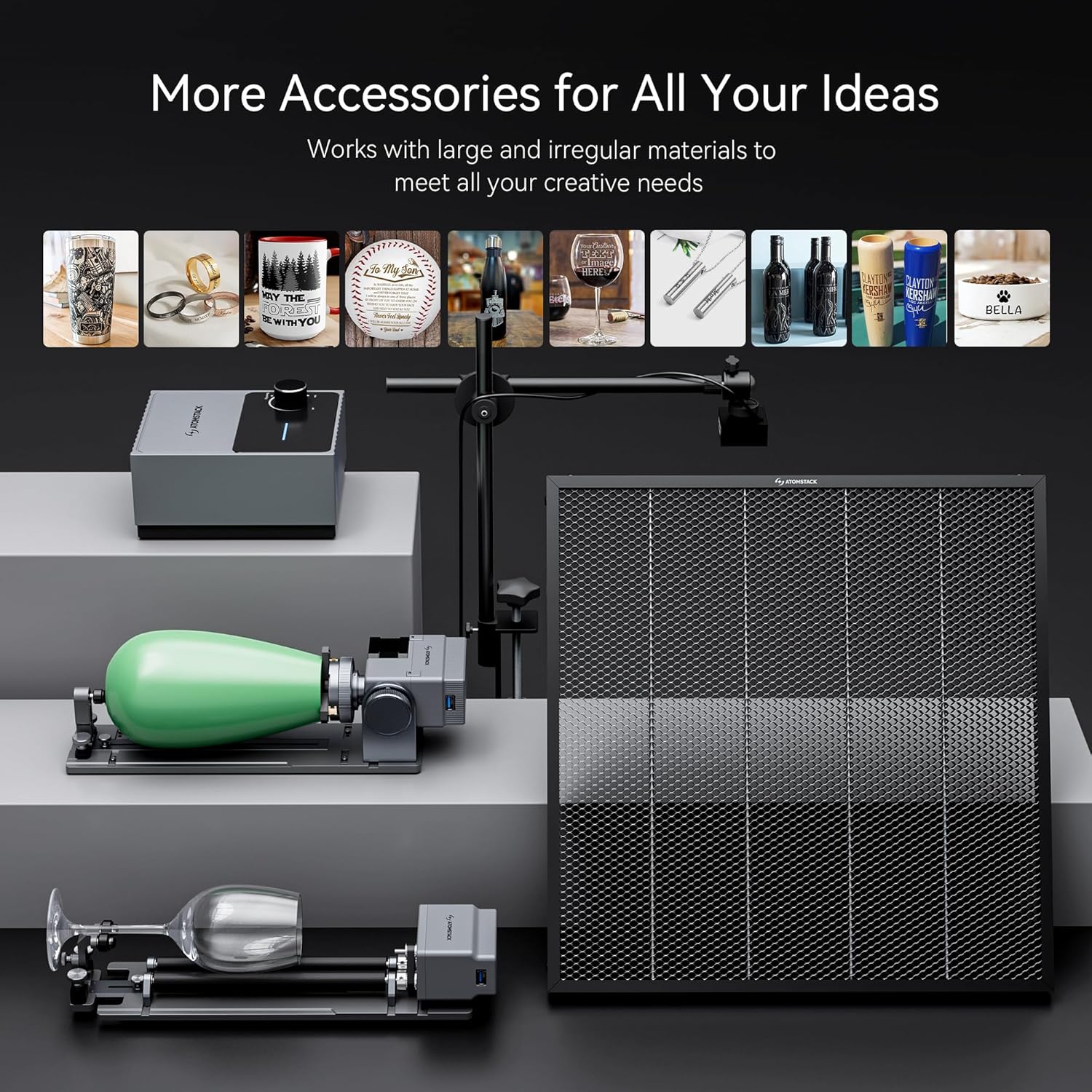
Image: The laser module being installed onto the X-axis and secured with a thumb screw.
- Connectar els cables:
Connect the motor cable, limit switch cables, and laser module cable to their respective ports. Ensure all connections are secure.

Image: Close-up of a hand connecting the various cables (motor, limit switch, laser module) to the main unit.
- Adjust Eccentric Nut (if needed):
Use an open-end wrench to adjust the eccentric nut until the X-axis can slide down smoothly when the machine is tilted at 45 degrees. This ensures proper movement and prevents binding.
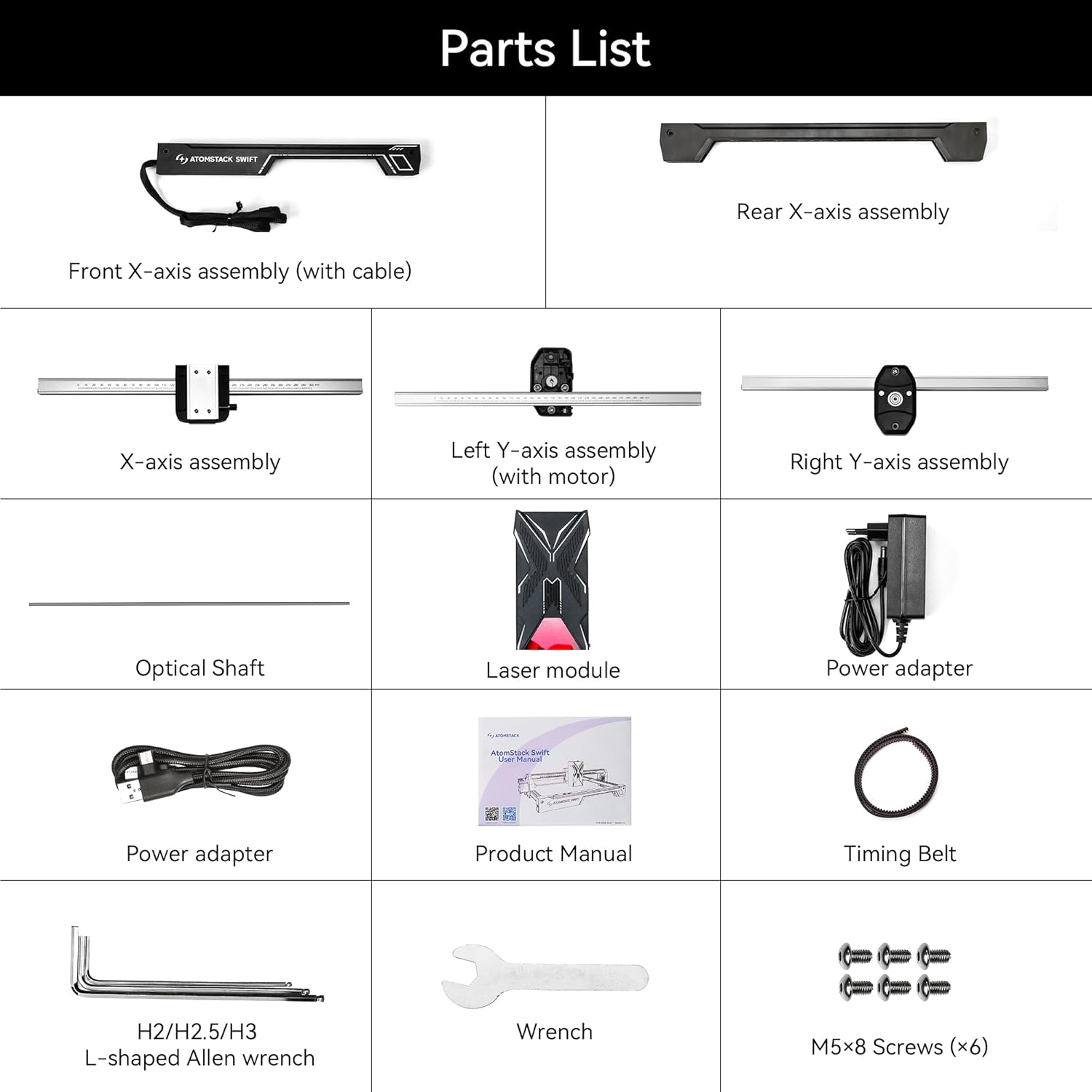
Image: A hand using a wrench to adjust the eccentric nut for smooth X-axis movement.
Guia de vídeo de muntatge:
Video: Detailed unboxing and installation guide for the ATOMSTACK Swift Laser Engraver, demonstrating each assembly step.
5. Guia de funcionament
5.1 Enfocament del làser
Accurate focusing is crucial for optimal engraving and cutting results.
- Place your workpiece directly under the laser module.
- Adjust the focus by turning the side knob on the laser module until the laser spot is at its smallest and sharpest point on the material surface.
- If the hand-tightened screw interferes with the optical shaft, pull out the black part, rotate it outward, and then release it to allow full adjustment.

Image: Illustration of precise cross-cursor alignment, demonstrating how to achieve accurate laser focusing on the material.
5.2 Compatibilitat de programari
The ATOMSTACK Swift 12W supports various software for design and control:
- ATOMSTACK Studio: Official app and PC software developed by ATOMSTACK.
- LightBurn: Popular third-party software for laser engravers.
- LaserGRBL: Free and open-source software for GRBL-based laser engravers.
- Connectivity options include Type-C, USB cable, WiFi, and Hotspot.
- Supported operating systems: Windows, macOS, Android, iOS.
- Admet file formats: JPG, JPEG, SVG, PNG, BMP, PDF, G-Code, DXF.

Image: Display of the ATOMSTACK Swift 12W Laser Engraver connected to various devices (laptop, tablet, smartphone) running different compatible software.
5.3 Engraving and Cutting Operations
The ATOMSTACK Swift 12W offers high precision and strong cutting performance.
- Alta precisió: Achieves a laser spot size of 0.06 x 0.08 mm for intricate details.
- Velocitat ràpida: Engraving speeds can reach up to 10000 mm/min (400 mm/s).
- Materials: Suitable for wood, bamboo, paper, leather, cardboard, cork, slate, felt, MDF, coated metal, dark acrylic, glass, and more.
- Capacitat de tall: Can cut 4mm black acrylic in one pass and 8mm basswood plywood in one pass.

Image: Visual comparison of cutting capabilities on 4mm black acrylic and 8mm basswood plywood, highlighting the 12W laser output.
Imatge: Examples of various materials such as plywood, non-woven fabric, wood, plastic, glass, paper, plated metal, stone, rubber, food, ceramic tile, and stainless steel, demonstrating the versatility of the engraver.
5.4 Funcions avançades
- Resume Engraving: The machine can continue work seamlessly after unexpected power outages, minimizing material waste.
- Sensors de seguretat: Equipped with a flame detector and gyroscope for enhanced safety during operation.
- Expandabilitat: Compatible with various accessories like air assist systems (purchased separately) for improved cutting performance and cleaner results.

Image: The laser engraver shown continuing an engraving task after a simulated power interruption, illustrating the resume engraving feature.
Guies de vídeo d'operació:
Vídeo: Una breu presentacióview demonstrating the ATOMSTACK Swift 7W Laser Engraver in action, showcasing its laser power measurement. Note: This video features the 7W model.
Vídeo: Un overview of the ATOMSTACK Swift Laser Engraver and Cutter, highlighting its features and various applications.
6. Manteniment
Un manteniment regular garanteix la longevitat i el rendiment òptim del vostre gravador làser.
- Netegeu la lent: Periodically clean the laser lens with a specialized lens cleaning solution and cloth to maintain beam quality.
- Lubricar les peces mòbils: Apply a small amount of lubricant to the guide rails and lead screw to ensure smooth movement of the laser module.
- Revisar cinturons: Inspect the timing belts for wear and tear. Ensure they are properly tensioned; loose belts can affect engraving accuracy.
- Neteja els residus: Regularly remove dust and debris from the machine, especially around the laser module and ventilation areas.
7. Solució De Problemes
If you encounter issues, refer to these common troubleshooting steps:
| Problema | Causa possible | Solució |
|---|---|---|
| El làser no dispara o la sortida és feble | Incorrect focus, dirty lens, loose cable, low power setting. | Adjust focus, clean lens, check all cable connections, increase laser power in software. |
| La màquina no es mou o té un moviment erràtic | Loose belts, motor cable disconnected, software error, jammed axis. | Check belt tension, reconnect motor cables, restart software/machine, clear any obstructions. |
| Engraving/cutting is inaccurate or distorted | Loose belts, unstable surface, incorrect speed/power settings, material shifting. | Tighten belts, ensure machine is on a stable surface, adjust speed/power, secure material firmly. |
| El programari no es connecta a la màquina | Incorrect port selection, driver issues, faulty USB cable. | Verify COM port, reinstall drivers, try a different USB cable. |
For further assistance, please contact ATOMSTACK customer support.
8. Especificacions
Key technical specifications for the ATOMSTACK Swift 12W Laser Engraver:
- Marca: ATOMSTAK
- Model: Swift 12W
- Potència làser: 12W (12000 Milliwatts)
- Precisió del gravat: 0.06 x 0.08 mm spot size
- Velocitat de gravat: Up to 10000 mm/min (400 mm/s)
- Àrea de treball: 300 x 300 mm
- Dimensions del producte: 9.98 x 7 x 23 polzades
- Pes de l'article: 6.24 lliures
- Connectivitat: Type-C, USB, WiFi, Hotspot
- Sistema operatiu compatible: Windows, macOS, Android, iOS
- Admet File Formats: JPG, JPEG, SVG, PNG, BMP, PDF, G-Code, DXF
9. Garantia i Suport
ATOMSTACK provides reliable customer service and warranty coverage for your product.
- Període de garantia: 1 year from the date of receipt.
- Atenció al client: 24/7 service available.
- Contacte: For any problems or technical assistance, please contact ATOMSTACK directly via the Amazon platform. Technicians aim to provide a solution within 24 hours.
For more information, visit the official ATOMSTACK Store: Botiga oficial d'ATOMSTACK


