1. Introducció
The Guide TB 630 LRF is a compact and lightweight thermal imaging clip-on system designed to transform your daylight riflescope into a high-definition thermal imaging scope. It features a 640x512 resolution thermal sensor, an integrated laser rangefinder, and compatibility with the TargetIR app for advanced functionalities. This manual provides essential information for the proper setup, operation, and maintenance of your device.
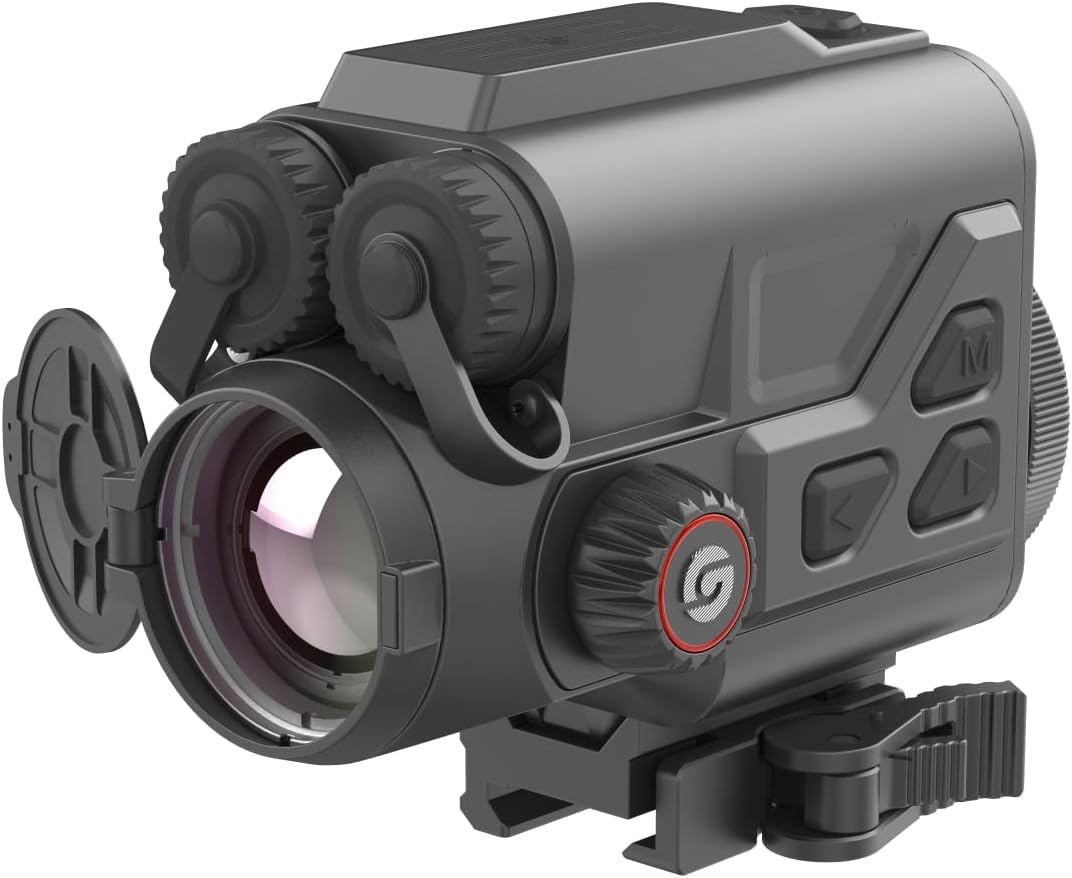
Figure 1.1: Guide TB 630 LRF Thermal Imaging Clip-On System, front-side view.
2. Informació de seguretat
Please read and understand all safety warnings and instructions before using the device. Failure to do so may result in injury or damage to the device.
- Do not look directly at the sun or other strong light sources through the device, as this may cause permanent eye damage.
- Mantingueu el dispositiu allunyat de temperatures extremes, humitat i llum solar directa.
- Do not attempt to disassemble or modify the device. Refer all servicing to authorized personnel.
- Use only the specified batteries and charging accessories.
- Ensure the device is securely mounted before use to prevent accidental drops.
- Eliminar les bateries segons la normativa local.
3. Contingut del paquet
Verifiqueu que tots els elements siguin presents al paquet:
- Guide TB 630 LRF Thermal Clip-On System
- Muntanya Picatinny
- Manual d'usuari (aquest document)
- Cable de càrrega
- Funda protectora de transport
4. Producte acabatview
The Guide TB 630 LRF is engineered for precision and ease of use, offering advanced thermal imaging capabilities for various applications.
Característiques principals:
- High-Sensitivity Thermal Sensor: Features a 640x512 resolution thermal sensor with a 12µm high-sensitivity detector and 20mK NETD for precise thermal imaging.
- Integrated Laser Rangefinder: Provides accurate distance measurements up to 1090 yards.
- Quick Release Picatinny Mount: Allows for rapid attachment and detachment to your daylight riflescope without tools.
- Temps de funcionament llarg: Up to 6 hours of continuous operation on a single charge with replaceable and rechargeable batteries.
- TargetIR App Compatibility: Supports built-in recording, picture capture, Wi-Fi hotspot, and a ballistic calculator via the TargetIR app (available on App Store and Google Play).
- Pantalla Full HD: 1920x1080 display ensures optimal viewing experience, even at higher magnification.
- Disseny durador: IP68 protection rating for robust performance in various environments.

Figura 4.1: lateral view of the Guide TB 630 LRF, highlighting control buttons.
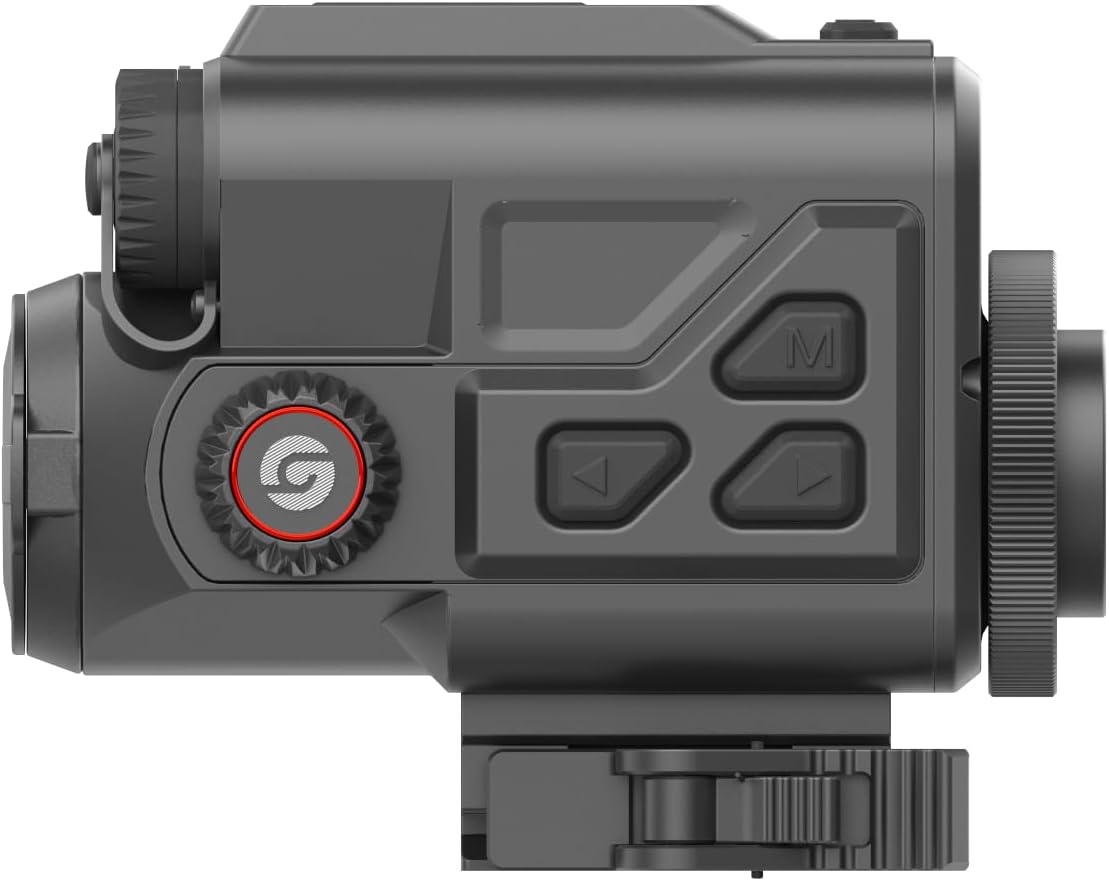
Figura 4.2: superior view of the Guide TB 630 LRF, showing the focus and diopter adjustments.
5. Configuració
5.1 Instal·lació de la bateria
- Localitzeu el compartiment de la bateria del dispositiu.
- Obriu la tapa del compartiment de la bateria.
- Insert the rechargeable batteries according to the polarity indicators.
- Tanqueu bé la tapa del compartiment de la bateria.
- Charge the device fully before first use using the provided charging cable.
5.2 Muntatge del dispositiu
The Guide TB 630 LRF utilizes a quick-release Picatinny mount for easy attachment to your daylight riflescope.
- Ensure your riflescope has a compatible Picatinny rail.
- Align the Picatinny mount on the TB 630 LRF with the rail on your riflescope.
- Engage the quick-release mechanism to secure the device firmly to the rail.
- Verify that the device is stable and does not wobble.
5.3 Encès inicial
- Press and hold the power button (usually marked with a power symbol) for a few seconds until the display illuminates.
- Allow the device to complete its startup sequence.
- Adjust the diopter and focus rings for a clear image.
6. Funcionament del dispositiu
6.1 Funcionament bàsic
- Encès/apagat: Manteniu premut el botó d'encesa.
- Navegació del menú: Use the directional buttons (up, down, left, right) and the 'M' (Menu/Confirm) button to navigate through the device's settings and options.
- Brillantor/Contrast: Adjust display settings via the menu for optimal viewing in different light conditions.
6.2 Thermal Imaging
The device automatically displays thermal imagery upon power-on. You can adjust various thermal settings:
- Paletes de colors: Select from different color palettes (e.g., White Hot, Black Hot, Red Hot) to best suit your observation needs.
- Zoom digital: Use the zoom function to magnify the thermal image.
- Image Calibration: Perform NUC (Non-Uniformity Correction) or shutter calibration as needed to maintain image quality.
6.3 Laser Rangefinder (LRF)
To use the integrated laser rangefinder:
- Aim the device at your target.
- Press the dedicated LRF button (refer to your device's button layout).
- La distància mesurada es mostrarà a la pantalla.
6.4 Recording and Sharing
The TB 630 LRF supports built-in recording and picture capture, along with Wi-Fi hotspot functionality for seamless integration with the TargetIR app.
- Captura de foto/vídeo: Press the designated button to capture still images or start/stop video recording.
- Punt d'accés Wi-Fi: Activate the Wi-Fi hotspot from the device menu. Connect your smartphone or tablet to the device's Wi-Fi network.
- TargetIR App: Download the TargetIR app from the App Store or Google Play. Use the app to view live feed, manage captured media, and utilize the ballistic calculator.
7. Manteniment
7.1 Neteja
- Lents: Use a soft, lint-free cloth specifically designed for optics. Gently wipe the lens surfaces. For stubborn smudges, use a small amount of lens cleaning solution.
- Cos del dispositiu: Netegeu l'exterior amb un suau, damp tela. No utilitzeu netejadors abrasius ni dissolvents.
- Ensure all covers and caps are closed when not in use to protect against dust and moisture.
7.2 Emmagatzematge
- Guardeu el dispositiu en un lloc fresc i sec, allunyat de la llum solar directa i de temperatures extremes.
- Si l'emmagatzemeu durant un període prolongat, traieu les piles per evitar fuites.
- Use the provided protective carrying case for transport and storage.
7.3 Cura de la bateria
- Recharge batteries regularly, even if the device is not in frequent use, to maintain battery health.
- Avoid fully discharging the batteries whenever possible.
- Do not expose batteries to high temperatures or puncture them.
8. Solució De Problemes
If you encounter issues with your Guide TB 630 LRF, refer to the table below for common problems and solutions.
| Problema | Causa possible | Solució |
|---|---|---|
| El dispositiu no s'encén. | Low or dead battery; Incorrect battery installation; Device malfunction. | Charge or replace batteries; Reinstall batteries correctly; Contact customer support. |
| Mala qualitat d'imatge / Imatge borrosa. | Lens dirty; Focus or diopter not adjusted; NUC needed. | Clean lenses; Adjust focus and diopter; Perform NUC calibration. |
| Laser Rangefinder not working. | Obstructed path; Target too far or too close; Device malfunction. | Ensure clear line of sight; Check target distance within range; Contact customer support. |
| Cannot connect to TargetIR app. | Wi-Fi hotspot not enabled; Incorrect Wi-Fi password; App not updated. | Enable Wi-Fi hotspot on device; Verify password; Update TargetIR app. |
9. Especificacions tècniques
| Característica | Especificació |
|---|---|
| Nom del model | Guide TB 630 LRF |
| Marca | Guia Sensmart |
| Resolució del sensor tèrmic | 640 x 512 |
| NETD | 20 mK |
| Laser Rangefinder Detection Range | 1090 iardes |
| Resolució de visualització | 1920x1080 (Full HD) |
| Durada de la bateria | Fins a 6 hores |
| Dimensions del producte | 5 cm de llargada x 3.5 cm d'amplada x 3.5 cm d'alçada |
| Pes de l'article | 3 lliures |
| Material | Metall |
| Tipus de muntatge | Muntanya Picatinny |
| Color | Negre |
| Classificació IP | IP68 |
10. Garantia i Suport
Guide Sensmart stands behind the quality of its products.
- Garantia: The Guide TB 630 LRF comes with a 10-year warranty on the optic and its thermal sensor.
- Centre de reparació: For service or repairs, Guide Sensmart operates a Texas-based repair center to ensure prompt assistance.
- Contacte amb l'assistència: For further assistance, technical support, or warranty claims, please refer to the contact information provided on the official Guide Sensmart weblloc web o la documentació de la compra.


