1. Producte acabatview
El Negreview Acebook 6 is a portable laptop designed for general computing tasks, featuring a 15.6-inch Full HD IPS display, an Intel N150 Quad-Core processor, 16GB DDR4 RAM, and a 512GB SSD. It operates on Windows 11 and supports 100W Type-C fast charging.

Image: The Blackview Acebook 6 laptop displaying the Windows 11 operating system interface.
2. Contingut del paquet
Verifiqueu que tots els elements siguin presents al paquet:
- Negreview Acebook 6 Laptop
- Power Adapter (100W Type-C)
- Ratolí sense fil
- Bossa d’ordinador portàtil
- Manual d'usuari (aquest document)
3. Guia de configuració
3.1 Càrrega inicial
Before first use, fully charge the laptop. Connect the provided 100W Type-C power adapter to the laptop's Type-C port and a power outlet. The charging indicator light will illuminate.

Image: The laptop's Type-C port connected to the fast charging cable, illustrating the charging process.
3.2 Engegada/apagada
- Per encendre: Press and hold the power button located on the top right of the keyboard until the screen illuminates.
- Per apagar: Click the Windows Start button, then select Power > Shut down. Alternatively, press and hold the power button for several seconds to force a shutdown (use only when necessary).
3.3 Connexió de perifèrics
The Acebook 6 features various ports for connecting external devices:
- Ports USB 3.2 Gen 1 (x2): For high-speed data transfer with USB devices.
- Port USB 2.0 (x1): For standard USB devices like mice or keyboards.
- Full-featured Type-C Port (x1): Supports 5Gbps data transfer, fast charging, and DisplayPort 1.4 video output.
- Port HDMI 2.0 (x1): Connect to external displays or projectors for up to 4K resolution at 60Hz.
- 3.5mm Audio Jack (x1): Per a auriculars o altaveus externs.
- TF Card Slot (x1): For memory card expansion (Max 25MB/s data transfer).

Imatge: Detallada view of the laptop's left and right sides, highlighting the USB, Type-C, HDMI, audio, and TF card ports.
4. Instruccions de funcionament
4.1 Característiques de visualització
The 15.6-inch Full HD (1920x1080) IPS display offers clear visuals. It features TÜV Rheinland Low Blue Light Certification to reduce eye strain during extended use.

Imatge: La pantalla del portàtilasing its TÜV SÜD Low Blue Light Certification for eye comfort.
4.2 Rendiment i emmagatzematge
The laptop is equipped with an Intel N150 Quad-Core processor, 16GB DDR4 RAM, and a 512GB M.2 SSD for efficient performance and ample storage. The SSD can be expanded up to 2TB.

Image: The laptop screen showing various applications running, emphasizing the 16GB RAM and 512GB SSD with 2TB expansion capability.
4.3 Gestió de la bateria
The Acebook 6 features a 45Wh battery. You can select from different power modes to optimize battery life or performance:
- Mode d'estalvi d'energia: Limits background activities to extend battery life.
- Mode equilibrat: Optimizes performance and battery life for everyday tasks.
- Mode de rendiment: Prioritizes maximum performance for demanding tasks.

Image: An illustration detailing the laptop's battery capacity and the three available power management modes.
4.4 Connectivitat sense fil
- Wi-Fi: Supports dual-band 5G Wi-Fi for stable and fast internet connections.
- Bluetooth: Per connectar perifèrics sense fil com ara auriculars, ratolins i teclats.
4.5 Teclat numèric
The integrated independent numeric keypad allows for efficient data entry, useful for financial reports or detailed document creation.

Image: A close-up of the laptop's keyboard, highlighting the independent numeric keypad for enhanced productivity.
5. Manteniment
5.1 Neteja
- Feu servir un drap suau i sense borrissol per netejar la pantalla i l'exterior.
- Eviteu utilitzar productes químics o materials abrasius.
- Per a taques difícils, fregueu lleugeramentampNetegeu el drap amb aigua o una solució netejadora de pantalles.
5.2 Gestió de la calor
The Acebook 6 features an expansive cooling area with a gaming-grade shark fin fan, operating at up to 4500 RPM, and thickened copper pipes to maintain optimal operating temperatures and quiet performance.

Imatge: Una imatge interna view of the laptop's heat dissipation system, showing the fan and copper pipes.
5.3 Actualitzacions de programari
Regularly check for and install operating system and driver updates to ensure optimal performance and security. These updates are typically managed through Windows Update.
6. Solució De Problemes
6.1 Problemes comuns i solucions
- El portàtil no s'encén: Ensure the laptop is charged or connected to the power adapter. Try a hard reset by holding the power button for 10-15 seconds.
- La pantalla està en blanc: Check if the laptop is powered on. Connect an external monitor via HDMI to verify if the issue is with the laptop's display.
- Problemes de connectivitat Wi-Fi: Assegureu-vos que el Wi-Fi estigui habilitat a la configuració de Windows. Reinicieu el router i el portàtil.
- Rendiment lent: Close unnecessary applications. Check for available system updates. Ensure sufficient free storage space on the SSD.
For persistent issues, refer to the support section or contact Blackview servei al client.
7. Especificacions
| Característica | Especificació |
|---|---|
| Nom del model | ACEBOOK 6 |
| Processador | Intel N150 Quad-Core (Up to 3.6GHz) |
| RAM | 16 GB DDR4 SDRAM |
| Emmagatzematge | 512GB M.2 SSD (Expandable up to 2TB) |
| Mostra | 15.6 Inches FHD IPS (1920x1080 Pixels) |
| Coprocessador gràfic | Gràfics Intel (integrats) |
| Sistema operatiu | Windows 11 |
| Tipus sense fil | Dual-band 5G Wi-Fi, Bluetooth |
| Ports | 2x USB 3.2 Gen 1, 1x USB 2.0, 1x Full-featured Type-C, 1x HDMI 2.0, 1x 3.5mm Audio, 1x TF Card Slot |
| Bateria | 45Wh Ió de liti |
| Pes de l'article | 3.74 lliures (1.7 kg) |
| Dimensions del producte | 14.1 x 0.7 x 9 polzades (35.8 x 1.8 x 22.8 cm) |
| Característica especial | Numeric Keypad, TÜV Rheinland Eye Care |
8. Garantia i Suport
8.1 Informació de la garantia
El Negreview Acebook 6 laptop comes with a 2 anys de garantiaAquesta garantia cobreix defectes de fabricació i avaries del maquinari en condicions d'ús normals.
8.2 Suport tècnic
Negreview proporciona Suport tècnic de per vida for the Acebook 6. For assistance with any issues, you can:
- Refer to the troubleshooting section in this manual.
- Visit the official Blackview suport weblloc web per a preguntes freqüents i recursos addicionals.
- Contact Blackview customer service directly.
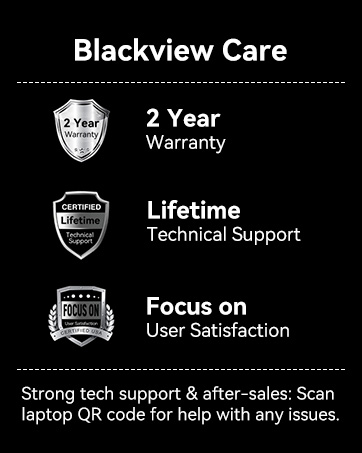
Image: Blackview Care details, including 2-year warranty and lifetime technical support commitment.


