1. Producte acabatview
The Bextgoo Mini Sports Body Camera (Model CS15-CA) is a compact and versatile recording device designed for various applications, including outdoor activities, personal security, and hands-free documentation. It features 1080P Full HD video recording, 12MP photo capture, and a 180° rotatable lens for flexible viewing angles. The camera includes a 64GB memory card and supports smart loop storage for continuous recording.
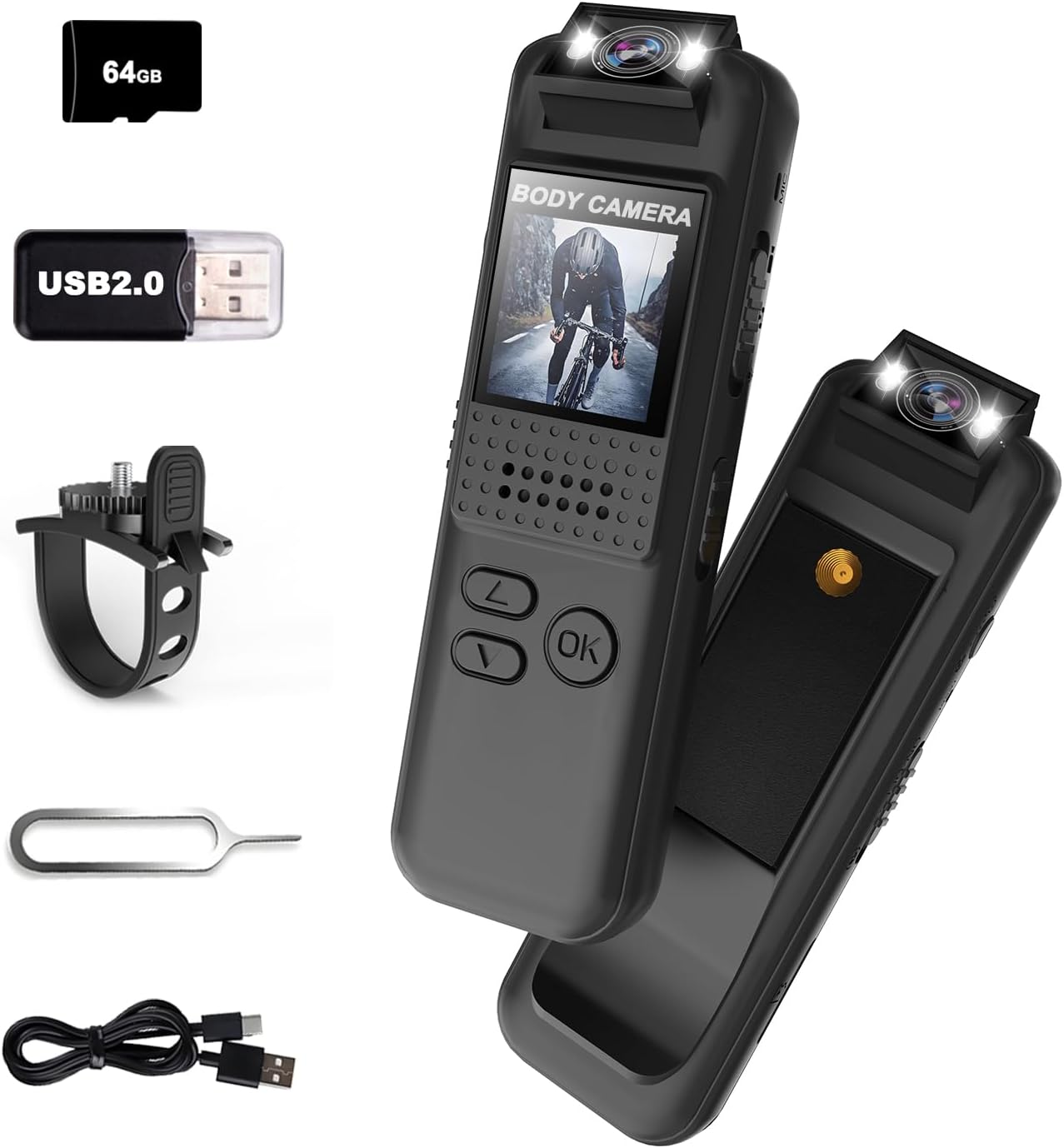
Image: The Bextgoo Mini Sports Body Camera shown with its various accessories, including the 64GB TF card, USB adapter, bike mount, reset pin, and charging cable.
Característiques principals:
- 1080P Full HD Video & 12MP Photos: Captures clear video and sharp images.
- 64GB Memory Card & Smart Loop Storage: Pre-installed 64GB card with automatic overwrite for continuous recording.
- Lent giratòria de 180°: Allows adjustment of the camera angle for optimal capture.
- Instant Playback on Full-Color Screen: Review footage directly on the device without a computer.
- Built-in Fill Light & Night Vision: Enhances visibility in low-light conditions and functions as a flashlight.
- Opcions de muntatge versàtils: Includes a magnetic back clip and bike mount for flexible attachment.
- Sense problemes File Accés: View videos directly on the camera, computer, or via a card reader.
2. Què hi ha a la caixa
Upon opening your Bextgoo Mini Sports Body Camera package, please verify that all the following components are included:
- 1x Bextgoo Body Camera
- 1x 64GB Memory Card (pre-installed)
- 1x Cycle Bracket (Bike Mount)
- 1x Card Reader (USB 2.0 adapter)
- 1x PIN de restabliment
- 1x Manual d'usuari (aquest document)
- 1x cable de càrrega USB
Vídeo: Un unboxing i mésview of the Bextgoo body camera, demonstrating the included accessories and initial setup steps like inserting the SD card and attaching the bike mount.
3. Disseny i controls del dispositiu
Familiarize yourself with the physical components and controls of your Bextgoo Mini Sports Body Camera:

Image: A detailed diagram illustrating the location and function of all buttons, switches, and ports on the Bextgoo body camera.
- Lent giratòria de 180°: Located at the top, allows for flexible recording angles.
- Fill Lights: Positioned next to the lens for illumination in dark environments.
- Pantalla LCD: Front-facing display for live view i la reproducció.
- Tecla d'engegada: On the side, for turning the device on/off.
- Photo/Flip Keys: For capturing photos and navigating menus.
- Scroll Up/Down Keys: Per a la navegació pels menús i l'ajust de la configuració.
- Tecla D'acord: For confirming selections.
- Video/Save/Record On Key: Dedicated button for starting/stopping video recording.
- Key to Turn On Fill Light: Activates the built-in illumination.
- Ranura per a targetes Micro SD: Located on the side for memory card insertion.
- Restableix el forat: A small pinhole for factory reset (use the included reset pin).
- Port USB-C: Per a càrrega i transferència de dades.
- Magnetic Back Clip: Integrated on the back for secure attachment to clothing or metal surfaces.
- Standard Camera Mount Thread: On the back, compatible with standard camera accessories like the bike mount.
4. Configuració
4.1 Càrrega del dispositiu
Before first use, fully charge the camera. Connect the included USB charging cable to the camera's USB-C port and a standard USB power adapter (not included) or a computer's USB port. The charging indicator will show the charging status and turn off when fully charged.
4.2 Inserting/Removing Micro SD Card
The camera comes with a 64GB Micro SD card pre-installed. If you need to replace or remove it:
- Localitza la ranura per a targetes Micro SD al lateral de la càmera.
- Gently push the card inward until it clicks, then release to eject.
- To insert, align the card correctly and push it into the slot until it clicks into place.
4.3 Fixació de suports
The camera features a magnetic back clip and a standard camera mount thread for versatile attachment.
- Magnetic Back Clip: Simply attach the camera to any metal surface or clip it onto clothing, bags, or other items.
- Suport per a bicicleta: Use the included cycle bracket by screwing it into the standard camera mount thread on the back of the camera. Secure the bracket to your bike's handlebars or other suitable locations.

Imatge: Examples of the Bextgoo body camera being used in various hands-free scenarios, including mounted on a bike, clipped to a delivery uniform, and worn by a security guard.
4.4 Initial Power On and Date/Time Settings
After charging, slide the Power Key to the 'ON' position. The camera will power on. You may need to set the correct date and time for accurate timestamps on your recordings. Refer to the on-screen menu using the scroll and OK keys to navigate to the 'Date/Time' settings and adjust as needed. If the device becomes unresponsive, use the included reset pin to press the reset button located in the reset hole.

Image: The camera's screen displaying the date and time settings menu, alongside a sample video frame with a visible date and time overlay.
5. Instruccions de funcionament
5.1 Encès/Apagat
- Per encendre: Slide the Power Key to the 'ON' position.
- Per apagar: Slide the Power Key to the 'OFF' position.
5.2 Enregistrament de vídeo
To start and stop video recording:
- Assegureu-vos que la càmera estigui engegada.
- Press the 'Video/Save/Record On' key once to begin recording. The screen will indicate recording status.
- Press the 'Video/Save/Record On' key again to stop recording. The video file es desarà a la targeta Micro SD.
5.3 Captura de fotos
To take still photographs:
- Assegureu-vos que la càmera estigui engegada.
- Press the 'Photo/Flip' key once to capture a photo. The image will be saved to the Micro SD card.
5.4 Gravació d'àudio
The camera supports audio-only recording. Locate the audio recording switch on the side of the device. Slide it to the 'ON' position to enable audio recording or 'OFF' to disable it.
5.5 Night Vision/Fill Light
To activate the built-in fill light for night vision:
- Assegureu-vos que la càmera estigui engegada.
- Press the 'Key to Turn On Fill Light' button. The fill lights will illuminate.
- Press the button again to turn off the fill light.

Image: A visual comparison showing a dark environment before and after activating the camera's built-in fill light, highlighting its effectiveness for night vision.
5.6 Playback on Device
Pots tornarview recorded videos and photos directly on the camera's full-color LCD screen:
- Navigate to the playback menu using the scroll keys.
- Seleccioneu el desitjat file using the scroll keys and press the 'OK' key to play/view.
- Use the 'Photo/Flip' key to exit playback or return to the previous menu.
5.7 Transferència Files al PC
To access your recorded files en un ordinador:
- Connexió directa: Connect the camera to your computer using the USB-C cable. The camera will appear as a removable disk, allowing you to copy files.
- Using Card Reader: Remove the Micro SD card from the camera and insert it into the included USB card reader. Plug the card reader into your computer's USB port to access the files.

Image: The camera displaying a video on its screen, and a separate image showing the camera connected to a laptop for file transfer, illustrating easy access to footage.
6. Manteniment
6.1 Neteja
- Feu servir un drap suau i sec per netejar el cos de la càmera.
- Per a la lent, feu servir un drap i una solució especials per netejar lents per evitar ratllades.
- No utilitzeu productes químics o materials abrasius.
6.2 Emmagatzematge
- Guardeu la càmera en un lloc fresc i sec, allunyat de la llum solar directa i de temperatures extremes.
- Si l'emmagatzemeu durant períodes prolongats, assegureu-vos que la bateria estigui parcialment carregada (al voltant del 50%) per allargar-ne la vida útil.
6.3 Cura de la bateria
- Eviteu descarregar completament la bateria amb freqüència.
- Charge the battery regularly, even if the camera is not in use, to maintain battery health.
7. Solució De Problemes
If you encounter issues with your Bextgoo Mini Sports Body Camera, refer to the following common problems and solutions:
| Problema | Causa possible | Solució |
|---|---|---|
| La càmera no s'encén | Bateria baixa; dispositiu bloquejat | Charge the camera; use the reset pin to restart the device. |
| No es pot gravar vídeo/fer fotos | Micro SD card full or corrupted; incorrect mode selected | Suprimeix l'antic files or format the SD card; ensure sufficient space; verify correct mode is active. |
| Poor video/photo quality | Dirty lens; low light conditions; unstable mounting | Clean the lens; activate fill light/night vision; ensure camera is securely mounted. |
| Files not transferring to PC | Faulty USB cable/port; driver issues | Try a different USB cable or port; use the included card reader; ensure camera is in mass storage mode if applicable. |
| Date/Time incorrect | Settings not saved or battery depleted | Re-enter date/time settings and ensure they are saved; keep battery charged. |
If the problem persists after attempting these solutions, please contact Bextgoo customer support for further assistance.
8. Especificacions
Detailed technical specifications for the Bextgoo Mini Sports Body Camera (Model CS15-CA):
| Característica | Especificació |
|---|---|
| Nom de marca | Bextgoo |
| Número de model | CS15-CA |
| Pes de l'article | 1.44 unces (40.8 grams) |
| Dimensions del producte | 0.55 x 1.02 x 3.35 polzades (1.4 x 2.6 x 8.5 cm) |
| Bateries | Cal 1 pila A (inclosa) |
| Color | Negre |
| Resolució de captura de vídeo | 1080p |
| Tecnologia del sensor fotogràfic | CMOS |
| Distància focal màxima | 4.3 mil·límetres |
| Apertura màxima | 2.4 f |
| Tipus de memòria flash | Micro SD (64GB included) |
| Format de captura de vídeo | Vídeo |
| Format d'àudio compatible | MP3 |
| Mida de la pantalla | 0.9 polzades |
| Tecnologia de connectivitat | USB |
| Característiques especials | 1080P FHD Video & 12MP Photos, Built-In Flash, Vivid Color Night Vision, 180° Rotatable Lens |
9. Garantia i Suport
Your Bextgoo Mini Sports Body Camera is covered by a manufacturer's warranty. For specific details regarding warranty coverage, duration, and terms, please refer to the warranty information provided with your purchase or contact Bextgoo customer support.
Atenció al client:
If you have any questions, require technical assistance, or need to claim warranty service, please contact Bextgoo customer support through the official channels provided at the time of purchase or on the Bextgoo website. Please have your product model number (CS15-CA) and purchase details ready when contacting support.


