Introducció
This manual provides instructions for the ARZOPA D14 14-inch Digital Picture Frame. This device allows you to display photos and videos, share memories with family and friends, and enjoy various smart features. Please read this manual thoroughly before operating your device.
Contingut del paquet
- Marc de fotos digital ARZOPA D14
- Adaptador d'alimentació
- Manual d'usuari
- Metal Stand (removable)

Image Description: The ARZOPA D14 digital picture frame in champagne gold, displaying a photo of two elderly people laughing. A smartphone screen next to it shows the companion app interface.
Configuració
1. Connexió d'alimentació
Connect the digital frame to the power adapter. Plug the adapter into a standard electrical outlet. The "ARZOPA" logo will appear, and the device will activate in approximately 40 seconds.
2. Connexió Wi-Fi
Connect the digital frame to a 2.4GHz or 5GHz Wi-Fi network. This enables effortless sharing of photos and videos through the ARZOPA App.
3. ARZOPA App Download
Download the proprietary ARZOPA App from your mobile device's app store (App Store for iOS, Google Play for Android). The app is essential for managing and sharing content.
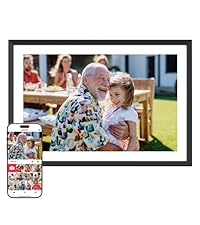
Image Description: A screenshot of the ARZOPA app interface on a smartphone, showing options for advanced privacy protection, unlimited uploads, inviting others to share, and customizing gift content. Download links for App Store and Google Play are visible.
4. Adding Content
Photos and videos can be added directly via the mobile app. For adding photos from a PC (not applicable to MacBook series) via USB cable, ensure the app is updated to the latest version.
SD card or USB drives can be used as external storage. Ensure the format of the SD card is FAT32/NTFS.
Supported formats: JPG/JPEG/WEBP/PNG for pictures, and MP4/3GP for videos.
Instruccions de funcionament
Interfície de pantalla tàctil
The 14-inch HD IPS anti-glare touch screen provides a clear and responsive interface for navigating photos and settings.

Image Description: A hand interacting with the touch screen of the ARZOPA D14 digital picture frame, demonstrating the ease of use.
Slideshow and Display Modes
The frame supports automatic photo slideshows. You can customize play intervals, play order (random, chronological, custom), and animation effects (e.g., Fade In/Out, 3D Card, 3D Flip, Rotate, Rotate and Zoom, Film Scale).
Funcions intel·ligents
- Detecció de gravetat: Automatically rotates the display for portrait or landscape orientation.
- Auto-Brightness Adjustment: Adapta la brillantor de la pantalla a les condicions de llum ambiental.
- Anti-Glare Protection: Reduces reflections for better viewing.
- Informació en temps real: Displays date, time, weather, temperature, and location.
- Mode de son intel·ligent: Allows for auto on/off scheduling to save energy.

Image Description: The ARZOPA D14 digital picture frame displaying a photo of a baby, with overlays indicating "Built-in Gravity Sensor for Auto-Rotation" and "Real-time Weather & Calendar."

Image Description: The ARZOPA D14 digital picture frame transitioning into sleep mode, with text highlighting "Sleep Mode & Auto-Slideshow" and features like "Automatic Photo Slideshow" and "Smart Sleep Mode."
Funcions avançades
Cloud Sharing & Data Security
The ARZOPA App facilitates effortless sharing of photos and videos. All data is secured via AWS Amazon Cloud. You can invite members to share content remotely.

Image Description: The ARZOPA D14 digital picture frame displaying a photo, surrounded by smaller images and icons representing "Free, unlimited storage," "File Management," supported video formats (MP4, M4V, 3GP, MOV), and "Lightning -fast Upload."
Custom Gift Mode
Pre-upload photos, videos, and custom greetings to the frame before gifting. This allows recipients to enjoy personalized content immediately upon unboxing.

Image Description: A person holding the ARZOPA D14 digital picture frame, which displays a personalized message and a family photo, illustrating the "Custom Gift Mode" feature.
Manteniment
To maintain the longevity and appearance of your ARZOPA D14 frame, regularly wipe the screen with a soft, dry, lint-free cloth. Avoid using abrasive cleaners or solvents. Ensure the frame is placed in a stable environment, away from direct sunlight, extreme temperatures, and moisture.
Resolució de problemes
If you encounter any issues, please refer to the user manual for common solutions. For technical assistance, contact the dedicated support team available 24/7 via email at support@arzopa.com.
Especificacions
| Característica | Detall |
|---|---|
| Dimensions del producte | 9.78 x 14.29 x 0.99 polzades |
| Pes de l'article | 4.88 lliures |
| Número de model de l'article | D14 |
| Marca | ARZOPA |
| Color | D14-Gold-Exquisite ornaments/Cloud Sharing |
| Resolució | 1080p |
| Dispositius compatibles | Ordinador personal, Smartphone |
| Mida de la pantalla | 14 polzades |
| Fabricant | ARZOPA Shenzhen G-world Technology Incorporated Company |

Image Description: The back of the ARZOPA D14 digital picture frame, highlighting its dimensions (14.0 inches diagonal, 36.3cm width, 24.85cm height) and showing the speaker, stand hole, wall hole, and power button.
Garantia i Suport
ARZOPA provides a dedicated support team available 24/7 to offer personalized technical assistance. For any questions or support needs, please email support@arzopa.com.


