1. Introducció
This manual provides comprehensive instructions for the installation, operation, and maintenance of the Hanwha Vision ANO-L7012R 4MP IR Bullet Camera. Please read this manual thoroughly before using the product to ensure correct usage and optimal performance. Keep this manual for future reference.
The Hanwha Vision ANO-L7012R is a compact 4MP IR bullet camera designed for reliable outdoor surveillance. Featuring a 3mm fixed lens with a 98.3° horizontal field of view, this camera captures sharp video at 2560x1440 resolution and 30fps. It includes intelligent motion detection, defocus, tampering, and directional detection capabilities. With a 20-meter IR range, H.265 compression, and IP66 weatherproof protection, this camera is suitable for high-performance surveillance installations.
2. Informació de seguretat
- Font d'alimentació: Use only the specified power adapter or Power over Ethernet (PoE) compliant devices. Incorrect power sources can damage the camera and void the warranty.
- Instal·lació: Installation should be performed by qualified personnel and comply with all local codes. Ensure the mounting surface can support the camera's weight.
- Aigua i humitat: Although the camera is IP66-rated for outdoor use, avoid submerging it in water or exposing it to high-pressure water jets.
- Neteja: Do not use liquid or aerosol cleaners. Use a soft, dry cloth for cleaning.
- Temperatura de funcionament: Operate the camera within the specified temperature range to prevent malfunction.
- Desmuntatge: No intenteu desmuntar ni modificar la càmera. Això anul·larà la garantia i pot causar danys.
3. Contingut del paquet
Verifiqueu que tots els components siguin presents al paquet:
- Hanwha Vision ANO-L7012R 4MP IR Bullet Camera
- Manual d'instruccions
- Mounting Screws and Anchors (may vary by region)
- Waterproof Cap for Ethernet Cable (if applicable)
4. Producte acabatview
The Hanwha Vision ANO-L7012R is a high-performance bullet-style network camera designed for robust surveillance applications.
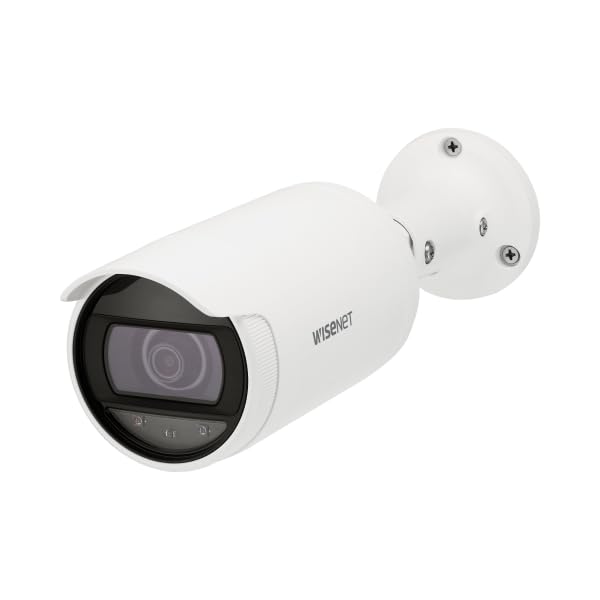
Figure 4.1: Hanwha Vision ANO-L7012R 4MP IR Bullet Camera. A white bullet-style security camera with a dark lens and a mounting base. The camera body has 'WISENET' printed on its side.
Característiques principals:
- Resolució de 4MP: Captures clear video at 2560x1440.
- Lent fixa: 3mm lens with a 98.3° Horizontal Field of View (HFoV).
- Visió nocturna IR: Up to 20 meters (65.6ft) in low-light conditions.
- Intelligent Analytics: Motion detection, directional detection, tampering, and defocus detection.
- Compressió eficient: Supports H.265/H.264/MJPEG with WiseStream II for optimized bandwidth and storage.
- Emmagatzematge perimetral: MicroSD slot (up to 128GB) with SD encryption.
- Resistent a la intempèrie: IP66-rated housing for outdoor durability.
- Alimentació per Ethernet (PoE): Simplifica la instal·lació proporcionant energia i dades a través d'un únic cable.
5. Configuració i instal·lació
5.1 Muntatge de la càmera
- Seleccioneu la ubicació: Choose a suitable indoor or outdoor location, typically a ceiling or wall, ensuring a clear field of view i accés al cablejat de xarxa.
- Prepara la superfície: Use the mounting template (if provided) to mark drill holes. Drill pilot holes for the mounting screws.
- Base segura: Attach the camera's mounting base securely to the surface using the provided screws and anchors.
- Ajust d'angle: Loosen the adjustment screws on the camera body to position the camera for the desired viewing angle. Tighten screws once adjusted.
5.2 Wiring and Network Connection
- Connexió Ethernet: Connect a standard Ethernet cable from your PoE-enabled network switch or injector to the camera's RJ45 port. If not using PoE, connect a separate 12V DC power adapter (not included) to the camera's power input.
- Protecció impermeable: For outdoor installations, ensure the Ethernet cable connection is protected using the provided waterproof cap or appropriate sealing methods to maintain the IP66 rating.
- Configuració de la xarxa: Once powered, the camera will obtain an IP address via DHCP (if available). Use the Hanwha Vision Device Manager software (available on the manufacturer's website) to discover the camera, change its default IP address, and configure network settings.
- Inici de sessió: Accedir a la càmera web interfície utilitzant a web browser and its IP address. The default login credentials are typically provided in a separate quick start guide or on the camera itself. Change default passwords immediately for security.
6. Funcionament de la càmera
6.1 Funcionament bàsic
- Viu View: Accedir a la càmera web interface or a compatible Video Management System (VMS) to view transmissió de vídeo en directe.
- Gravació: Configure recording settings via the web interface. Options include continuous recording, scheduled recording, and event-triggered recording (e.g., motion detection). Recordings can be stored on a microSD card (if installed) or a Network Video Recorder (NVR).
- Visió nocturna: The camera automatically switches to IR night vision mode in low-light conditions, providing clear black and white video up to 20 meters.
6.2 Funcions avançades
- Detecció de moviment: Configure detection zones and sensitivity to trigger alarms or recordings when movement is detected.
- Directional Detection: Set up rules to detect objects moving in specific directions across a virtual line.
- TampDetecció de corrents: Rebre alertes si la càmera view is obstructed or if the camera is tamperigit amb.
- Defocus Detection: Alerts if the image becomes out of focus, indicating a potential issue or tamperrant.
- WiseStream II: Enable this feature to dynamically control encoding, reducing bandwidth and storage requirements without compromising image quality.
- Targeta MicroSD: Insert a microSD card (up to 128GB) for local storage. Ensure SD encryption is enabled for data security.
7. Manteniment
- Neteja: Periodically clean the camera lens and housing with a soft, dry cloth to remove dust and dirt. Do not use abrasive cleaners or solvents.
- Actualitzacions de firmware: Regularly check the Hanwha Vision weblloc web per a actualitzacions de firmware. Mantenir el firmware actualitzat garanteix un rendiment òptim, seguretat i accés a noves funcions.
- Inspecció del cable: Periodically inspect all cables for signs of wear or damage, especially in outdoor installations.
- Còpia de seguretat de la configuració: Back up your camera's configuration settings regularly to easily restore them if needed.
8. Solució De Problemes
| Problema | Causa possible | Solució |
|---|---|---|
| Sense alimentació/La càmera no s'encén | Incorrect power source; PoE not active; faulty cable. | Verify power connection and source. Ensure PoE switch/injector is active. Check Ethernet cable for damage. |
| No video stream | Network connectivity issue; incorrect IP address; firewall blocking. | Check network cable. Verify camera's IP address. Ensure no firewall is blocking ports. Restart camera and network devices. |
| Mala qualitat d'imatge | Dirty lens; improper focus; low light conditions; network bandwidth issues. | Clean the lens. Check camera settings for focus (if adjustable) and exposure. Ensure sufficient lighting or proper IR function. Check network bandwidth. |
| La detecció de moviment no funciona | Incorrect sensitivity settings; detection zones not configured; firmware issue. | Adjust motion detection sensitivity and configure detection zones in the web interface. Update firmware if available. |
9. Especificacions
| Característica | Detall |
|---|---|
| Nom del model | ANO-L7012R |
| Resolució | 4MP (2560x1440) |
| Sensor d'imatge | CMOS d'1/3" |
| Lent | Objectiu fix 3mm |
| Camp horitzontal de View (HFoV) | 98.3° |
| Gamma de visió nocturna | 20 meters (65.6ft) IR |
| Compressió de vídeo | H.265, H.264, MJPEG (with WiseStream II) |
| Àmbit dinàmic ampli (WDR) | 120 dB |
| Emmagatzematge | MicroSD slot (up to 128GB) with SD encryption |
| Classificació de protecció d'entrada (IP). | IP66 (resistent a la intempèrie) |
| Font d'alimentació | PoE (alimentació per Ethernet) |
| Dimensions (L x A x A) | 3.07 x 10.31 x 10.31 polzades |
| Pes | 0.86 lliures |
| Protocol de connectivitat | RTSP |
| Usos recomanats | Seguretat interior, Seguretat exterior |
10. Garantia i Suport
For warranty information, please refer to the warranty card included with your product or visit the official Hanwha Vision weblloc.
For technical support, software downloads, and additional resources, please visit the Hanwha Vision support portal.
- Oficial Weblloc: www.hanwhavision.com (Exampl'enllaç, l'enllaç real pot variar)
- Suport: Consulteu l'embalatge del producte o la fitxa oficial website for specific support contact details.


