1. Introducció
Thank you for choosing the AULA SC680 Wireless Gaming Mouse. This manual provides detailed instructions to help you set up, operate, and maintain your device for optimal performance. The SC680 features tri-mode connectivity, a high-performance PAW3395 sensor, and customizable options designed for both gaming and professional use.

Imatge: Superior view of the AULA SC680 Wireless Gaming Mouse in black, showcasing its ergonomic design and primary buttons.
2. Característiques clau
- Connectivitat trimodal: Supports USB-C wired, 2.4GHz wireless, and Bluetooth 5.2 connections for versatile use across multiple devices and operating systems (Windows 7/8/10, Vista, XP, Mac, Windows 2000, Linux).
- High-Performance PAW3395 Sensor: Delivers precise tracking with up to 26000 programmable DPI, 650 IPS speed, 50g acceleration, and an 8000Hz polling rate.
- Durable & Responsive Buttons: Equipped with switches rated for up to 80 million clicks, ensuring longevity and quick response.
- Disseny ultralleuger: Weighs only 58g for comfortable, extended use, reducing hand fatigue. Includes anti-slip and sweat-proof stickers for enhanced grip.
- Llarga vida útil de la bateria: Built-in 500mAh rechargeable battery provides up to 75 hours of continuous use.
- Programari personalitzable: Allows users to personalize DPI settings, button functions, macro files, and polling rates (Windows systems only for driver functionality).

Image: Diagram illustrating the PAW3395 flagship sensor and its performance specifications including DPI adjustment, IPS, and accelerated speed.
3. Contingut del paquet
Si us plau, comproveu el paquet per veure si hi ha els elements següents:
- Ratolí de joc sense fil AULA SC680
- Cable de càrrega/dades USB-C
- Receptor USB de 2.4 GHz
- Anti-slip Stickers (optional application)
- Spare Foot Pads
- Manual d'usuari (aquest document)
4. Configuració i connexió
4.1 Càrrega del ratolí
Before first use, it is recommended to fully charge the mouse. Connect the provided USB-C cable to the mouse's front port and the other end to a USB power source (e.g., computer USB port, USB wall adapter). The indicator light on the mouse will blink red while charging and turn solid when fully charged. A full charge provides up to 75 hours of battery life.

Image: The AULA SC680 mouse connected via USB-C cable for charging, highlighting its 500mAh battery and up to 75 hours of battery life.
4.2 Connexió del ratolí (Tri-Mode)
The AULA SC680 offers three connection modes: 2.4GHz Wireless, Bluetooth 5.2, and USB-C Wired.
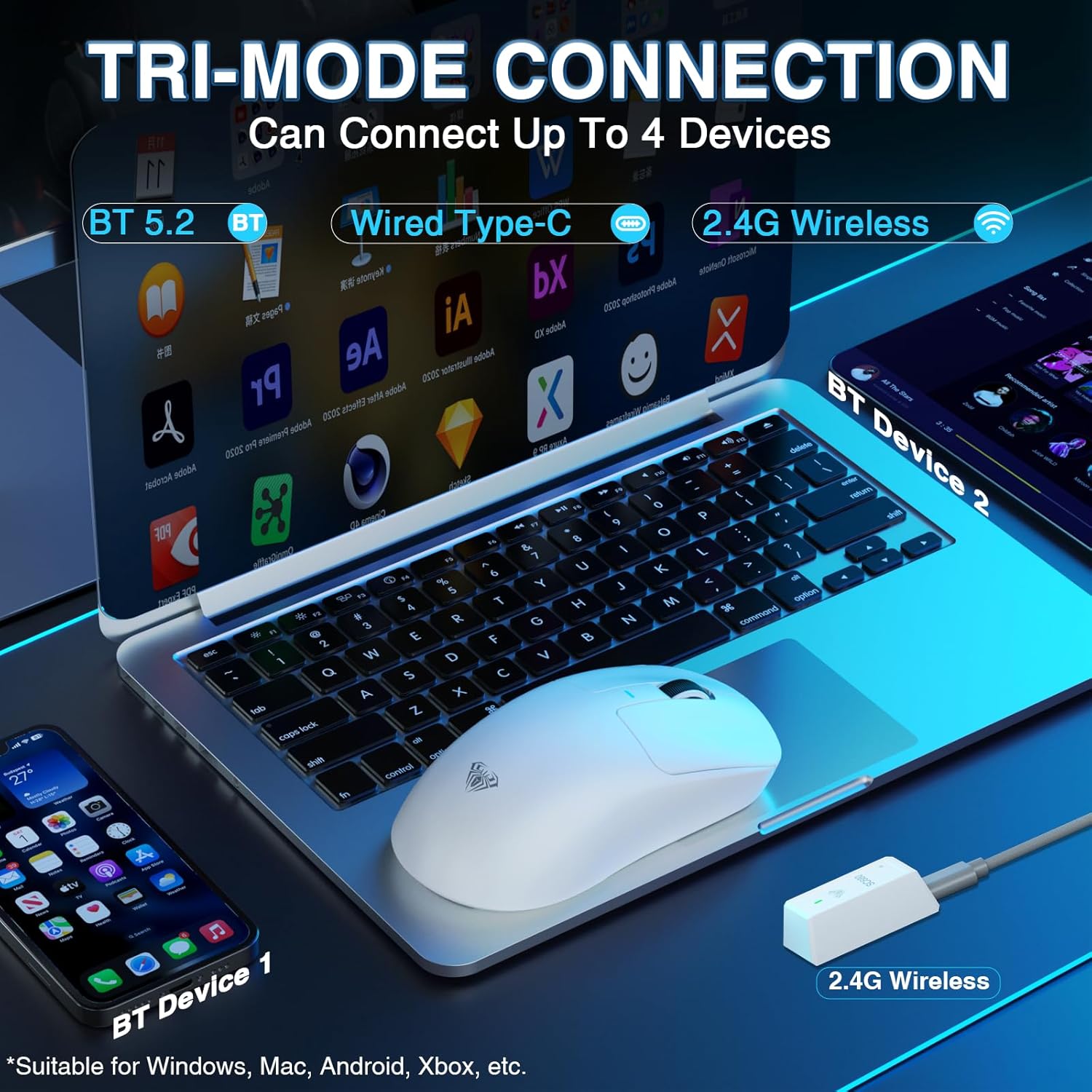
Image: The AULA SC680 mouse demonstrating its tri-mode connection capabilities, including Bluetooth, wired USB-C, and 2.4GHz wireless with a receiver.
- Mode sense fil de 2.4 GHz:
- Locate the 2.4GHz USB receiver (often stored in a compartment on the bottom of the mouse).
- Connecteu el receptor a un port USB disponible de l'ordinador.
- Slide the switch on the bottom of the mouse to the "2.4G" position. The mouse should connect automatically.
- Mode Bluetooth 5.2:
- Feu lliscar l'interruptor de la part inferior del ratolí a la posició "BT".
- On your device (PC, laptop, Mac, PS5), go to Bluetooth settings and search for new devices.
- Select "AULA-SC680" from the list to pair. The mouse supports two Bluetooth connections (BT1 and BT2).
- For BT1: Hold down the DPI key for 5 seconds; the blue light will flash.
- For BT2: Hold down the middle key + back key for 5 seconds; the green light will flash.
- To switch between BT1 and BT2: Hold down the middle key + forward key for 5 seconds.
- Mode amb cable USB-C:
- Connect the provided USB-C cable to the mouse and to your computer's USB port.
- El ratolí funcionarà com un ratolí amb cable i es carregarà simultàniament.
Video: An official product video demonstrating the AULA SC680 Tri-Mode Wireless Gaming Mouse, highlighting its features and connectivity options.
5. Instruccions de funcionament
5.1 Funcions dels botons
The AULA SC680 mouse features several programmable buttons:
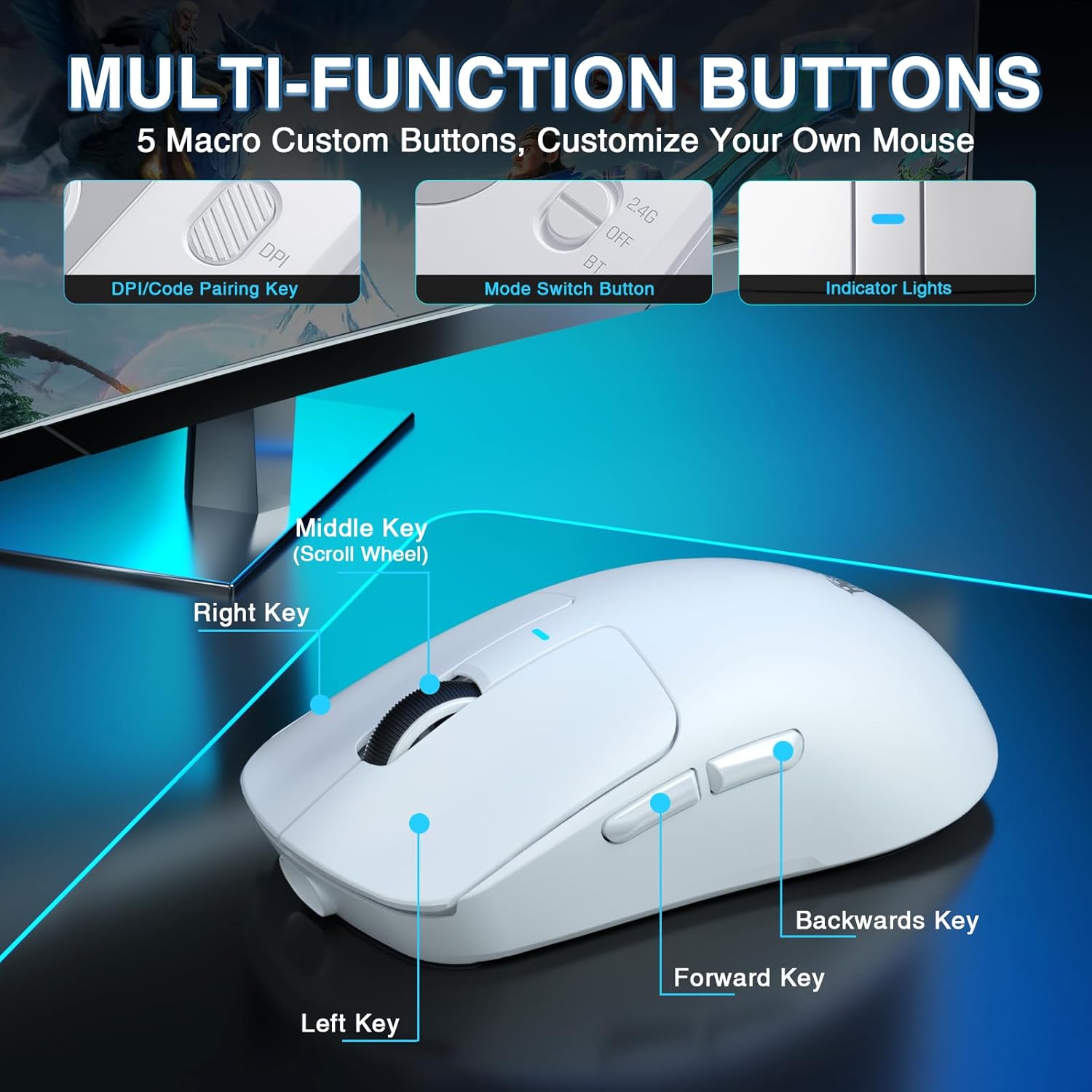
Image: A detailed diagram labeling the multi-function buttons on the AULA SC680 mouse, including Left Key, Right Key, Middle Key (Scroll Wheel), Forward Key, Backwards Key, DPI/Code Pairing Key, Mode Switch Button, and Indicator Lights.
- Clic esquerre: Standard primary click.
- Clic dret: Standard secondary click.
- Middle Key (Scroll Wheel): Desplaceu-vos amunt/avall, feu clic per a la funció del botó central.
- Clau d'enviament: Navega cap endavant web navegadors o file exploradors.
- Backwards Key: Navega cap enrere web navegadors o file exploradors.
- DPI/Code Pairing Key (Bottom): Cycles through DPI settings and initiates Bluetooth pairing.
- Mode Switch Button (Bottom): Toggles between 2.4G, OFF, and BT modes.
5.2 Ajust de DPI
The mouse supports up to 26000 programmable DPI. You can cycle through preset DPI levels using the DPI button on the bottom of the mouse. The indicator light on the mouse will change color to indicate the current DPI setting. Default levels are typically 400-800-1600-3200-6400.
5.3 Customizable Software
For advanced customization, including precise DPI settings, macro programming, and button remapping, download the official AULA driver software.
- Descarrega del controlador: Visita bit.ly/m/AULA
- Nota de compatibilitat: The gaming driver is compatible only with Windows systems and supports 2.4GHz wireless mode and USB-C wired mode. For Bluetooth connection mode, Windows 10 or higher is required.
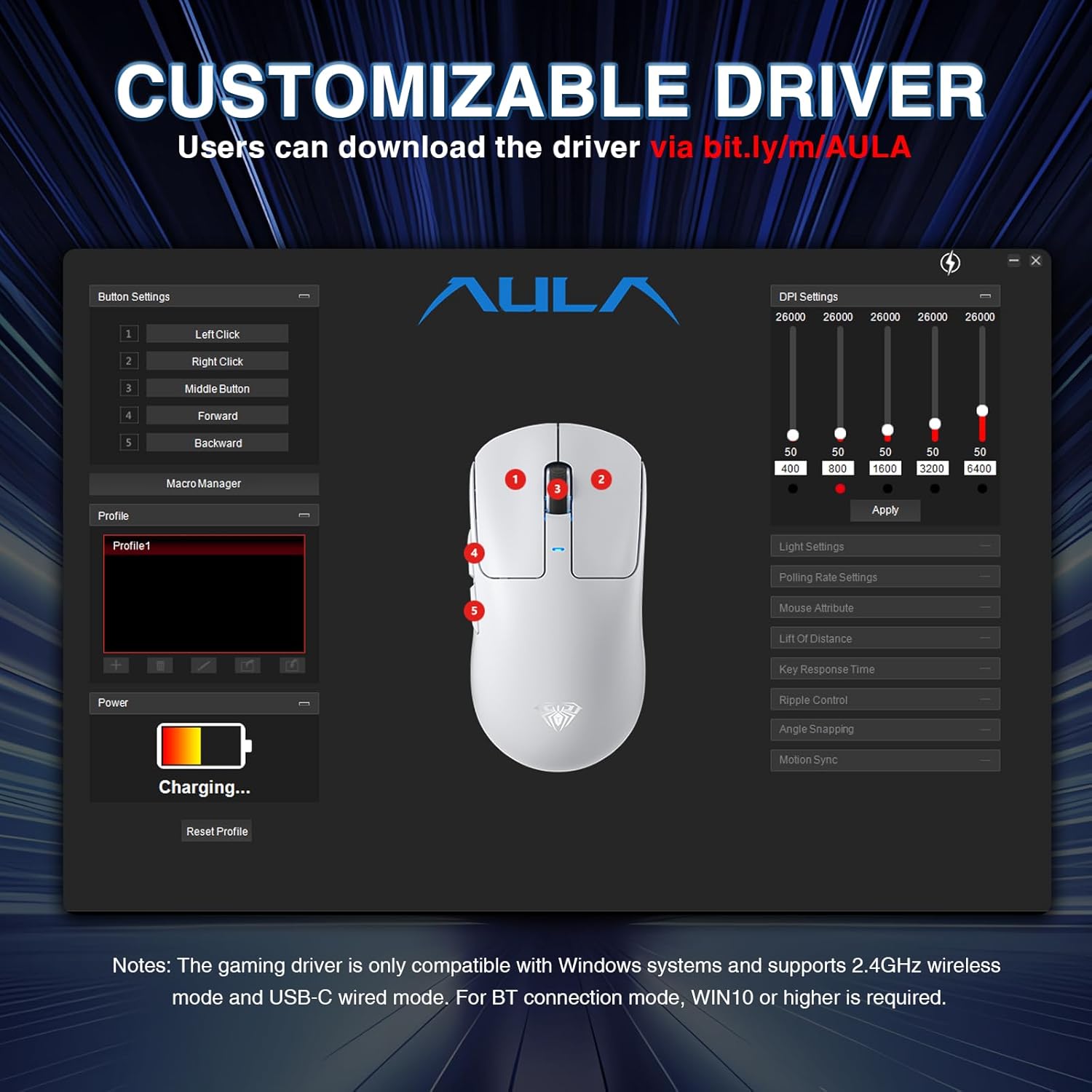
Image: A screenshot of the AULA customizable driver software, showing options for button settings, DPI adjustments, polling rate, and other mouse attributes.
6. Manteniment
To ensure the longevity and optimal performance of your AULA SC680 mouse, follow these maintenance guidelines:
- Neteja: Feu servir un drap suau i sec per netejar la superfície del ratolí. Per a la brutícia persistent, netegeu lleugerament.amp es pot fer servir un drap, però assegureu-vos que no entri humitat als components interns. Eviteu productes químics agressius o netejadors abrasius.
- Emmagatzematge: Quan no l'utilitzeu durant períodes prolongats, guardeu el ratolí en un lloc fresc i sec.
- Cura de la bateria: Eviteu descarregar completament la bateria amb freqüència. Carregueu el ratolí quan l'indicador de bateria estigui baix.
- Cura del cable: Do not sharply bend or pull the USB-C cable to prevent damage.
- Coixinets per als peus: The mouse comes with spare foot pads. Replace them if the original pads show significant wear to maintain smooth gliding.
- Anti-slip Stickers: Apply the included anti-slip stickers for improved grip and a personalized aesthetic. Ensure the mouse surface is clean and dry before application.

Image: The AULA SC680 mouse with colorful anti-slip stickers applied, demonstrating the customizable grip and aesthetic options.
7. Solució De Problemes
If you encounter issues with your AULA SC680 mouse, please refer to the following common solutions:
- El ratolí no respon:
- Ensure the mouse is charged. Connect it via USB-C cable to charge and check if it works in wired mode.
- Verify the connection mode switch (2.4G/OFF/BT) on the bottom of the mouse is set correctly for your desired connection type.
- For 2.4GHz: Ensure the USB receiver is securely plugged into a working USB port. Try a different USB port.
- For Bluetooth: Ensure Bluetooth is enabled on your device and the mouse is paired correctly. Re-initiate pairing if necessary (refer to Section 4.2).
- Reinicieu l'ordinador o el dispositiu.
- Connexió endarrerida o intermitent:
- Move the mouse closer to the 2.4GHz receiver or Bluetooth device to reduce interference.
- Ensure there are no large metal objects or other wireless devices causing interference between the mouse and receiver/device.
- Check battery level; low battery can affect wireless performance.
- Update mouse drivers (if applicable, via customizable software).
- DPI Settings Not Changing:
- Ensure you are pressing the correct DPI button on the bottom of the mouse.
- If using customizable software, ensure the settings are applied and the mouse is in a compatible mode (2.4GHz or wired).
- Botons que no funcionen:
- Check if the buttons are remapped in the customizable software. Reset to default if unsure.
- Ensure the mouse is clean and there's no debris obstructing the buttons.
8. Especificacions
| Característica | Detall |
|---|---|
| Marca | AULA |
| Model | SC680 |
| Tecnologia de connectivitat | Sense fil de 2.4 GHz, Bluetooth 5.2, USB-C amb cable |
| Sensor | Sensor òptic PAW3395 |
| DPI (punts per polzada) | Up to 26000 (Programmable), Default: 400-800-1600-3200-6400 |
| IPS (polzades per segon) | 650 |
| Acceleració | 50 g |
| Taxa de votació | 8000 Hz |
| Vida útil del botó | 80 milions de clics |
| Tipus de bateria | Ió de liti (inclòs) |
| Capacitat de la bateria | 500 mAh |
| Durada de la bateria | Fins a 75 hores |
| Pes de l'article | 58g (Ultra-Lightweight) |
| Característiques especials | Ergonomic Design, Lightweight, Programmable Buttons, Rechargeable |
| Compatibilitat | Windows 7/8/10, Vista, XP, Mac, Windows 2000, Linux (BT requires WIN10+) |
9. Garantia i Suport
Per obtenir informació sobre la garantia i assistència tècnica, consulteu l'AULA oficial. weblloc web o poseu-vos en contacte amb el vostre distribuïdor. Conserveu el rebut de compra per a reclamacions de garantia.
For further assistance or to download the latest drivers and software, please visit the AULA official support page.


