1. Introducció
Welcome to the LIGE Military Smartwatch EF13-L user manual. This guide provides essential information for setting up, operating, and maintaining your new smartwatch. Please read this manual thoroughly to ensure proper use and to fully utilize all features of your device.

Image 1.1: LIGE Military Smartwatch EF13-L, showcasing its robust design and interchangeable straps.
2. Contingut del paquet
Upon opening your LIGE Military Smartwatch EF13-L package, please verify that all the following items are included:
- LIGE Military Smartwatch EF13-L (1 unit)
- Watch Strap (2 units - typically one metal, one silicone)
- Magnetic Charger (1 unit)
- Manual d'instruccions (1 unitat)
3. Producte acabatview
3.1 Components físics
The LIGE EF13-L smartwatch features a durable casing and a large display. It comes with two interchangeable straps for versatility. The watch includes physical buttons for power and navigation, along with a crown for additional control.

Imatge 3.1: Detallada view of the smartwatch dimensions, including a 56mm case diameter and strap length, along with included accessories.
3.2 Pantalla
The smartwatch is equipped with a 1.85-inch HD display, offering a resolution of 360*360 pixels. This large screen provides clear visuals for notifications, health data, and watch faces.

Image 3.2: Comparison illustrating the 1.85-inch Ultra HD display size against a smaller screen, highlighting its clarity and full-touch capability.
4. Configuració
4.1 Càrrega del rellotge intel·ligent
Before initial use, fully charge your smartwatch. Connect the magnetic charging cable to the charging points on the back of the watch and plug the USB end into a power adapter (not included) or a computer's USB port. The watch features a 1000mAh battery, providing extended usage time.
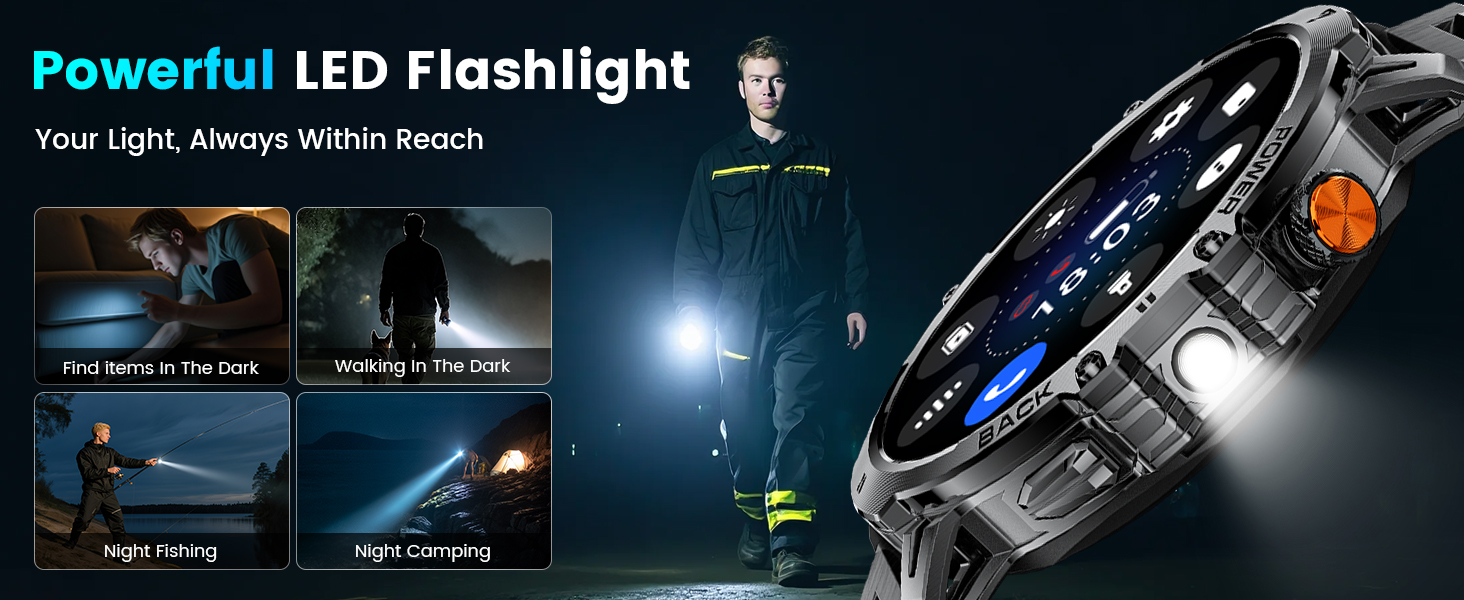
Image 4.1: The smartwatch connected to its magnetic charger, highlighting its 1000mAh battery capacity.
4.2 Instal·lació de l'aplicació
To unlock the full functionality of your smartwatch, download and install the companion application on your smartphone. The app is named "FitCloudPro" and is available on both the Google Play Store for Android devices and the Apple App Store for iOS devices.
4.3 Emparellament de dispositius
Follow these steps to pair your smartwatch with your smartphone:
- Download and install the "FitCloudPro" app from your phone's app store.
- Assegureu-vos que el Bluetooth estigui habilitat al vostre telèfon intel·ligent.
- Open the "FitCloudPro" app. Navigate to the device section and tap "Add New Device."
- The app will search for available devices. Select "EF13" or "EF13-L" from the list.
- Confirma la sol·licitud d'emparellament tant al telèfon com al rellotge intel·ligent.
- Grant necessary permissions within the app for notifications and health data synchronization.
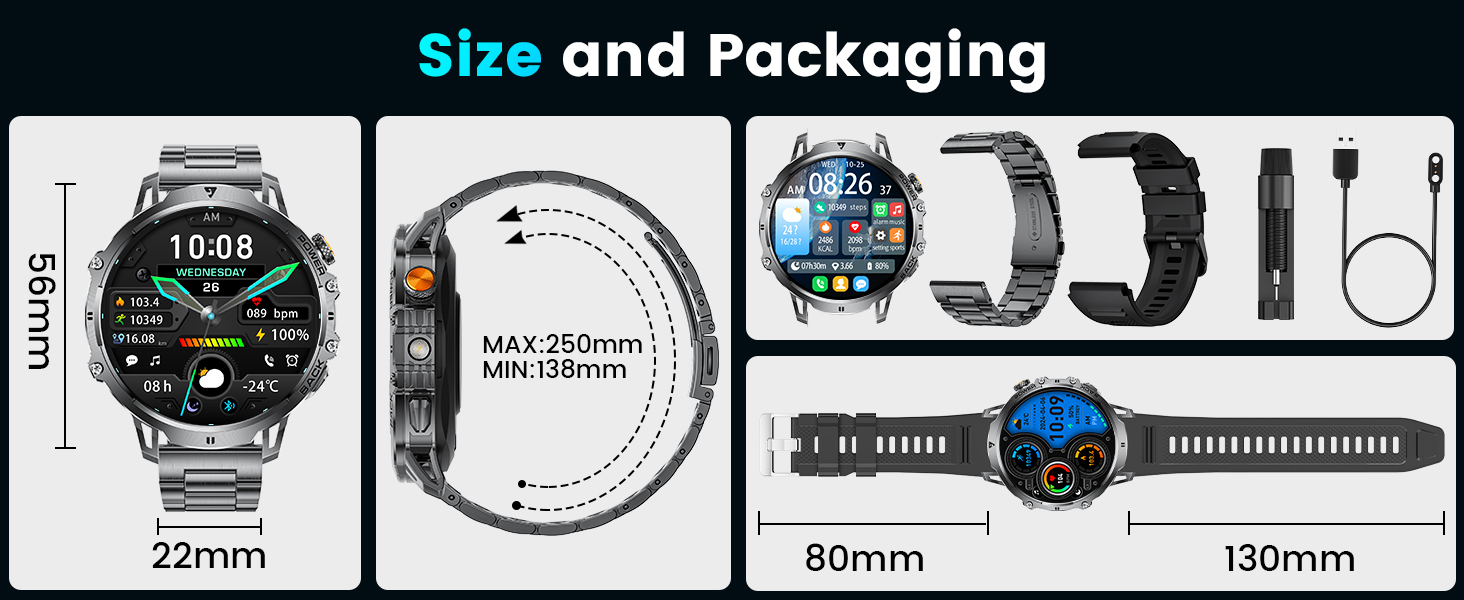
Image 4.2: Visual guide demonstrating the five steps to connect the smartwatch to a smartphone using the FitCloudPro application.
5. Instruccions de funcionament
5.1 Navegació bàsica
- Pantalla tàctil: Swipe left/right, up/down to navigate menus and access different features. Tap to select.
- Botons laterals: Typically, one button serves as a power/back button, while others may provide quick access to specific functions or the sports mode menu.
5.2 Trucades i notificacions per Bluetooth
Once paired, the smartwatch supports Bluetooth 5.3 for stable connections. You can answer or dial calls directly from your watch using its built-in speaker and microphone. The watch also displays incoming messages and notifications from various social media applications (SMS, Facebook, WhatsApp, etc.).

Image 5.1: The smartwatch displaying AI voice assistant, message alerts, and call handling interfaces.
5.3 modes esportius
The EF13-L offers over 100 sports modes to track your physical activities. It automatically records data such as steps, calories burned, and distance covered, helping you monitor your fitness progress.

Image 5.2: The smartwatch interface showing various sports modes and activity tracking data like steps, distance, calories, and heart rate.
5.4 Vigilància de la salut
The smartwatch monitors various health metrics, including heart rate, sleep patterns, and blood oxygen levels. These features are designed for general wellness tracking and should not be used for medical diagnosis.
5.5 Llanterna LED
Activate the built-in LED flashlight function for instant illumination in low-light conditions. This feature is useful for outdoor activities or in emergencies.

Image 5.3: The smartwatch emitting light from its integrated LED flashlight, illustrating its utility in various scenarios like outdoor adventures or power outages.
5.6 Altres funcions
The smartwatch includes several additional features:
- Assistent de veu: Control your device with voice commands.
- Pronòstic del temps: Rep actualitzacions meteorològiques en temps real.
- Control remot de la càmera: Activa la càmera del telèfon de forma remota.
- Control de música: Gestiona la reproducció de música al teu telèfon intel·ligent.
- Esferas personalitzables: Choose from various watch faces or create your own.
- Alarms, Stopwatches, Timers: Essential time management tools.
- Sedentary and Water Reminders: Prompts to stay active and hydrated.
6. Manteniment
6.1 Neteja
Regularly clean your smartwatch and straps to prevent skin irritation and maintain device longevity. Use a soft, dry cloth to wipe the screen and casing. For silicone straps, a damp es pot utilitzar un drap amb sabó suau i assecar-lo completament.
6.2 Resistència a l'aigua
The LIGE EF13-L smartwatch is IP68 waterproof, meaning it is resistant to dust and can withstand immersion in water up to 1.5 meters for 30 minutes. It is suitable for daily use, hand washing, and light rain. However, it is not recommended for hot showers, saunas, diving, or prolonged submersion in water, as steam and high water pressure can compromise the seals.
7. Solució De Problemes
- El rellotge no s'encén: Assegura't que el rellotge estigui completament carregat. Connecta'l al carregador durant almenys 30 minuts.
- No es pot emparellar amb el telèfon: Make sure Bluetooth is enabled on your phone and the watch is within range. Restart both the watch and your phone, then try pairing again through the "FitCloudPro" app.
- Notificacions no rebudes: Check app permissions on your phone to ensure "FitCloudPro" has access to notifications. Also, verify that "Do Not Disturb" mode is not active on either the watch or your phone.
- Dades de salut inexactes: Ensure the watch is worn snugly on your wrist, not too tight or too loose. Keep the sensor clean. Remember that data is for reference only and not for medical purposes.
- La pantalla no respon: Try restarting the watch by pressing and holding the power button. If the issue persists, ensure the screen is clean and dry.
- Watch feels too large: Please note that this smartwatch has a 1.85" screen and a case diameter of approximately 56mm, which may not be suitable for customers with smaller wrists.
8. Especificacions
| Característica | Especificació |
|---|---|
| Marca | LIGE |
| Model | EF13-L |
| Mida de la pantalla | 1.85 polzades |
| Resolució de pantalla | 360*360 píxels |
| Capacitat de la bateria | Polímer de liti de 1000 mAh |
| Durada de la bateria (ús normal) | 10-15 dies |
| Battery Life (Power Saving Mode) | Fins a 30 dies |
| Connectivitat | Bluetooth 5.3 |
| Resistència a l'aigua | IP68 |
| Dispositius compatibles | iOS 11.0 i posterior, Android 5.0 i posterior |
| Característiques especials | Bluetooth Calls, Message Alerts, Voice Assistant, LED Flashlight, 100+ Sports Modes, Exercise Data Tracking, Music Control, Alarm Clock, Stopwatch, Drinking Water Reminder, Sedentary Reminder, DIY Wallpaper, Screen Brightness Adjustment, Timer, Find Phone, Do Not Disturb Mode |
9. Garantia i Suport
LIGE offers 24 months of product maintenance for your smartwatch. If you encounter any issues or require assistance, please contact LIGE customer support. We aim to respond and resolve your concerns within 24 hours.
Per obtenir assistència, consulteu la informació de contacte proporcionada amb la vostra compra o visiteu el lloc web oficial de LIGE. weblloc.


