1. Introducció
Welcome to the SteelSeries Arctis GameBuds ANC Wireless Gaming Earbuds. This manual provides essential information for setting up, operating, maintaining, and troubleshooting your new gaming earbuds. Please read these instructions carefully before use to ensure optimal performance and longevity of your device.
2. Producte acabatview
The SteelSeries Arctis GameBuds ANC are designed for a versatile gaming experience across multiple platforms, offering active noise cancellation, dual wireless connectivity, and a comfortable fit.
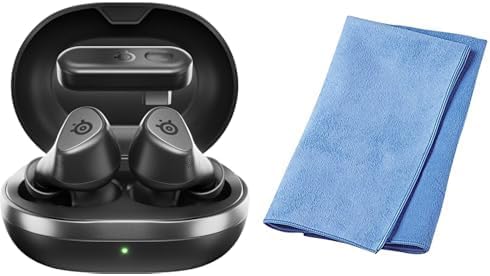
Image: The SteelSeries Arctis GameBuds ANC Wireless Gaming Earbuds are shown inside their open charging case, with a green indicator light visible. A folded blue cleaning cloth is positioned next to the case.
Contingut del paquet:
- SteelSeries Arctis GameBuds ANC Wireless Gaming Earbuds
- Estoig de càrrega
- Cable de càrrega USB-C
- Wireless Dongle (USB-C)
- Sanwa Cleaning Cloth
- Guia d'inici ràpid
3. Configuració
3.1 Càrrega inicial
- Col·loqueu els auriculars a la caixa de càrrega.
- Connect the charging case to a power source using the provided USB-C cable, or place it on a Qi-compatible wireless charging pad.
- The LED indicator on the case will show charging status. A full charge provides up to 40 hours of battery life (including case charges). Rapid charging is supported.
3.2 Connecting via 2.4GHz Wireless (Low Latency)
- Insert the USB-C wireless dongle into your PC, PlayStation (PS5/PS4), or Nintendo Switch.
- Ensure the earbuds are charged and removed from the case. They should automatically connect to the dongle.
- Confirm the connection through your device's audio settings.
3.3 Connexió mitjançant Bluetooth 5.3
- Traieu els auriculars de la funda de càrrega.
- Activate Bluetooth pairing mode on the earbuds (refer to the Quick Start Guide for specific button presses).
- On your smartphone or other Bluetooth-enabled device, search for "Arctis GameBuds" in the Bluetooth settings and select to pair.
3.4 Instal·lació del programari (SteelSeries GG)
For advanced customization, including EQ settings and firmware updates, download and install the SteelSeries GG software on your PC. This software allows access to over 100 EQ presets and personalized audio profiles.
4. Instruccions de funcionament
4.1 Encès/Apagat
- Encès: Traieu els auriculars de l'estoig de càrrega. S'encendran automàticament.
- Apagar: Torna a col·locar els auriculars a l'estoig de càrrega. S'apagaran automàticament i començaran a carregar-se.
4.2 Cancel·lació activa del soroll (ANC)
The earbuds feature Active Noise Cancellation to minimize ambient distractions. Control ANC through the touch controls on the earbuds or via the SteelSeries GG software.
4.3 Controls d'àudio
The earbuds are equipped with intuitive touch controls for managing audio playback and calls:
- Reproduir/pausa: Un sol toc a qualsevol dels auriculars.
- Pista següent: Toqueu dues vegades l'auricular dret.
- Pista anterior: Toqueu tres vegades l'auricular esquerre.
- Pujar/baixar el volum: Specific gestures or button presses may be customizable via SteelSeries GG.
4.4 Ús del micròfon
The integrated microphones allow for clear communication during gaming or calls. Ensure the earbuds are properly seated for optimal microphone performance.
5. Manteniment
5.1 Neteja
Regularly clean your earbuds and charging case to maintain hygiene and performance. Use the provided Sanwa cleaning cloth or a soft, dry, lint-free cloth. Avoid using abrasive materials or harsh chemicals.
5.2 Emmagatzematge
When not in use, store the earbuds in their charging case to protect them from dust and damage, and to ensure they remain charged.
5.3 Resistència a l'aigua i la pols
The earbuds are rated IP55 for dust and water resistance, meaning they are protected against limited dust ingress and low-pressure water jets from any direction. This rating does not imply full waterproofing; avoid submerging the earbuds in water.
6. Solució De Problemes
6.1 Problemes de connexió
- Sense connexió (2.4 GHz): Ensure the wireless dongle is securely plugged into your device. For optimal performance, place the dongle in a USB port close to your line of sight, potentially using a USB-C extension cable if interference occurs.
- Error d'emparellament Bluetooth: Ensure the earbuds are in pairing mode and your device's Bluetooth is enabled. Try unpairing and re-pairing the earbuds.
- Desconnexions intermitents: Check for potential interference from other wireless devices. Ensure the earbuds are fully charged.
6.2 Problemes de qualitat d'àudio
- Low Volume/Poor Sound: Adjust EQ settings via the SteelSeries GG software. Ensure the earbuds are properly seated in your ears.
- ANC White Noise: Some users may experience a subtle white noise with ANC enabled. This is often normal for ANC technology. If it is excessive, ensure a proper earbud fit.
6.3 Bateria i càrrega
- Els auriculars no es carreguen: Ensure the charging contacts on both the earbuds and the case are clean and free of debris. Verify the charging cable is functional and the power source is active.
- Mode de repòs automàtic: If earbuds enter sleep mode unexpectedly during low volume playback, adjust the auto-sleep settings in the SteelSeries GG software.
6.4 Problemes d'actualització de programari
- Error d'actualització del firmware: Ensure a stable internet connection and that the earbuds are connected to your PC via the dongle or Bluetooth during the update process. Note that some operating systems, such as certain versions of macOS, may have compatibility issues with the SteelSeries GG update utility.
7. Especificacions
| Marca | SteelSeries |
| Model | Arctis GameBuds ANC (61680) |
| Connectivitat | 2.4GHz Wireless (via USB-C dongle), Bluetooth 5.3 |
| Compatibilitat | PC, PlayStation 5, PlayStation 4, Nintendo Switch, Smartphones |
| Durada de la bateria | Fins a 40 hores (amb estoig de càrrega) |
| Carregant | USB-C, Qi Wireless Charging, Rapid Charging |
| Durabilitat | Resistent a la pols i l'aigua IP55 |
| Funcions d'àudio | Active Noise Cancellation (ANC), Hi-Fi Audio, 100+ EQ Settings via SteelSeries GG |
| Color | Negre |
8. Informació de la garantia
SteelSeries products are covered by a manufacturer's warranty. For detailed information regarding warranty terms, conditions, and duration, please refer to the warranty card included with your product or visit the official SteelSeries weblloc web. Conserveu el comprovant de compra per a reclamacions de garantia.
9. Suport
Per obtenir més ajuda, assistència tècnica o per accedir als controladors i actualitzacions de firmware més recents, visiteu el lloc web oficial d'assistència de SteelSeries. weblloc:
També podeu trobar preguntes freqüents i fòrums de la comunitat a la pàgina d'assistència.


