Introducció
The WAVLINK WL-UG69PD13 PROM is a versatile 15-in-1 USB-C docking station designed to expand the connectivity and display capabilities of your laptop. It supports triple 4K@60Hz displays for both Mac (M1/M2/M3/M4) and Windows systems, offering a comprehensive solution for enhanced productivity in office or home environments. This docking station integrates multiple ports including HDMI, DisplayPort, USB-C, USB-A, RJ45 Gigabit Ethernet, SD/TF card slots, and an Audio/Mic port, all powered by a robust 130W adapter providing up to 100W Power Delivery to your host laptop.
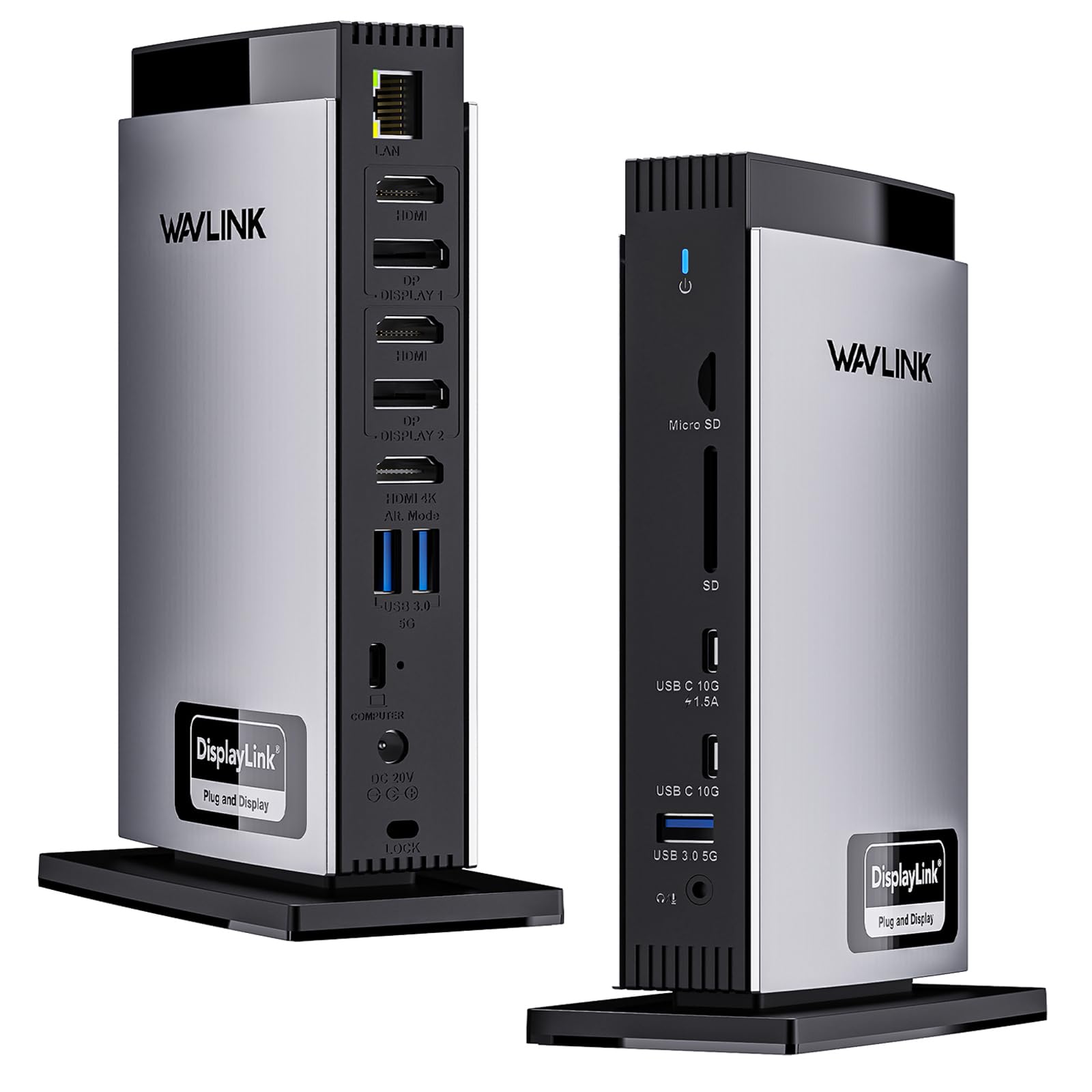
Image: WAVLINK WL-UG69PD13 PROM USB-C 15-in-1 Docking Station, showcasing el seu disseny elegant i els seus múltiples ports.
Configuració
Contingut del paquet
- WAVLINK WL-UG69PD13 PROM Docking Station
- Adaptador de potència de 130W
- Cable USB-C a USB-C
- Manual d'usuari
Port Overview
The docking station features a comprehensive array of ports to connect all your peripherals and displays:
- 3 ports HDMI: For connecting external displays. One HDMI (Alt. Mode) supports 4K@60Hz, while two HDMI (DisplayLink) support dual 4K@60Hz.
- 2x DisplayPort: For connecting external displays. These are part of the DisplayLink group and support dual 4K@60Hz. Note: Only one of the HDMI and DP ports can be selected per DisplayLink group.
- 2x USB-C Ports (10Gbps): Transferència de dades d'alta velocitat.
- 3x USB-A Ports (5Gbps): Per connectar dispositius USB.
- RJ45 Gigabit Ethernet: Provides stable wired network performance.
- Ranures per a targetes SD/TF: For fast data transfer from memory cards (up to 104MB/s).
- Port d'àudio/micròfon: Per connectar auriculars o micròfons.
- Host USB-C Port (100W PD): Connects to your laptop and provides up to 100W charging power.
- DC IN (130W): Power input for the docking station.
- Ranura de bloqueig Kensington: Per assegurar el dispositiu.

Image: Detailed diagram of the 15-in-1 port layout on the WAVLINK docking station.
Instal·lació del controlador
For proper functionality, especially for multiple displays, the DisplayLink driver must be installed on your host device. Visit the official DisplayLink website (synaptics.com) to download the correct driver version for your operating system (Windows or macOS).

Image: Visual guide for DisplayLink driver download and installation process.
Video: Tutorial on how to download and install the DisplayLink Manager application for Mac M1/M2 MacBooks.
Compatibilitat
The docking station is widely compatible with various operating systems and devices:
- Sistema operatiu compatible: Windows 11/10/8.1/8/7/XP/Vista, Mac OS 10.14-14.x and later, Chrome OS, Ubuntu, Android, Harmony OS.
- Unsupported OS: Unix systems, Linux, iOS, iPad operating systems.
- Nota: HDMI (Alt. Mode) requires your laptop's Type-C port to support video output. Ensure your host's Type-C port supports power delivery for charging functionality.

Image: Guide illustrating examples of supported and unsupported USB-C port functionalities on laptops.
Instruccions de funcionament
Connexió de pantalles
The docking station allows for triple 4K@60Hz display connections. The HDMI (Alt. Mode) port provides a direct 4K@60Hz output, while the DisplayLink-6950 chipset supports dual 4K@60Hz displays via the other HDMI/DisplayPort combinations. Remember, only one port (HDMI or DisplayPort) can be used per DisplayLink group.

Image: Various triple display configurations for Mac and Windows laptops using the docking station.
Supported Monitor Resolutions
| Mode de visualització | HDMI/DP (Group 1) | HDMI/DP (Group 2) | HDMI (Alt Mode) |
|---|---|---|---|
| Pantalla única | 3840x2160 a 60 Hz | / | / |
| / | 3840x2160 a 60 Hz | / | |
| / | / | 3840x2160 a 60 Hz | |
| Pantalla dual | 3840x2160 a 60 Hz | 3840x2160 a 60 Hz | / |
| 3840x2160 a 60 Hz | / | 3840x2160 a 60 Hz | |
| / | 3840x2160 a 60 Hz | 3840x2160 a 60 Hz | |
| Visualització triple | 3840x2160 a 60 Hz | 3840x2160 a 60 Hz | 3840x2160 a 60 Hz |
Table: Supported monitor resolutions for single, dual, and triple display configurations.
Lliurament d'energia
Equipped with a powerful 130W power adapter, the host USB-C port can provide up to 100W charging power for compatible laptops. This ensures your laptop remains charged while connected, and also powers connected peripherals.

Image: Illustration of the 130W input power to the docking station and 100W output power to a connected laptop.
Super-Speed Data Transfer
Enjoy quick file transfers with 3 USB-A 5Gbps and 2 USB-C 10Gbps ports, ideal for external hard drives and USB devices. The SD/TF card slots offer fast transfer speeds of up to 104MB/s, beneficial for photographers, designers, and filmmakers.

Image: Visual representation of high-speed data transfer via USB-A, USB-C, and SD/TF card slots.
Manteniment
To ensure optimal performance and longevity of your WAVLINK docking station, keep it in a clean, dry environment. Avoid exposing it to extreme temperatures, humidity, or direct sunlight. Regularly check cable connections for secure fit. Clean the exterior with a soft, dry cloth. Do not use liquid cleaners or abrasive materials.
Resolució de problemes
- Sense sortida de pantalla: Ensure the DisplayLink driver is correctly installed and enabled. Verify your laptop's USB-C port supports video output (Alt. Mode) for the corresponding HDMI port. Check all cable connections.
- Problemes de càrrega: Confirm your laptop's USB-C port supports Power Delivery (PD) functionality. Ensure the 130W power adapter is securely connected to the docking station and a power outlet.
- Transferència lenta de dades: Verify that your connected devices and cables support the advertised USB speeds (5Gbps or 10Gbps).
- Actualitzacions de controladors/firmware: If experiencing issues, check the WAVLINK official website (wavlink.com) for the latest DisplayLink drivers and firmware updates.

Imatge: Example of customer support interaction for firmware updates.
Especificacions
- Dimensions del producte: 5.3 x 3.9 x 10.4 polzades
- Pes de l'article: 3.34 lliures (1.52 quilograms)
- Número de model de l'article: WL-UG69PD13 PROM
- Marca: WAVLINK
- Interfície de maquinari: 3.5mm Audio, DisplayPort, Ethernet, HDMI, USB Type C
- Dispositius compatibles: Dell, MacBook (M1/M2/M3/M4/Windows)
- Ports USB totals: 5 (2x USB-C 10Gbps, 3x USB-A 5Gbps)
- Nombre de ports: 15
- Ports HDMI totals: 3
- Wattage: 130W (Power Adapter)
- Entrada Voltage: 20 volts (CC)
Suport
For further assistance, technical support, or firmware updates, please visit the official WAVLINK weblloc web o contacteu amb el servei d'atenció al client:
- Weblloc: www.wavlink.com
- Suport telefònic: +1 8889730883 (UTC-5) Mon - Fri 9AM - 6PM
- Missatge d'Amazon: Feel free to contact us via Amazon Message.


