1. Introducció
The Machenike KG98 is a versatile mechanical keyboard designed for various applications, including gaming, typing, and general computer use across Windows and Mac operating systems. It features a compact 98-key layout, tri-mode connectivity (Bluetooth, 2.4GHz wireless, and wired USB-C), hot-swappable switches, and customizable RGB backlighting. This manual provides detailed instructions for setting up, operating, and maintaining your KG98 keyboard to ensure optimal performance and longevity.
2. Contingut del paquet
Si us plau, verifiqueu que tots els elements que s'enumeren a continuació estiguin inclosos al vostre paquet:
- Machenike KG98 Mechanical Keyboard
- Cable USB (tipus C)
- 2.4GHz Wireless Dongle (typically stored in the keyboard)
- Extractor de tecles
- Extra 2 Grey Pre-lubed Linear Switches
- Manual d'usuari (aquest document)
3. Producte acabatview
The Machenike KG98 keyboard integrates several features for enhanced user experience and customization.

Imatge: Frontal view of the Machenike KG98 Mechanical Keyboard, showcasing its 98-key layout and RGB lighting.
Característiques principals:
- Connectivitat trimodal: Supports Bluetooth 5.0, 2.4GHz wireless, and wired USB-C connections for versatile device compatibility.
- Interruptors intercanviables en calent: Allows for easy replacement of switches without soldering, enabling personalized typing feel.
- Pre-lubed Linear Switches: Equipped with factory-lubed linear switches for smooth and consistent keystrokes.
- Retroil·luminació RGB: Features 16.8 million colors and various adjustable lighting effects.
- Disseny compacte de 98 tecles: Offers a full-sized typing experience while saving desk space.
- Multi-functional Toggle Switch: Provides quick control over volume, mute, and RGB lighting modes.
- Disseny ergonòmic: Gasket structure and PCB single-key slotting design enhance typing comfort and reduce noise.
- Bateria de llarga durada: Built-in high-capacity battery for extended wireless use.

Image: Diagram illustrating key features such as tri-mode connectivity, 8000mAh battery, RGB backlight, 98 keys, advanced structure, PBT keycaps, hot-swappable switches, and multifunction toggle switch.
Estructura interna:
The KG98 incorporates a premium 5-layer acoustic filling and GASKET design for improved sound and feel.

Imatge: Explosió view diagram showing the 5-layer acoustic filling components: Keycaps, Switches, Top Case, Flex-Cut PC Positioning Plate, Sandwich Foam, IXPE Switch Pad, PET Acoustic Mat, Per-Key Flex-Cut PCBA Board, Damping Bottom Foam, Silicone Base Pad, Bottom Shell, and Aluminum-Alloy Counterweight.
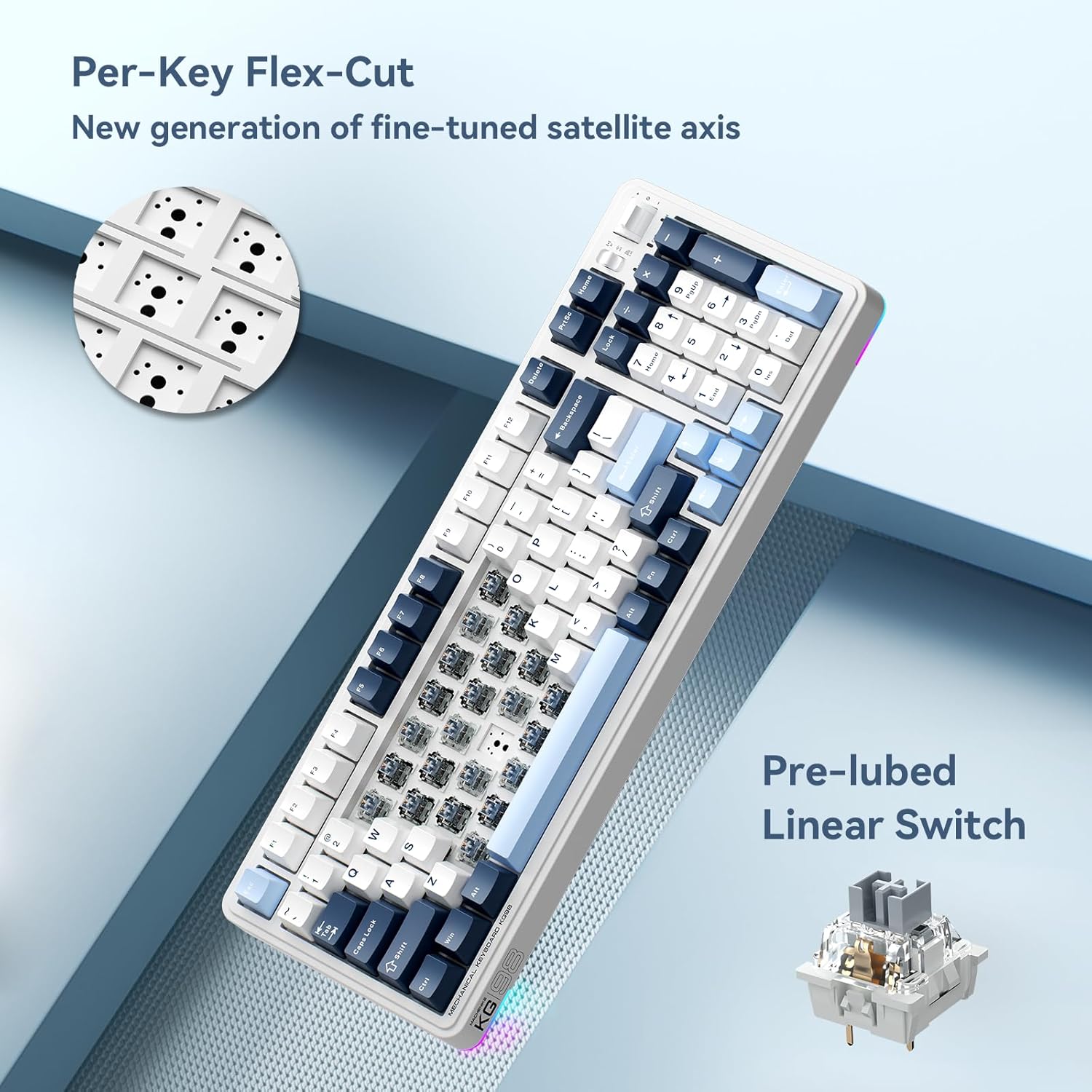
Imatge: Primer pla view of the Per-Key Flex-Cut design for enhanced acoustic performance and a detailed view of a pre-lubed linear switch.
Tipus d'interruptor:
The KG98 is compatible with various linear switch types, offering different actuation forces and travel distances.
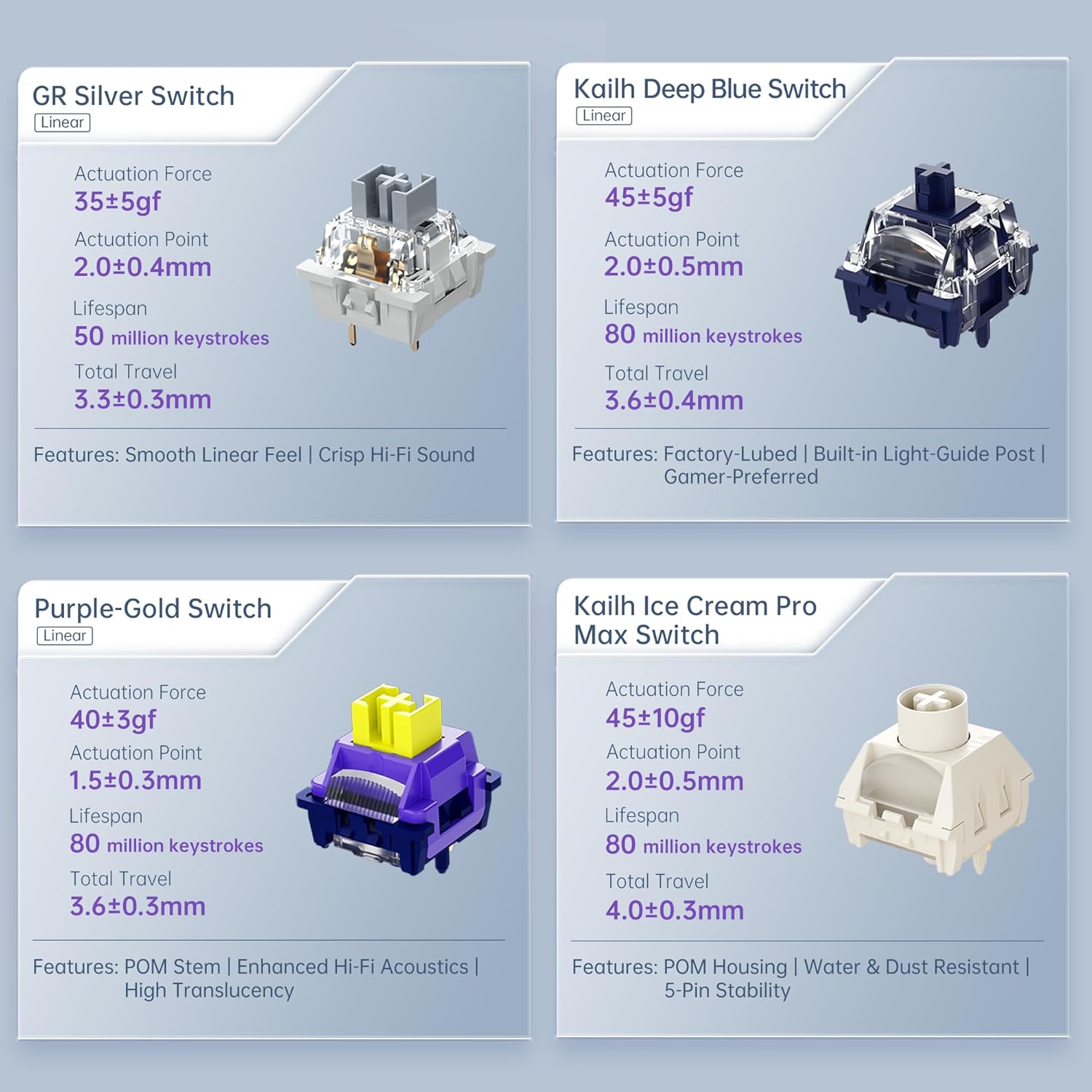
Image: Comparison of different linear switch types including GR Silver, Kailh Deep Blue, Purple-Gold, and Kailh Ice Cream Pro Max, detailing their actuation force, actuation point, lifespan, and total travel.
4. Configuració
4.1 Càrrega inicial
Before first use, connect the keyboard to a USB power source using the provided USB-C cable to ensure it is fully charged. The charging indicator will typically show the charging status and turn off or change color when fully charged.
4.2 Modes de connectivitat
The KG98 supports three connection modes: Wired (USB-C), 2.4GHz Wireless, and Bluetooth 5.0. Use the toggle switch located on the top right side of the keyboard to select your desired mode.

Image: Close-up of the multifunction toggle switch and the tri-mode connectivity selector switch on the top right of the keyboard.
4.2.1 Wired Mode (USB-C)
- Set the mode switch on the keyboard to the 'Wired' or 'USB' position.
- Connecteu el cable USB-C al teclat i l'altre extrem al port USB de l'ordinador.
- El sistema operatiu reconeixerà automàticament el teclat.
4.2.2 Mode sense fil de 2.4 GHz
- Locate the 2.4GHz USB dongle, typically stored in a slot on the keyboard.
- Set the mode switch on the keyboard to the '2.4G' position.
- Connecteu el dongle USB a un port USB disponible de l'ordinador.
- El teclat s'hauria de connectar automàticament.
4.2.3 Mode Bluetooth
- Set the mode switch on the keyboard to the 'BT' position.
- The keyboard will enter pairing mode (an indicator light may flash).
- Al dispositiu (ordinador, tauleta, telèfon intel·ligent), obriu la configuració de Bluetooth.
- Cerca available devices and select 'Machenike KG98' (or similar name).
- Seguiu les indicacions de la pantalla per completar el procés de vinculació.
5. Instruccions de funcionament
5.1 Funcions de les tecles estàndard
The KG98 features a standard 98-key layout, including a numeric keypad, function row, and navigation keys. All keys operate as labeled in their default configuration.
5.2 Control de retroil·luminació RGB
The keyboard offers 16.8 million colors and multiple dynamic RGB lighting effects. Use the dedicated function keys or the multi-functional toggle switch to cycle through presets and adjust brightness.

Image: The Machenike KG98 keyboard displaying its vibrant 16.8 million color RGB backlighting.
5.3 Multi-functional Toggle Switch
The toggle switch located on the top right of the keyboard provides quick access to media controls and lighting adjustments:
- Control de volum: Push the toggle up or down to adjust the system volume.
- Silencia/Activa el silenci: Press the toggle switch inwards to mute or unmute audio.
- RGB Mode Cycle: Press and hold the toggle switch to cycle through different RGB lighting effects.
5.4 Interruptors i tecles de canvi en calent
The KG98 features hot-swappable sockets, allowing you to change mechanical switches without soldering. You can also replace keycaps to customize the keyboard's appearance.
- Eliminació de les tecles: Use the provided keycap puller to gently grip and lift keycaps straight up.
- Eliminació dels interruptors: Use a switch puller (not always included, but compatible with the provided keycap puller for some designs) to carefully unclip and pull the switch straight up from its socket.
- Instal·lació d'interruptors: Align the pins of the new switch with the holes on the PCB. Gently push the switch down until it clicks into place. Ensure pins are not bent.
- Instal·lació de les tecles: Alineeu la tapa de la tecla amb la tija de l'interruptor i premeu fermament fins que quedi encaixada.
6. Manteniment
Regular maintenance helps preserve the keyboard's functionality and appearance.
- Neteja de les tecles: Remove keycaps using the keycap puller. Clean them with a mild soap solution and a soft cloth, then rinse and dry thoroughly before reattaching.
- Neteja del cos del teclat: Use a soft, dry cloth to wipe down the keyboard's surface. For stubborn dirt, a slightly damp es pot fer servir un drap, assegurant-se que no entri líquid al teclat.
- Eliminació de pols: Feu servir aire comprimit per eliminar la pols i les restes que hi ha entre les tecles i els interruptors.
- Emmagatzematge: Quan no l'utilitzeu durant períodes prolongats, guardeu el teclat en un lloc sec i fresc, allunyat de la llum solar directa.
7. Solució De Problemes
If you encounter issues with your Machenike KG98 keyboard, refer to the following common problems and solutions:
| Problema | Causa possible | Solució |
|---|---|---|
| El teclat no respon (amb cable) | Loose cable connection, incorrect mode selected, faulty USB port. | Ensure USB-C cable is securely connected. Check if the mode switch is set to 'Wired'. Try a different USB port on your computer. |
| Keyboard not responding (2.4GHz/Bluetooth) | Low battery, incorrect mode, dongle not plugged in (2.4GHz), not paired (Bluetooth), interference. | Charge the keyboard. Ensure the mode switch is set correctly ('2.4G' or 'BT'). For 2.4GHz, ensure dongle is plugged in. For Bluetooth, re-pair the device. Move closer to the receiver or reduce interference. |
| La il·luminació RGB no funciona o és incorrecta | Mode d'il·luminació desactivat, brillantor massa baixa, conflicte de programari. | Cycle through RGB modes using the multi-functional toggle switch or dedicated keys. Increase brightness. Restart the keyboard or computer. |
| Les claus no es registren o s'escriuen dues vegades | Interruptor defectuós, deixalles sota la tapa de la tecla/interruptor. | Remove the keycap and switch. Clean the area. Replace the switch with one of the spares provided or a new compatible switch. |
| La bateria s'esgota ràpidament | High RGB brightness, frequent wireless use, aging battery. | Reduce RGB brightness or turn off lighting when not needed. Use wired mode when possible. If the battery life significantly degrades, contact support. |
8. Especificacions
| Característica | Detall |
|---|---|
| Model | KG98 |
| Tecnologia de connectivitat | BT5.0, 2.4G Wireless, USB-C Wired |
| Disposició del teclat | 98 claus |
| Tipus de canvi | Pre-lubed Linear Mechanical Switches (Hot-Swappable) |
| Il·luminació de fons | RGB (16.8 milions de colors) |
| Capacitat de la bateria | 8000 mAh (típic) |
| Dispositius compatibles | PC, ordinador portàtil, consola de jocs, telèfon intel·ligent, tauleta |
| Dimensions del producte | 16.61" de llargada x 7.48" d'amplada x 2.16" d'alçada (42.19 x 19.00 x 5.49 cm) |
| Pes de l'article | 3.52 lliures (1.6 kg) |
| Fabricant | Machenike |
9. Garantia i Suport
Machenike products are manufactured to high-quality standards. For warranty information, technical support, or service inquiries, please refer to the official Machenike weblloc web o poseu-vos en contacte amb el seu departament d'atenció al client. Conserveu el rebut de compra com a comprovant de compra per a reclamacions de garantia.


