Introducció
The JBL Horizon 3 is a versatile radio alarm clock designed to enhance your daily routine. It features clear digital audio via DAB/DAB+/FM radio and Bluetooth connectivity for streaming from smart devices. Key functions include a sunrise simulation alarm, customizable sleep mode with natural sounds, and internal memory for favorite stations. Its portable design makes it suitable for various environments, from bedside tables to outdoor settings, delivering powerful and clear JBL sound.
This manual provides essential information for setting up, operating, and maintaining your JBL Horizon 3 to ensure optimal performance and longevity.
Configuració
1. Desembalatge i col·locació
- Traieu amb cura tots els components de l'embalatge.
- Place the JBL Horizon 3 on a stable, flat surface. Ensure adequate ventilation around the unit.
- For optimal radio reception, extend the spiral antenna fully.

Figura 1: Frontal view of the JBL Horizon 3, displaying the time and alarm status on its digital screen.
2. Connexió d'alimentació
- Connect the provided power cable to the power input port on the back of the unit.
- Connecteu l'altre extrem del cable d'alimentació a una presa de corrent.
- The device will power on automatically or can be turned on using the power button.
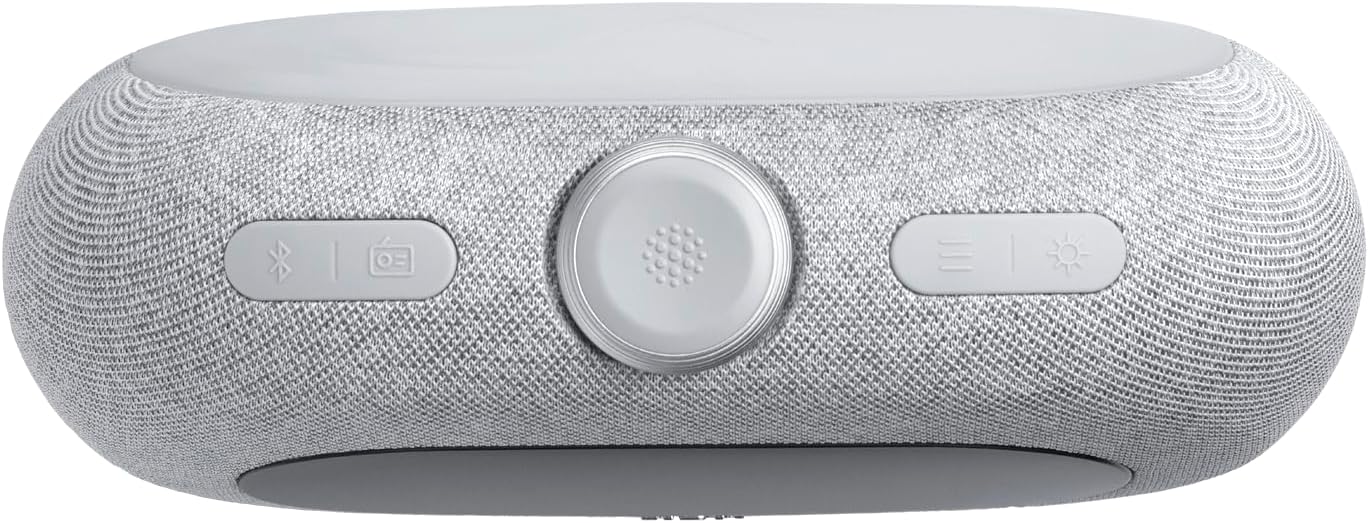
Figura 2: A baix view of the JBL Horizon 3, illustrating the power connection point and the battery compartment.
3. Initial Setup (Time and Date)
- Upon first power-on, the device may prompt you to set the time and date. Follow the on-screen instructions.
- Alternatively, use the JBL ONE application for easier configuration.
Instruccions de funcionament
1. Controls sobreview

Figura 3: superior view of the JBL Horizon 3, highlighting the main controls including the rotary dial, function buttons, and alarm presets.
- Marcador rotatiu: Used for adjusting volume, navigating menus, and setting time/alarms.
- Botó d'encesa: Encén/apaga la unitat.
- Botó Bluetooth: Activa el mode d'emparellament Bluetooth.
- Radio Button (DAB/FM): Toggles between DAB and FM radio modes.
- Botó de llum ambiental: Controls the ambient light settings.
- Alarm Presets (1, 2, 3): Quick access to saved alarm settings.
2. Radio Operation (DAB/DAB+/FM)
- Premeu el botó Ràdio per canviar entre els modes DAB/DAB+ i FM.
- In DAB mode, the device will automatically scan for available stations. Use the rotary dial to browse.
- In FM mode, use the rotary dial to tune to a specific frequency or press the scan buttons to find the next available station.
- To save a favorite station, long-press one of the numbered preset buttons (1-3).
3. Transmissió Bluetooth
- Premeu el botó Bluetooth button to enter pairing mode. The display will show "Pairing".
- On your smart device, enable Bluetooth and select "JBL Horizon 3" from the list of available devices.
- Once connected, you can stream audio from your device to the JBL Horizon 3.
4. Configuració d'alarma
- Premeu un dels fitxers Preconfiguració d'alarma buttons (1-3) to configure an alarm.
- Use the rotary dial to set the alarm time, alarm source (radio, natural sound, Bluetooth), and volume.
- Enable the sunrise simulation feature for a gradual wake-up experience.
- To snooze, press the rotary dial when the alarm sounds.
5. Sleep Mode and Ambient Light
- Activate sleep mode to fall asleep to soothing natural sounds or a chosen radio station.
- Utilitza el Llum ambiental button to adjust the color and brightness of the integrated LED light.
- Further customization of sleep sounds and ambient light is available through the JBL ONE application.
Manteniment
- Neteja: Feu servir un drap suau i sec per netejar la superfície del dispositiu. No utilitzeu productes de neteja abrasius ni dissolvents.
- Emmagatzematge: Quan no l'utilitzeu durant períodes prolongats, guardeu el dispositiu en un lloc fresc i sec.
- Cura de la bateria: If the device uses an optional battery, ensure it is charged regularly to maintain its lifespan.
Resolució de problemes
- Sense energia: Ensure the power cable is securely connected to both the device and the wall outlet. Check if the outlet is functional.
- Mala recepció de ràdio: Fully extend the spiral antenna. Try repositioning the unit to improve signal strength. Perform a new station scan.
- Problemes de vinculació de Bluetooth: Ensure Bluetooth is enabled on your smart device and the JBL Horizon 3 is in pairing mode. Move your device closer to the Horizon 3.
- L'alarma no sona: Verify that the alarm is enabled and the volume is set to an audible level. Check the alarm time.
- Pantalla massa brillant/apagada: Adjust the display brightness settings via the device controls or the JBL ONE application.
Especificacions
| Característica | Detall |
|---|---|
| Dimensions del producte (L x A x A) | 22.5 x 3.81 x 14.2 cm |
| Pes | 780 grams |
| Marca | JBL |
| Número de model | Horitzó 3 |
| Color | Gris |
| Tipus de visualització | Digital |
| Característiques especials | Display, USB Port, LED Light |
| Font d'alimentació | Corded Electric (with optional battery) |
| Ús interior/exterior | Interior |
| Material | Plastic, Metal (frame) |
| Piles necessàries | Sí |
| Components inclosos | 1 JBL Horizon 3 unit, 1 spiral antenna, 1 warranty card and safety instructions, 1 quick start guide, Power cables (up to 4 cables depending on regional SKUs) |
Garantia i Suport
Informació de la garantia
The JBL Horizon 3 comes with a 2 any de garantia. Please refer to the included warranty card and safety instructions for detailed terms and conditions.
Atenció al client
Per a més ajuda, assistència tècnica o reclamacions de garantia, visiteu el lloc web d'assistència oficial de JBL. website or contact their customer service. Contact information can typically be found in the included documentation or on the JBL brand weblloc.


