Introducció
L'anell intel·ligent COLMI R12 és un dispositiu compacte i innovador dissenyat per integrar perfectament el seguiment de la salut i l'exercici físic a la teva vida diària. Amb una pantalla tàctil, controla indicadors de salut essencials com la freqüència cardíaca, l'oxigen a la sang i els patrons de son. També admet diversos modes esportius i ofereix funcions pràctiques com la càrrega sense fil i el control remot de la càmera. Aquest manual proporciona instruccions completes per a la configuració, el funcionament, el manteniment i la resolució de problemes per garantir un ús òptim del teu anell intel·ligent.

Imatge: L'anell intel·ligent COLMI R12, mostraasinel seu disseny elegant i les seves característiques clau com la pantalla intel·ligent, el tacte intel·ligent i la càrrega sense fil.
Què hi ha a la caixa
En desembalar el teu anell intel·ligent COLMI R12, assegura't que hi hagi tots els elements següents:
- 1 x Anell intel·ligent COLMI R12
- 1 x Suport de càrrega portàtil
- 1 cable de càrrega (USB-A a USB-C)
- 1 x manual d'instruccions
Configuració
1. Triar la mida adequada de l'anell
Per a una comoditat òptima i una recollida de dades precisa, és crucial seleccionar la mida correcta de l'anell. Es recomana comprar un kit de mida COLMI abans de comprar el vostre anell intel·ligent per determinar la vostra talla ideal. L'anell ha d'ajustar-se bé però còmodament al dit, permetent un lleuger moviment sense quedar massa fluix ni massa ajustat.
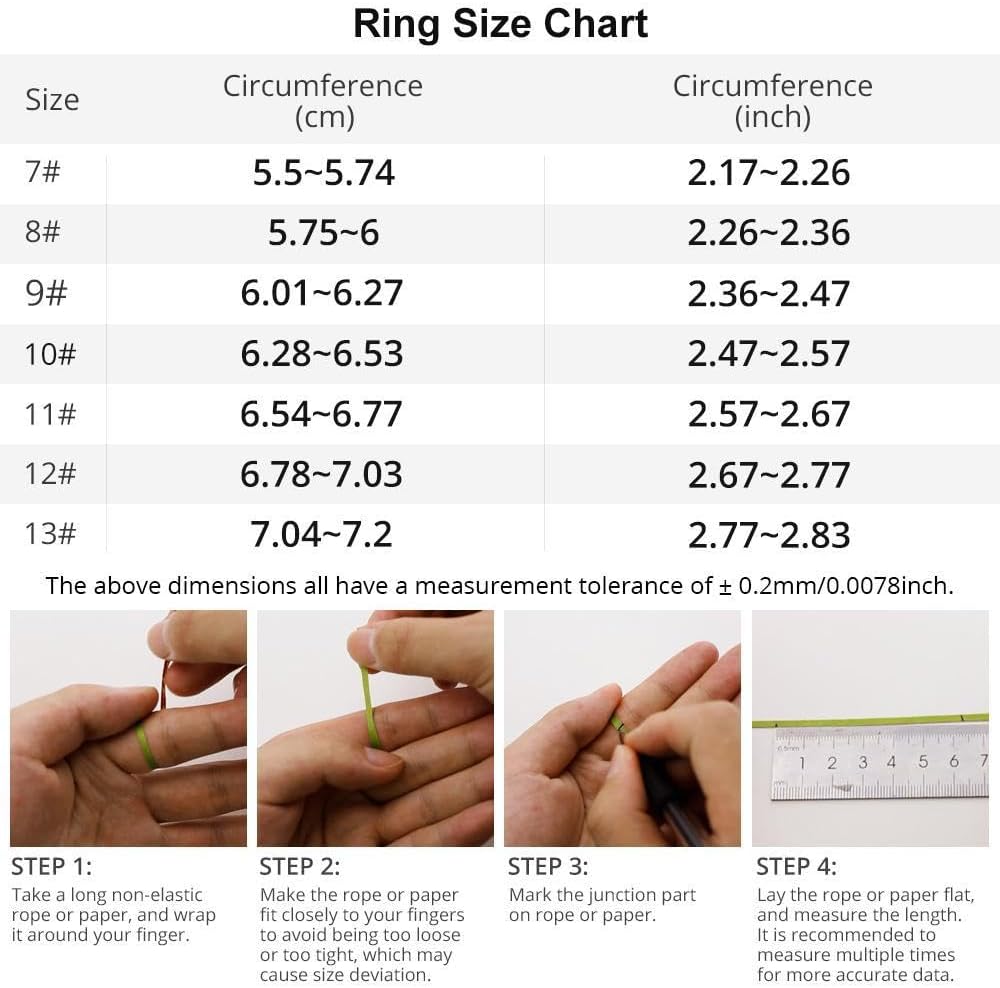
Imatge: Una taula detallada de mides d'anell i instruccions per mesurar el dit per garantir un ajust còmode i precís per a l'anell intel·ligent.
2. Descàrrega i emparellament de l'aplicació
Per desbloquejar tot el potencial del teu anell intel·ligent COLMI R12, has de descarregar-lo i emparellar-lo amb l'aplicació complementària al teu telèfon intel·ligent. L'aplicació és compatible amb dispositius Android i iOS.
- Escaneja el codi QR que es proporciona al manual d'instruccions o busca l'aplicació "Q Ring" a la botiga d'aplicacions del teu dispositiu.
- Baixeu i instal·leu l'aplicació.
- Obre l'aplicació i segueix les instruccions que apareixen a la pantalla per crear un compte i configurar el teu professional personal.file (data de naixement, sexe, alçada, pes).
- Assegura't que l'anell intel·ligent estigui carregat i que estigui dins de l'abast del Bluetooth del teu telèfon intel·ligent.
- A l'aplicació, seleccioneu l'opció per afegir un dispositiu nou i trieu el COLMI R12 de la llista de dispositius disponibles.
- Confirma la sol·licitud d'emparellament tant al telèfon com a l'anell intel·ligent (si se't demana).

Imatge: Una guia visual de quatre passos que il·lustra el procés des de la compra del kit de mida fins a la descàrrega de l'aplicació i l'emparellament per al COLMI R12 Smart Ring.
Funcionament de l'anell intel·ligent
1. Funcions tàctils i de pantalla
L'anell intel·ligent COLMI R12 té una pantalla tàctil que permet consultar ràpidament informació essencial sense necessitat del telèfon ni del rellotge. Només cal tocar l'anell per anar canviant per les diferents pantalles, com ara l'hora actual, el recompte de passos i el nivell de la bateria.
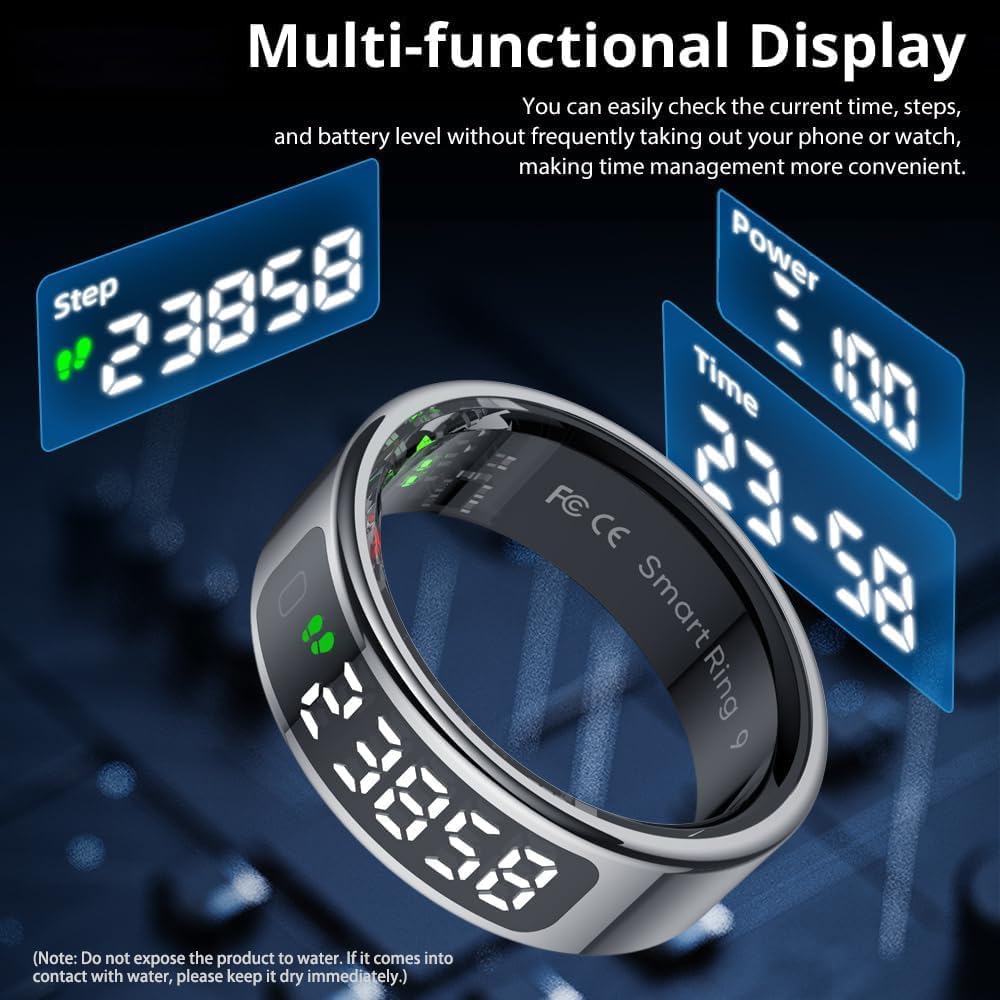
Imatge: La pantalla multifuncional de l'anell intel·ligent que mostra el temps, el recompte de passos i la bateria, cosa que destaca la seva comoditat.
2. Monitorització de la salut
L'anell intel·ligent controla contínuament diverses mètriques de salut, proporcionant informació valuosa sobre el vostre benestar. Totes les dades es sincronitzen amb l'aplicació complementària per obtenir informes detallats i un seguiment històric.
- Freqüència cardíaca: Fa un seguiment de la freqüència cardíaca les 24 hores del dia, els 7 dies de la setmana. També pots consultar-la manualment a través de l'aplicació per obtenir lectures instantànies.
- Oxigen en sang: Controla els nivells d'oxigen a la sang.
- Seguiment del son: Analitza la qualitat del teu son, incloent-hi el son profund, el son lleuger i el son REM, per ajudar-te a desenvolupar millors hàbits de son.

Imatge: Representació visual de la freqüència cardíaca, sontages, i dades de monitorització d'oxigen en sang tal com es mostren a l'aplicació complementària.

Imatge: La interfície de l'aplicació que demostra les capacitats de monitorització de la freqüència cardíaca les 24 hores del dia, els 7 dies de la setmana, de l'anell intel·ligent.

Imatge: La funció de monitorització del son de l'anell intel·ligent, que fa un seguiment de la qualitat del son i genera informes per millorar els hàbits de son.
3. Modes esportius
Connecta l'anell intel·ligent a l'aplicació complementària per accedir i fer un seguiment de les dades de diversos modes esportius. L'aplicació registra el temps d'exercici, els passos, la distància i les calories consumides, cosa que t'ajuda a controlar el teu progrés físic.

Imatge: La interfície d'estadístiques d'activitat de l'aplicació, que mostra el consum d'energia diari, els passos, la distància i les calories, amb opcions de visualització de dades.
4. Control de la presa de fotos
Quan està connectat al telèfon mòbil, l'anell intel·ligent et permet controlar la càmera del telèfon de forma remota. Només cal moure la mà per capturar fotos, cosa que facilita la gravació de moments bonics.

Imatge: La funció de control intel·ligent amb la punta dels dits de l'anell intel·ligent, que permet la captura remota de fotos amb un simple gest amb la mà.
Carregant
L'anell intel·ligent COLMI R12 ofereix una càrrega sense fil pràctica. Per carregar el dispositiu:
- Col·loca l'anell intel·ligent al suport de càrrega portàtil dedicat. Assegura't que els contactes de càrrega estiguin alineats correctament.
- Connecteu el cable de càrrega al suport i a una font d'alimentació (per exemple, un adaptador de paret USB, un port USB de l'ordinador).
- L'indicador de càrrega del suport s'il·luminarà per confirmar que la càrrega està en curs.
El suport de càrrega està dissenyat per a la portabilitat i l'eficiència, oferint un rendiment més fort i un consum d'energia més baix.

Imatge: L'anell intel·ligent sobre el seu suport de càrrega sense fil, que il·lustra la facilitat de càrrega.

Imatge: Càrrega intel·ligent en curs, que mostra l'anell a la base amb un indicador il·luminat.
Especificacions
| Característica | Detall |
|---|---|
| Número de model | COLMI R12 |
| Dimensions | 3.94 x 3.15 x 0.98 polzades (paquet) |
| Pes de l'article | 3.53 unces (100 grams) |
| Tipus de bateria | 1 bateria no estàndard (polímer de liti) |
| Capacitat de la bateria | 18 milionsamp Hores |
| Sistema operatiu | Android, iOS |
| Connectivitat | Bluetooth |
| Característiques especials | Control de fotografia, Múltiples modes esportius, Enregistrament de dades d'exercici, Tàctil i pantalla, Càrrega sense fil |
| GPS | Sense GPS |
| Forma | Ronda |
Resolució de problemes
Si teniu algun problema amb el vostre anell intel·ligent COLMI R12, consulteu els següents consells habituals per a la resolució de problemes:
- Problemes de connexió: Assegura't que el Bluetooth estigui activat al teu telèfon intel·ligent i que l'anell estigui dins del seu abast. Prova de reiniciar tant l'anell com el telèfon.
- Lectures inexactes: Verifiqueu que l'anell estigui correctament posat al dit, que els sensors facin contacte amb la pell. No us moveu durant les mesures.
- Problemes de càrrega: Comproveu que el cable de càrrega i el suport estiguin connectats correctament a una font d'alimentació. Assegureu-vos que l'anell estigui correctament col·locat al suport de càrrega.
- Sincronització d'aplicacions: Assegura't que l'aplicació "Q Ring" estigui actualitzada a la darrera versió. Tanca i torna a obrir l'aplicació si les dades no se sincronitzen.
- Durada de la bateria: Si la durada de la bateria és més curta del que s'esperava, assegureu-vos que tots els processos de l'aplicació en segon pla estiguin tancats i reduïu la freqüència de les mesures manuals.
Garantia i Suport
COLMI es compromet a oferir un servei postvenda professional. Si teniu problemes d'ús o de qualitat amb el vostre anell intel·ligent COLMI R12 que no es puguin resoldre mitjançant la resolució de problemes, no dubteu a posar-vos en contacte amb el nostre equip d'atenció al client. Consulteu la informació de contacte que es proporciona a l'embalatge del producte o a la fitxa oficial de COLMI. weblloc d'assistència.


