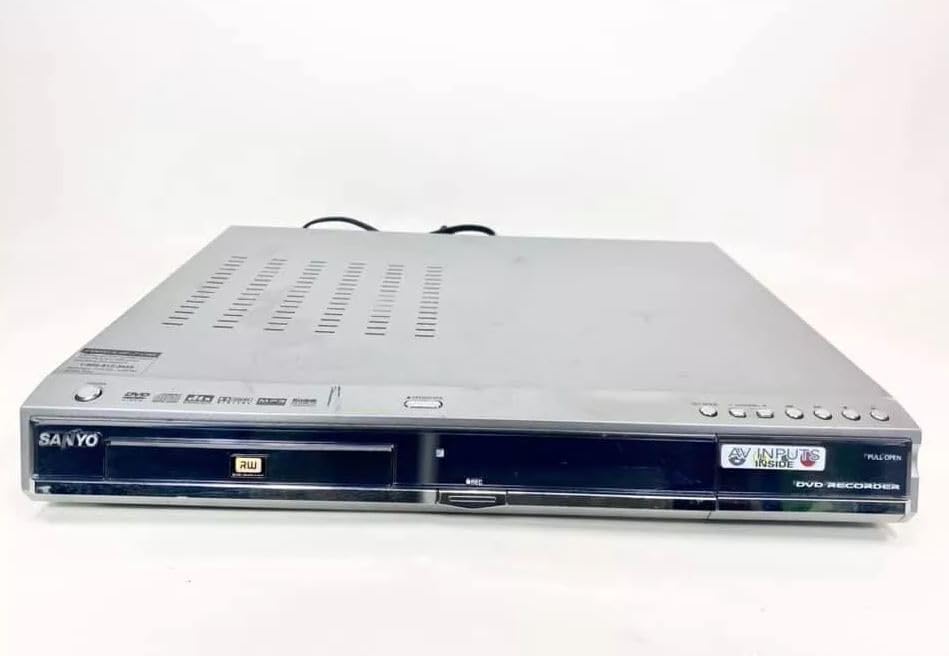
Sanyo DRW-500 DVD Recorder/Player Instruction Manual
Model: DRW-500
Introducció
This manual provides comprehensive instructions for the safe and efficient operation of your Sanyo DRW-500 DVD Recorder/Player. Please read this manual thoroughly before using the device and retain it for future reference. The Sanyo DRW-500 allows you to record television programs and home videos onto DVD-R/RW discs, as well as play back DVD-Video and Audio CD discs.
Informació important de seguretat
ADVERTÈNCIA: PER REDUIR EL RISC D'INCENDI O DESCÀCTICA ELÈCTRICA, NO EXPOSEU AQUEST APARELL A LA PLUJA NI A LA HUMITAT.
Seguiu sempre les precaucions de seguretat bàsiques quan utilitzeu aquest producte per reduir el risc d'incendi, descàrrega elèctrica i lesions a les persones.
No bloquegeu cap obertura de ventilació. Instal·leu-ho d'acord amb les instruccions del fabricant.
No instal·leu a prop de cap font de calor com ara radiadors, registres de calor, estufes o altres aparells (inclosos amplificadors) que produeixen calor.
Eviteu que el cable d'alimentació sigui trepitjat o pessigat, especialment als endolls, els endolls i el punt on surten de l'aparell.
Utilitzeu només accessoris/accessoris especificats pel fabricant.
Demaneu tot el servei a personal de servei qualificat. Cal fer servei quan l'aparell s'hagi fet malbé d'alguna manera.
Contingut del paquet
Si us plau, comproveu que tots els elements siguin presents a la caixa:
Sanyo DRW-500 DVD Recorder/Player Unit
Control remot
RCA Audio/Video Cable
Cable d'alimentació
Manual d'instruccions (aquest document)
Producte acabatview
Familiarize yourself with the front and rear panels of your Sanyo DRW-500.
Figura 1: Front Panel of Sanyo DRW-500. Shows the disc tray, power button, play/pause, stop, record buttons, and the display screen.
Controls del panell frontal:
Botó d'encendre: Encén o apaga la unitat.
Botó OBRIR/TANCAR: Obre i tanca la safata del disc.
PLAY Button: Starts disc playback.
Botó STOP: Stops disc playback or recording.
Botó RECORD: Inicia la gravació.
MOSTRA: Shows current status, time, and track information.
Connexions del panell posterior:
SORTIDA D'ÀUDIO/VÍDEO (RCA): Connects to your TV's audio/video input.
S-VIDEO OUT: Provides higher quality video output to compatible TVs.
AUDIO/VIDEO IN (RCA): Connects to external devices like VCRs or camcorders for recording.
POTÈNCIA D'ENTRADA: Connecta el cable d'alimentació.
Configuració
1. Connexió a un televisor
There are two primary ways to connect your Sanyo DRW-500 to a television:
Option A: RCA (Composite Video) Connection
Connect one end of the RCA audio/video cable (red, white, yellow) to the SORTIDA D'ÀUDIO/VÍDEO jacks on the rear of the DRW-500.
Connect the other end of the RCA cable to the corresponding ENTRADA D'ÀUDIO/VÍDEO jacks on your television. Ensure colors match (yellow to yellow for video, red to red for right audio, white to white for left audio).
Select the correct input channel on your TV (e.g., Video 1, AV1, Input 1).
Connect an S-Video cable (not included) from the SORTIDA S-VIDEO jack on the DRW-500 to the S-Video input on your television.
Connect a separate RCA audio cable (red, white) from the SORTIDA D'ÀUDIO jacks on the DRW-500 to the corresponding audio input jacks on your television. S-Video only carries video, not audio.
Select the correct input channel on your TV (e.g., S-Video, Input 2).
2. Connexió d'alimentació
Connecteu el cable d'alimentació subministrat a la ENERGIA port on the rear of the DRW-500.
Connecteu l'altre extrem del cable d'alimentació a una presa de corrent de CA estàndard.
3. Initial Setup and Clock Setting
Upon first power-on, the unit may prompt you to set the clock and other basic settings. Follow the on-screen instructions using the remote control.
Instruccions de funcionament
Reproducció d'un DVD o CD
Premeu el botó PODER per engegar la unitat.
Premeu el botó OBRIR/TANCAR botó per obrir la safata del disc.
Col·loqueu un disc DVD o CD a la safata amb l'etiqueta cap amunt.
Premeu el botó OBRIR/TANCAR botó de nou per tancar la safata.
La reproducció hauria de començar automàticament. Si no, premeu el botó JUGAR botó.
Use the remote control for functions like Pause, Stop, Fast Forward, Rewind, and Chapter Skip.
Recording to DVD-R/RW
The Sanyo DRW-500 can record from various external sources connected to its ENTRADA D'ÀUDIO/VÍDEO preses.
Recording from a TV/Cable Box:
Connect the audio/video output of your TV or cable box to the ENTRADA D'ÀUDIO/VÍDEO jacks on the rear of the DRW-500.
Insert a blank recordable DVD (DVD-R or DVD-RW) into the disc tray.
Select the correct input source on the DRW-500 using the SELECCIÓ D'ENTRADA button on the remote control (e.g., L1, L2).
Tune your TV/cable box to the desired program.
Premeu el botó REGISTRAR button on the DRW-500 or its remote control to start recording.
Premeu el botó STOP botó per finalitzar l'enregistrament.
Recording from a VCR or Camcorder:
Connect the audio/video output of your VCR or camcorder to the ENTRADA D'ÀUDIO/VÍDEO jacks on the rear of the DRW-500.
Introduïu un DVD gravable verge a la safata de disc.
Select the correct input source on the DRW-500 using the SELECCIÓ D'ENTRADA botó del comandament a distància.
Start playback on your VCR or camcorder.
Premeu el botó REGISTRAR button on the DRW-500 or its remote control to start recording.
Premeu el botó STOP botó per finalitzar l'enregistrament.
Finalització d'un disc
For recorded DVD-R/RW discs to be playable on other DVD players, they must be "finalized."
Insert the recorded DVD-R/RW disc into the DRW-500.
Accedeix al MENÚ al comandament a distància.
Navigate to the "Disc Settings" or "Setup" menu.
Select the "Finalize Disc" option.
Confirm the action. The finalization process may take several minutes. Do not interrupt power during this process.
Note: DVD-RW discs can be unfinalized and re-recorded multiple times. DVD-R discs, once finalized, cannot be recorded on again.
Manteniment
Neteja de la unitat
Desconnecteu sempre la unitat de la presa de corrent abans de netejar-la.
Utilitzeu un drap suau i sec per netejar l'exterior de la unitat.
Do not use liquid cleaners, aerosol cleaners, or strong chemical solvents, as these may damage the finish.
Cura del disc
Handle discs by their edges to avoid fingerprints on the recording surface.
Guardeu els discs a les seves fundes quan no els feu servir per evitar ratllades i acumulació de pols.
Netegeu els discs bruts amb un drap suau i sense borrissol, netejant suaument des del centre cap a fora.
Resolució de problemes
Problema
Causa possible
Solució
Sense poder
Cable d'alimentació no connectat correctament.
Comproveu la connexió del cable d'alimentació a la unitat i a la presa de corrent.
Sense imatge ni so
Incorrect TV input selected. A/V cables not connected properly.
Select the correct input on your TV. Ensure A/V cables are securely connected to the correct input/output jacks.
El disc no es reprodueix
Disc is dirty or scratched. Disc is inserted incorrectly. Incompatible disc format.
Clean the disc. Insert the disc with the label side up. Ensure the disc is a compatible format (DVD-Video, Audio CD, recorded DVD-R/RW).
No es pot gravar
No blank recordable disc inserted. Disc is full or protected. Incorrect input source selected.
Insert a blank DVD-R or DVD-RW. Use a new disc or erase a DVD-RW. Select the correct input source (e.g., L1, L2).
Recorded disc won't play on other players
Disc not finalized.
Finalize the disc using the "Finalize Disc" option in the unit's menu.
Especificacions
Característica
Detall
Model
DRW-500
Fabricant
Sanyo
Compatible Disc Formats (Playback)
DVD-Video, CD-Audio, DVD-R, DVD-RW (finalized)
Recordable Disc Formats
DVD-R, DVD-RW
Sortida de vídeo
Composite Video (RCA), S-Video
Sortida d'àudio
RCA estèreo
Compatibilitat d'entrada de vídeo
NTSC
Tecnologia de connectivitat
AUX (RCA)
Característica especial
Disseny compacte
Font d'alimentació
AC 120V, 60Hz (typical for US models)
Garantia i Suport
This product is covered by a limited manufacturer's warranty. Please refer to the warranty card included with your purchase for specific terms and conditions. For technical support or service inquiries, please contact Sanyo customer service through their official weblloc web o la informació de contacte que es proporciona a la documentació de la garantia.
Please note that warranty terms may vary by region and retailer. Keep your proof of purchase for warranty claims.
SANYO FWBP505F Blu-ray Disc™ / DVD Player Owner's Manual This owner's manual provides comprehensive instructions for the SANYO FWBP505F Blu-ray Disc™ and DVD Player, covering setup, features, playback, connections, troubleshooting, and maintenance. Visit www.sanyo-av.com for more support.
Manual de servei de la gravadora de casset amb ràdio i CD portàtil SANYO MCD-Z120/MCD-Z120F Aquest manual de servei complet proporciona especificacions tècniques detallades, procediments d'ajust, informació detallada viewi llistes de peces per als sistemes de gravació de casset de ràdio i CD portàtils SANYO MCD-Z120 i MCD-Z120F. Essencial per a tècnics i professionals de la reparació.
SANYO DC-PT70 DVD Micro Component System Service Manual Comprehensive service manual for the SANYO DC-PT70 DVD Micro Component System. Covers laser safety, service mode operations, component replacement, tuner adjustments, parts lists, wiring diagrams, and detailed IC block diagrams and descriptions.
Manual d'instruccions del sistema de components SANYO DC-F210 Mini Manual d'instruccions per al sistema de components SANYO DC-F210 Mini, que cobreix la configuració i el funcionament del reproductor de CD, el sintonitzador, amplificador i platina de casset, enregistrament, doblatge, funcions de temporitzador, manteniment i especificacions tècniques. Inclou precaucions de seguretat importants i informació sobre la garantia.