1. Producte acabatview
The GIGABYTE B840M Eagle WIFI6 is a Micro-ATX motherboard designed for AMD Socket AM5 processors, supporting AMD Ryzen 9000, 8000, and 7000 series. It features DDR5 memory support, dual M.2 slots, PCIe 4.0 connectivity, USB 3.2 Gen 1, WIFI6, and 2.5GbE LAN. This motherboard is engineered to provide a stable and high-performance foundation for your personal computer system.


2. Característiques clau
- Sòcol AMD AM5: Admet processadors AMD Ryzen 9000 / Ryzen 8000 / Ryzen sèrie 7000.
- Compatible amb DDR5: Disposa de 2 ranures DIMM per a memòria DDR5.
- Disseny de potència: Disseny robust de fases de potència 5+2+2 per a un rendiment estable.
- Tèrmics: Equipped with VRM and M.2 Thermal Guards for efficient heat dissipation.
- Connectivitat: Includes PCIe 4.0, 2x M.2 Slots, and USB-C ports.
- Apte per a bricolatge: Features M.2 EZ-Latch, PCIe EZ-Latch, and Wi-Fi EZ-Plug for simplified installation.
- Xarxa: Integrated WIFI6 and 2.5GbE LAN for high-speed network connectivity, plus BT 5.3.
3. Guia de configuració
This section provides a general guide for installing your GIGABYTE B840M Eagle WIFI6 motherboard. Always refer to the detailed instructions provided with your CPU, RAM, and other components for specific installation procedures.
3.1. Preparació
- Assegureu-vos que el vostre espai de treball estigui net i ben il·luminat.
- Descarregueu l'electricitat estàtica tocant un objecte metàl·lic connectat a terra abans de manipular els components.
- Gather all necessary components: CPU, CPU cooler, RAM, M.2 SSDs, graphics card, power supply, and PC case.
3.2. Instal·lació de la CPU
- Locate the AMD Socket AM5 on the motherboard.
- Obriu la palanca de retenció del sòcol de la CPU.
- Alineeu amb cura la CPU amb el sòcol, assegurant-vos que el triangle daurat de la CPU coincideixi amb el triangle del sòcol. No forceu la CPU a col·locar-la al seu lloc.
- Tanqueu la palanca de retenció per fixar la CPU.
3.3. Instal·lació del refrigerador de CPU
Install your chosen CPU cooler according to its manufacturer's instructions. Ensure proper thermal paste application for optimal cooling.
3.4. Instal·lació de la memòria RAM
- Obriu els clips dels dos extrems de les ranures DIMM DDR5.
- Alineeu el mòdul de RAM amb la ranura, assegurant-vos que l'osca del mòdul coincideixi amb la clau de la ranura.
- Premeu fermament els dos extrems del mòdul RAM fins que els clips encaixin al seu lloc.
3.5. Instal·lació d'un SSD M.2
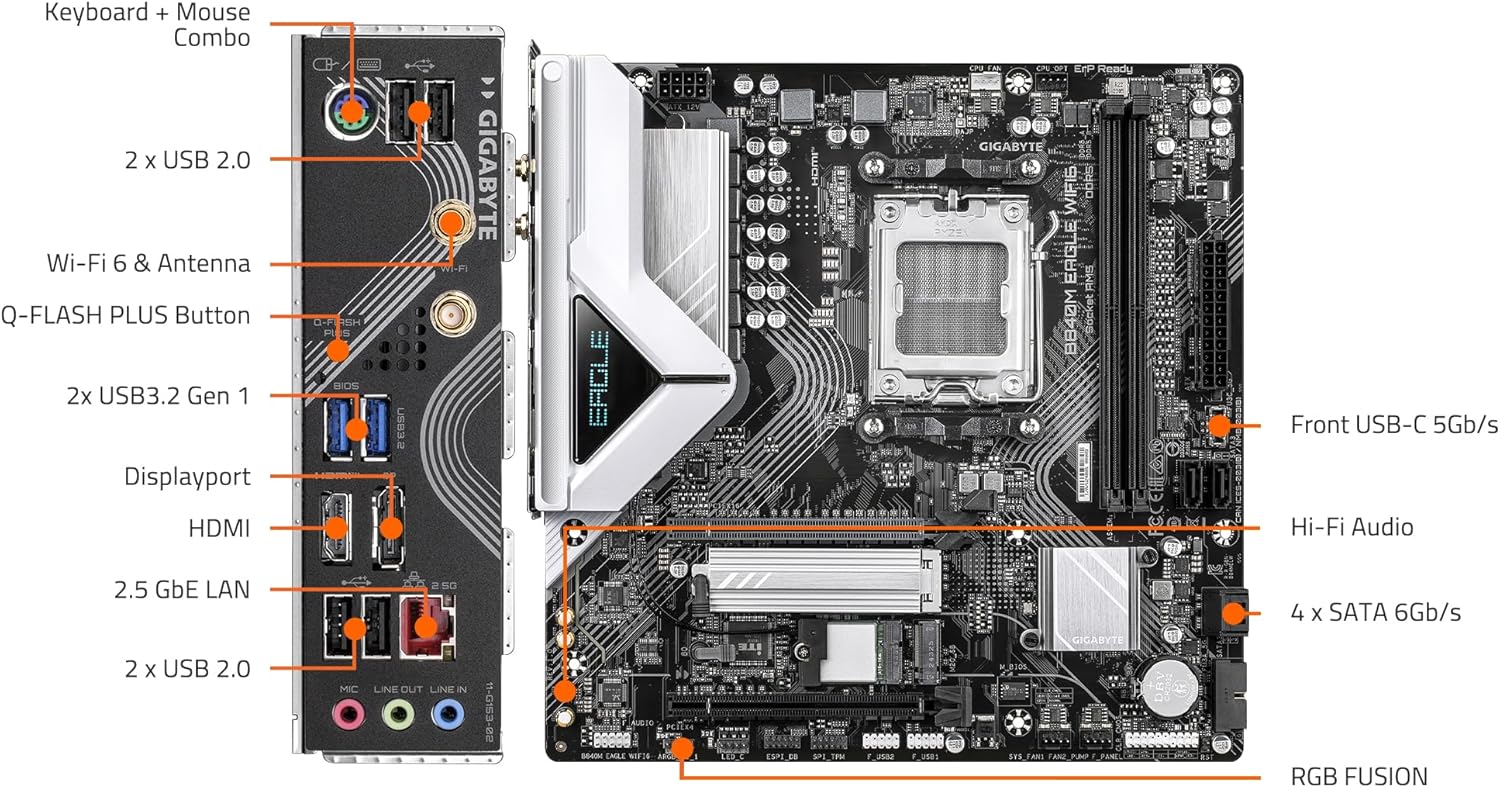
The motherboard features 2 M.2 slots with EZ-Latch. Refer to the motherboard diagram for their locations.
- Locate an M.2 slot and remove the M.2 Thermal Guard if present.
- Inseriu l'SSD M.2 a la ranura en angle.
- Gently push down the SSD and secure it using the M.2 EZ-Latch mechanism.
- Reinstall the M.2 Thermal Guard.
3.6. Muntatge de la placa base
- Install the I/O shield into your PC case (if not pre-attached).
- Alineeu la placa base amb els separadors de la carcassa del vostre PC.
- Fixeu la placa base amb cargols, procurant no apretar-los massa.
3.7. Connexions d'alimentació
- Connecteu el connector d'alimentació principal ATX de 24 pins de la font d'alimentació a la placa base.
- Connect the 8-pin (or 4+4-pin) ATX 12V CPU power connector.
3.8. Panell frontal i connexions perifèriques
Connect the front panel headers (power button, reset button, USB ports, audio jacks) and other peripherals (SATA drives, case fans) to the appropriate headers on the motherboard. Refer to the labeled diagram below for assistance.

3.9. Instal·lació de la targeta gràfica
- Open the PCIe EZ-Latch on the primary PCIe x16 slot.
- Insert your graphics card firmly into the slot until it clicks into place.
- Fixeu la targeta gràfica a la carcassa de l'ordinador amb cargols.
- Connecteu els cables d'alimentació PCIe necessaris de la font d'alimentació a la targeta gràfica.
4. Instruccions de funcionament
4.1. Primera arrencada i configuració de la BIOS/UEFI
- After connecting all components and peripherals, power on your system.
- Premeu la tecla designada (normalment DEL or F2) durant l'inici per accedir a la utilitat de configuració de la BIOS/UEFI.
- Configure boot order, system time, and other essential settings as needed. Save changes and exit.
4.2. Instal·lació del sistema operatiu
Inseriu el suport d'instal·lació del sistema operatiu (unitat USB o DVD) i seguiu les instruccions que apareixen a la pantalla per instal·lar el vostre sistema operatiu preferit.
4.3. Instal·lació del controlador
After OS installation, install the latest drivers for your motherboard, graphics card, and other components. You can find the latest drivers on the GIGABYTE official website for your B840M Eagle WIFI6 motherboard.
4.4. Connectivitat de xarxa
- LAN per cable: Connect an Ethernet cable to the 2.5GbE LAN port on the rear I/O panel.
- Wireless (WIFI6): Attach the included Wi-Fi antennas to the connectors on the rear I/O panel. Ensure Wi-Fi drivers are installed for wireless connectivity.
5. Manteniment
Un manteniment regular ajuda a garantir la longevitat i el rendiment òptim de la placa base i del sistema informàtic.
- Neteja de pols: Periodically clean dust from inside your PC case, especially from fans, heatsinks, and motherboard components, using compressed air. Ensure the system is powered off and unplugged before cleaning.
- Actualitzacions de la BIOS/UEFI: Comproveu els GIGABYTES website for the latest BIOS/UEFI updates. Updates can improve compatibility, stability, and performance. Follow GIGABYTE's instructions carefully when updating the BIOS.
- Actualitzacions de controladors: Mantingueu els controladors del sistema actualitzats per garantir la compatibilitat i un rendiment òptim amb el programari i el maquinari nous.
- Comprovació de components: Occasionally check all cable connections (power, data, front panel) to ensure they are secure.
6. Solució De Problemes
This section addresses common issues you might encounter. For more complex problems, refer to the GIGABYTE support weblloc o contacteu amb l'assistència tècnica.
6.1. Sense alimentació / Sense POST (autoprova d'engegada)
- Ensure all power cables (24-pin ATX, 8-pin CPU, PCIe power) are securely connected.
- Verifiqueu que la font d'alimentació estigui connectada i funcioni correctament.
- Check front panel connections, especially the power button header.
- Torneu a instal·lar els mòduls de RAM i la targeta gràfica.
- Try booting with minimal components (CPU, one RAM stick, graphics card) to isolate the issue.
- Clear CMOS by removing the CMOS battery for a few minutes or using the clear CMOS jumper (refer to motherboard manual for exact location).
6.2. Inestabilitat / Fallades del sistema
- Assegureu-vos que tots els controladors estiguin actualitzats.
- Check CPU and GPU temperatures to rule out overheating.
- Executeu eines de diagnòstic de memòria per comprovar si hi ha defectes a la memòria RAM.
- Verificar la font d'alimentaciótage és suficient per a tots els components.
6.3. Problemes de connectivitat de xarxa
- Amb cable: Check Ethernet cable connection and router/modem status. Ensure LAN drivers are installed.
- Sense fil: Ensure Wi-Fi antennas are properly attached and Wi-Fi drivers are installed. Check Wi-Fi network settings in your operating system.
6.4. Perifèric no detectat
- Ensure the peripheral is correctly connected to the appropriate port.
- Install the latest drivers for the peripheral.
- Test the peripheral on another port or another system if possible.
7. Especificacions tècniques
| Característica | Especificació |
|---|---|
| Socket de CPU | Socket AMD AM5 |
| Processadors compatibles | AMD Ryzen 9000 / Ryzen 8000 / Ryzen 7000 Series |
| Chipset | AMD B840 |
| Tecnologia de memòria RAM | DDR5 |
| Ranures de memòria | 2x DIMMs |
| Velocitat de rellotge de memòria | Up to 5200 MHz (and higher via OC) |
| Emmagatzematge | 2x M.2 Slots, 4x SATA 6Gb/s |
| PCIe tragamonedas | PCIe 4.0 |
| Ports USB | USB 3.2 Gen 1, USB-C |
| Treball en xarxa | WIFI6, 2.5GbE LAN, BT 5.3 |
| Factor de forma | Micro-ATX |
| Dimensions (LxWxH) | 8.82 x 8.82 x 1 polzades |
| Pes de l'article | 4.4 lliures |
| Suport del sistema operatiu | Windows 11 |
8. Garantia i Suport
For detailed warranty information, technical support, driver downloads, and BIOS updates, please visit the official GIGABYTE website. You can find product-specific support by navigating to the support section and searching for your model, B840M Eagle WIFI6.
Oficial de GIGABYTE Weblloc: https://www.gigabyte.com/
Assegureu-vos sempre de descarregar el programari i els controladors del lloc web oficial del fabricant. website to prevent security risks.


