Introducció
This user manual provides comprehensive instructions for the installation, operation, and maintenance of your ANRAN Q04 Solar Security Cameras and ANRAN F2M3 Solar Door Light Security Camera. These devices are designed to provide reliable outdoor surveillance with the convenience of solar power, offering enhanced security for your property.

Imatge: Més deview of the ANRAN Q04 solar security cameras and the ANRAN F2M3 solar door light security camera included in the system.
Contingut del paquet
Si us plau, verifiqueu que tots els elements que s'enumeren a continuació siguin presents al vostre paquet:
- 2 x ANRAN Q04 Solar Security Cameras (with integrated solar panels)
- 1 x ANRAN F2M3 Solar Door Light Security Camera (with separate solar panel)
- Mounting Brackets and Screws for all cameras
- Cables de càrrega USB
- Manual d'usuari (aquest document)
Producte acabatview
Familiarize yourself with the components of your ANRAN security camera system.
Càmera de seguretat solar ANRAN Q04
- Integrated Solar Panel: For continuous power supply.
- Camera Lens: Captures video footage.
- PIR Sensor: Detects motion.
- Infrared LEDs/Spotlights: For night vision and color night vision.
- Microphone & Speaker: For two-way audio communication.
- Antennas: For Wi-Fi connectivity.
- Mounting Base: For secure installation.

Image: The ANRAN Q04 camera demonstrating its pan and tilt range, along with a depiction of its live view en un dispositiu mòbil.
ANRAN F2M3 Solar Door Light Security Camera
- Camera Lens: Captures video footage.
- PIR Sensor: Detects motion.
- Integrated Light: 200-lumen motion-activated light.
- Microphone & Speaker: For two-way audio communication.
- Separate Solar Panel: Connects to the camera for power.
- Mounting Base: For secure installation.

Image: The ANRAN F2M3 camera highlighting its features including motion detection, integrated light, and audio capabilities.
Instal·lació
Proper installation ensures optimal performance and longevity of your security cameras.
Consells generals d'instal·lació
- Trieu una ubicació amb ample direct sunlight for the solar panels.
- Assegureu-vos que la càmera estigui dins de l'abast de la vostra xarxa Wi-Fi de 2.4 GHz.
- Mount cameras at a height that provides a clear view of the desired surveillance area, typically 7-10 feet (2-3 meters) above ground.
- Avoid placing cameras directly facing strong light sources or reflective surfaces.
ANRAN Q04 Camera Installation
- Seleccioneu la ubicació: Identify a suitable outdoor location that receives consistent sunlight and has good Wi-Fi signal.
- Marca els punts de perforació: Feu servir el suport de muntatge com a plantilla per marcar els forats dels cargols a la paret o a la superfície.
- Forats: Drill pilot holes at the marked points. Insert wall anchors if mounting on masonry or stucco.
- Suport segur: Fixeu el suport de muntatge a la paret amb els cargols proporcionats.
- Connecta la càmera: Securely attach the Q04 camera to the mounting bracket. Adjust the angle of the camera and its integrated solar panel for optimal sun exposure and viewangle de ing.

Image: A user installing the ANRAN Q04 camera, highlighting its straightforward installation process.
ANRAN F2M3 Light Camera Installation
- Seleccioneu la ubicació: Choose a location near a door or entry point, ensuring the separate solar panel can be positioned to receive maximum sunlight.
- Muntar la càmera: Mark and drill holes for the F2M3 camera's mounting base. Secure the base and attach the camera.
- Muntatge del panell solar: Position the separate solar panel in a sunny spot, ideally within cable reach of the camera. Mark and drill holes, then secure the solar panel bracket.
- Connecteu el panell solar: Connect the solar panel cable to the F2M3 camera.

Image: A user installing the ANRAN F2M3 camera, emphasizing its ease of installation and Wi-Fi connectivity.
Configuració i connectivitat
Before operating your cameras, you need to set them up with the ANRAN mobile application.
1. Download the ANRAN App
Cerca "ANRAN" in your mobile device's app store (App Store for iOS or Google Play Store for Android) and download the official ANRAN application.
2. Creeu un compte
Open the ANRAN app and follow the on-screen instructions to register a new account or log in if you already have one.
3. Afegeix la teva càmera
- Toca la icona "+" a l'aplicació per afegir un dispositiu nou.
- Select your camera model (Q04 or F2M3) from the list.
- Power on your camera. Ensure it is in pairing mode (refer to camera's LED indicator for status).
- Connecteu-vos a una xarxa Wi-Fi de 2.4 GHz: The cameras only support 2.4GHz Wi-Fi networks. Enter your Wi-Fi network name (SSID) and password into the app.
- Escaneja el codi QR: The app will generate a QR code. Hold your camera's lens approximately 6-8 inches (15-20 cm) in front of your phone screen until you hear a confirmation sound from the camera.
- Configuració completa: Follow any remaining prompts in the app to name your camera and finalize the setup process.
Instruccions de funcionament
Once set up, you can control and monitor your cameras through the ANRAN app.
Viu View i la reproducció
- From the app's home screen, tap on the desired camera to access its live view.
- Utilitzeu la funció de reproducció per tornarview recorded events stored on the SD card (if installed) or cloud storage (subscription may be required).
Pan and Tilt Control (ANRAN Q04 Only)
The ANRAN Q04 camera offers a wide field of view with its pan and tilt capabilities.
- En directe view, use the directional controls on the app interface to remotely rotate the camera 355 degrees horizontally (pan) and 90 degrees vertically (tilt).
Image: The ANRAN Q04 camera demonstrating its pan and tilt range, along with a depiction of its live view en un dispositiu mòbil.
PIR Detection & Motion Activated Light (ANRAN F2M3 Only)
The F2M3 camera features intelligent motion detection and an integrated light.
- The Passive Infrared (PIR) sensor detects heat signatures, triggering recording and notifications.
- The 200-lumen light automatically activates upon motion detection, illuminating the area and deterring intruders.
- You can configure motion detection sensitivity and light activation settings within the ANRAN app.
Image: The ANRAN F2M3 camera highlighting its features including motion detection, integrated light, and audio capabilities.
Night Vision Modes (ANRAN Q04 & F2M3)
Both cameras offer multiple night vision options for clear monitoring in low-light conditions.
- Mode intel·ligent: Automatically switches between infrared and color night vision based on detected motion or light conditions.
- Mode de color: Utilizes built-in spotlights to provide full-color video even in complete darkness.
- Mode infraroig: Uses infrared LEDs for black and white video in low light, conserving power.
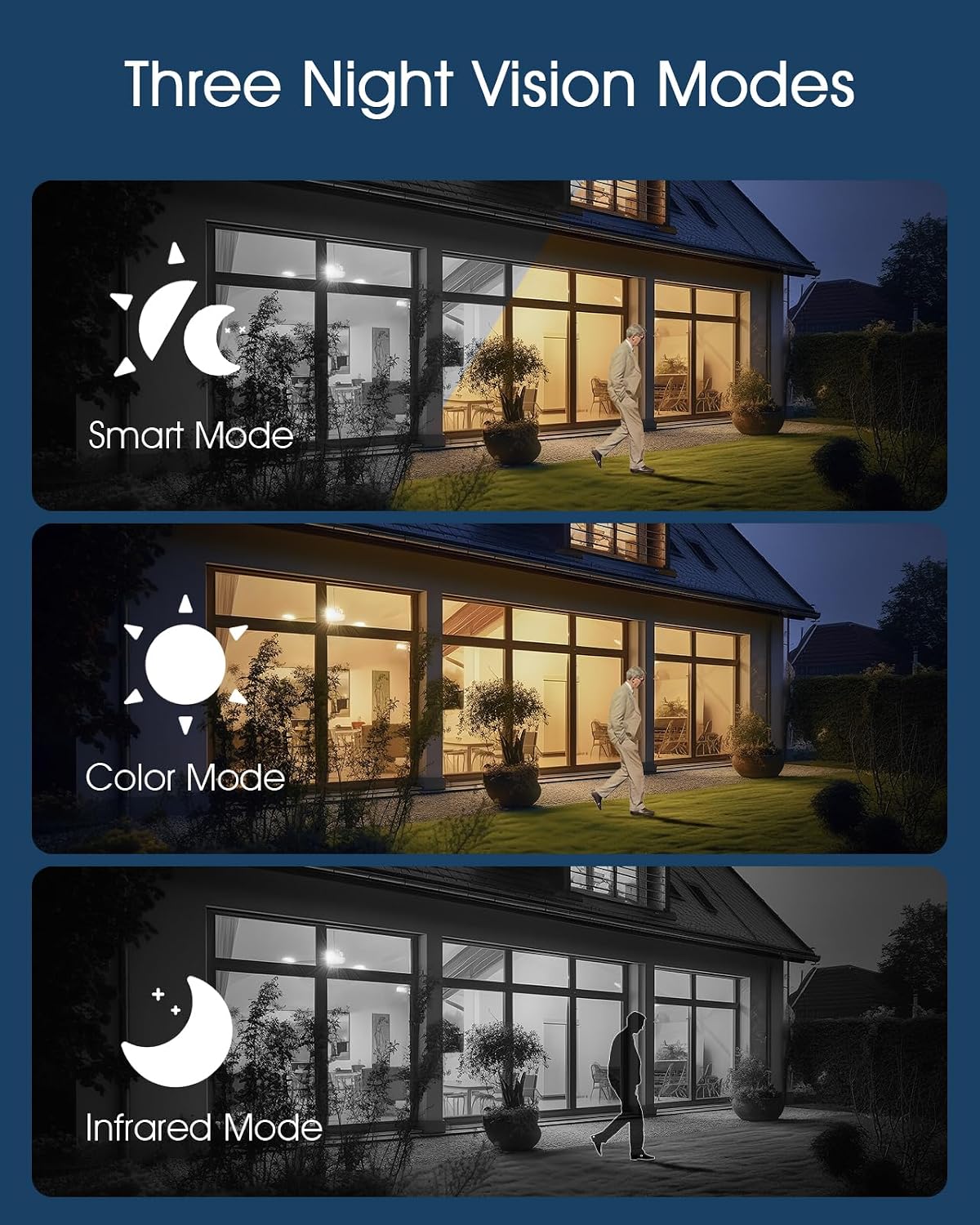
Image: Visual representation of the three night vision modes available on the cameras: Smart, Color, and Infrared.
Àudio bidireccional
Communicate with visitors or deter unwanted guests using the built-in microphone and speaker.
- En directe view, toca la icona del micròfon per parlar a través de la càmera. Torna a tocar per acabar.
- The speaker allows you to hear audio from the camera's location.

Image: Demonstration of the two-way audio feature, showing communication between a user via the app and a person near the camera.
Remote Light Control (ANRAN F2M3 Only)
The ANRAN F2M3's integrated light can be controlled manually via the app.
- Access the F2M3 camera's settings in the ANRAN app to manually turn the light on or off, or adjust its brightness.

Image: Illustrates the solar charging efficiency, 360-degree lighting capability of the F2M3, and the 2K resolution of the cameras.
Manteniment
Regular maintenance ensures the optimal performance and longevity of your ANRAN security cameras.
- Cleaning Lenses and Solar Panels: Periodically wipe the camera lenses and solar panels with a soft, damp cloth to remove dust, dirt, and debris. This ensures clear video and efficient solar charging. Avoid abrasive cleaners.
- Gestió de la bateria: The solar panels are designed to keep the camera batteries charged. In periods of prolonged low sunlight, or if the camera is in a high-traffic area with frequent recordings, you may need to manually charge the camera using the provided USB cable.
- Actualitzacions de firmware: Check the ANRAN app regularly for firmware updates. Keeping your camera's firmware up-to-date ensures you have the latest features and security enhancements.
- Protecció del medi ambient: The cameras are IP66 waterproof and dustproof, designed for outdoor use. However, extreme weather conditions (e.g., severe hail, prolonged sub-zero temperatures) may affect performance.

Image: The ANRAN Q04 camera demonstrating its IP66 waterproof and dustproof rating, suitable for various outdoor conditions.
Resolució de problemes
If you encounter issues with your ANRAN security camera system, refer to the following common solutions:
| Problema | Possible solució |
|---|---|
| La càmera no es connecta a la Wi-Fi |
|
| Poor video quality or blurry images |
|
| La bateria no es carrega a través del panell solar |
|
| Motion detection not working or too sensitive |
|
Especificacions
Key technical specifications for the ANRAN Q04 and F2M3 cameras:
| Característica | ANRAN Q04 | ANRAN F2M3 |
|---|---|---|
| Resolució | 2K (3MP) | 2K (3MP) |
| Connectivitat | Wi-Fi de 2.4 GHz | Wi-Fi de 2.4 GHz |
| Font d'alimentació | Integrated Solar Panel & Rechargeable Battery | Separate Solar Panel & Rechargeable Battery |
| Panorama/inclinació | Panorama de 355°, inclinació de 90° | Angle fix |
| Visió nocturna | Smart, Color, Infrared | Smart, Color, Infrared |
| Àudio | Àudio bidireccional | Two-Way Audio, 70db Siren |
| Light Output (F2M3 only) | N/A | 200 lúmens |
| Resistència a la intempèrie | IP66 resistent a l'aigua i a la pols | IP66 resistent a l'aigua i a la pols |
| Temperatura de funcionament | -4 °F a 140 °F (-20 °C a 60 °C) | -4 °F a 140 °F (-20 °C a 60 °C) |
| ASIN | B0FDVZ77P5 | |
| Data de primera disponibilitat | 11 d'abril de 2025 | |
Garantia i Suport
ANRAN products are designed for reliability and performance. For specific warranty details, please refer to the warranty card included with your product or visit the official ANRAN weblloc.
For technical support, troubleshooting assistance, or any inquiries regarding your ANRAN security camera system, please contact ANRAN Customer Service through the contact information provided on the official ANRAN weblloc web o dins de l'aplicació mòbil d'ANRAN.
Recursos en línia:
- ANRAN Official Weblloc: www.anran-cctv.com
- ANRAN App: Check the "Help" or "About" section within the app for FAQs and support contact.


