1. Introducció
Aquest manual proporciona informació essencial per a la configuració, el funcionament i el manteniment adequats de la tauleta MUNBYN IRT12 Rugged Windows. Llegiu atentament aquest manual abans d'utilitzar el dispositiu per garantir-ne un rendiment i una longevitat òptims.
1.1 Producte acabatview
La MUNBYN IRT12 és una tauleta Windows robusta de 10.1 polzades dissenyada per a entorns exigents. Compta amb una pantalla llegible a la llum del sol, connectivitat Wi-Fi 6 i un disseny robust per suportar condicions difícils.

Figura 1.1: La tauleta Windows resistent MUNBYN IRT12, que es mostra amb un llapis òptic inclòs i una corretja de mà adjunta.
2. Què hi ha a la caixa
Verifiqueu que tots els elements siguin presents al paquet:
- Tauleta robusta amb Windows MUNBYN IRT12
- Corretja de mà
- Adaptador de CA
- Cable d'alimentació de CA.
- Làpix per a tauleta
- Cable OTG TIPUS-C
- Nansa de transport

Figura 2.1: Tots els components inclosos amb la tauleta Windows resistent MUNBYN IRT12.
3. Disseny i característiques del dispositiu
Familiaritzeu-vos amb la disposició física i les característiques clau de la vostra tauleta IRT12.

Figura 3.1: Davant, darrere i lateral views de la tauleta IRT12 amb etiquetes per a tots els components externs.
3.1 Característiques clau
- Pantalla llegible a la llum solar de 1000 nits: La pantalla de 10.1 polzades ofereix una alta brillantor per a una visibilitat clara a la llum solar directa.
- Connectivitat Wi-Fi 6: Admet connexions de xarxa sense fil més ràpides i estables amb taxes de transferència de dades de fins a 1800 Mbps.
- Windows 11 Pro: Equipat amb el sistema operatiu Windows més recent per a necessitats professionals.
- Processador Intel Alder Lake N100: Ofereix una potència de càlcul millorada i una multitasca eficient.
- 8 GB de RAM + 128 GB de ROM: Memòria i emmagatzematge suficients per a múltiples aplicacions i dades.
- Classificació IP65 i certificació MIL-STD-810H: Dissenyat per a la durabilitat, ofereix protecció a la pols i resistent a l'aigua, i provat segons els estàndards militars per a condicions extremes.
- Bateria extraïble de 5000 mAh: Ofereix fins a 6.5 hores de durada de la bateria, amb un disseny extraïble per facilitar la substitució.
- GPS integrat: Per a serveis de navegació i localització.
4. Configuració i ús inicial
4.1 Fixació de la corretja de mà
La corretja de mà inclosa es pot fixar a la part posterior de la tauleta per a un maneig segur, especialment durant l'ús mòbil.
Vídeo 4.1: Demostració de com fixar la corretja de mà a la tauleta MUNBYN IRT12 per millorar l'adherència i la seguretat.
4.2 Instal·lació de la bateria
La tauleta IRT12 inclou una bateria extraïble de 5000 mAh. Per instal·lar o substituir la bateria:
- Localitza la tapa de la bateria a la part posterior de la tauleta.
- Desbloquegeu la tapa de la bateria amb el pestell o els cargols designats (si escau).
- Introduïu la bateria al compartiment, assegurant-vos que els contactes estiguin correctament alineats.
- Assegureu la coberta de la bateria.
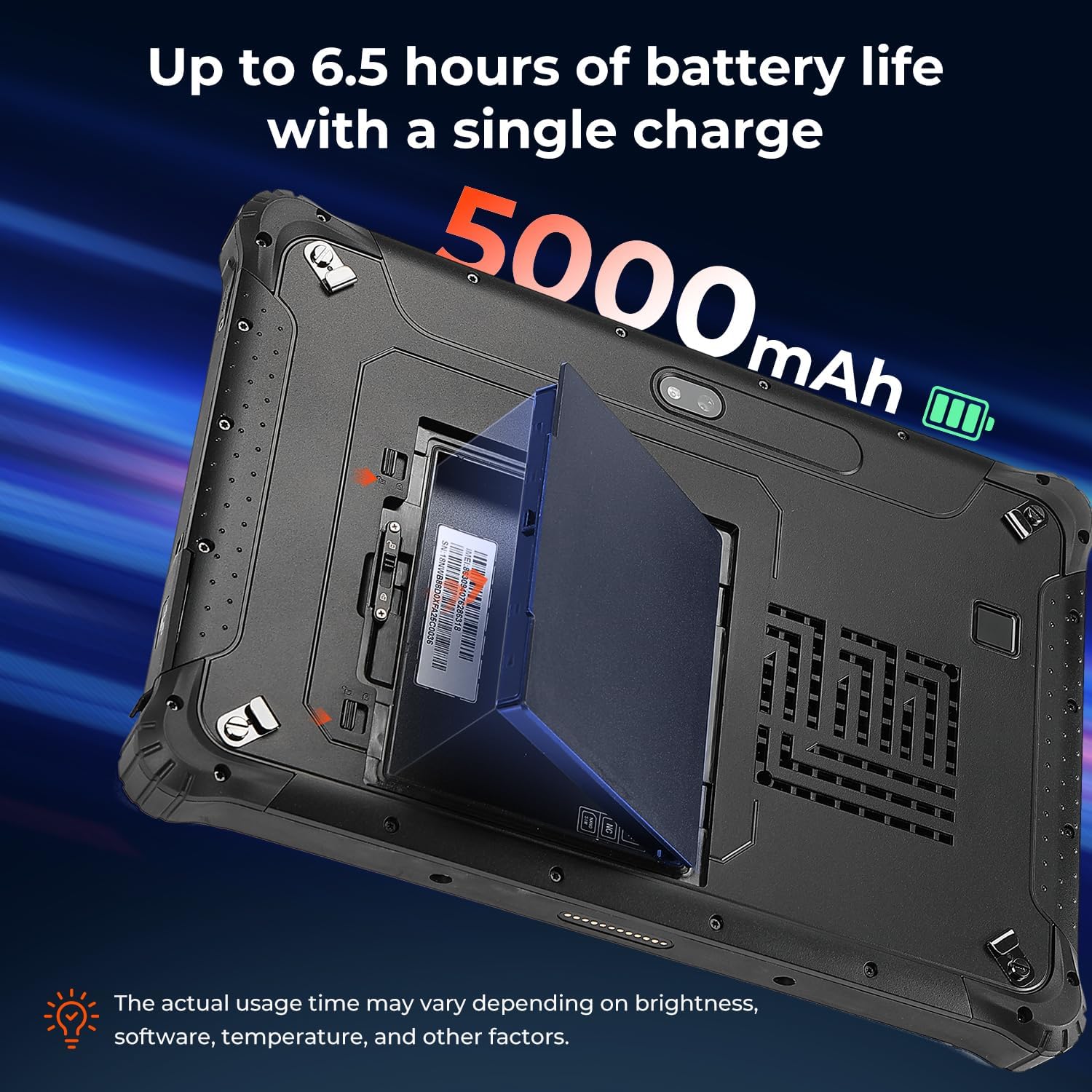
Figura 4.2: La bateria extraïble de 5000 mAh instal·lada a la tauleta.
4.3 Instal·lació de la targeta SIM
Si teniu previst utilitzar dades mòbils, instal·leu una targeta Nano SIM:
- Localitza la ranura de la targeta SIM, normalment sota la tapa de la bateria o una solapa protectora.
- Inseriu la targeta Nano SIM a la ranura marcada com a "NANO SIM". No feu servir la ranura marcada com a "NC".
- Assegureu-vos que la targeta SIM estigui completament col·locada.
4.4 Engegada/apagada
Per encendre la tauleta, manteniu premut el botó d'engegada fins que aparegui el logotip de MUNBYN. Per apagar-la, manteniu premut el botó d'engegada i, a continuació, seleccioneu "Apagar" a les opcions que apareixen a la pantalla.
5. Funcionament de la tauleta
5.1 Pantalla i brillantor
La pantalla de 10.1 polzades està dissenyada per a la llegibilitat en diverses condicions d'il·luminació, inclosa la llum solar directa, amb una brillantor de més de 1000 nits.

Figura 5.1: La pantalla de la tauleta es manté nítida i llegible fins i tot en condicions exteriors brillants.
5.2 Desbloqueig per empremta digital
Per a una seguretat millorada i un accés ràpid, la tauleta admet el desbloqueig per empremta digital.
Figura 5.2: Ús del lector d'empremtes dactilars per a l'accés segur a la tauleta.
Connectivitat sense fil 5.3 (Wi-Fi 6 i Bluetooth 5.2)
L'IRT12 admet Wi-Fi 6 per a l'accés a Internet d'alta velocitat i Bluetooth 5.2 per connectar perifèrics sense fil.

Figura 5.3: Capacitats sense fil avançades de la tauleta.
5.4 Funcionalitat del GPS
El GPS integrat permet un seguiment de la ubicació i la navegació precisos, útils per a operacions de camp.

Figura 5.4: La tauleta que s'utilitza per a la navegació GPS en un vehicle.
6. Durabilitat i protecció
El MUNBYN IRT12 està dissenyat per suportar condicions dures, amb una classificació IP65 i la certificació estàndard militar MIL-STD-810H.
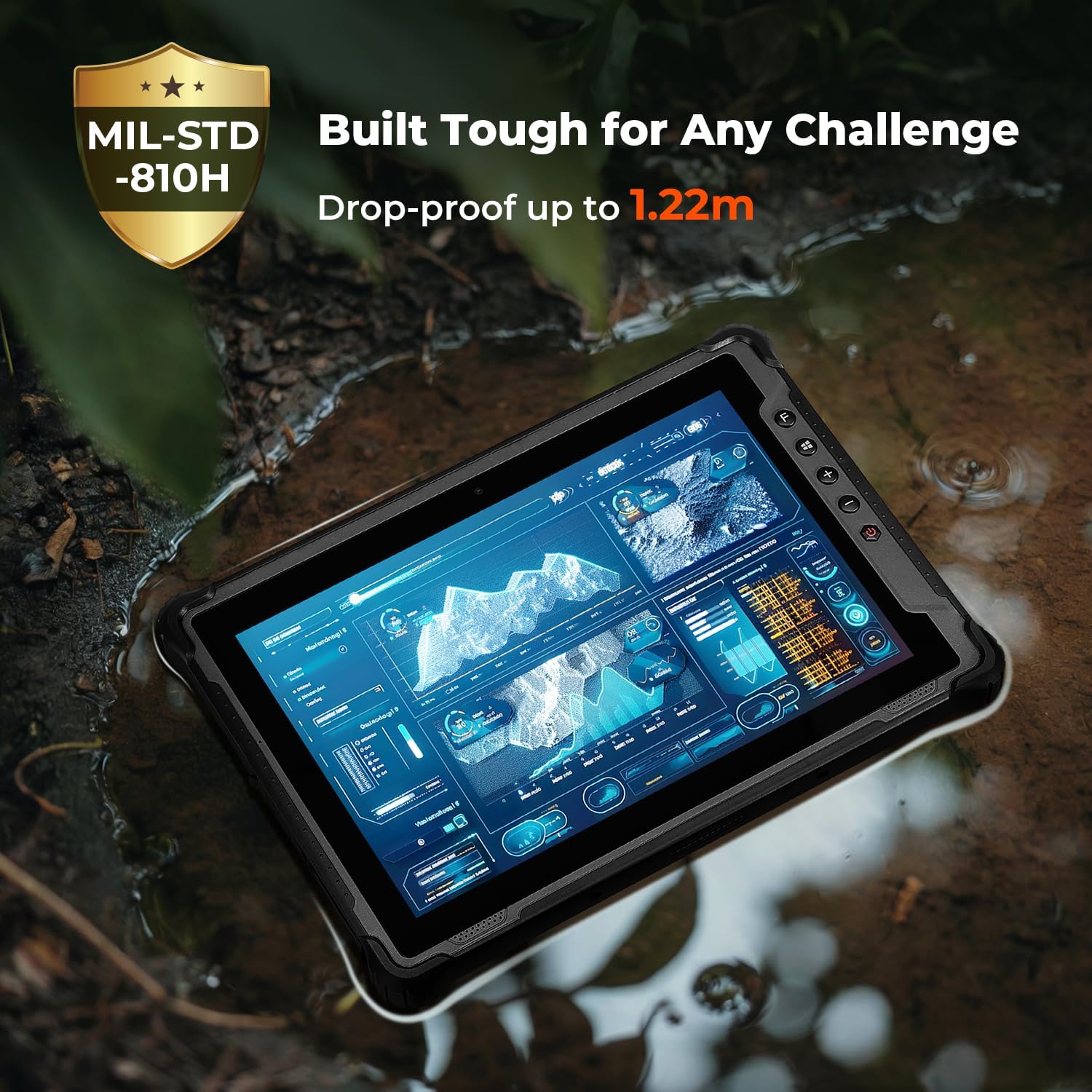
Figura 6.1: La construcció robusta de la tauleta li permet funcionar en entorns difícils.
7. Manteniment
Per garantir la longevitat i el rendiment òptim de la tauleta MUNBYN IRT12, seguiu aquestes pautes de manteniment:
- Neteja: Utilitzeu un suau, damp drap per netejar la pantalla i l'exterior. Eviteu productes químics agressius o materials abrasius.
- Protecció del port: Assegureu-vos que totes les cobertes dels ports estiguin ben tancades quan no s'utilitzin per mantenir la classificació IP65 contra l'entrada de pols i aigua.
- Cura de la bateria: Eviteu temperatures extremes en carregar o guardar la bateria. Si la tauleta no s'utilitzarà durant un període prolongat, guardeu-la amb una càrrega parcial (al voltant del 50%).
- Actualitzacions de programari: Comproveu i instal·leu regularment si hi ha actualitzacions de Windows per garantir l'estabilitat i la seguretat del sistema.
8. Solució De Problemes
Si teniu problemes amb la tauleta, consulteu els passos habituals següents per resoldre problemes:
- La tauleta no s'encén: Assegureu-vos que la bateria estigui correctament instal·lada i carregada. Connecteu la tauleta a l'adaptador de CA i torneu-ho a provar.
- La pantalla no respon: Feu un restabliment suau mantenint premut el botó d'engegada durant 10-15 segons. Si el problema persisteix, assegureu-vos que la pantalla estigui neta i seca.
- Problemes de connectivitat Wi-Fi: Comproveu si el Wi-Fi està habilitat a la configuració de Windows. Reinicieu la tauleta i l'encaminador Wi-Fi. Assegureu-vos que esteu dins de l'abast d'un senyal Wi-Fi.
- Rendiment lent: Tanqueu les aplicacions innecessàries. Comproveu si hi ha espai d'emmagatzematge disponible i allibereu espai si cal. Assegureu-vos que Windows estigui actualitzat.
- No s'ha detectat la targeta SIM: Verifiqueu que la targeta SIM estigui inserida correctament a la ranura "NANO SIM". Reinicieu la tauleta.
Per a més ajuda, poseu-vos en contacte amb el servei d'atenció al client de MUNBYN.
9. Especificacions
| Característica | Especificació |
|---|---|
| Marca | MUNBYN |
| Número de model | IRT12 |
| Sistema operatiu | Windows 11 Professional |
| Processador | Intel Alder Lake N100 |
| RAM | 8 GB |
| Emmagatzematge | 128 GB |
| Mida de la pantalla | 10.1 polzades |
| Resolució de pantalla | 1920 x 1200 píxels (màxim 1200 * 1920 píxels) |
| Brillantor de la pantalla | 1000 nits (llegible a la llum del sol) |
| Connectivitat sense fil | Wi-Fi 6, Bluetooth 5.2 |
| Capacitat de la bateria | 5000 mAh (extraïble) |
| Durada mitjana de la bateria | 6.5 hores (fins a) |
| Classificació de durabilitat | Certificació IP65, MIL-STD-810H |
| Pes de l'article | 4.47 lliures |
| Dimensions del producte | 10.83 x 0.87 x 7.43 polzades |
10. Garantia i Suport
La tauleta MUNBYN IRT12 Rugged amb Windows inclou un pla de protecció de 2 anys que garanteix la compatibilitat amb el dispositiu.

Figura 10.1: MUNBYN ofereix un pla de protecció de 2 anys i suport continu en línia.
10.1 Atenció al client
MUNBYN ofereix servei d'atenció al client les 24 hores del dia, els 7 dies de la setmana, per ajudar amb qualsevol consulta o problema tècnic. Les opcions d'assistència inclouen assistència remota per a la configuració, vídeos instructius i assistència tècnica local.

Figura 10.2: Serveis d'atenció al client disponibles.


