1. Producte acabatview
The DoukAudio U2PRO is a high-performance USB digital interface designed to convert USB audio signals into various digital outputs, including Optical, Coaxial, and I2S. It is equipped with the advanced XMOS XU316 chip, ensuring stable, low-latency, and high-resolution audio transmission. This device is ideal for connecting PCs, Macs, phones, or gaming consoles like PS5 and Switch to DACs, amplifiers, and AV receivers that lack USB input, providing a significant upgrade to audio quality.

Imatge: Frontal view of the DoukAudio U2PRO USB Digital Interface, showcasing its compact black chassis and indicator lights.
2. Característiques clau
- Pristine Lossless Audio Conversion: Converts USB signals from various sources (PC, Mac, phone, Raspberry Pi) into clean, simultaneous Optical, Coaxial, and I2S outputs. Delivers a clear, stable, and jitter-free digital signal to DACs, amplifiers, and AV receivers without USB input.
- Ultra-high Resolution with XMOS XU316: Features the latest XMOS XU316 chip for minimal latency, stable signal transmission, and exceptional sound clarity. Supports PCM up to 32bit/768kHz and DSD512, suitable for high-end audio streaming and professional playback.

Imatge: Primer pla view of the XMOS XU316 chip, highlighting its role in enabling ultra-high resolution audio processing.
- Strong Compatibility via UAC Mode Switch: Includes a UAC mode switch for versatile compatibility.
- UAC 1.0 Mode: Offers plug-and-play, driver-free compatibility for gaming consoles such as PS4, PS5, and Nintendo Switch.
- UAC 2.0 Mode: Enables high-resolution audio support for advanced playback needs with devices like PCs, tablets, and network music players.

Image: Illustration showing the U2PRO connected to various devices, demonstrating compatibility with PS5, Switch (UAC 1.0) and laptops, phones (UAC 2.0).
- Expandable Oscillator Design: Provides internal space for compatible crystal oscillators, allowing users to upgrade to preferred high-precision clocks for reduced jitter and enhanced sonic performance.
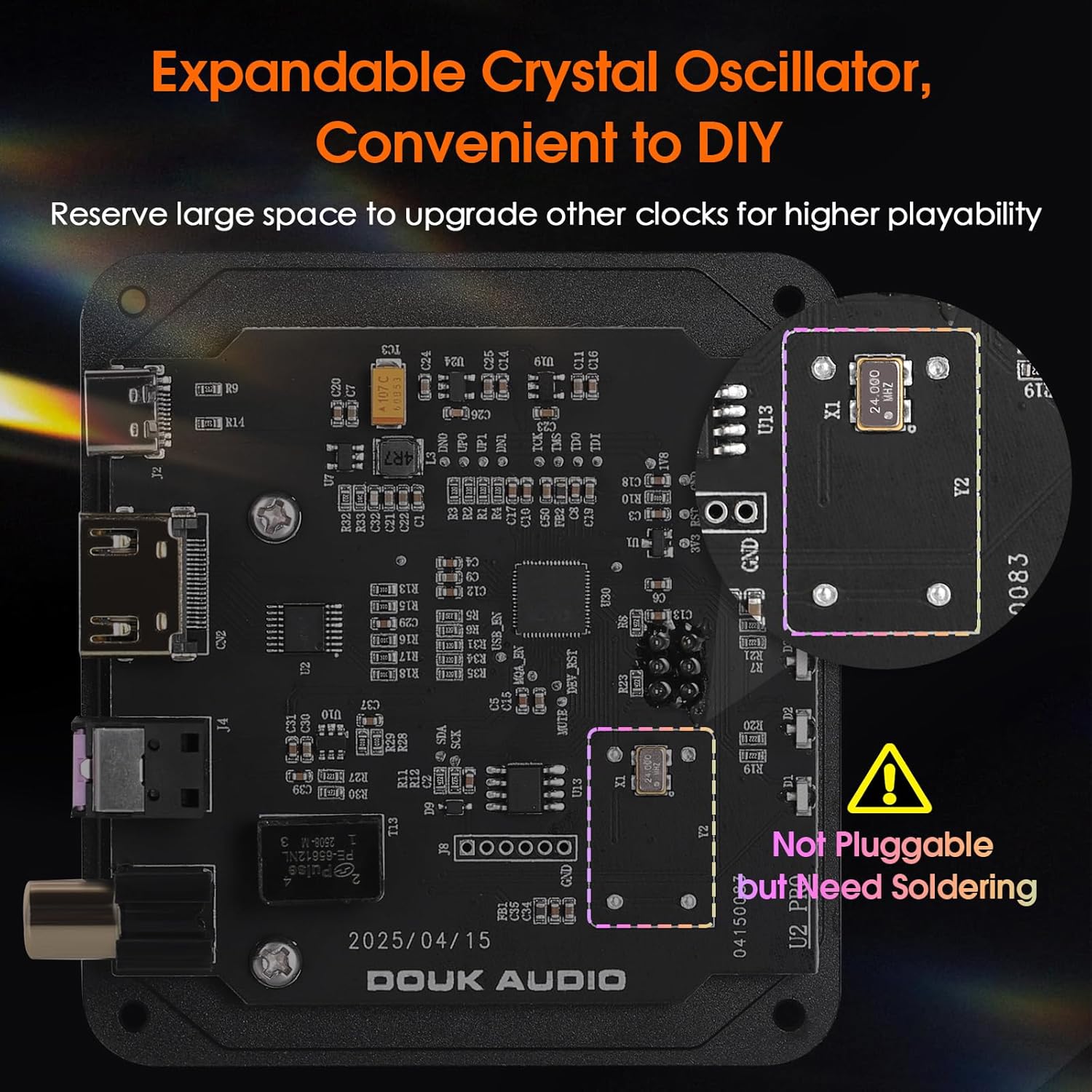
Image: Internal circuit board view of the U2PRO, highlighting the designated area for an expandable crystal oscillator, indicating it requires soldering.
- Compact Size with Convenient Indicators: Pocket-sized and USB-powered for portability and ease of use. Includes a USB-C to USB-A/C cable for broad device compatibility. Real-time PCM/DSD indicators allow easy monitoring of samples tarifes i formats.
3. Què hi ha a la caixa
En obrir el paquet, comproveu que hi hagi tots els elements següents:
- 1 x DoukAudio U2PRO Digital Interface
- 1 x cable òptic
- 1 x USB-C to USB-A/C Cable
- 1 x Manual d'usuari

Image: Visual representation of the DoukAudio U2PRO package contents, including the device, optical cable, USB-C cable, and user manual.
4. Guia de configuració
Follow these steps to set up your DoukAudio U2PRO digital interface:
- Connecta al dispositiu d'origen: Use the provided USB-C to USB-A/C cable to connect the U2PRO's "PC-USB IN" port to your source device (PC, Mac, phone, PS5, Switch). The U2PRO is USB-powered, so no external power adapter is needed.
- Select UAC Mode: On the bottom of the U2PRO, locate the UAC mode switch.
- For gaming consoles (PS4, PS5, Switch), set the switch to UAC 1.0 for plug-and-play functionality.
- For high-resolution audio with PCs, tablets, or network music players, set the switch to UAC 2.0.
Note: The selected UAC mode will take effect only after a restart (disconnect and reconnect USB power).
- Connect to Audio Receiver (DAC/Amplifier/AV Receiver):
- Sortida òptica: Use the provided optical cable to connect the U2PRO's "OPT OUT" port to the optical input of your audio receiver.
- Sortida coaxial: Use a coaxial cable (not included) to connect the U2PRO's "COAX OUT" port to the coaxial input of your audio receiver.
- I2S Output: Use an HDMI cable (not included) to connect the U2PRO's "HDMI-IIS OUT" port to the I2S input of your audio receiver. Refer to the pinout definition on the bottom of the device for compatibility.

Imatge: Detallada view of the U2PRO's rear panel, showing the USB-C input, HDMI-IIS output, Optical output, Coaxial output, and the UAC mode switch on the bottom.
- Encès: Once all connections are secure, power on your source device and audio receiver. The U2PRO will power on automatically via the USB connection.
5. Instruccions de funcionament
The DoukAudio U2PRO is designed for simple operation. Once connected, it functions as a plug-and-play device.
5.1. Llums indicadores
The front panel of the U2PRO features indicator lights that display the current audio format and sampla taxa:
- Blue Indicators: Represent PCM (Pulse Code Modulation) audio. Lights indicate sample rates such as 44.1K/48K, 88.2K/96K, 176.4K/192K, 352.8K/384K, and 705.6K/768K.
- Red Indicators: Represent DSD (Direct Stream Digital) audio. Lights indicate DSD rates such as DSD64, DSD128, DSD256, and DSD512.
Image: Close-up of the U2PRO's front panel, showing the blue lights for PCM sample rates and red lights for DSD rates, indicating the active audio format.
5.2. UAC Mode Switching
As mentioned in the setup, the UAC mode switch on the bottom of the device allows you to optimize compatibility. Remember to disconnect and reconnect the USB cable after changing the switch position for the new setting to take effect.
6. Manteniment
To ensure the longevity and optimal performance of your DoukAudio U2PRO, please follow these maintenance guidelines:
- Neteja: Use a soft, dry cloth to clean the exterior of the device. Do not use liquid cleaners, aerosols, or abrasive materials, as they may damage the finish or internal components.
- Medi ambient: Operate and store the device in a cool, dry place, away from direct sunlight, heat sources, and excessive humidity. Avoid environments with high dust levels.
- Manipulació: Manipuleu el dispositiu amb cura. Eviteu deixar-lo caure ni sotmetre'l a impactes forts.
- Ventilació: Ensure proper ventilation around the device. Do not block any vents or place the device in an enclosed space that could lead to overheating.
- Desconnexió: When disconnecting cables, always grasp the connector, not the cable itself, to prevent damage to the cable or port.
7. Solució De Problemes
If you encounter issues with your DoukAudio U2PRO, please refer to the following common problems and solutions:
| Problema | Causa possible | Solució |
|---|---|---|
| Sense sortida d'àudio. | Incorrect UAC mode selected. Incorrect input selected on DAC/ampmés viu. Connexions de cable soltes. Configuració d'àudio del dispositiu font. |
|
| No indicator lights on U2PRO. | No power from USB source. Cable USB defectuós. |
|
| Audio distortion or dropouts. | High jitter (less common with XU316). Cable interference. Driver issues (UAC 2.0). |
|
| UAC mode switch not working. | Not restarted after switching. |
|
If the problem persists after trying these solutions, please contact Douk Audio customer support for further assistance.
8. Especificacions
| Característica | Detall |
|---|---|
| Dimensions del producte | 3.35 x 3.11 x 0.1 polzades |
| Número de model de l'article | SUC-U2-PRO-AU |
| Pes | 14.08 unces |
| Fabricant | Douk Audio |
| ASIN | B0FF4KKZ1F |
| Subministrament Voltage | 5 volts (CC) |
| Tipus d'interfície | Coaxial, HDMI (I2S), Optical, USB |
| Nombre de canals | 2 |
| Màx. Sampling Rate (PCM) | 32 bits/768 kHz |
| Màx. Sampling Rate (DSD) | DSD512 |
| Chipset | XMOS XU316 |
9. Garantia i Suport
Douk Audio products are designed for reliability and performance. For specific warranty details, please refer to the warranty card included in your product packaging or visit the official Douk Audio weblloc.
If you require technical assistance, have questions about your product, or need to report an issue, please contact Douk Audio customer support through their official channels. You can typically find contact information on the manufacturer's weblloc web o a través del venedor on vau comprar el producte.
Per a més informació, visiteu el Douk Audio Store on Amazon.


