1. Introducció
This manual provides detailed instructions for the ADESSO EasyTouch 1500 Ergonomic Mechanical Keyboard. Designed for comfort and efficiency, this keyboard features Cherry Red mechanical switches, versatile connectivity, customizable RGB illumination, and multi-OS compatibility. Please read this manual thoroughly to ensure proper setup and optimal use of your device.

Figura 1: De dalt a baix view of the ADESSO EasyTouch 1500 Ergonomic Mechanical Keyboard.
2. Configuració
2.1 Contingut del paquet
- ADESSO EasyTouch 1500 Ergonomic Mechanical Keyboard
- Cable USB-C a USB-A
- Adaptador USB sense fil de 2.4 GHz
- Eina d'extracció de tecles
- Eina d'extracció d'interruptors
2.2 Opcions de connectivitat
The EasyTouch 1500 offers three primary connection methods:
- Sense fil de 2.4 GHz: Insert the 2.4GHz USB dongle into an available USB-A port on your computer. The keyboard should connect automatically.
- Bluetooth: Activate Bluetooth on your device. On the keyboard, switch to one of the Bluetooth modes (BT1 or BT2, typically indicated by a switch or key combination). Cerca "EasyTouch 1500" in your device's Bluetooth settings and pair.
- USB-C amb cable: Connect the provided USB-C to USB-A cable from the keyboard's USB-C port to a USB-A port on your computer. This also charges the keyboard.

Figura 2: lateral view illustrating the USB-C port and connectivity switch.
2.3 Ajustament ergonòmic
The keyboard features integrated wrist rests and adjustable feet on the underside to customize the typing angle for optimal comfort and reduced strain.

Figura 3: Angle view of the keyboard's ergonomic design.
3. Instruccions de funcionament
3.1 Característiques clau
- Cherry Red Switches: Experience smooth, linear keypresses with a quiet tactile feel, rated for 50 million keystrokes.
- Disseny ergonòmic: Split key layout and integrated wrist rest promote natural hand and wrist positioning.
- Il·luminació RGB: Customizable backlighting with adjustable brightness levels and lighting effects.
- Compatibilitat amb diversos sistemes operatius: Easily switch between Windows and Mac layouts using the Fn+M combinació de tecles.
- VIA Programmable: Full customization of key layouts, shortcuts, and backlight effects via open-source VIA software.
- Hot-Swappable Keys: Personalize your typing experience by changing keycaps and switches with the included tools.
- Estructura de la junta: Reduces noise and enhances typing feel.
- Tecla d'accés directe de la IA del copilot: Dedicated key for instant access to AI assistance.

Figure 4: Detail of a Cherry Red mechanical switch.
3.2 Switching Operating Systems
To switch between Windows and Mac layouts, press and hold the Fn+M keys for 3 seconds. The keyboard will adapt to the selected operating system.

Figure 5: OS switching using Fn+M keys.
3.3 Control de retroil·luminació RGB
The keyboard features adjustable RGB backlighting. Use the dedicated function keys or VIA software to customize brightness levels and lighting effects. Refer to the VIA software section for advanced customization.

Figure 6: RGB LED backlit keys with function controls.
3.4 VIA Software Customization
The EasyTouch 1500 is VIA programmable, allowing for extensive customization. Download the VIA software from the official ADESSO website to remap keys, create macros, and fine-tune backlight effects.
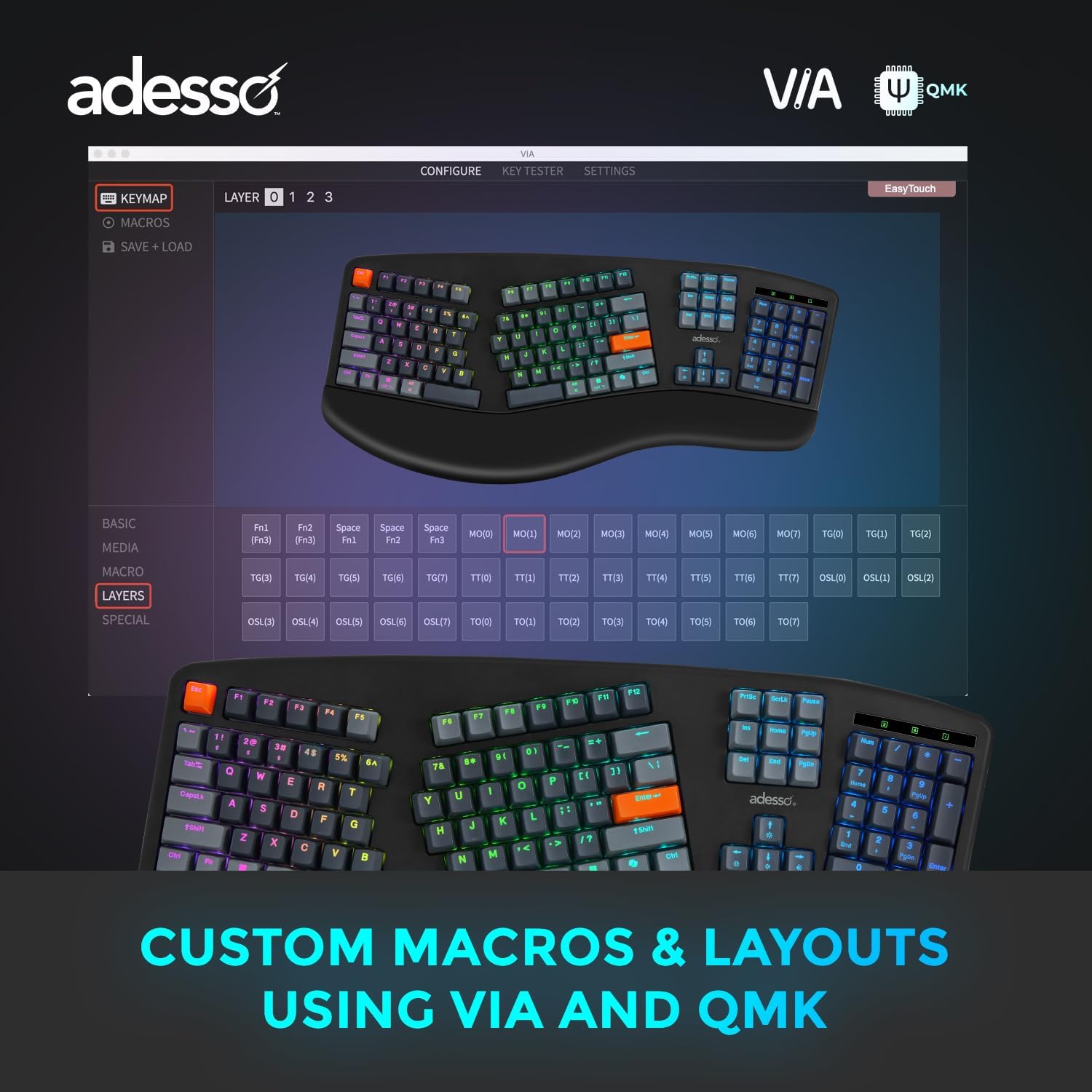
Figure 7: VIA software interface for custom macros and layouts.
3.5 Copilot AI Hotkey
Utilize the dedicated Copilot AI hotkey for quick access to AI assistance features on compatible systems.

Figure 8: Dedicated Copilot AI hotkey.
4. Manteniment
4.1 Neteja
Per netejar el teclat, netegeu suaument la superfície amb un drap suau iamp cloth. Avoid using harsh chemicals or abrasive materials. For deeper cleaning, remove keycaps using the provided keycap puller and clean underneath.
4.2 Substitució de la tapa de les tecles i l'interruptor
The EasyTouch 1500 features hot-swappable switches. Use the included keycap puller to carefully remove keycaps and the switch puller to replace switches. Ensure proper alignment when reinserting components.

Figure 9: Hot-swappable keycaps and switches for customization.
5. Solució De Problemes
- El teclat no respon: Check the connectivity mode (2.4GHz, Bluetooth, Wired) and ensure the keyboard is charged. For wireless connections, verify the dongle is securely inserted or Bluetooth is paired correctly.
- Les tecles no s'il·luminen: Note that only indicator lights for Caps Lock, Number Lock, and F-Lock are present. Individual keys are RGB backlit but do not have constant illumination unless configured via VIA software.
- Fading Key Labels: Over extended use, some key labels may show minor fading, particularly on frequently used keys. This is normal wear and tear.
- Problemes de programari VIA: Ensure you have downloaded the correct VIA software and JSON definition file for the EasyTouch 1500 model from the official ADESSO weblloc.
6. Especificacions
| Nom del model | EasyTouch 1500 |
| Dimensions del producte | 9 x 21 x 2 polzades |
| Pes de l'article | 6.49 lliures |
| Material | Plàstic |
| Tecnologia de connectivitat | Bluetooth, RF (2.4GHz), USB-A (Wired) |
| Descripció del teclat | Mechanical (Cherry Red Switches) |
| Característiques especials | Copilot AI hotkey, Hot-Swappable, Long-lasting battery (4000mAh), Multi OS Layout for Mac, VIA support |
| Nombre de bateries | 1 |
7. Garantia
The ADESSO EasyTouch 1500 keyboard comes with a 12-month manufacturer's warranty against defects in materials and workmanship. Please retain your proof of purchase for warranty claims. This warranty does not cover damage caused by misuse, accident, modification, or unauthorized repair.
8. Suport
For technical support, troubleshooting assistance, or further inquiries regarding your ADESSO EasyTouch 1500 keyboard, please visit the official ADESSO weblloc o poseu-vos en contacte amb el seu departament d'atenció al client.