1. Producte acabatview
The VEVOR T31 GPS Navigator is a versatile navigation system designed for various vehicle types, including cars, trucks, and RVs. It features a 9-inch touchscreen display, lifetime map updates, and intelligent voice guidance to enhance your travel experience. This manual provides detailed instructions for its proper use and maintenance.
Característiques principals:
- Pantalla tàctil HD d'9 polzades: Responsive display with 800x480 resolution.
- Lifetime Map Updates: Ensures you always have the latest map data.
- Voice Turn-by-Turn Guidance: Clear audio instructions in 30 languages.
- Alertes de seguretat: Includes overspeed, speed camera, and traffic light warnings.
- Encaminament de camions personalitzat: Avoids restricted roads based on vehicle dimensions.
- Multiple Vehicle Modes: Supports Car, Pedestrian, Bicycle, Emergency, Bus, Taxi, and Truck modes.
- POI Search: Cerca points of interest, addresses, and coordinates.
- Transmissió FM: Transmit audio to your vehicle's stereo system.
2. Contingut del paquet
Carefully unpack your VEVOR GPS Navigator and ensure all items are present. If any items are missing or damaged, please contact VEVOR customer support.
- 1 x VEVOR GPS Navigator (Model T31)
- 1 x Car Charger (Cable Length: 1.5m, DC 12-40V to 5V/2.5A)
- 1 x Succió de suport
- 1 x Data Cable (USB, Cable Length: 50cm)
- 1 x Manual d'usuari (Aquest document)
- 1 x bossa de tela
- 1 x Round Pad

Image: The VEVOR GPS Navigator T31 shown with its car charger, suction mount, USB data cable, cloth bag, and round pad.
3. Configuració i instal·lació
3.1 Càrrega inicial
Before first use, fully charge the GPS navigator using the provided car charger. Connect the car charger to the device and your vehicle's power outlet. A full charge ensures optimal performance.
3.2 Muntatge del dispositiu
The VEVOR GPS Navigator offers two primary mounting options: windshield mount and dashboard mount, using the included suction mount and round pad.
- Prepareu la zona de muntatge: Clean the desired area on your windshield or dashboard with a damp cloth and allow it to dry completely. If using the dashboard, apply the round pad first for better adhesion.
- Attach Suction Mount to Device: Align the suction mount with the mounting holes on the back of the GPS navigator and slide it into the slot until it clicks securely.
- Assegurar al vehicle: Press the suction cup firmly against the cleaned surface (windshield or round pad on dashboard) and engage the lever to create a strong vacuum seal.
- Ajust d'angle: Adjust the arm and ball joint of the mount to achieve the optimal viewing angle without obstructing your view de la carretera.
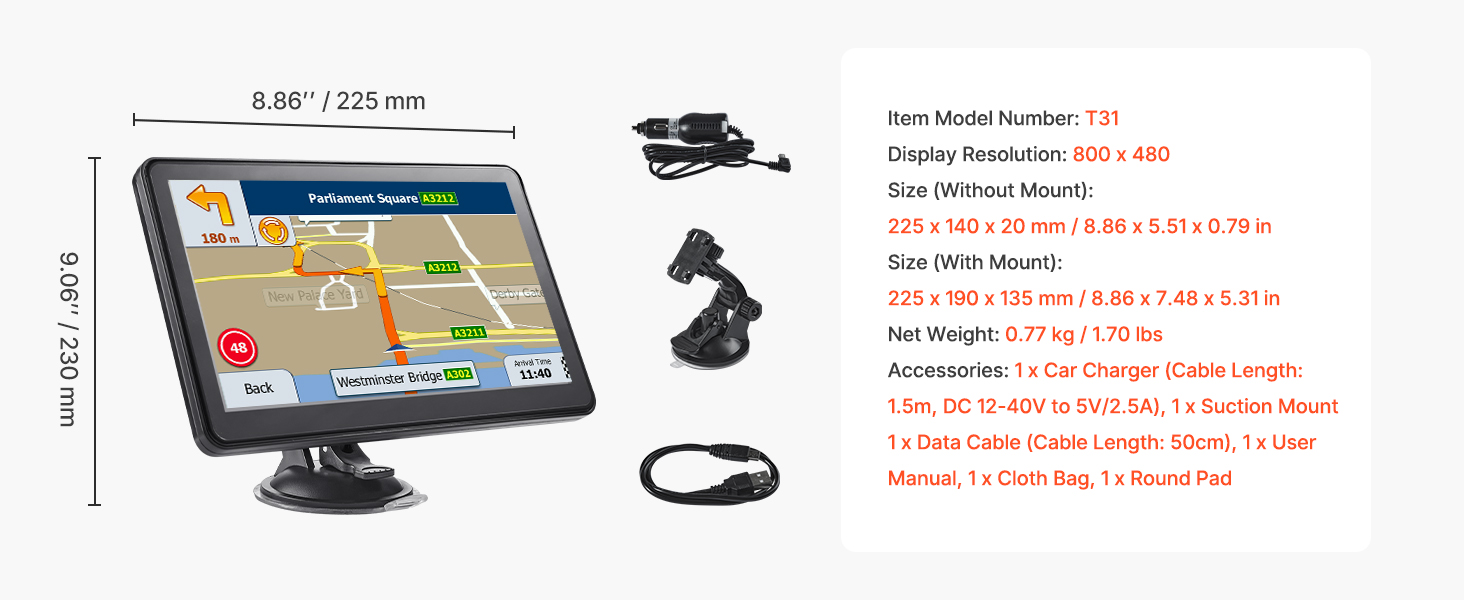
Image: Visual guide demonstrating how to attach the suction mount to the GPS device and then secure it to a vehicle's dashboard or windshield.
4. Instruccions de funcionament
4.1 Engegada/apagada
- Per encendre: Premeu i manteniu premut el botó d'engegada fins que la pantalla s'il·lumini.
- Per apagar: Press and hold the power button until a power-off prompt appears, then select 'Power Off'. A short press will put the device into sleep mode.
4.2 Navegació bàsica
From the main menu, tap 'Navigation' to access the map interface. You can input your destination using various methods:
- Address Search: Enter the street name, house number, city, and state/country.
- Zip Code Search: Enter the postal code for your destination.
- POI (Points of Interest) Search: Cerca categories like restaurants, gas stations, hotels, etc.
- Coordinate Search: Input specific latitude and longitude coordinates.
- Preferits: Select from previously saved destinations.
Once a destination is set, the device will calculate the route and provide turn-by-turn voice guidance. The 9-inch touchscreen allows for easy map manipulation (zoom, pan).

Image: A close-up of the VEVOR GPS Navigator T31 screen showing a detailed map with a highlighted route and navigation instructions.
4.3 Vehicle Mode Selection
The GPS navigator supports 7 different vehicle modes to optimize routing based on your vehicle type. This is particularly important for trucks to avoid restricted roads.
To switch to 'Truck' mode or other modes:
- Aneu al menú principal.
- Tap 'Navigation'.
- Select 'Settings'.
- Choose 'Route Settings'.
- Select 'Vehicle'.
- Choose your desired vehicle type (e.g., 'Truck', 'Car', 'RV', 'Bus', 'Taxi', 'Bicycle', 'Pedestrian', 'Emergency').
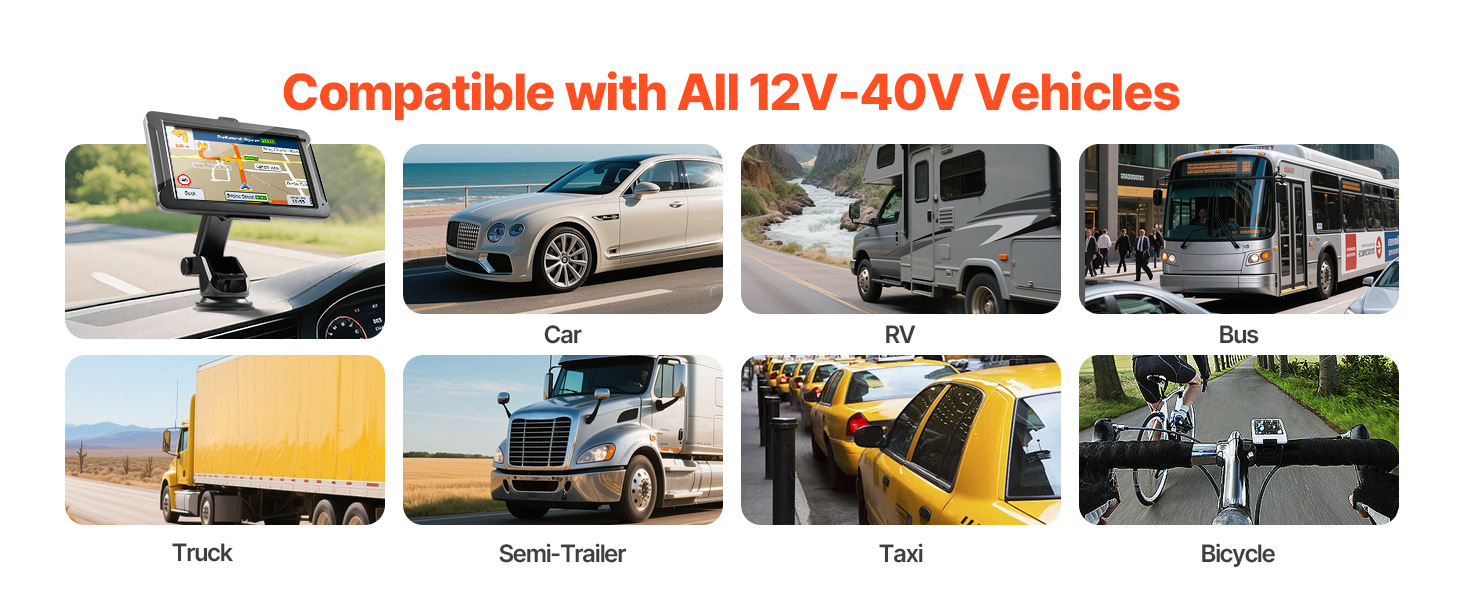
Image: The VEVOR GPS Navigator T31 displayed in various vehicle environments, illustrating its compatibility with cars, RVs, buses, trucks, semi-trailers, taxis, and bicycles.
4.4 Safety Features and Alerts
The device provides several alerts to enhance driving safety:
- Overspeed Alerts: Notifies you when exceeding the speed limit.
- Avisos de càmeres de velocitat: Alerts you to upcoming speed cameras.
- Traffic Light Warnings: Provides warnings for traffic lights.
- Assistència de carril: Guides you into the correct lane for upcoming turns or exits.
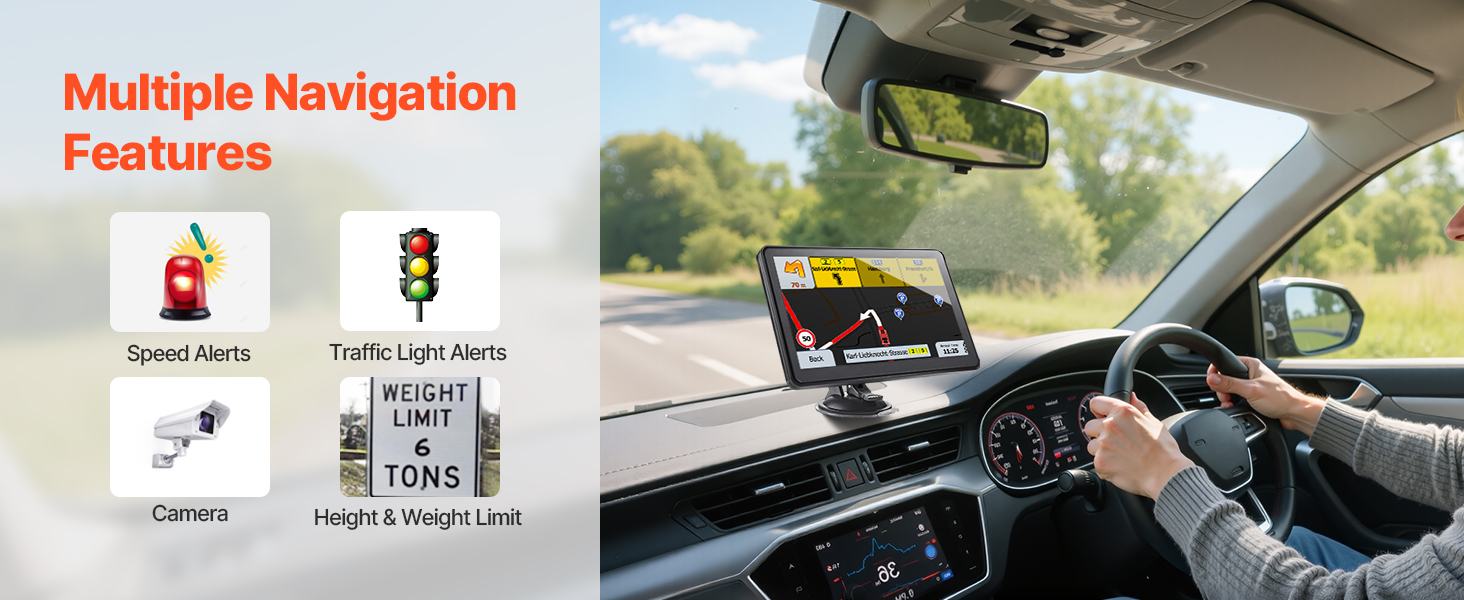
Imatge: Un tauler de control view with the VEVOR GPS Navigator T31, highlighting icons for speed limit alerts, traffic light warnings, route planning, speed camera alerts, FM transmission, and 30 language options.
4.5 Actualitzacions de mapes
The VEVOR GPS Navigator comes with lifetime map updates. There are two methods for updating maps:
- Via PC (USB Connection): Connect the GPS navigator to your computer using the provided USB data cable. Follow the instructions on the device or VEVOR's official website to download and install map updates.
- Mitjançant targeta TF: Download map update files to a TF card (not included) from VEVOR's official website. Insert the TF card into the device's slot and follow the on-screen prompts to update the maps.

Image: A setup showing the VEVOR GPS Navigator T31 connected to a computer for map updates via USB, and an alternative method using a TF card.
5. Manteniment
- Neteja de pantalla: Feu servir un drap suau i sense borrissol per netejar la pantalla tàctil. No utilitzeu productes de neteja abrasius ni dissolvents.
- Emmagatzematge: Quan no l'utilitzeu durant períodes prolongats, guardeu el dispositiu en un lloc fresc i sec, allunyat de la llum solar directa i de temperatures extremes.
- Cura de la bateria: To prolong battery life, avoid fully discharging the battery frequently. Charge the device regularly, especially before long trips.
- Actualitzacions de programari: Comproveu i instal·leu regularment si hi ha actualitzacions de programari per garantir un rendiment òptim i l'accés a les noves funcions.
6. Solució De Problemes
If you encounter issues with your VEVOR GPS Navigator, refer to the following common troubleshooting steps:
| Problema | Possible solució |
|---|---|
| El dispositiu no s'encén. | Ensure the device is fully charged. Connect it to the car charger and wait a few minutes before attempting to power on again. If the issue persists, perform a soft reset by pressing and holding the power button for 10-15 seconds. |
| Senyal GPS perdut o inexacte. | Assegureu-vos que el dispositiu té una imatge clara view of the sky. Move away from tall buildings, tunnels, or dense foliage. Check for updated maps. |
| La pantalla tàctil no respon. | Restart the device. Ensure the screen is clean and free of debris. If the issue continues, a factory reset might be necessary (note: this will erase personal data). |
| Voice guidance is not working. | Check the volume settings on the device. Ensure the correct language is selected. If using FM transmission, verify the frequency and your car stereo settings. |
| Map updates fail. | Ensure a stable internet connection for PC updates. Verify the TF card is properly formatted and has sufficient space for TF card updates. Follow the update instructions precisely. |
Per a més ajuda, poseu-vos en contacte amb el servei d'atenció al client de VEVOR.
7. Especificacions
| Característica | Detall |
|---|---|
| Nom del model | T31 |
| Mida de la pantalla | 8.86 polzades (classe de 9 polzades) |
| Resolució de visualització | 800 x 480 |
| Capacitat d'emmagatzematge de memòria | 16 GB (intern) |
| RAM | 256 MB |
| Tecnologia de connectivitat | USB |
| Entrada de la interfície humana | Pantalla tàctil |
| Tipus de servei del vehicle | Car, Truck, RV, Bus, Taxi, Bicycle, Pedestrian, Emergency |
| Tipus de mapa | carrer |
| Entrada de potència | DC 12-40V (via car charger) |
| Bateria | Built-in 2500mAh (Nonstandard Battery) |
| Pes de l'article | 1.7 lliures (0.77 kg) |
| Dimensions del paquet | 10.24 x 10.24 x 6.1 polzades |
| Tipus de muntatge | Windshield Mount, Dashboard Mount |

Image: A diagram illustrating the physical dimensions of the VEVOR GPS Navigator T31, along with its included accessories like the car charger, suction mount, and USB cable.
8. Garantia i Suport
VEVOR products are designed for reliability and performance. For specific warranty information regarding your VEVOR GPS Navigator T31, please refer to the warranty card included in your product packaging or visit the official VEVOR weblloc.
If you require technical assistance, have questions about product operation, or need to report an issue, please contact VEVOR customer support through their official channels. Provide your product model (T31) and purchase details for efficient service.
VEVOR Oficial Weblloc: www.vevor.com


