1. Introducció
Aquest manual proporciona instruccions detallades per a la configuració, el funcionament i el manteniment dels escàners de codis de barres Bluetooth industrials NETUM NT-1200 i CS7501 QR. Llegiu atentament aquest manual abans d'utilitzar els dispositius per garantir-ne el funcionament correcte i maximitzar-ne la vida útil. Aquests escàners estan dissenyats per a una lectura de codis de barres eficient i fiable en diversos entorns, i admeten codis de barres 1D i 2D des d'etiquetes físiques i pantalles digitals.
2. Producte acabatview
2.1 Característiques clau
- Escaneig d'alta resolució: Equipat amb un sensor CMOS de megapíxels (1280 × 800), el CS7501 escaneja codis de barres 1D i 2D (QR, PDF417, Data Matrix, etc.) de pantalles de paper o digitals.
- Connectivitat versàtil: Ofereix opcions de connexió 3 en 1: Bluetooth, adaptador sense fil de 2.4 GHz i connexió USB amb cable per a compatibilitat amb telèfons intel·ligents, ordinadors, sistemes de punt de venda, iPhones, iPads i ordinadors portàtils.
- Durada de la bateria ampliada: Compta amb una bateria d'alta capacitat de 2400 mAh que permet fins a 12 hores de funcionament continu, amb indicadors del nivell de bateria en temps real.
- Construcció duradora: Construït amb plàstic ABS i reforçat amb material TPU, capaç de suportar caigudes de fins a 1.5 metres. Disseny ergonòmic per a un ús còmode i prolongat.
- Múltiples modes d'escaneig: L'NT-1200 ofereix modes de disparador manual, escaneig continu i escaneig amb detecció automàtica.
- Mode d'emmagatzematge: Admet l'emmagatzematge de fins a 100,000 codis de barres quan està fora de l'abast sense fil.
2.2 Components del producte
El paquet normalment inclou l'escàner o els escàners de codis de barres, una base de càrrega (per a l'NT-1200), un adaptador sense fil de 2.4 GHz i cables USB.

Figura 1: Escàners de codis de barres NETUM NT-1200 (dreta, amb base) i CS7501 (esquerra).

Figura 2: Escàner de codis de barres NETUM CS7501, que mostra el seu disseny compacte, cable USB-C i dongle sense fil de 2.4 GHz.

Figura 3: Escàner de codis de barres NETUM NT-1200 col·locat de manera segura a la base de càrrega i comunicació.
3. Configuració
3.1 Càrrega inicial
Abans del primer ús, carregueu completament l'escàner. Connecteu el cable USB a l'escàner (CS7501) o a la base de càrrega (NT-1200) i després a una font d'alimentació (per exemple, un port USB de l'ordinador, un adaptador de paret USB). L'indicador de la bateria mostrarà l'estat de càrrega.
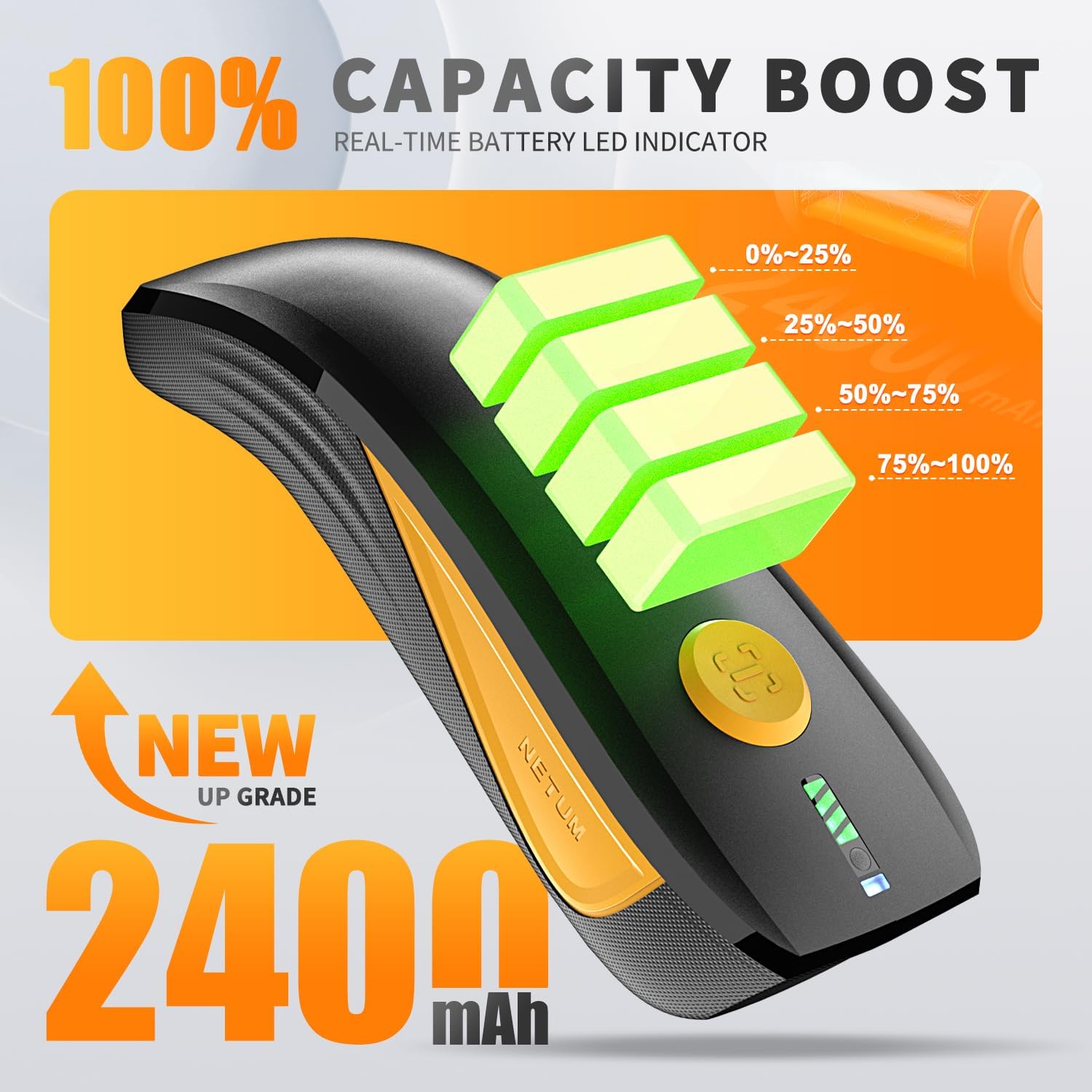
Figura 4: Escàner CS7501 que mostra indicadors del nivell de bateria en temps real (0-25%, 25-50%, 50-75%, 75-100%).
3.2 Opcions de connectivitat
Tots dos escàners ofereixen diverses opcions de connectivitat. Assegureu-vos que l'escàner estigui encès abans d'intentar connectar-vos.
3.2.1 Connexió Bluetooth
- Engegueu l'escàner i canvieu al mode Bluetooth (vegeu la imatge del botó de commutació a continuació).
- Al dispositiu amfitrió (telèfon intel·ligent, tauleta, ordinador), activeu el Bluetooth i cerqueu els dispositius disponibles.
- Seleccioneu l'escàner (per exemple, "NETUM Barcode Scanner" o similar) de la llista per emparellar-lo.
- Una connexió correcta s'indicarà amb un so específic o un llum LED a l'escàner.

Figura 5: El botó de commutació de l'escàner CS7501, que permet seleccionar entre els modes de connexió Bluetooth i sense fil de 2.4 GHz. El Bluetooth ofereix un abast de fins a 10 m/33 peus.
Connexió sense fil 3.2.2 de 2.4 GHz
- Connecteu l'adaptador sense fil de 2.4 GHz (dongle) a un port USB disponible de l'ordinador.
- Engegueu l'escàner i canvieu al mode sense fil de 2.4 GHz (vegeu la imatge del botó de commutació que hi ha a sobre).
- L'escàner s'hauria de connectar automàticament a l'adaptador. Una connexió correcta s'indicarà amb un so específic o una llum LED. Aquest mode normalment ofereix un abast més llarg, de fins a 100 m/330 peus.
3.2.3 Connexió USB amb cable
Connecteu l'escàner directament a l'ordinador amb el cable USB proporcionat. L'escàner funcionarà com un dispositiu de teclat HID USB i normalment no calen controladors addicionals. Aquest mode també carrega l'escàner.
3.3 Configuració inicial (NT-1200)
Per a l'NT-1200, configuracions específiques com ara els modes d'escaneig o les opcions de transmissió de dades poden requerir la configuració de l'escaneig de codis de barres que es troben al manual separat de l'NT-1200. Consulteu sempre el manual específic per a l'NT-1200 per obtenir informació detallada sobre la configuració dels codis de barres.
4. Instruccions de funcionament
4.1 Escaneig de codis de barres
Apunteu la finestra de l'escàner al codi de barres que voleu escanejar. Premeu el botó disparador (per al mode manual) o deixeu que l'escàner detecti el codi de barres automàticament (en mode de detecció automàtica). Un escaneig correcte normalment s'indica amb un bip i/o un llum LED verd.

Figura 6: L'escàner CS7501 demostra la capacitat del seu sensor d'alta resolució d'1 MP per capturar diversos codis de barres 1D i 2D, inclosos codis QR, de diferents superfícies.
4.2 Modes d'escaneig (NT-1200)
- Mode de disparador manual: Premeu el botó disparador per escanejar cada codi de barres.
- Mode d'escaneig continu: L'escàner emet contínuament una línia d'escaneig, llegint codis de barres a mesura que passen pel camp de view sense necessitat de prémer el gallet.
- Mode d'escaneig amb detecció automàtica: L'escàner detecta automàticament un codi de barres al seu camp de view i l'escaneja sense activació manual del disparador.
Per canviar entre aquests modes, haureu d'escanejar codis de barres de configuració específics que es proporcionen al manual dedicat de l'NT-1200.
4.3 Mode d'emmagatzematge
Quan l'escàner està fora de l'abast de Bluetooth o sense fil de 2.4 GHz, pot emmagatzemar codis de barres escanejats internament. L'NT-1200 admet l'emmagatzematge de fins a 100,000 codis de barres. Per carregar les dades emmagatzemades, torneu a connectar l'escàner al dispositiu amfitrió i escanegeu el codi de barres de configuració "Carregar dades" (si escau, consulteu el manual del vostre model específic).
5. Manteniment
- Neteja: Feu servir un drap suau i sec per netejar l'exterior de l'escàner. Per a la finestra d'escaneig, feu servir un drap de neteja de lents i un netejador suau i no abrasiu si cal. Eviteu productes químics agressius o materials abrasius.
- Emmagatzematge: Guardeu l'escàner en un lloc fresc i sec, allunyat de la llum solar directa i de temperatures extremes.
- Cura de la bateria: Per a una durada òptima de la bateria, eviteu descarregar-la completament amb freqüència. Si la guardeu durant un període prolongat, carregueu-la fins a un 50% aproximadament i torneu-la a carregar cada pocs mesos.
- Protecció contra caigudes: Tot i que està dissenyat per ser resistent (resistir caigudes de fins a 1.5 metres), eviteu caigudes innecessàries per allargar la vida útil del dispositiu.

Figura 7: La construcció robusta de l'escàner CS7501, amb materials ABS+TPU per a una major durabilitat i protecció contra caigudes.
6. Solució De Problemes
- L'escàner no es connecta:
- Assegureu-vos que l'escàner estigui encès i completament carregat.
- Verifiqueu que el mode de connectivitat correcte (Bluetooth, 2.4 GHz, USB) estigui seleccionat a l'escàner.
- Per al Bluetooth, assegureu-vos que el Bluetooth del dispositiu amfitrió estigui habilitat i que l'escàner estigui emparellat.
- Per a 2.4 GHz, assegureu-vos que el dongle estigui ben connectat.
- Proveu de reiniciar tant l'escàner com el dispositiu amfitrió.
- No es poden escanejar codis de barres:
- Assegureu-vos que el codi de barres estigui net, sense danys i ben il·luminat.
- Comproveu la distància i l'angle entre l'escàner i el codi de barres.
- Verifiqueu que l'escàner estigui en el mode d'escaneig correcte (per exemple, disparador manual si cal).
- Assegureu-vos que el tipus de codi de barres sigui compatible amb l'escàner (1D/2D).
- Netegeu la finestra de lectura de l'escàner.
- No apareixen les dades escanejades:
- Confirmeu que l'escàner s'ha connectat correctament al dispositiu amfitrió.
- Assegureu-vos que el cursor es troba en un camp d'entrada de text del dispositiu amfitrió.
- Comproveu si l'escàner està en mode d'emmagatzematge; si és així, pengeu les dades.
- Durada de la bateria curta:
- Assegureu-vos que l'escàner estigui completament carregat abans d'utilitzar-lo.
- Comproveu els indicadors d'estat de la bateria.
- Reduïu la brillantor de la pantalla o desactiveu les funcions innecessàries si escau.
7. Especificacions
| Característica | Detall |
|---|---|
| Números de model | NT-1200, CS7501 |
| Sensor (CS7501) | CMOS de megapíxels (1280 × 800) |
| Compatibilitat amb codis de barres | 1D i 2D (QR, PDF417, Data Matrix, GS1 Code128, Aztec, Maxi, etc.) |
| Tecnologia de connectivitat | Bluetooth, sense fil de 2.4 GHz, USB |
| Interval Bluetooth | Fins a 10 m / 33 peus |
| Abast sense fil de 2.4 GHz | Fins a 100 m / 330 peus |
| Dispositius compatibles | Ordinador, portàtil, TPV, telèfon intel·ligent, iPad, iPhone |
| Font d'alimentació | Funciona amb bateria |
| Capacitat de la bateria (CS7501) | 2400 mAh |
| Funcionament continu (CS7501) | Fins a 12 hores |
| Protecció contra caigudes | Suporta caigudes de fins a 1.5 metres (4.92 peus) |
| Capacitat d'emmagatzematge (NT-1200) | Fins a 100,000 codis de barres |
8. Garantia i Suport
Els productes NETUM estan dissenyats per a la fiabilitat i el rendiment. Per obtenir detalls específics de la garantia, consulteu la targeta de garantia inclosa amb el producte o visiteu el lloc web oficial de NETUM. weblloc web. Per a assistència tècnica, assistència per a la resolució de problemes o consultes de servei, poseu-vos en contacte amb l'atenció al client de NETUM a través de la informació de contacte que es proporciona al seu lloc web oficial. weblloc o embalatge del producte.