1. Introducció
Thank you for choosing the PoP voice Mini Microphone. This wireless lavalier microphone system is designed to provide high-quality audio capture for video recording, vlogging, live streaming, and more. Featuring advanced noise cancellation, extended battery life, and broad compatibility, it offers a professional audio solution in a compact and portable design.
Please read this manual thoroughly before using the product to ensure proper operation and to maximize its performance and lifespan.
2. Contingut del paquet
Verifiqueu que tots els elements que s'enumeren a continuació s'inclouen al vostre paquet:
- 1 × Estoig de càrrega
- 2 × Transmitters (Microphones)
- 1 × Receptor USB-C
- 1 × Receptor de llamps
- 2 × Mini Clip Magnets
- 2 × Windscreen (Furry Wind Muffs)
- 1 × cable de càrrega USB-C
- 1 × Manual d'usuari (aquest document)

Figure 2.1: All components included in the PoP voice Mini Microphone package.
3. Característiques del producte
3.1 Immersive 48KHz/16-Bit Sound
Capture studio-quality sound with the professional omnidirectional microphone. An advanced DSP chip ensures a wide 20Hz-20kHz frequency response and a 70dB signal-to-noise ratio, delivering crystal-clear vocals with rich detail. With a high 110dB SPL, the mini mic preserves vocal warmth while eliminating distortion.

Figure 3.1: Internal chip design highlighting studio-quality sound capabilities.
3.2 Intelligent Noise Cancellation
Simply press the transmitter button to activate the noise reduction mode, actively suppressing wind, traffic, and crowd noise (tested up to 20dB reduction). The included windscreen further combats wind buffeting, making these wireless microphones ideal for bustling streets, busy offices, and unpredictable outdoor shoots.

Figure 3.2: Visual representation of noise cancellation effectiveness in different environments.
3.3 Extended 40-Hour Runtime
Record all day, worry-free. Each lavalier microphone transmitter provides up to 6 hours of use per charge and up to 40 hours with the compact charging case. The receiver’s charging port allows you to charge your phone simultaneously. This portable microphone is perfect for long shoots, travel, or back-to-back interviews.
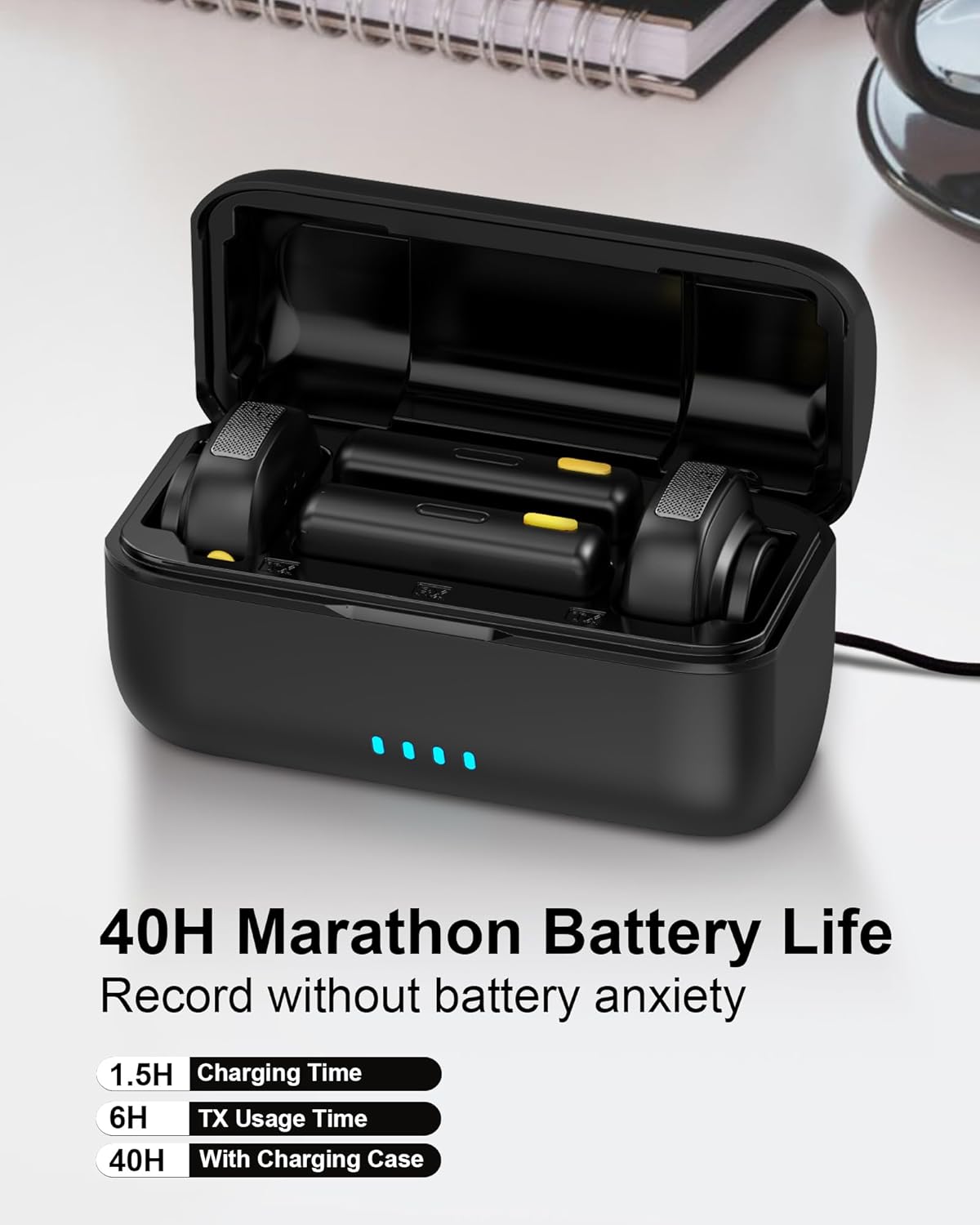
Figure 3.3: Charging case and battery life indicators.
3.4 Featherlight & Travel-Ready Design
Unmatched portability. At just 0.3oz (0.9g) per mic—lighter than a house key—and featuring a credit-card-sized charging case (3" x 1.8" x 1.4"), the entire kit slips effortlessly into jeans pockets or camera bags. Your mini microphone studio is always ready to go anywhere without any bulk or hassle.

Figure 3.4: Demonstrating the compact size and versatile wearing options.
3.5 True Plug-and-Play Setup & Universal Compatibility
Start recording instantly with zero configuration required. The universal receiver (featuring USB-C and Lightning) seamlessly connects to iPhones (series 5-16), Android devices (Samsung/Google), iPads, and PCs. Simply power on the wireless mic, plug the receiver into your phone, and it auto-pairs within seconds.

Figure 3.5: Compatibility with various devices and platforms.
3.6 164FT/50M Stable Wireless Range
Move freely with confidence. The lapel mic's advanced 2.4GHz transmission technology guarantees a reliable, uninterrupted signal up to 164ft/50m line-of-sight. Ultra-low latency ensures perfect audio-video sync for professional results. It's ideal for drone shots, stage presentations, and multi-room filming.

Figure 3.6: Illustration of the extended wireless range.
3.7 Magnetic Clip & 360° Rotation
Secure, discreet, and flexible placement. The powerful magnetic clip effortlessly attaches to collars, hats, and pockets on any fabric thickness. You can rotate the tiny microphone 360° to position it perfectly close to the sound source for optimal audio capture.
4. Guia de configuració
- Charge the Transmitters and Charging Case: Before first use, fully charge the charging case and both transmitters. Place the transmitters into the charging case. Connect the USB-C charging cable to the case and a power source. The indicator lights on the case will show charging status.
- Select the Correct Receiver: Identify whether your recording device (smartphone, tablet, PC) uses a USB-C port or a Lightning port. Select the corresponding receiver (USB-C Receiver or Lightning Receiver).
- Connecteu el receptor: Plug the selected receiver directly into your device's charging/data port. No additional adapters or Bluetooth pairing are required.
- Power On Transmitters: Take the transmitters out of the charging case. They will automatically power on and attempt to pair with the receiver. The indicator lights on the transmitters will show their pairing status (e.g., solid blue when connected).
- Connecteu el micròfon: Use the integrated clip or the provided magnetic clip to attach the transmitter to your clothing, as close to your mouth as possible for optimal sound capture. For outdoor use or in windy conditions, attach the furry windscreen over the microphone.
- Begin Recording: Open your preferred recording app (camera, voice recorder, live streaming app) on your device. The microphone system is now ready to use.
Video 4.1: Demonstration of unboxing, connecting, and using the PoP voice Mini Microphone, including noise cancellation features.
5. Instruccions de funcionament
5.1 Funcionament bàsic
- Encès/apagat: Transmitters automatically power on when removed from the charging case and power off when returned.
- Maridatge: The transmitters and receiver automatically pair upon power-on. A solid blue light on the transmitter indicates a successful connection.
- Indicador de gravació: The receiver's indicator light will typically show activity when audio is being received, though this can vary by device and app.
5.2 Noise Cancellation Mode
- To activate noise cancellation, briefly press the power button on the transmitter. The indicator light may change color or pattern to confirm activation.
- Press the button again to cycle through different noise cancellation levels or to deactivate the feature. Refer to the indicator light guide for specific modes.
5.3 Càrrega durant la gravació
The receiver features a pass-through charging port. You can connect your device's charging cable to the receiver's port to charge your phone or tablet while simultaneously recording audio with the microphone. This is particularly useful for extended recording sessions or live streams.
6. Especificacions
| Característica | Detall |
|---|---|
| Nom del model | D07 |
| Marca | veu PoP |
| Tecnologia de connectivitat | 2.4 GHz sense fils |
| Tipus de connector | Lightning, USB tipus C |
| Patró polar | Omnidireccional |
| Interval de freqüència | 20Hz - 20KHz |
| Relació senyal/soroll (SNR) | 70 dB |
| Nivell de pressió sonora (SPL) | 110 dB |
| abast sense fils | Up to 164ft/50m (line-of-sight) |
| Durada de la bateria del transmissor | Fins a 6 hores per recàrrega |
| Durada total de la bateria (amb estoig de càrrega) | Fins a 40 hores |
| Temps de càrrega | Approx. 1.5 hours (for case and transmitters) |
| Item Weight (per mic) | 0.3 oz (0.9 g) |
| Charging Case Dimensions (L x W x H) | 3 x 1.8 x 1.4 polzades |
| Material | Metall, plàstic |
| Dispositius compatibles | iPhones (5-16 series), Android (Samsung/Google), iPads, PCs, Laptops, Tablets |
7. Manteniment i cura
- Neteja: Use a soft, dry cloth to clean the microphone and charging case. Do not use liquid cleaners or solvents.
- Emmagatzematge: Store the device in its charging case in a cool, dry place when not in use. Avoid extreme temperatures and humidity.
- Cura de la bateria: Per allargar la durada de la bateria, eviteu descarregar completament el dispositiu amb freqüència. Carregueu-lo regularment, fins i tot si no l'utilitzeu constantment.
- Manejar amb cura: The microphones are small and lightweight. Avoid dropping them or subjecting them to strong impacts.
- Parabrisa: The furry windscreens can be gently cleaned with a soft brush if they accumulate dust or debris.
8. Solució De Problemes
| Problema | Causa possible | Solució |
|---|---|---|
| Sense so ni volum baix | Microphone not paired; Device volume too low; Microphone too far from source; Receiver not fully inserted. | Ensure transmitters are powered on and indicator lights are solid blue. Increase device volume. Position microphone closer to the sound source. Re-insert receiver firmly into device port. |
| Àudio intermitent o estàtic | Out of range; Interference; Low battery. | Move closer to the receiver. Avoid strong electromagnetic interference. Charge transmitters and charging case. |
| Noise cancellation not effective | Incorrect mode; Extreme noise levels. | Ensure noise cancellation mode is activated (check indicator light). Use the furry windscreen in very windy conditions. |
| Device not recognizing receiver | Receiver not fully inserted; Device compatibility issue; Device settings. | Ensure receiver is fully inserted. Verify your device is compatible (check specifications). Some Android devices may require enabling "OTG" or "External Microphone" in settings. Try restarting your device. |
| Transmitters not charging | Not properly seated in case; Charging cable issue; Case battery low. | Ensure transmitters are correctly placed in the charging slots. Check USB-C cable and power adapter. Charge the charging case. |
9. Garantia i Suport
PoP voice products are designed for reliability and performance. This product comes with a Garantia de substitució gratuïta d'2 any from the date of purchase (June 25, 2025).
For technical support, troubleshooting assistance, or warranty claims, please contact our customer service team. We offer 24/7 customer service via email i suport de tota la vida per garantir la vostra satisfacció.
Please visit the official PoP voice store or contact your retailer for contact information and further details.
Manufacturer: PoP Voice


