1. Introducció
The nuphy Air75 V3 is an 84-key, 75% layout low-profile mechanical keyboard designed for versatility and performance. It features hot-swappable switches, RGB backlighting, gasket-mounted construction, and multiple connectivity options including Bluetooth, 2.4GHz wireless, and USB-C wired. This manual provides detailed instructions for setting up, operating, and maintaining your keyboard.

Image: The nuphy Air75 V3 mechanical keyboard in black, showcasing its compact 75% layout and vibrant keycap accents.
2. Contingut del paquet
Please verify that all items are present in your nuphy Air75 V3 package:
- 1 x nuphy Air75 V3 Keyboard
- 1 x cable USB-C a USB-C
- 1 x High-Profile Mòdul perilla
- 1 x Low-Profile Mòdul perilla
- 1 adaptador de 2.4 G
- Keycap/Switch Puller (not explicitly listed but common accessory)
- Quick Guide & FAQ (documentation)
Video: An unboxing demonstration of the nuphy Air75 V3, showing the keyboard and its included accessories.
3. Característiques del producte
- Disseny de muntatge de junta: Ensures a smooth and quiet typing experience by absorbing keystrokes and reducing vibration.
- Low-Profile & Compact: With a thickness of 13.2mm and a 75% layout, it saves desktop space and is highly portable.
- Connectivitat multidispositiu: Supports Bluetooth, 2.4GHz wireless, and USB-C wired connections, allowing simultaneous connection to up to four devices.
- NuPhyIO Customization Software: Enables personalized keyboard configurations, including key remapping and macro creation.
- Removable Knobs: Customizable knobs can be set for volume control, zoom, or other functions via NuPhyIO.
- Latència baixa: Achieves a 1000Hz polling rate in wired and 2.4GHz modes for responsive performance.
- RGB Backlight & PBT Keycaps: Features extensive theme effects and durable, colorfast Doubleshot PBT keycaps.
- Llarga vida útil de la bateria: Equipped with a 4000 mAh battery for extended wireless use.

Image: The nuphy Air75 V3 keyboard with a graphic emphasizing its 4000mAh high-capacity battery.
4. Configuració
4.1 Càrrega inicial
Before first use, connect the keyboard to a USB-C power source using the provided cable to ensure it is fully charged. The battery indicator lights will show charging status.
4.2 Modes de connectivitat
The Air75 V3 supports three connection types:
- USB-C amb cable: Connect the keyboard directly to your device using the USB-C cable.
- Sense fil de 2.4 GHz: Insert the 2.4G dongle into your device's USB port. The keyboard will automatically connect.
- Bluetooth: El teclat es pot emparellar amb fins a tres dispositius Bluetooth.
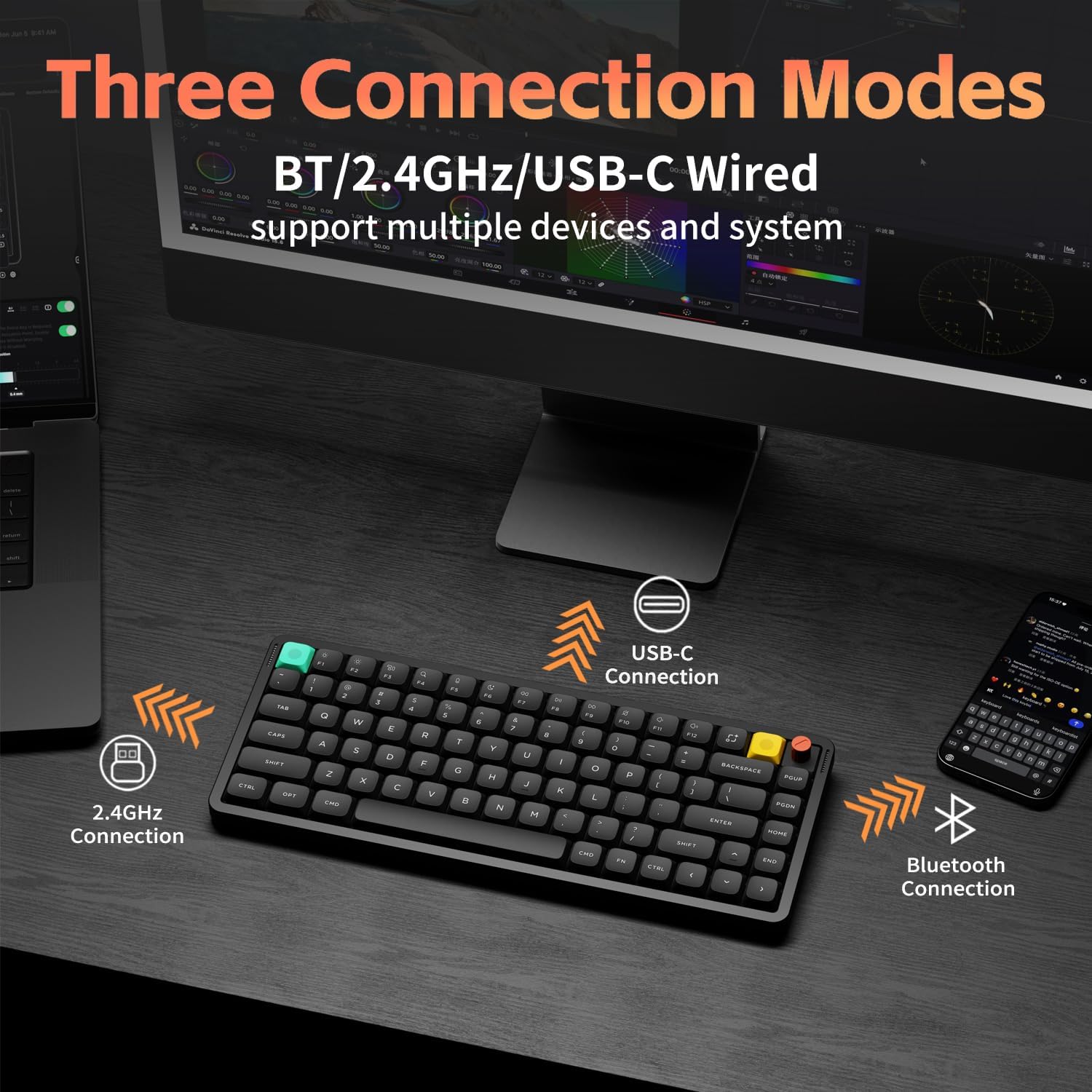
Image: Visual representation of the nuphy Air75 V3's three connection modes: Bluetooth, 2.4GHz wireless, and USB-C wired, connecting to a phone, laptop, and monitor.
4.3 Switching Between Devices (Wireless)
To switch between paired Bluetooth devices or the 2.4GHz dongle:
- Ensure the keyboard is in wireless mode (switch on the back).
- Manteniu premut el botó Fn clau.
- Premeu 1, 2, o 3 for Bluetooth channels, or 4 for the 2.4GHz dongle.
Video: A demonstration of switching between wireless devices on the nuphy Air75 V3 keyboard using function keys.
4.4 Canvi de sistema operatiu
Use the switch on the back of the keyboard to select between Windows (WIN) and Mac (MAC) layouts for optimal key functionality.
4.5 peus ajustables
The keyboard features a 3-stage adjustable kickstand, allowing you to set the typing angle to 4°, 8°, or 10° for ergonomic comfort.

Image: The nuphy Air75 V3 keyboard demonstrating its three adjustable typing angles (4°, 8°, 10°) for ergonomic customization.
5. Instruccions de funcionament
5.1 Encès/Apagat
Locate the power switch on the back of the keyboard to turn it on or off.
Control de retroiluminació 5.2
The Air75 V3 features customizable RGB backlighting:
- Canvia el color: Premeu Fn + Fletxa dreta.
- Change Effect: Premeu Fn + Fletxa esquerra.
- Ajusta la brillantor: Premeu Fn + Fletxa amunt (augmentar) o Fn + Fletxa avall (disminució).

Image: The nuphy Air75 V3 keyboard illuminated with colorful RGB backlighting, showcasing its dynamic lighting effects.
5.3 Knob Functionality
The included knobs are removable and customizable. By default, they may control volume or other media functions. Use the NuPhyIO software to reassign their actions.
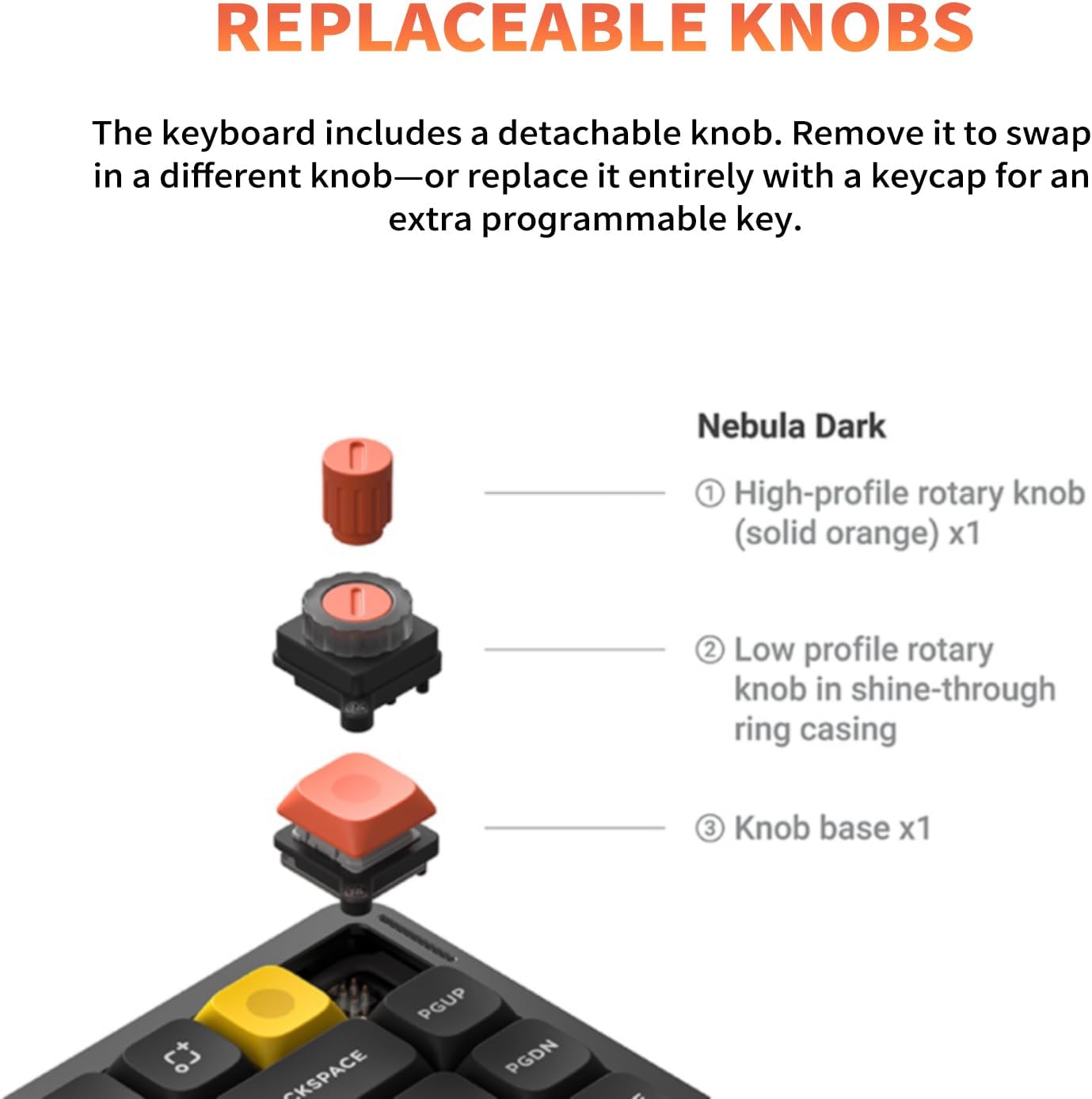
Image: A diagram illustrating the replaceable knob components of the nuphy Air75 V3 keyboard, including high-profile i baix profile opcions.
5.4 NuPhyIO Software
The NuPhyIO software allows for advanced customization of your Air75 V3 keyboard. You can remap keys, create macros, and fine-tune lighting effects. Access the software via the official nuphy weblloc.

Image: A screenshot of the NuPhyIO software interface displayed on a monitor, showing options for key remapping, lighting effects, and macro recording for the nuphy Air75 V3 keyboard.
6. Manteniment
- Neteja: Use a soft, dry cloth to clean the keyboard surface. For keycaps, a damp cloth with mild soap can be used, ensuring no liquid enters the switches.
- Keycap/Switch Replacement: Use the provided keycap and switch puller for safe removal and replacement of components.
- Emmagatzematge: Guardeu el teclat en un lloc fresc i sec, allunyat de la llum solar directa i de temperatures extremes.
7. Solució De Problemes
- Problemes de connectivitat: Ensure the keyboard is charged and the correct mode (Bluetooth, 2.4GHz, or wired) is selected. Re-pair Bluetooth devices if necessary.
- Les tecles no responen: Check if the keyboard is powered on and connected. If hot-swappable, ensure switches are properly seated.
- La llum de fons no funciona: Ajusta la brillantor amb Fn + Fletxa amunt/avall. Check settings in NuPhyIO software.
- Lag in Wireless Mode: Ensure the 2.4GHz dongle is used for optimal low-latency performance, especially during gaming.
8. Especificacions
| Dimensions del producte | 12.56 x 5.07 x 1.76 polzades |
| Pes de l'article | 1.6 lliures |
| Fabricant | Nuphy |
| Número de model de l'article | Air75 V3 |
| Bateries | 1 x 12V battery required (4000 mAh capacity) |
| Tecnologia de connectivitat | USB-C/2.4 GHz/Bluetooth |
| Dispositius compatibles | Laptop, PC, Tablet (Windows/macOS/Linux support) |
| Il·luminació del teclat | RGB |
| Material | Acrylonitrile Butadiene Styrene, Aluminum, Polybutylene Terephthalate |
9. Garantia i Suport
For warranty information and technical support, please refer to the official nuphy weblloc web o poseu-vos en contacte amb el servei d'atenció al client. Conserveu el rebut de compra per a reclamacions de garantia.


